Up next in 10

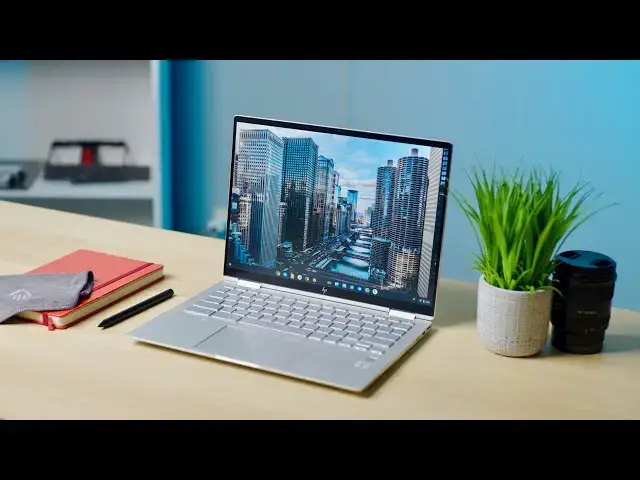
HP Elite c1030 Chromebook Review: Premium for a Price
Feb 2, 2021


Sponsored by NordVPN. For a limited time, grab the 2-year plan with 70% off! Click here: https://chromeunboxed.com/nordvpn
Buy the HP Elite c1030: https://fave.co/3g4jWON
Buy the HP Elite c1030 (Enterprise): https://fave.co/3azd4GQ
Shop Chromebooks on CHROME SHOP: https://chrmshop.com/
・・・・・・・
Premium Chromebooks took a bit of a hit in 2020. As mid-range Chromebooks got a lot better over the course of the year (the Acer Spin 713 is a prime example of this), we started seeing features in $500-$600 Chromebooks that we used to reserve for only the high-end flagship devices. While there were a few top of the line Chromebooks released in 2020, many of them failed to really gain any ground due to the increase in mid-range competition.
That being said, there are still many out there – myself included – that still put an emphasis on build quality, premium materials, and not having to compromise when choosing a Chromebook as a daily driver laptop. Just because I like Chrome OS, it doesn’t mean I shouldn’t have options to purchase high-quality machines to work from. If you find yourself in this seat and devices like last year’s Samsung Galaxy Chromebook felt like nearly the perfect Chromebook, then something like this HP Elite C1030 Chromebook could be just the laptop you’ve been looking for.
Read more: https://chromeunboxed.com/hp-elite-c1030-chromebook-review-premium-price
Join our Patreon community for exclusive extras, an ad-free website experience, access to our private Discord server, and more: https://www.patreon.com/chromeunboxed
Join our newsletter: http://bit.ly/2WjCDm7
・・・・・・・
Show More Show Less View Video Transcript
0:00
expensive chromebooks took a bit of a
0:01
hit in 2020. as mid-range chromebooks
0:04
got so much better and offered
0:05
a lot of the things that we used to wait
0:07
for in high-end devices
0:09
those same high-end chromebooks that
0:10
were still hanging around all of last
0:12
year had a hard time selling because
0:14
frankly it's just difficult to get
0:15
excited about a device that costs nearly
0:17
a thousand dollars
0:19
and doesn't offer that much more than
0:21
the five or six hundred dollar
0:22
competition
0:23
that being said there are still some of
0:25
you out there myself included
0:27
that really enjoy good build quality
0:29
premium materials and not really having
0:31
to compromise on any part of the chrome
0:32
os experience
0:34
that sounds like you and devices like
0:36
the samsung galaxy chromebook from last
0:37
year were interesting to you and
0:39
may have been nearly a great fit aside
0:41
from the battery woes than
0:43
something like this the hp elite c1030
0:46
chromebook
0:46
could be a great device for you
0:49
[Music]
0:52
today's video is brought to you by
0:53
nordvpn they're the vpn of choice for
0:55
millions of consumers because they're
0:56
awesome at what they do and that's
0:57
keeping your browsing safe
0:59
and secure whether you're at home or out
1:01
and about if you'd like to learn more
1:02
about them and their services head over
1:04
to chromeunbox.com forward slash nordvpn
1:06
where you can learn more and get started
1:08
today
1:09
the hp elite c1030 chromebook really
1:11
does feel every bit the premium
1:13
chromebook
1:14
and if you've ever picked up a macbook
1:15
or an expensive windows laptop like a
1:17
surface or
1:18
heck even a pixel book then you know
1:20
what premium stuff feels like and the
1:22
elite c1030 chromebook does
1:24
all of those premium laptop things the
1:26
build materials feel great the fit and
1:28
finish is very nice
1:29
it's got a unique form factor it's thin
1:31
it's light it's very attractive
1:33
it does basically everything you want
1:35
very very well and
1:36
the only real knock anyone's going to be
1:38
able to have against this thing is the
1:40
price tag if we could though
1:41
just for a few minutes let's put that
1:43
price tag out of our minds
1:45
instead we'll circle back to that
1:47
towards the end and just focus in on all
1:49
the things hp got right
1:50
in this high-end chromebook and it
1:52
really all starts out with build quality
1:54
i mean look at this thing it's
1:56
absolutely gorgeous right down to the
1:58
brand new hp logo on the lid
2:00
i love everything about the way this
2:02
chromebook is put together the
2:03
all-aluminum frame has a really nice
2:05
soft touch finish there are edges where
2:07
it feels like there need to be edges but
2:09
some rounded corners where those feel
2:11
fitting and the entire thing just comes
2:13
together and looks amazing on a desk or
2:15
in your hand
2:16
no matter what angle you hold it from
2:18
this thing oozes premium from every
2:20
angle coming in at a little under three
2:21
pounds it's
2:22
like 2.8 pounds and only 15 millimeters
2:25
thick at its thickest point this thing
2:27
is also easy to tote around
2:28
it's mil-spec rated so it's been tested
2:30
for drops and all that kind of stuff
2:32
dust sand water resistance so it's made
2:35
to take a beating
2:36
it feels absolutely incredible and again
2:38
i just love the way that hp has put it
2:40
together
2:40
coming all the way down to the hinges i
2:42
mean the hinge mechanism on this thing
2:45
is nearly perfect it feels like it has
2:47
tension and release at
2:48
every single angle and flips obviously
2:51
all the way around into
2:52
tablet mode and all your presentation
2:54
modes in between but from the hinge to
2:56
the build quality to the casing to the
2:58
durability to the weight to the size
3:00
hp absolutely knocked it out with this
3:03
chromebook it's
3:04
it's just fantastic and all of that
3:05
continues as soon as you open up this
3:07
lid and see the screen on the inside
3:09
its resolution isn't mind blowing at
3:11
1920x1280
3:13
but it does have some unique traits for
3:14
one it has very tiny bezels
3:17
two it's three by two so it's got a
3:19
taller aspect ratio and three it's 13.5
3:22
inches which
3:22
when i use the acer spin 713 for the
3:25
better part of 2020
3:26
i really came to love this screen size
3:28
and form factor because
3:29
a 13.5 inch diagonal measure 3x2 aspect
3:33
ratio screen
3:34
gives you what almost feels like a 15.6
3:36
inch laptop in terms of raw screen real
3:39
estate
3:39
while fitting still into that small form
3:42
factor of this particular device the
3:44
small bezels means you're not seeing all
3:45
kinds of extra stuff
3:46
around the edges of the screen and it's
3:48
just this immersive display that allows
3:50
you to get a lot of stuff done
3:52
whether you're docked at a desk or
3:54
you're out and about on the go i just
3:56
love it hp does offer the screen in a
3:58
couple different varieties at one point
3:59
they were saying that there would be a
4:00
thousand knit
4:01
viewable outdoor version that's not
4:04
available to buy right now but may turn
4:05
up eventually but
4:06
the one we have is the 400 nit
4:08
anti-glare screen
4:10
it's still touch still usi compatible it
4:12
just has this nice kind of
4:14
anti-glare coating on it that makes it
4:16
almost paper-like in its look and
4:18
doesn't really affect the colors or the
4:20
vibrancy of the screen i still think i'd
4:22
prefer the other 400 nit ips kind of
4:24
standard screen option that is available
4:26
but either way the screen options for
4:28
this chromebook are really fantastic
4:30
additionally i really appreciate the
4:32
fact that they tried to trim the bezel
4:33
down a bit on the bottom side a lot of
4:35
convertibles have that huge bezel across
4:37
the bottom and because hinges are
4:39
difficult and you need extra space there
4:41
but hp really minimized that bottom
4:43
bezel so the screen just
4:44
feels that much more immersive and
4:47
frankly looks
4:47
far less ridiculous than most when you
4:49
use it in tablet mode and a high quality
4:51
laptop wouldn't be
4:52
high quality if the typing experience
4:54
was poor the track pad was floppy or
4:56
just didn't work right and i'm not
4:58
surprised at all that this hp has
5:00
none of those issues in fact i'd rank
5:01
this keyboard up there at the top of the
5:03
chrome os heap because i've gone back
5:05
and forth between it and the pixelbook
5:07
go that i hold in high esteem and
5:09
i can't honestly decide which one i like
5:11
better so the keyboard here is awesome
5:13
it's backlit it feels wonderful under
5:15
your fingers
5:16
but it does have that issue with silver
5:18
keys and dark silver lettering on them
5:20
where
5:21
when the sun comes in and out i gotta
5:23
fuss around a little bit with the back
5:25
lighting because
5:25
sometimes i can't quite see the cymbals
5:27
and sometimes i can and
5:29
you need more backlight or less and it's
5:31
just one of those things that can be
5:32
remedied really easily by turning the
5:34
back lighting up and down but
5:35
honestly if you're near window you're
5:37
definitely going to be making those
5:39
adjustments as you go throughout your
5:40
day and no keyboard would be complete
5:42
without a great track pad and this one
5:44
is no exception
5:45
it's big glass wide it's got a great
5:48
click mechanism it's buttery smooth on
5:50
the surface
5:51
absolutely nothing to complain about and
5:53
again i would give it the superlative of
5:55
probably being the best trackpad i've
5:57
used on a chromebook to date chromebooks
5:59
especially the
6:00
high-end enterprise targeted ones like
6:02
this one have come with way more i o in
6:05
them than we've been seeing in past
6:06
years and this one is no exception
6:08
you get usb type c on both sides but you
6:11
also get a usb type a for all those
6:13
peripherals you might need to plug in
6:15
you get a micro sd card slot headphone
6:17
microphone jack
6:18
a kansington lock and power and volume
6:20
rocker on one side
6:22
there's another button there that we're
6:23
going to talk about here in just a
6:25
second kind of in its own section but
6:26
you get the idea
6:28
the i o is good here it would have been
6:30
cool to see a full-size hdmi slot on
6:32
this thing like we're starting to see in
6:34
other high-end business-minded
6:35
chromebooks but
6:36
i just don't know with the thinness and
6:38
form factor of this device
6:40
exactly how they could have made it fit
6:42
in thankfully usb-c
6:43
is completely up to the task so you're
6:45
not really losing much there
6:46
and while we're talking about fitting
6:48
better things into smaller frames we do
6:50
have to talk about the speakers on this
6:52
one
6:52
though branded as b o again they're just
6:55
mediocre at best
6:56
one thing they could have done here to
6:58
separate themselves from the pack a bit
7:00
i feel like anyway is to include some
7:02
speakers that were exceptional and great
7:04
because
7:05
we know it can be done the pixelbook go
7:07
did it with a thin
7:08
form factor and a nice firm sturdy build
7:11
and
7:11
that chromebook still blows my mind with
7:14
speakers that just
7:15
don't make any sense coming out of such
7:17
a small space
7:18
it would have been really cool to see hp
7:19
figure out a way to fit that in
7:21
whether it was up on top above the keys
7:23
or down the sides but
7:25
as it stands they're downward firing
7:27
they're mediocre at best and you know
7:29
they'll help you get through a video
7:30
call or whatever if you need it but
7:33
you're just not going to want to watch
7:34
much media on these you can't have
7:36
luxury chromebooks without some perks
7:37
right
7:38
this chromebook comes with a bunch of
7:39
them and the first example is the switch
7:41
we just talked about previously on the
7:43
side that toggles
7:45
a privacy shade for your webcam there's
7:46
a small physical switch by the volume
7:49
rocker that allows you to turn on your
7:50
webcam
7:51
and turn it off and though the webcam
7:53
here is
7:54
mediocre again 720p just like most
7:57
webcams we get in chromebooks
7:59
it is very nice to have that physical
8:00
button there that you can use to flip
8:02
the camera on and off
8:03
so you know for sure when your video is
8:05
being shared with the world
8:07
and when it's not we have more small
8:08
perks up on the keyboard starting with
8:10
a separate brightness toggle up and down
8:13
for your keyboard backlighting so again
8:14
when i said earlier with the keyboard
8:16
had some issues with visibility and
8:18
backlight levels it was really easy and
8:20
quick to just
8:21
adjust keyboard backlighting here
8:22
because there are buttons specifically
8:24
for them
8:25
right within reach right at the top of
8:27
the keyboard and honestly i found myself
8:29
using those
8:29
quite a bit in that same row right next
8:31
to your overview key is the new
8:33
screenshot key and
8:34
this is the first chromebook we've seen
8:36
with this button and it
8:37
does exactly what you'd expect so
8:39
instead of having to hit
8:40
alt overview to get your screenshot you
8:42
just hit that one single button and you
8:45
get a standard screen grab
8:46
alt in that same button now brings up
8:48
the new screenshot tool that's available
8:50
in chrome os 88 and while i'm fine with
8:52
knowing the keyboard shortcuts and how
8:54
to get around this stuff
8:55
i did find myself liking the standalone
8:57
button and just like the specific
8:59
keyboard backlighting keys
9:01
i found myself using it quite often for
9:03
the final perk we have a fingerprint
9:05
scanner and it's not that this is the
9:06
only chromebook with a fingerprint
9:07
scanner it's just
9:08
nice to see on a top of the line device
9:11
like this that they didn't choose to nix
9:13
it for some odd reason and so taking all
9:14
that stuff into consideration
9:16
taking the build quality the screen
9:18
aspect ratio the thinness the lightness
9:20
of the device
9:21
usi pen compatibility everything that
9:23
you can get in the small petite very
9:25
portable very excellent looking
9:27
chromebook
9:28
you start seeing why it costs a bit more
9:29
than some of the others it's not just
9:31
about processors inside it's
9:33
not just about how much ram it has it's
9:35
about the little things the things that
9:37
make a device go from feeling
9:38
utilitarian
9:39
to elegant but that doesn't mean that we
9:41
don't have to talk about the processors
9:43
we obviously need to talk about what's
9:45
inside this thing the model we're
9:46
testing came equipped with a core i7
9:48
16 gigs of ram and 256 gigs of nvme
9:52
storage and while i think that's a bit
9:53
of overkill for most people
9:55
there are all sorts of different
9:56
variations you can get on hp's website
9:58
so depending on how much processing
10:00
power you're looking for
10:02
you can get anything from a core i3 to a
10:04
core i7
10:05
10th gen intel processor every model
10:07
across the board of this device comes
10:08
with a 50 watt hour battery that hp is
10:11
touting is being able to charge up to
10:12
like 90
10:13
in 90 minutes but longevity really isn't
10:15
class leading here by any stretch of the
10:17
imagination
10:18
instead i got what kind of feels like
10:19
standard chromebook battery life at this
10:21
point and
10:22
it got me through a normal day but not
10:24
much else you can probably count on
10:26
eight hours of use on a charge as long
10:27
as you don't have the display cranked
10:29
all the way up to 100 the whole time and
10:30
for what it's worth it was never a cause
10:32
for concern like we saw with like the
10:33
samsung galaxy chromebook
10:35
but it also doesn't slot itself as some
10:37
sort of battery champ either
10:38
it's just okay and usable you can get
10:41
anywhere from 8 to 16 gigs of ram
10:43
and you can go from 128 gigs to 256 gigs
10:47
of nvme storage
10:48
so the layouts are really going to be
10:50
based mostly on what users choose to do
10:52
if they're buying this as a
10:53
customized business device but if you
10:56
get the standard consumer facing model
10:58
you're looking at a core i3 10th gen
11:00
intel processor
11:01
8 gigs of ram 128 gigs of nvme storage
11:04
and all the rest of the goodies on this
11:07
device on the exterior that we have
11:08
talked about so far
11:09
so not only do you get a very comparable
11:12
processor in the core i3 i mean it's
11:14
decently fast
11:15
you're getting plenty of ram with eight
11:16
gigs and plenty of internal storage
11:19
and then all those other cool keys and
11:21
buttons and aesthetics and build quality
11:23
and everything that this chromebook
11:24
brings to the table but that device
11:26
starts at 999 dollars and
11:29
that's where we have to come back and
11:31
really start thinking about cost
11:33
and whether the things we've highlighted
11:35
are worth it to you
11:36
because if at the end of the day your
11:37
main concern is having a device that
11:40
just gets the job done and it's fast
11:42
enough then we can't
11:43
not talk about devices like the x360 14c
11:47
from hp themselves
11:48
or the acer spin 713 that cost hundreds
11:51
of dollars less than this device and
11:54
in some areas give you more performance
11:56
i mean the spin 713 has a higher
11:58
resolution screen
11:59
with the same 13.5 inch 3x2 aspect ratio
12:02
it's got a faster processor with a core
12:04
i5 again 10th gen
12:06
and the same internal ram and storage
12:09
specs so for 400
12:11
less it feels like you're getting more
12:13
in some ways right but when we ask that
12:14
question we have to come back to all the
12:16
other niceties on offer
12:18
and when i put this device right next to
12:20
the acer
12:21
it's far smaller it's lighter it's
12:23
clearly put together better with better
12:25
tolerances and
12:26
everything about it looks feels and
12:29
behaves better
12:30
than the acer spin 713 and if you're
12:32
after those types of things
12:34
if you're after having perks like extra
12:36
switches and extra keys and fingerprint
12:38
scanners
12:39
very very good keyboard and trackpad and
12:41
a great screen
12:42
superior build quality all aluminum
12:44
materials and solid internals
12:46
if you want all of that all put together
12:49
in one device
12:50
and i think the price starts to make a
12:52
little bit more sense at that point
12:54
if you're after a chromebook that comes
12:56
with no compromises with build quality
12:58
no compromises on the screen or input
13:00
method no compromises on performance
13:03
and you equate those particular things
13:05
with a substantial reason for a higher
13:07
price tag i think the hp elite
13:09
c1030 chromebook could be a perfect fit
13:11
for you but guys that's it for this one
13:13
if you like this video
13:14
give us a thumbs up go down there and
13:16
hit that subscribe button and don't
13:18
forget to ring the notification bell
13:19
if you'd like to be alerted when we make
13:21
future videos just like this one
13:22
until next time we'll see
13:36
you
#Computers & Electronics