Up next in 10



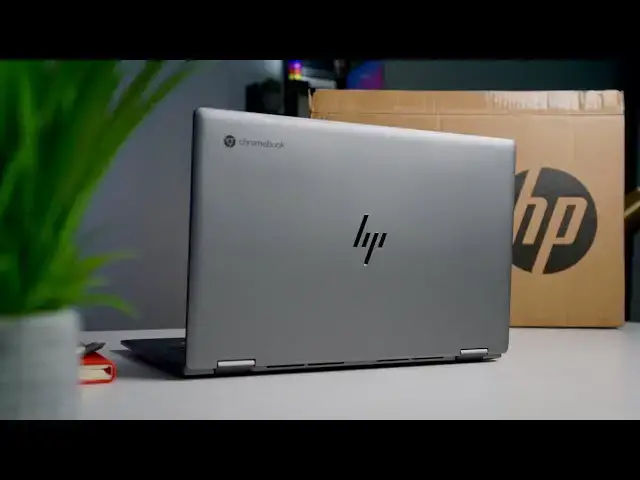
We’ve only officially known of the HP x360 14c for a little over a month, so to see it go from announced to available in just a few weeks is a nice change. As I’ve said before, I’d love to see this on a more-regular basis across the board. All that being said, we now have the rather-lovely new HP Chromebook x360 14c in the office and are jumping in the box to see what it looks and feels like with an initial hands-on. With a combo of great looks, fast internals, and a generous 14-inch display, this Chromebook could be a big seller this year.
Shop the HP Chromebook x360 14c at Best Buy: https://fave.co/2Zh9jle
Read more: https://chromeunboxed.com/hp-chromebook-x360-14c-unboxing-hands-on-impressions/
Join our newsletter: http://bit.ly/2WjCDm7
・・・・・・・
Shop Chromebooks on CHROME SHOP: https://chrmshop.com/
Subscribe to the channel: http://bit.ly/2xFuj6L
The Music We Use - PERFECT for YouTube: http://bit.ly/31W6PYP
Become a member of Chrome Unboxed to help us make our channel even better, and for access to exclusive perks: http://bit.ly/CU-join
Follow us: https://www.instagram.com/chromeunboxed
https://twitter.com/chromeunboxed
Show More Show Less View Video Transcript
0:00
smack dab in the middle of 2020 we are
0:02
excited to have in the house for an
0:04
unboxing the new HP X360 14c the
0:08
successor to the very popular X
0:11
36014 U so let's just jump in the box
0:13
and see what's in
0:15
[Music]
0:18
here all right so we grabbed this at
0:21
Best Buy uh the retail price on it is
0:23
$629 for right now we actually got it
0:25
for $100 off um you can get a student
0:28
discount on it currently and if this
0:30
one's anything like the HP x364 that
0:33
came before it it's going to be on sale
0:35
like all the time so we're kind of
0:37
hoping that's the case cuz honestly at
0:39
$630 before even messing with this
0:41
device I can tell you it faces some
0:44
pretty stiff competition and things like
0:45
the flex 5 from Lenovo and the very
0:48
excellent uh 713 the spin 713 from Acer
0:52
both of those devices compete heavily on
0:54
features and price and the 713 for
0:57
instance is the exact same price MSRP as
0:59
this one and just looking at a spec
1:01
sheet alone brings some things to the
1:02
table that the HP doesn't have but
1:05
that's to say nothing of the way this
1:06
thing feels the fit the finish all that
1:08
kind of stuff so we got to figure all
1:09
that stuff out obviously this is pretty
1:12
general standard uh Chromebook boxing
1:16
here nothing
1:18
flashy the charger it's going to be a
1:22
two-piece which I'm not against because
1:25
honestly having the huge block in the
1:26
wall sometimes is kind of awkward to get
1:28
plugged in so it is nice to have the
1:30
basic extension um so yeah there's
1:33
nothing special going on here obviously
1:35
USBC power
1:37
brick but yeah I I'd like to see the
1:40
extension but then have kind of the
1:41
brick that goes you know along with that
1:44
uh paperwork here yeah nothing out of
1:46
the ordinary here nothing different than
1:49
what we would expect uh but you're here
1:51
for this Chromebook and I can already
1:52
tell you I'm happy to see right up top
1:55
that new HP logo and I there's just
1:58
something to be said about the ability
2:00
to Brand yourself with four lines I mean
2:03
that's really cool I think HP needs to
2:05
put this on like all of their stuff and
2:07
the more you sit and stare at it the
2:08
more it looks just like lines but it's
2:10
it's kind of ingenious I really like
2:11
that um trying to feel here definitely
2:14
an aluminum lid nice and solid nice and
2:16
firm not that light um again for the
2:20
review we'll get into all the specifics
2:21
but I think this is around 3 lb and it
2:24
it feels it it feels substantial we'll
2:26
say that not the thinnest device either
2:28
uh but you know very attractive looking
2:31
from the
2:32
outside feels like HP went with a
2:34
plastic bottom again it looks very
2:36
similar to the aluminum on top but that
2:38
is almost definitely plastic on the
2:40
bottom nice huge grill across the bottom
2:43
here for your vents and some vents
2:46
across the back too which tells me it
2:48
will have a fan which is good we don't
2:49
want to run into those Samsung Galaxy
2:52
Chromebook overheating issues uh nice
2:54
hinges around the sides we've got a USB
2:57
type-c micro SD card headphone
2:59
microphone and that kind of new jaw drop
3:01
thing that HP is doing uh with their
3:04
full-size USB ports um this device isn't
3:07
like crazy thin so I'm not really sure
3:09
what the purpose of that mechanic is but
3:12
it's kind of cool looking uh then you
3:13
got power volume rocker over here um and
3:16
then you've got this privacy slider
3:18
which is really cool uh power button and
3:20
another USB type-c port obviously we're
3:23
going to have to cut away here in just a
3:24
second to get it powered
3:25
on um so yeah let's do that real quick
3:29
okay now now we're powered up and logged
3:31
in um I can tell you the hinge feels
3:33
nice and firm um you've got upward
3:35
firing
3:37
speakers a nice wide glass
3:40
trackpad uh and and very minimal bezels
3:42
let's wake it back up here so super
3:44
minimal bezels especially on the three
3:46
sides and even the bottom side is is
3:47
pretty minimal here a lot of times we
3:49
get these 16x9 Chromebooks that have
3:50
this huge chunk bezel on the bottom so
3:52
it's nice to see HP kind of minimizing
3:54
that a little bit there's this nice
3:56
tapered rounded off thing going on here
3:59
on the top that's really nice you've got
4:00
a fingerprint scanner obviously that
4:02
will work after it's all set up and
4:04
everything uh but more importantly very
4:07
quiet on the keys and man they they they
4:10
feel really nice uh really nice click
4:13
it's just becoming a normal thing I
4:15
think with Chromebooks we're just
4:16
getting these great keyboards one after
4:18
the other uh it is back lit obviously
4:20
and HP has made great keyboards on their
4:22
Chromebooks for a few years now so I
4:23
wasn't expecting anything less but yeah
4:25
that feels really nice and nice glass
4:29
trackpad add a very satisfying click so
4:32
everything feels really good there and
4:34
it feels like this is an aluminum upper
4:36
so we've got an aluminum lid nice and
4:38
firm aluminum bottom piece here not a
4:40
lot of flex to the chassis which is nice
4:43
bno speakers um you know we'll get into
4:45
those for the review don't expect too
4:47
much but it is nice that they're upward
4:49
firing so regardless of how good or bad
4:51
speakers are anytime they fire upwards
4:53
it's always kind of a win there let's
4:55
see how the tablet mode feels like that
4:57
hinge is super sturdy that feels really
4:59
good uh slight magnet there on the
5:02
enclosure so when it's in tablet mode if
5:04
you're going to use a 14in device in
5:06
tablet mode that often um it does that
5:09
pretty well kind of a strange offset if
5:11
you can see the way that that hinge
5:13
offsets that's just weird I've not seen
5:16
that before so um again none of these
5:20
devices are ever built with tablet mode
5:22
uh as the first priority it's just kind
5:25
of a secondary thing so um take that for
5:28
what it is but yeah the key board feels
5:30
great the back lighting doesn't bleed
5:31
all over the place and everything feels
5:35
nice and solid well built and premium
5:38
like I and I think that's the takeaway
5:39
here I mean at 600 bucks you need a
5:42
device to feel premium and you know this
5:45
one is going to be coming in just a
5:46
single configuration from what we know
5:48
core I3 8 gigs of RAM so it's a 10th gen
5:51
core I3 8 gigs of RAM and 64 gigs of
5:53
internal storage obviously expandable
5:55
via SD card slot so you're not going to
5:58
be able to bump up the I 5 or 16 gigs of
6:00
RAM I do wish they would have put 128
6:02
gigs of storage in here though
6:04
especially at that $630 price point but
6:07
I think the way this thing is going to
6:08
compete is a it's going to go on sale a
6:10
lot that would be my guess and then B it
6:13
does have a little bit better fit and
6:14
finish I can just tell you already out
6:16
of the box uh over some of the
6:18
competitors so when you compare it to
6:20
like the Lenovo Flex 5 or the Acer spin
6:24
713 like I don't know this thing just
6:26
feels a little more put together just I
6:29
don't know thoughtfully designed
6:30
possibly uh but yeah it's it's very nice
6:33
obviously I'm going to have to use it
6:34
over the next uh you know couple weeks
6:37
and give you all some thoughts and a
6:38
full review on it uh because again stiff
6:42
competition at this point in 2020 that
6:44
honestly I just didn't see coming but I
6:45
know part of that is because of things
6:47
like the flex 5 but we're getting these
6:49
great Chromebooks with great features
6:51
coming down in price and so you can't
6:53
throw something out there with 64 gigs
6:55
of internal storage even if everything
6:56
else is nice about it and expect people
6:59
to jump on it when there are other
7:00
options that have just as many features
7:02
and maybe more features and better
7:04
internal specs uh at the same price
7:06
point one last thing I will say uh it
7:09
does look like the screen I think that
7:11
HP rated it at uh 250 nits um it looks
7:15
good um not crazy bright I would say 250
7:18
is about as much as you're going to get
7:19
there so it's probably not blowing the
7:21
shot out I wouldn't think um so I mean
7:24
bright enough 250 nits is is usable and
7:26
it's going to be workable in most uh
7:28
environments but in a bright environment
7:30
you're going to notice a 250 nit screen
7:32
comes down and and uh in some of its
7:34
brightness compared to things around it
7:36
and so keep that in mind uh there are
7:38
other screens out there that similar
7:39
price point that are much brighter I
7:41
mean that's just kind of the the nature
7:42
of the Beast there but I can say colors
7:44
look awesome the small bezels look
7:46
awesome on it and a 14-inch diagonal
7:48
measure it's a 1080p screen so 1920 x
7:50
1080 I mean it's it's got a great pixel
7:53
density the colors look really good the
7:55
whites look nice um so it's not a bad
7:57
display by any by any stretch of the
7:59
Imagine
8:00
I just think there are other competitors
8:02
out there so anyway I've got to form all
8:04
my opinions about this thing I need to
8:05
use it for a little bit like I told you
8:07
I I can tell you right now already that
8:09
it just feels great in the hand and it
8:11
looks great I mean it is just a
8:13
strikingly pretty device and so I'm
8:15
excited to get you know some more time
8:17
in with it and get back to you guys with
8:18
a full review but that's it for this one
8:20
if you liked it give it a thumbs up go
8:22
down there and hit that subscribe button
8:23
make sure and hit the notification Bell
8:24
as well if you'd like to be alerted when
8:26
we make future videos just like this one
8:28
and don't forget to hit the join button
8:29
if You' like like to see The Cool Stuff
8:30
our members get like behind the scenes
8:32
footage and custom emoji till next time
8:34
we'll see you
8:38
[Music]
#Laptops & Notebooks
#Consumer Electronics