Up next in 10

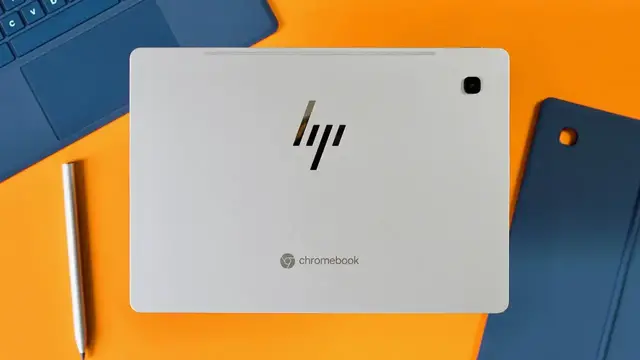
HP Chromebook x2 11 Review
Feb 17, 2022


Sponsored by NordVPN. Get secure and private access to the internet! Click here: https://chromeunboxed.com/nordvpn
Enter our On The Run To 200K giveaway: http://bit.ly/run200k
Buy the HP Chromebook x2 11 at Best Buy: https://fave.co/2WPga6P
・・・・・・・
I have to be honest right up front: I’m not really a tablet guy. I want to be – I promise – but when it comes down to it, a large-screened phone handles most of my gaming, reading and casual consumption stuff and when I need a bigger screen, I normally want a keyboard to go along with it. So, in most scenarios, a Chromebook is a perfect fit for that use case. Between the two (phone and thin/light Chromebook), most of my digital needs are met and I start asking the inevitable question: where does a tablet even fit in for me? And the truth is, I just don’t know.
That doesn’t mean I don’t WANT to like tablets. I like the idea of them and I feel like I generally WANT to have a reason to pick one up, but unless I’m forcing myself to do so, my default needs just don’t require one and I never feel compelled to reach for a tablet in my real-world, day-to-day use. However, it’s important to note that I’m not a representative of all consumers. Plenty of people prefer tablets and even find great use for them in both personal and professional settings: I’m just not one of them.
Why am I telling you all of this? Because it became painfully obvious for me during my time with the HP Chromebook x2 11 and instead of trying to approach this device from a philosophical perspective of where tablets do or don’t fit in these days for general consumers, I’ve decided to sidestep that entire conversation and instead focus on what this device does well, where it struggles, and hopefully arm you with enough detail to know if this tablet is the one for you or not. Let’s get into it.
Read more: https://chromeunboxed.com/hp-chromebook-x2-11-review/
Join our newsletter: http://bit.ly/2WjCDm7
・・・・・・・
Show More Show Less View Video Transcript
0:00
I have to be honest, I'm not really a tablet guy
0:02
I want to be, I promise, but when it comes down to it, a big screen phone handles most of my gaming, reading, and casual consumption stuff
0:10
And when I need a bigger screen, I normally want a keyboard to go with it. So a Chromebook's a perfect fit for that use case
0:17
And between the two, most of my digital needs are met. And I started asking the question, where does a tablet even fit in for me
0:25
And the truth is, I just don't know. Now, that doesn't mean I don't want to like tablets
0:29
I like the idea of them, and I feel like I generally want to have a reason to pick one up
0:33
but unless I'm forcing myself to, I just don't require one, and I never feel compelled to reach
0:39
for one. Now, I'm not representative of all consumers. Plenty of people prefer tablets
0:44
and even find great use for them in both personal and professional settings. I'm just not one of
0:49
them. So why am I telling you this? Because this has all become painfully obvious for me
0:53
during my time with the HP Chromebook X211. And instead of trying to approach this device review from a philosophical perspective of
1:01
where tablets do or don't fit in these days, I've just decided to sidestep that whole thing
1:06
and instead focus on what this device does well, where it struggles, and hopefully arm you
1:12
with enough detail to know if this tablet is the one for you or not
1:17
So let's get into it. Before we get into all that, today's video is brought to you by NordVPN, and they're the VPN
1:27
of choice for millions of consumers because they're awesome at what they do, and that's
1:31
keeping your browsing safe and secure, whether you're at home or out and about. If you'd like
1:35
to learn more about them and all their services, head over to chromeunbox.com forward slash NordVPN
1:41
and there you can learn more and get started. So let's start off with the build quality of the X2
1:45
I have to commend HP for a job well done. It feels great in the hand. It's well crafted. It looks great doing just about anything
1:53
Seriously, there are very few faults to be found in this one. So let's talk tablet first. The whole thing is crafted out of this single slab of powdered aluminum that resists fingerprints
2:03
And it has HP's cool new logo in the back in chrome. The whole thing is just sturdy. It's cool to the touch. It has a great weight
2:10
without all the additions the back and the keyboard the 11 inch tablet comes in at 1.25
2:15
pounds and can be held in one hand for reasonable amounts of time the volume rocker and power
2:21
button are in good spots they're clicky they don't interrupt this clean aesthetic hp has going on
2:27
i mean honestly this thing is just gorgeous now we can't forget the other pieces that come in the
2:32
box for this one if the tablet is fantastic and the other parts that attach to it are junky then
2:37
the overall experience can feel kind of cheap. But thankfully with the X2, that's not the case at
2:42
all. The back panel is sturdy. It has a firm hinge with a huge range of motion and slaps onto the
2:47
back of the main tablet with a really firm magnetic clasp. For real, this thing's tough to pull off
2:52
once it's in place. The keyboard's magnets are really good too. It firmly connects the keyboard
2:57
and tablet if they're even close to being in the same vicinity. And I appreciate the extra magnet
3:02
that lifts the back part of the keyboard up to the screen when it's in laptop mode, but
3:06
I do wish that was a little bit more sturdy. It works, but compared to the strength of all the
3:12
other magnets in this thing, it feels a little bit weak. Now, in daily use, I never actually had the
3:17
keyboard screen magnet part come apart, but it always felt like it was just on the verge of doing
3:23
so. All closed up, the seams are really good, and all the additional pieces don't feel bolted on or
3:29
half-baked. It just all comes together in a smooth overall package, and again, I really think HP
3:35
he built this thing right The only complaint I have with the build is the hinge running across the backside It works great but the hinge itself protrudes from the back And if you leave the back plate on and set the tablet on a table
3:48
there's a wobble that's frankly just kind of annoying, especially if you're trying to like do any kind of work with the pen
3:54
take notes or just even mark up a PDF or something. I found myself taking the back plate off all the time as I was trying to use the tablet
4:01
And honestly, that just got really frustrating having to take it off
4:05
and put it back over and over again. Alright, so that covers all the ways that this thing is built and put together
4:11
It's almost all good stuff at this point, and that honestly just continues with the screen when we talk about the one on this tablet
4:17
It's 2160x1440, 11 inches, 3x2. It's just a treat to look at
4:23
I love everything about it. The aspect ratio is the right one for tablets
4:27
The bezels all around are symmetrical. The brightness is really bright at 400 nits
4:31
and everything just looks great on the screen. I have zero complaints here
4:35
It's the perfect size for tablets. It allows for light one-handed operation, still large enough to get real work done when the keyboard's attached
4:43
I just really think HP 100% nailed it on every aspect of the screen here
4:49
Now, being a tablet first, the X2 doesn't have to have the best keyboard-trackpad combo, but it needs to be usable
4:56
The Lenovo Duet comes to mind when we talk about serviceable keyboard covers that definitely don't make you want to use them on a regular basis
5:03
Now, thankfully, HP did a good job on this part of the equation too. Now, don't get me wrong, this isn't the best keyboard you'll ever use
5:09
but it's absolutely usable for lengthy writing times, and it'll 100% work for users that just need to bust out a few emails
5:17
write some blog posts, or knock out some more lengthy documents. I wrote a handful of articles on this keyboard
5:22
and found it to be plenty comfortable to use for long periods
5:26
It's a keyboard cover, though, so keep that in mind. and it's not really rigid like the tablet portion of this device is
5:33
There's some flex here, but it didn't really bother me while I was using it
5:37
The extra magnet that gets the back of the keyboard up off the table that we talked about earlier
5:41
does add some stability. It keeps it from wobbling left to right when it's in your lap
5:45
and it just makes the entire laptop mode of this thing a lot more usable
5:49
than something like the Duet or Pixel Slate ever could manage for me
5:53
The trackpad is much the same. It's wide, glass, and it has a perfect click
5:58
and honestly, I didn't feel like I was using a trackpad that's made as an afterthought or an
6:02
attachment. Other than the fact that you can flex the keyboard cover enough to register a trackpad
6:07
click, there was nothing about using it that felt cheap or flimsy. Even in my lap, the whole thing
6:12
was usable. But that word usable doesn't really conjure up images of a good time, does it? It's
6:17
not exactly what you aim for when you're making a piece of hardware, but that's exactly what this
6:23
tablet starts to feel like when you're trying to use it as a Chromebook on a regular basis. A
6:27
standard Chromebook is always going to be better for this type of use. And whether I liked it or
6:32
not, that's how I kept ending up using the X2, like a Chromebook. And that's not its best use
6:38
case. It's a tablet, not a Chromebook. And when you start using it with the keyboard on it all
6:44
the time, you really start to feel it. Sorry, I said I wouldn't get into the tablet versus
6:49
Chromebook stuff, but it's just hard not to. Anyway, let's move on to some of the other external
6:53
things going on with this tablet. Around the outside, there's a volume rocker and a power
6:58
button, a SIM SD card tray, two USB Type-C ports, and I'm very glad they included the second USB
7:05
port, but a bit sad they chose to ditch the headphone microphone jack. There's plenty of
7:10
room here, so I just don't get it. I do like the inclusion of an SD card option here, but some of
7:15
you will confuse that with a SIM card tray For the models that support LTE down the road this tray will pull double duty but for the available model that we have here there only a spot for a micro SD card in that tray You will need a SIM tool or a paper clip to get it open And luckily there is one hiding in the box in the paperwork section So you
7:34
want to keep up with that for sure. Hidden in the power button is a fantastic fingerprint scanner
7:38
and it works just like you'd expect, allowing you to get logged in up and running with just the
7:42
tap of a registered finger. There's no doubt this needs to be part of any Chromebook and it just
7:47
makes things feel so much more cohesive. I really, really enjoyed having it there. Flanking both sides
7:52
of the screen are the stereo speakers that sound all right. There are some tablets that really lean
7:57
into great sound, and I was hoping HP would do that with this one, but that's just not the case
8:02
unfortunately. And the fact that the speakers are kind of thin and weak makes me less apt to pick
8:07
this up for video watching. An activity tablet should be great at. Take the Pixel Slate. While
8:12
it didn't really appeal to me as a tablet for multiple reasons, it has great speakers and that
8:17
made me choose it for content consumption when given the opportunity. That's just not the case
8:22
with the X2. Like many Chromebooks on the market these days, the X2 supports USI pen input, but
8:27
this one does it in a much cooler way. Taking a cue from the iPad Pro, the pen that comes in the
8:32
box, by the way, magnetically attaches to the side of the tablet and it charges while it's there
8:37
It looks cool, it works well, and it gives the pen a place to stay when it's not actually in use
8:42
We'll talk about the pen performance in a second, but the fact that this one comes in the box and basically just takes care of itself when it's not being used is just awesome
8:52
The pen's tip's a tad wide for my liking, but again, it's an included pen, so it gets a pass for not being perfect in every way
8:59
But all those cool tricks don't give the HPX2 a pass on how the stylus actually works
9:04
And the results are what you'd expect for USI in a Chromebook at this point
9:08
A bit all over the place. Apps like Squid still work better than most, and Google's new Cursive app is pretty bad
9:14
We did a whole video about that app and its shortcomings, but it does feel odd that this new handwriting app launched with this new tablet
9:22
and it all works together so poorly. Part of that is the lack of speed this tablet is saddled with
9:27
and we'll talk about that in a minute, but the other part is Cursive just isn't optimized the way it should be just yet
9:33
I tried some other apps and they weren't great either. Concepts, Google Keep, and others still
9:39
had far too much pen lag to be useful and I can't tell if that's on the pen, the processor
9:44
or a combination of the two. Either way, the pen experience was pretty mediocre and while I'm
9:49
hopeful that it gets better eventually, don't buy this tablet right now expecting an exceptional
9:55
inking experience. It's just not there yet. So we have great build quality, great aesthetics
10:01
nice additions in the fingerprint scanner, magnetic stylus, a fantastic screen. I mean
10:06
outside, HP's outdone themselves with this tablet in a bunch of ways, but what about the inside
10:12
stuff? With the Snapdragon 7c, 8 gigs of RAM, and 64 gigs of internal storage, how does this thing
10:17
actually perform? Not great, honestly. For some general browsing, it's fine, but if you get into
10:23
some multitasking and even a bit of real work, you feel the processor struggling to keep up. While I
10:28
can forgive this for most things. I constantly felt the lag when moving things around in tablet
10:33
mode. I mean, love it or hate it, Chrome OS has some useful parts of the tablet UI that
10:38
when given enough horsepower to support them, can actually be kind of fun to use. Swiping around
10:43
the interface should feel fluid and intuitive, like I'm just moving stuff through space, but
10:47
the processor in the HP just can't keep up. It makes all those fun swipes and animations sluggish
10:54
and kind of aggravating to use. And then there's Android app performance. As an ARM-based tablet
10:59
with Snapdragon branding I really expected Android apps to fly on this thing That just wasn the case To be fair some apps worked just fine but a few of the smaller games I play on my phone struggled mightily on this device Ultimate Golf
11:13
was so laggy, it was unplayable. Call of Duty Mobile, that used to play quite well on the Duet
11:18
when you could install it, wouldn't let me go past the lowest possible graphics settings
11:23
and drawing apps like Concepts were just terrible. I don't understand why things weren't better in
11:27
this department, but there's clearly some work that still needs to be done for Snapdragon and
11:32
Snapdragon 7c on Chromebooks here. Now, that being said, I know a ton of people that use the duet on
11:38
a regular basis in tablet mode and don't seem to be too bothered by the overall performance for web
11:43
apps or Android apps. The missing animations and jittery multitasking don't seem to be that much
11:48
of a bother for these people, and if that sounds like you, the HP will actually be a step up from
11:54
that experience. For me, my standards for gesture-based navigation is my phone, for better
12:00
or worse, and it floats through my swipes with ease. It moves me from app to app without much
12:05
thought, and that's just not the experience on the HPX2 as much as I wish it was. I just have
12:10
to let you know that using this thing as a tablet is probably going to feel a little bit half-baked
12:16
so after all the good and all the bad is this thing worth buying it depends for those of you
12:26
who use and like tablets and find that something like the duet is pretty good for your uses i'd
12:31
say 100 the hpx2 is a step up from that device in every possible way it's built better it has a
12:38
better screen a better aspect ratio better keyboard and trackpad an included pen it's got a faster
12:43
processor, a fingerprint scanner, and more RAM. Even for you Pixel Slate users, there are upgrades
12:48
to be found here. The keyboard case is better, the size is more manageable, and the pen actually has
12:54
a place to live. But for those of you who are like me and aren't sure where a tablet fits into your
12:58
life, I'm not sure what to tell you. The X2 is a well-made tablet that handles Chrome OS like a
13:05
mid-range Chromebook would. It's not so bad I'd tell you to skip it, but it's also not fast enough
13:10
that you escape the regular jitters and slowdowns. If the perks on offer here sound like things that you're into
13:17
this could be a great device for you. If you're into high-performance machines
13:21
and spend most of your time with keyboards and mice and stuff like that attached
13:25
I'd argue that your money could go farther with a more standard Chromebook
13:29
But we can't forget price, and that's a big part of the equation. As we're filming this, a big change happened that is really notable
13:36
HP decided to drop $200 off the $599 price tag for the X2
13:40
and that matters a whole lot. At $599, you have to decide if the aesthetic and tablet form factor are
13:46
right for you. At $399, that decision becomes a lot easier. While $400 isn't secondary device money
13:53
it does put this tablet into the same realm as the Lenovo Duet. Again, the X2 beats that tablet
13:59
in every way possible, and it's now only $100 more? I definitely think it's worth that kind of upgrade
14:05
But I don't know where you are in all this. I can't tell you whether a tablet is right for you
14:09
or if a Chromebook is better, but I can tell you 100% that this HP X211 is a fantastic overall
14:15
piece of hardware that I think a lot of you could really enjoy. And who knows, maybe if we eventually
14:21
get some tablets with a bit more horsepower, I'll get on board too. But guys, that's it for this one
14:26
If you enjoyed this video, give us a thumbs up, head down there and hit that subscribe button
14:31
and be sure to ring the notification bell as well if you'd like to be alerted when we make new videos just like this one. Until next time, we'll see you
14:39
Thank you
#Computer Hardware
#Laptops & Notebooks