Up next in 10

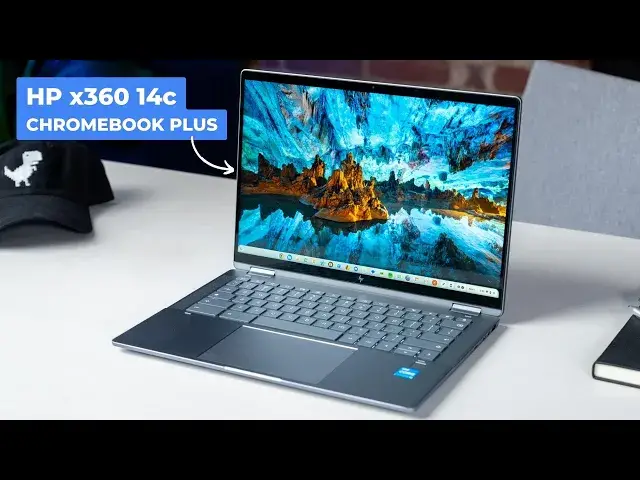
HP Chromebook Plus x360 14c Review: Great When The Price Is Right
Jun 5, 2024


Brought to you by Best Buy! Shop new Chromebook and Chromebook Plus models here: https://howl.me/clIWq9IPFHU
・・・・・・・
Chromebook Plus is officially here and upon us and with that comes a ton of reviews we're beginning the process of working on. Of the 8 new devices that debuted with Google's announcement of Chromebook Plus, 5 of them were already available for purchase and are simply getting a bit of rebranding. The Chromebook we're talking about today - the HP Chromebook Plus x360 14c - was one of those devices. We don't have the version with the new branding on the lid, but this Chromebook is exactly the same as the branded version, and I've been spending some time with it to see just how good Chromebook Plus really is to use. Spoiler alert: it's been pretty great.
💲Buy the HP Chromebook Plus x360 14c at Best Buy: https://howl.me/ckWTchbUu9Q
👉 READ MORE: https://chromeunboxed.com/
📰 Join our newsletter: http://bit.ly/2WjCDm7
・・・・・・・
Join our Patreon community for access to our private Discord, an ad-free website experience, and more ➡️ https://www.patreon.com/chromeunboxed
Fueled by Fresh Roasted Coffee! Buy the special edition Chrome Unboxed bag here: https://chromeunboxed.com/coffee
Subscribe to the channel: http://bit.ly/2xFuj6L
Follow us:
Show More Show Less View Video Transcript
0:00
Chromebook Plus is officially here and upon us, and with that comes a ton of reviews that we're beginning the process of working on
0:05
Of the eight new devices that debuted with Google's announcement of Chromebook Plus, five of those were already available for purchase and are just simply getting a bit of rebranding
0:14
The Chromebook we're talking about today, the HP Chromebook Plus X36014C, was one of those devices
0:20
Now, we don't have the new version with the new branding on the lid, but this Chromebook is exactly the same as the new branded version, and I've been spending some time with it to see just how
0:29
good Chromebook Plus really is to use. Spoiler alert, it's been pretty great, so let's talk about why
0:39
But before we get into this review, if you are looking for a Chromebook Plus model or just any
0:44
Chromebook for that matter, we would recommend checking out Best Buy. We are a Best Buy partner
0:49
and it's for good reason. They offer up probably the largest selection of Chromebooks. They have devices
0:54
constantly on sale. And most importantly, you can walk into a Best Buy and look at, check out a new
0:59
piece of hardware before you actually go to buy it and that's just important in the entire process
1:04
of picking up new Chromebook hardware so if you're interested and want to check them out there's a
1:10
link in the description that you can follow to see all of the stuff that Best Buy offers in the
1:14
chrome book space now HPB has been making the x-36014c Chromebook for years at this point now
1:20
the past three versions have had the same-ish look to them and they've all been quietly great
1:25
this most current model keeps the same weight and thickness but increases the overall size
1:29
just a bit to accommodate that new 16 by 10 screen. We'll talk about that and one other notable
1:34
improvement that we've been asking HP4 in this lineup for the past few years in just a few minutes
1:39
Let's start by talking about the build quality. It's a bit of a mixed bag. See, the prior models of
1:45
the X-36014c all had rigid, mostly aluminum chassis, great hinges, really premium feel
1:51
And this latest version has most of all that stuff, but there are changes to the bottom half
1:56
of this Chromebook that I just don't like. While the lid is all aluminum and
1:59
glass, the bottom portion's all plastic or some sort of alloy and the difference is noticeable
2:05
On the desk it looks really amazing, sleek, modern, professional, but once you pick it up
2:09
you can feel some of that deflection in the bottom half of the chassis and with the thin nature
2:13
of this Chromebook that slight bend is enough to engage the click mechanism on the track pad So if you holding it in one hand and try to click the track pad it just doesn work Now to be fair if you avoid that particular hand placement you may never even notice the give in the bottom half of this chassis but I still hate that it
2:30
there. Yeah, it's slight, but with devices like the HP Dragonfly Pro out there, it's clear
2:35
HP understands the importance of solid material choice for the bottom half of a laptop, and they just
2:40
kind of chose to ignore that bit for this particular Chromebook Plus model. Oddly enough, the hinges are
2:45
nice and firm, and when on the desk, the keyboard deck actually feels really fantastic
2:50
This issue only arises when you pick it up from the front two corners. Otherwise, the build of this device is pretty solid
2:56
Closed up, it feels thin at just .71 inches, light enough at 3.34 pounds
3:01
and rigid, thanks to the lid portions, aluminum and glass makeup. It all comes together to make the X-360-14-C feel pretty great in the hand
3:09
and I can't stress enough how good this Chromebook looks. with its slim bottom bezel, powder-coated body, and just this particular color on this Chromebook
3:18
all just works. I love the way it looks, even if I don't always love the way it feels
3:23
And we started on a tough note there, but things really do get better from here, and it starts with the screen
3:28
HP chose to upgrade to a 16-10, 14-inch IPS display this time around, and I love this combo of size and aspect ratio
3:35
We're seeing it more and more in Chromebooks, and for good reason. It just works
3:39
At 14 inches, the slight bit of extra vertical real estate, offered up by a 16 by 10 screen, makes the workspace on your Chromebook just feel larger than you'd
3:48
expect, and the 1920 by 1,200 resolution is enough to keep those pixels at bay when you're looking
3:54
at it from any real standard viewing distance. And though I'm still sitting here wishing HP would
3:59
borrow a few of those nits from the 1,200 they have in the Dragonfly Pro to lend to this X36014C
4:05
I'm not totally put off by this 250-knit screen. It could stand to be a bit brighter, but
4:10
Nits don't always tell the whole story, and if I didn't know better, I'd actually think the
4:14
screen was closer to like 300 nets. It's not super bright, but the resulting image from this
4:19
display panel doesn't feel as dim as I expect normally from a 250 net screen. Still, I really wish
4:25
HP would go with a panel like we see in something like the ACE or Chromebook's been 714
4:30
Same size, same resolution, but a lot more brightness. As you would expect, we get full USI support as
4:36
well So if you have a pen or want to pick up one from Penoval or HP or anyone else this Chromebook will work well for pen input And with the faster processors on hand for Chromebook Plus devices that means pen input is just better And the inking
4:49
experience on the X36014C has been really good to use when I've needed it. And above that screen is a
4:54
5 megapixel webcam that employs the temporal noise reduction Google now requires for Chromebook
4:59
Plus. And it's pretty good. The fact that you get to use the new Chromebook Plus camera tools
5:04
with the camera, whether you're in a call or not, means that I was able to add a bit of
5:08
a background blur and some lighting fixes to take a selfie when I needed to and actually use it
5:14
for something. I mean, take a look at the shot. With no setup, no extra lighting, no doctoring in
5:20
post, this looks really awesome from a Chromebook. Below the screen sits one of the major highlights
5:24
of this Chromebook, the keyboard trackpad combo. HP has been getting this setup right in the
5:29
X360 lineup for years and this one is no different. The backlighting on the keys look great
5:34
The keyboard's easy to type on. It's quiet, clicky, comfortable. The trackpad
5:38
It's huge, it's glass, and it's smooth as silk. The click mechanism is sure, and using this trackpad on a daily basis is just delightful
5:47
It's only outdone by the haptic version on the Dragonfly Pro, and even then, it's not that far off
5:54
I just, I really like this trackpad. Flanking those input methods are a set of speakers that finally make good on the longstanding B&O branding HP loves to include on this line of Chromebooks
6:04
In the past, even with upward firing drivers, the overall speaker quality on the X360
6:08
line has always been a bit of a letdown. I'm happy to say that this year, that's just not the case at all
6:14
And instead, the speakers are rich and full and loud and offer up some of the best audio you can get on a Chromebook
6:19
Feels like they borrowed a little bit of that Dragonfly Pro mojo for this one. And we can't forget the other two premium additions on the bottom portions of the X-36014C, the fingerprint scanner and the hardware camera shutoff switch
6:31
As they have for years at this point, the fingerprint scanner on this device works perfectly, and it provides a simple, fast way to get logged into your Chrome
6:38
book. And the hardware shutoff switch for the camera simply provides a more elegant way to turn off
6:44
video quickly when you need some privacy. It's a nice touch. On the inside, this Chromebook Plus model
6:49
comes with the 12th gen Intel Core I3, 1215U, 8 gigs of RAM and 256 gigs of NVME storage. With that speed
6:56
you also get a decent port selection with two USB type C ports a single USB type A port both of those 3 a microSD card slot and a headphone microphone jack With a chassis this slim fitting in the now fan favorite full HDMI slot just isn really possible So
7:11
you will need a dock or some sort of dongle if you want to push an external display. And this
7:15
Chromebook can most definitely do that. At my desk, it handled my quad HD 120 hertz external
7:21
screen with no problems at all on it. No point was there ever any indication that this Chromebook
7:26
couldn't keep up. And that's the idea behind Chromebook Plus with a specific guideline
7:30
on internals, you can know that you're going to get a great performance experience across the board
7:35
as long as the device says Chromebook Plus on it. And that power comes with decent battery life as well
7:40
though quoted by HP to be up to 10.5 hours, I was realistically getting like eight or nine hours of
7:47
use. While I tend to feel the need to pump up the screen to 100% most of the times on 250-knit
7:52
devices like this one, I actually ended up keeping things closer to like 70% on the X-360. Still, that's on the
7:58
high end of things and I'm sure that shaved a bit of my total battery life off. So with all that said
8:03
is this device worth the $699 asking price? I'd say no, but it's complicated. At $699, I think you should
8:09
pass on this Chromebook. There's a lot to like in it for sure. The screen size, keyboard, trackpad
8:14
speakers, fingerprint scanner, and all of its speed make for a great overall experience. Don't get me
8:20
wrong. But the give in the chassis and the 250 net screen really do give me pause at this price point
8:25
But there's good news. This Chromebook has been on sale a few times. already and as we're filming this review it's actually marked down $320 down to a ridiculous
8:35
$379. Now will it stay there? Probably not but the fact that we're seeing deals on it already
8:40
means those deals are likely to continue in different amounts over time. So while I'd say $699 is too
8:47
much, $379 makes this device an insane value and at that sort of price you can forgive the small
8:53
stuff that I've brought up in this review and just enjoy the great parts. There's a ton to love
8:58
about the HP Chromebook Plus X36014C, and it's a great value if you simply wait for the right time to buy it
9:05
But guys, that's it for this one. If you enjoyed this video, give us a thumbs up, head down there, hit that subscribe button
9:09
and be sure to ring the notification icon if you'd like to be alerted when we make future videos
9:13
just like this one. Until next time, we'll see you
#Computer Hardware
#Laptops & Notebooks
#Consumer Electronics
#Consumer Electronics