Up next in 10

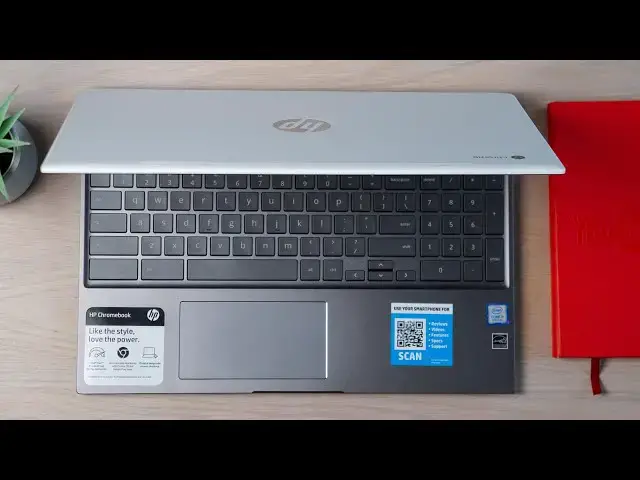
HP Chromebook 15 Review: The First Chromebook With a Number Pad!
Aug 16, 2019


Sponsored by NordVPN. Try it out and get 75% off a three-year plan for a limited time! Click here: https://chromeunboxed.com/nordvpn
Buy the HP Chromebook 15 on Amazon: https://fave.co/30ch7T4
・・・・・・・
Back in April of 2019, Acer previewed a Chromebook to the world at their annual hardware reveal that possessed a very unique feature at the time: a number pad on the keyboard. Sure, this is a pretty commonplace item on many Windows devices, but we'd not seen a Chromebook sporting this input method yet and many readers and YouTube viewers were very excited about the prospect of seeing a 15.6-inch Chromebook with a number pad on the keyboard.
Fast forward four months and we're still waiting on the Acer Chromebook 715 to actually begin shipping. In the meantime, Lenovo has teased a number pad-toting Chromebook and HP has simply just shown up first with their brand-new Chromebook 15 equipped with a number pad. While that means we now have 3 choices for large Chromebooks with number pads, you technically only have one choice at this point if you are ready to pull the trigger and actually buy one.
Read more: https://chromeunboxed.com/hp-chromebook-15-review-numberpad/
Join our newsletter: http://bit.ly/2WjCDm7
・・・・・・・
Subscribe to the channel: http://bit.ly/2xFuj6L
Shop Chromebooks: https://fave.co/2OuedYL
The Music We Use - PERFECT for YouTube: http://bit.ly/31W6PYP
Show More Show Less View Video Transcript
0:00
if you recall back in April we went to
0:02
an Acer event where they unveiled the
0:04
world's first Chromebook with a
0:05
number-pad
0:06
on the actual keyboard deck shortly
0:09
thereafter HP also announced kind of a
0:11
me-too device and said hey we're gonna
0:13
put out a 15-inch Chromebook with a
0:14
number-pad - and so it kind of became a
0:16
race to see who is actually going to get
0:18
to market first and honestly
0:19
surprisingly HP has made it to market
0:22
already and their Chromebook 15 with a
0:24
number pad on it has been available now
0:26
for a few weeks and we're already
0:28
starting to see sales and specials and
0:30
all kinds of stuff so we wanted to take
0:32
a deeper look at it and help you decide
0:34
whether or not this Chromebook is the
0:36
Chromebook for you
0:37
[Music]
0:43
today's video is brought to you by Nord
0:45
VPN and they are the VPN of choice for
0:47
millions of users because regardless of
0:49
your device they will keep your browsing
0:51
secure and safe whether you're at home
0:53
or out and about on the go if you'd like
0:55
to learn more about them and their
0:56
service go to chroma and box.com forward
0:59
slash Nord VPN so with the Chromebook 15
1:02
HP has done a couple things different
1:04
here first they've put out their first
1:06
15-inch Chromebook so that's something
1:08
of note I mean we're kind of giving into
1:10
a crowded space here Acer now has
1:12
multiple 15-inch Chromebook variants HP
1:15
now has a 15-inch Chromebook we have the
1:17
really fantastic Lenovo c6 30 the yoga
1:20
line of Chromebooks that are out and
1:23
then Lenovo's even got some coming with
1:25
number pads and stuff like that in a new
1:27
line that they've teased out in some
1:29
YouTube videos so the 15-inch Chromebook
1:31
space used to be completely devoid of
1:33
Chromebooks and now we have all kinds of
1:35
different choices here so when we look
1:37
at HP's offering we kind of look at it
1:39
through that lens through through price
1:41
and through all the features it brings
1:43
to the table and try to decide you know
1:45
is this a device that's actually worth
1:47
your time worth your money because
1:49
ultimately if all that you care about is
1:51
having a number pad on a Chromebook you
1:53
still have multiple options it's just at
1:55
this point right now this one is the
1:57
only option so let's go through this
1:59
thing point by point just like we do in
2:00
a normal review and talk about all the
2:02
pluses and minuses that this one brings
2:03
to the table so let's start off with
2:05
build quality if you've seen the HP
2:07
Chromebook X 360 you kind of know what
2:09
we're dealing with here you've got HP's
2:11
signature language for design going on
2:14
with the ceramic like lid and then
2:17
aluminum interior and in a plastic
2:19
bottom and it is two colors so you have
2:21
a white lid and a gray bottom and I
2:23
think this looks a little better than
2:25
the X 360 did that one polarized a
2:28
little bit and some people loved it and
2:29
some people didn't like it I personally
2:31
liked it but a lot of people didn't and
2:33
I think with the gray and white it's
2:35
it's just a little less off-putting for
2:37
people that don't like two-toned laptops
2:39
but in general the thing is built really
2:41
well
2:42
no creaks and no floppy hinges going on
2:45
everything feels good solid and put
2:47
together in a way that doesn't feel like
2:49
it's gonna fall apart
2:50
and so with Chromebooks in this price
2:52
range this is kind of
2:53
mid-priced Chromebook you kind of are
2:55
starting to expect a better build
2:57
quality overall I think HP is delivering
2:59
that here it's nice and thin at a 15.6
3:02
inch screen you expect kind of a big
3:05
clunky device and it just doesn't feel
3:06
that way it feels slender it looks good
3:08
on the desktop and at just around four
3:10
pounds that sounds kind of heavy but
3:12
again for a larger Chromebook it's a
3:14
manageable weight and it fits in a
3:15
backpack really nicely once we open this
3:17
up and get inside you're met with a full
3:20
HD 15.6 inch 16 by 9 1080p IPS wide
3:25
viewing angle screen with great colors
3:28
and very minimal bezels and what's
3:30
really nice about the bezels and the way
3:32
that it's put together is it helps
3:33
reduce the footprint a little bit of
3:35
this slightly large Chromebook and all
3:38
those things are great and I love the
3:40
way that looks I love the way that all
3:42
performs where it kind of falls down
3:44
just a little bit is in the brightness
3:46
category and unfortunately this is a
3:47
troubling trend from HP lately we're
3:50
getting these screens that have great
3:51
color and viewing angles and all the
3:53
right things in place and small bezels
3:55
and then don't have enough brightness
3:57
really to back them up now don't get me
3:59
wrong if you're in a standard living
4:01
room or you're at a coffee shop or
4:02
something like that you're probably not
4:04
going to have too much issue now you
4:05
will have to have the brightness
4:07
probably at 75 80 % almost all the time
4:10
but the minute you go outside or you go
4:12
to near a window or your under office
4:14
lighting that's bright and harsh you're
4:16
gonna run into all kinds of glare and
4:18
reflections and you can try pushing that
4:20
brightness up as much as you want it's
4:22
never going to be quite enough and
4:23
that's just a bummer I I'm not expecting
4:26
400 nits panels and I'm not expecting
4:28
you know crazy resolutions and I'm not
4:30
expecting super-high refresh rates or
4:33
something like an iPad pro in a device
4:35
in this price bracket what I do expect
4:37
is something closer to like 300 nits so
4:39
that you don't have to battle lighting
4:41
environments all the time and so that's
4:43
kind of a shame and it's the only real
4:45
knock I have against the screen in this
4:47
device moving on down we have what's
4:49
become another trend of HP's which is
4:51
great
4:52
keyboards and great track pads this
4:54
one's another glass trackpad and I do
4:56
wish they would have brought the glass
4:57
trackpad over from the x360 it's
4:59
definitely plastic but it's textured in
5:01
such a way that
5:02
have any issue with it building up oils
5:04
I didn't have any issue with any of the
5:06
multi-finger gestures and as we're now
5:08
starting to have you know virtual
5:09
desktops and so forefinger gestures as
5:11
well no issues with any of those things
5:14
whatsoever the keyboard is backlit the
5:16
keys feel great it feels very similar to
5:18
typing on an X 360 and then you get the
5:21
addition of the number pad on the right
5:22
side which is honestly going to be the
5:25
reason some people go out and buy this
5:27
thing if you're a number cruncher you
5:28
deal with spreadsheets you have to input
5:30
numbers for whatever reason and you
5:32
really have been waiting for a number
5:34
pad again this is the only Chromebook on
5:36
the market right now with one where
5:38
you're assuming we'll see a sirs come
5:39
out pretty shortly but for right now
5:42
this is the only one in the game and
5:43
it's a great keyboard so it feels like a
5:45
great number pad as well to go with
5:47
these input devices so overall input
5:49
methods on this particular Chromebook or
5:52
just a win around the sides of the
5:53
device we have a really familiar port
5:56
selection here because honestly this
5:58
device is built on the same base board
6:00
as a lot of other Chromebooks we
6:02
reviewed that dell inspiron HP x 360
6:05
we've already talked a lot about the
6:06
lenovo c 630 all of those devices are
6:09
built off the same base board as this
6:10
device so you've got the USB type a
6:13
which gets you out of that dongle life a
6:15
USB type-c on the other side Kensington
6:17
port micro SD card slot headphone
6:19
microphone jack so no surprises there at
6:21
all you do have a speaker port and grill
6:24
right above the keyboard and they house
6:27
decent speakers and that again has
6:29
become this trend with HP of having
6:32
these B&O branded speakers right on the
6:35
keyboard deck and right there in your
6:36
face and you kind of expect this really
6:38
huge full sound and and get a decent
6:40
sound I mean they're ok for laptop
6:43
speakers but I really am excited about
6:45
one day being able to open up an HP
6:47
Chromebook with B&O speakers on it and
6:49
then really making me go whoa those
6:51
sound amazing kind of you know like the
6:53
Acer Chromebook 15 or the pixel slate
6:56
those speakers as soon as I turn them on
6:58
I was like wow this is this is
7:00
impressive I've just never had that
7:01
experience with HP unfortunately one
7:03
other thing you'll notice on this device
7:05
is a
7:06
and port and this thing has to have
7:08
vents because it is a fan device and
7:10
just like the other devices we just
7:13
mentioned that are on the same base for
7:15
this one comes with processors and
7:17
choices that necessitate a fan I didn't
7:20
hear him kick on very often and here are
7:22
plenty quiet when they did so I don't
7:23
think that's an off-putting thing
7:25
especially for a big laptop like this
7:26
but you know if you're in the market for
7:29
a nice silent Chromebook without fans
7:30
you need to know that this one does come
7:32
with fans processor options finally
7:35
let's talk about internals inside this
7:37
thing we're looking at an Intel 8th gen
7:40
Pentium gold chip paired up with 4 gigs
7:42
of RAM 64 gigs of internal storage there
7:45
is a version of it that is available
7:47
only at Costco and Sam's it seems at
7:49
this point and it ups it to an i3 so
7:52
still an 8th gen core i3 fanned I 3 u
7:55
series processor and 128 gigs of
7:59
internal storage we're gonna talk about
8:00
pricing on both of those here in just a
8:02
second because it fluctuates pretty
8:04
wildly but in general you need to know
8:06
that either one of these processors is
8:08
gonna do quite well for just about
8:10
anybody in general the Pentium Gold
8:13
hasn't been in a lot of devices that got
8:15
into people's hands so nobody really
8:17
knows what to expect of it but looking
8:18
at benchmark scores and stuff like that
8:20
we can freely assume it's going to get
8:22
between twenty and twenty two thousand
8:24
on octane so that puts it in the class
8:26
of processor where you're not really
8:28
gonna have to think too much about
8:29
whether or not it's gonna be able to
8:30
handle certain things you throw at it
8:32
pretty much Linux Android apps web apps
8:34
all that kind of stuff general Chrome OS
8:36
stuff it's going to handle really well
8:38
my main hang-up with this device is that
8:41
regardless of the internal processor it
8:43
only comes with four gigs of ram across
8:45
all models at this point anyway and
8:47
that's kind of a bummer honestly and it
8:50
takes away from some of the performance
8:52
gains you get with that Pentium Gold
8:53
chip or that core i3 chip for a lot of
8:56
users you're not really going to notice
8:58
it for power users though people like to
9:00
have lots of tabs and apps and stuff
9:02
like that open you're gonna notice stuff
9:03
closing the background every once in a
9:05
while and that's kind of a bummer
9:13
[Music]
9:17
all right so last but not least we need
9:20
to talk about pricing because as with
9:22
just about every other Chromebook on the
9:24
market pricing is pretty volatile at
9:26
this point with this device the MSRP on
9:28
it is $450 I would tell you never pay
9:31
that for this Chromebook because at $450
9:34
there's too many other devices that dip
9:36
down into that price range that I think
9:38
are better devices overall than this one
9:40
is but MSRP isn't exactly the asking
9:43
price a matter of fact if you look
9:44
around right now you'll probably see
9:46
this device listed for 379 just about
9:49
everywhere new a Walmart Office Depot
9:51
Amazon I don't know where they agree
9:54
upon these things when they have MSRP s
9:56
maybe they just mark it up so they can
9:58
mark it down I'm not sure but 380 seems
10:00
to be about the going price for this and
10:01
at that price I think
10:03
HP's put together a pretty compelling
10:05
package here because they're not a lot
10:07
of devices you can get for sub $400 on a
10:09
regular basis without having to go look
10:11
for a special deal and you get some
10:13
aluminum build here you get an IPS panel
10:15
you get the number pad you get backlit
10:17
keys you get a nice trackpad you get a
10:19
touch screen you get a very good
10:21
processor and a decent amount of storage
10:23
so that puts together a nice package for
10:26
us we ended up getting the core i3 model
10:28
on a one day sale its aims for $400
10:31
which is 150 dollars off its MSRP and it
10:34
does the same thing at five hundred and
10:36
fifty dollars and it's hard to recommend
10:38
because there's a lot of good
10:39
Chromebooks for $550 even on a regular
10:42
basis without finding sales so at that
10:45
price I would tell you to go look
10:47
somewhere else and probably get a
10:48
different device but when it dips down
10:50
into that 4 or 450 to get a core i3 and
10:53
128 gigs of storage and a number pad in
10:55
a backlit keyboard the list kind of adds
10:57
up and you go yeah that's it that's
10:59
actually a pretty good deal so price
11:00
informs just like it always does with
11:02
this device it's just usually we have to
11:04
wait till months after a device comes
11:05
out but it seems like this one's already
11:07
just jumping into the market and jumping
11:10
all over the place with its price and so
11:11
be a smart buyer if you're wanting this
11:14
if you're deciding that hey I want a
11:16
15-inch Chromebook I like the way that
11:17
one looks or I need the number pad being
11:19
formed as you go into that buying
11:21
decision and make sure that you don't
11:23
pay MSRP for this because I think you
11:25
might feel a little disappointed with
11:26
that price range but if you get it down
11:28
into these other ones three
11:30
350 $400 for the core i3 450 even I
11:33
think for the core i3 model I think
11:35
you're gonna be satisfied with your
11:36
purchase and feel like you're getting a
11:38
lot of Chromebook for the money but guys
11:40
that's it for this one if you liked it
11:42
give it a thumbs up and hit the
11:43
subscribe button down below
11:44
make sure to hit the notification bell
11:46
as well if you'd like to be notified
11:47
when we make future videos and just like
11:49
this one until next time we'll see
11:52
[Music]
#Computers & Electronics
#Shopping