Up next in 10



Sponsored by NordVPN. Try it out and get 75% off a three-year plan for a limited time! Click here: https://chromeunboxed.com/nordvpn
・・・・・・・
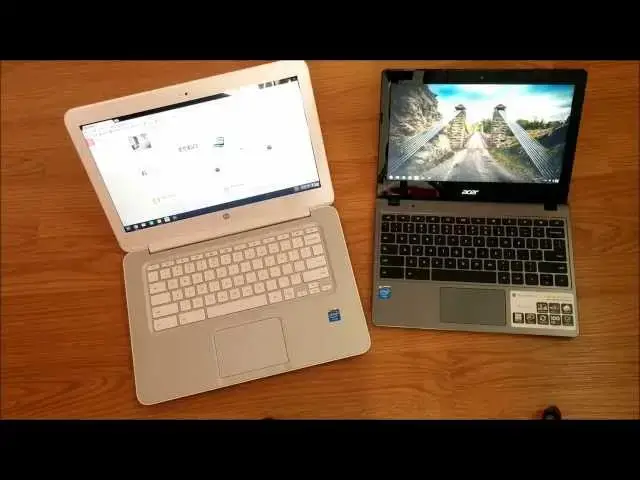
In this video I'm comparing the HP Chromebook 14 and the ACER C720 side by side. For both full reviews of the individual Chromebooks, check out my channel.
Hope you enjoy it!
・・・・・・・
Subscribe to the channel: http://bit.ly/2xFuj6L
Shop Chromebooks: https://amzn.to/2NE2wKq
Read more: https://chromeunboxed.com/
Follow us: https://www.instagram.com/chromeunboxed
https://twitter.com/chromeunboxed
Show More Show Less View Video Transcript
0:01
hey guys Robbie pay here again today
0:04
coming at you with a head-to-head
0:07
between the HP Chromebook 14 and the
0:11
Acer
0:13
C720 now if you haven't already uh there
0:17
are full reviews up on my channel so uh
0:20
I'm not going to bug you with a bunch of
0:21
stuff popping up all over the screen
0:23
just uh hit my Channel Down Below uh you
0:26
can see the reviews for both um
0:30
and kind of check them out individually
0:32
and now we're going to put them side by
0:34
side now interestingly enough those of
0:36
you who have watched these reviews or
0:38
have researched these things uh you do
0:41
realize that internally uh if we were to
0:44
strip away all the exterior Parts the
0:46
things that are pushing these guys are
0:49
literally the same right down to the the
0:52
pieces and everything obviously the
0:53
motherboards a little bit different but
0:55
all the pieces that matter are all the
0:57
same we have the Haswell uh
1:01
class um celerant processor in both we
1:04
have 4 gigs of ram in both um and then
1:07
we have Chrome OS uh on version 31 I
1:10
believe at this point uh running on both
1:12
of these so you're not going to see any
1:14
performance differences so it really
1:16
makes no difference or makes no sense
1:17
for me to open these things up and start
1:19
opening a bunch of tabs and let's try
1:21
this game on this one and this one on
1:22
that one kind of like you saw on the HP
1:24
14 versus the hp11 there was a point to
1:26
be made there that even though the hp11
1:29
is gorgeous and beautiful um it it lacks
1:32
severely in performance and until you
1:34
get your hands on one of these Haswell
1:36
type Chromebooks it's it's hard to even
1:38
appreciate it really and then once you
1:40
use it it's it's really difficult to
1:42
ever think about going back and so we're
1:44
not going to spend a whole lot of time
1:46
um uh talking about the internals and
1:48
looking at speed tests and stuff like
1:50
that we're really going to focus more on
1:51
the external Parts because that's the
1:53
that's the difference in them uh
1:55
internally the way they perform the way
1:56
they actually do the functions you need
1:58
them to do exactly the same and having
2:01
used both of them at length I can say
2:03
that um there's there's no difference in
2:05
performance what you would expect from
2:06
one you get from the other um the only
2:09
difference I've seen and I'll show you
2:11
uh uh the Linux environment really
2:13
quickly um I guess uh Crouton has fixed
2:17
a few things when I loaded it up on the
2:20
HP um before uh this was a month ago or
2:24
so I had to do a couple fixes and scour
2:27
the internet a little bit to get fixes
2:29
for the track it wasn't working quite
2:30
well um they fixed that there are two
2:33
issues the trackpad doesn't respond well
2:35
to touch and then the second issue it
2:37
disappears when you hover or certain
2:38
elements in the Ubuntu uh interface and
2:43
so they have fixed the trackpad
2:46
sensitivity thing with HP I don't know
2:48
if I'm not sure if that was just my
2:50
particular machine the first time or the
2:53
Crouton has changed something they're
2:54
continually updating that stuff so I'm
2:56
not sure what the difference is exactly
2:58
but when I installed Bo on here right
3:01
out of the box mouse works just fine the
3:03
cursor was still disappearing on
3:04
particular elements and so I had to do
3:06
the mouse fix number two if you end up
3:09
with either of these machines I did have
3:10
to do both Mouse fixes on the Acer so if
3:13
you end up with either machine you want
3:14
to put Linux you want to put uu on there
3:17
uh hit me up in the comments or on
3:19
Google+ I'll I'll I'll put the links uh
3:22
and if I remember to I'll throw the
3:23
links down even in the description of of
3:25
the mouse fixes and then the link to the
3:28
article I always end up going to mind
3:30
myself and grab the latest version of
3:31
Crouton and all that kind of stuff uh
3:33
there's an article by Life Hacker that's
3:35
really good really straightforward um
3:37
but there's tons of them out there if
3:38
you just search for uh Ubuntu on a
3:41
Chromebook there's a bunch of guides
3:43
that tell you how uh so I'm not going to
3:44
reinvent the wheel that way I'll just
3:46
link you to those guys and then I have
3:47
found two particular things one's a
3:49
video one's Post in Inu uh question
3:52
Forum uh that that fix the issues with
3:55
the the mouse in theu environment and so
3:58
um I can provide you with those things
4:00
so never fear if you if you like some uh
4:03
Linux action on your Chromebook uh for
4:06
me it just it fills a couple voids I'm
4:08
not going to spend a lot of time on this
4:09
but uh if you're if you do any kind of
4:11
design work any kind of graphic design
4:13
obviously there's there's some stuff
4:15
that's okay uh more Photoshop type stuff
4:18
pixel editor and um Sumo paint both of
4:23
which browser based and they do some
4:25
good
4:26
stuff uh but for me I'm I'm more of an
4:28
SVG edit kind of person uh SVG edit is
4:31
pretty awesome but there's still a lot
4:32
of problems with it right now um I'm
4:35
more of an Adobe Illustrator serff draw
4:38
plus you know I like to I like Victor
4:40
graphic type stuff for the work that I
4:42
do and so um for me I need that kind of
4:45
thing well the best open- source Vector
4:47
graphic program is inkscape and so if
4:50
You' never heard of it and you need
4:51
something like that it's free and it's
4:52
open source and it keeps getting better
4:54
ink Escape um but it won't run on Chrome
4:57
OS right now so I need Linux in order to
5:00
do that um other than that I really
5:02
don't need anything outside of Chrome OS
5:04
so as soon as a a workable usable SVG
5:08
editor comes along and it's it's coming
5:11
um if you use svg-edit uh you can try
5:14
that out Google that and and you can see
5:16
how powerful these things are getting uh
5:18
janas is another one canvas with a J in
5:21
front of it uh there are a couple
5:22
programs that are showing hey look we
5:24
can do Vector editing uh in a browser
5:26
and so it's just a matter of time before
5:28
Chrome OS has a a great Vector
5:31
editor um and so at that point I
5:34
honestly won't have a lot of need to go
5:36
outside of the chromeos environment at
5:38
all so that aside
5:42
um if you need Linux uh there are fixes
5:44
for the mouse and you can use it and
5:46
I'll show you how quickly you can bounce
5:48
back and forth between those two um a
5:50
lot of people have been asking me about
5:51
doing this this head-to-head so um I
5:54
just want to spend time on the hardware
5:56
and and kind of move on like I said uh
5:57
performance is the exact same so we'll
5:59
start with the hp14 uh the the the
6:03
overall build of this guy and I've used
6:05
all the current Chromebooks uh minus the
6:07
Chromebook Pixel um I've got my hands on
6:10
every Chromebook now
6:12
actually other than the CR 48 the
6:15
initial uh Chromebook experiment device
6:18
and so um of all of those this is my
6:20
favorite build quality holistically I
6:24
should say uh the hp11 is built really
6:27
really well and if you see my side by
6:28
side between this and the hp11 you'll
6:30
see that I really like a lot of the
6:32
stuff they do their keyboard is
6:33
fantastic the build quality of the thing
6:36
and the look fantastic I really love it
6:39
but its performance is so bad um it just
6:43
Mars all of that for me and the and the
6:45
trackpad is just mediocre at best and so
6:48
um I feel like as a whole package this
6:51
is my favorite Chromebook right now um
6:54
I'm probably giving away a little bit of
6:55
spoiler I'm not trying to do a this
6:57
versus that and this one's better um
6:59
just kind of giving you a side by- side
7:00
comparison um and spoiler alert this is
7:03
this is my guy this one's actually going
7:05
back um because I I love the way this
7:09
thing's built I love the form factor the
7:11
size of it as far as being a work
7:12
machine again it's it's use case
7:15
scenario we'll talk about a little bit
7:16
more about that here in just a minute
7:17
but um all those factors involved I like
7:21
this um if you haven't felt one of these
7:23
before it it's a unique feel almost a
7:25
rubberized plastic um on on the top
7:28
bottom sides everywhere on the on the
7:31
back of it it gets a little bit dimply
7:34
um and so uh just a unique feel uh nice
7:38
and thin form factor uh but not
7:41
completely just boring you know it's got
7:43
some nice curves to it it it strikes a
7:45
nice profile um and it's got all the
7:49
ports you need you've got USB here USB
7:52
over here um they are 3.0 you see the SS
7:55
next to them over here these are 3.0 you
7:57
have full size HDMI slot you've got
8:00
earphone microphone Jack henington
8:02
lock um full size SD this one comes
8:05
equipped with LTE and free 200 megabits
8:08
per month from T-Mobile powerjack um and
8:11
your speakers down here which are plenty
8:13
loud actually side by side with the hp11
8:15
which probably has the best speaker
8:17
options of all the Chromebooks uh where
8:19
it kind of comes up through the keyboard
8:21
uh this one stood its ground just fine
8:24
and so um I I just I enjoy the build
8:27
quality uh of of the HP it looks sharp I
8:31
don't care for the other colors I wish
8:32
they would have made one more neutral
8:34
color a black or a gray something like
8:36
that the I've seen the other two and I
8:38
just I I wouldn't be able to work with
8:40
those um you'll see in my first review
8:42
of this guy I ended up with the green
8:44
one and it's not that bad it's more of a
8:46
blue to be honest um but it even still
8:50
um maybe this says something about me as
8:52
a person I don't know but I I just had
8:56
it just it bothered me having having the
8:59
blue and and the red/ pinkish one uh
9:02
Coral Peach is what they're calling it I
9:04
think would bother me as well so um I I
9:07
I'm a fan of kind of more neutral colors
9:09
let the thing get out of the way and let
9:10
the content shine that kind of stuff and
9:12
so I wish they did have one other
9:14
neutral color but really love the
9:16
profile this thing strikes it's just
9:18
sharp looking it's beautiful we'll talk
9:19
about the internal parts of the design
9:21
here in just a second we're going to
9:22
move over to the Acer now and um you
9:26
know you can see from the outside very
9:28
plain uh m finish but cheap plastic so
9:31
it's it doesn't have kind of rubberized
9:32
texture of of the HP um on the sides
9:37
again Port wise these guys stack up
9:38
pretty nice SD card slot USB 2 over here
9:42
Kensington lock over here we have a USB
9:44
oops sorry we have a
9:45
usb3.0 uh earphone microphone Jack HDMI
9:49
port and power charging and down here
9:51
just like with the HP you get some slots
9:53
for fans and speakers on the sides um
9:56
speakers on the HP definitely win um
9:59
neither one of them sound amazing but uh
10:01
the HP speaker a little bit better um
10:04
you do get a nice thin form factor here
10:06
um it's not much thicker than the hp11
10:09
um and it's light um you know 2 lb and
10:13
some change I can't remember off the top
10:15
of my head uh how much this thing weighs
10:17
but considerably lighter than the hp14
10:21
now like I said about use cases if
10:24
you're looking to get a device to sit on
10:26
the couch with and use while you're
10:28
watching
10:30
television that form factor is a huge
10:32
consideration the weight is a huge
10:34
consideration the the ease of of just
10:37
popping it on your lap and using it's a
10:38
huge consideration and I said this in
10:40
the hp14 versus hp11 review that the 11
10:43
suits that need a whole lot better
10:45
because it feels more like a tablet uh
10:47
almost in its weight and and its uh ease
10:50
of access kind of you start lugging this
10:52
thing up on your lap now you can you can
10:54
do it uh it's just it's it's a little
10:56
over 4 lb and so all of a sudden you it
10:58
feels feel like you're kind of lugging
11:00
something around however for me I use it
11:02
for work and so I've got a Windows
11:05
desktop that sits at home that I can
11:06
remote into for emergency case things
11:09
but I want to do everything I need to do
11:10
work-wise I do website work uh design
11:13
and and and build and
11:16
development I love the fact that I'm
11:18
able to do most of it on on my
11:19
Chromebook I'm not sure why I just love
11:21
the fact that a web based device I'm
11:24
able to do web based work on um it's
11:27
it's kind of a neat thing and a neat
11:28
feeling and feels like I'm kind of
11:29
Unshackled from all the old uh um
11:32
operating systems and so for me this
11:35
works way better because it's a much
11:36
larger uh a much larger display a much
11:40
larger surface for my hands to rest on
11:42
typing all that kind of stuff so again
11:45
use case is more important than anything
11:47
else figure out what you're going to use
11:48
it for and then base your decision on
11:49
that I'm not saying that there's one
11:51
Chromebook that's better than the other
11:52
for every single use case let's open
11:54
them up really quickly
12:03
and I'm not sure if let's scoot these
12:06
guys down a
12:10
bit I'm unsure whether it comes off on
12:12
the video it probably doesn't
12:15
um you know the colors uh I've got both
12:18
of them cranked to full brightness I'm
12:20
trying to tilt the screens back a lot so
12:21
that the camera can catch realistically
12:24
what these things look like um the color
12:27
is just way better on the P I mean just
12:30
it's just a lot lot better um things
12:33
look really washed out on the Acer in
12:36
comparison and
12:38
uh while the matte finish display over
12:41
here is nice for knocking down glare uh
12:44
the the overall screen is much better
12:45
over here and what's interesting
12:48
is um this compared to an HP Chromebook
12:53
11 this looks terrible compared to the
12:55
IPS display on the 11 so uh again it's
12:59
relative in its tradeoffs I wish that
13:01
this had a better display on it if this
13:03
one had a an IPS panel even at the same
13:05
resolution if it had an IPS panel of
13:07
better blacks and deeper colors and all
13:10
that kind of stuff this in my mind would
13:12
easily be the best Chromebook on the
13:14
market when it comes holistically all
13:16
around but it loses a bit in in the
13:19
screen Department um a couple
13:22
differences uh design differences again
13:24
HP goes with a uh what they call metal
13:27
look uh for the plastic here it's
13:29
plastic um but you know it's firm
13:32
there's not a lot of creaking moving
13:34
there's not a lot of flex or Gib in the
13:35
keyboard here um the screen is is
13:39
decently bright uh we're in a pretty
13:41
bright room all windows right now and so
13:43
I'm not having any issue seeing it but
13:45
it is cranked to full brightness great
13:47
thing is your has well uh with your
13:49
processor here so you can crank the
13:52
screen to full brightness and still
13:53
probably get six 6 and 1/2 hours out of
13:56
it no problem so if you want to get that
13:58
closer to 89 9 hours you need to stay
14:00
down between 60 and 70% screen
14:02
brightness be realistic about it but um
14:06
that both of them do fantastic on
14:08
battery so yeah the screens aren't the
14:10
brightest in the world but you can crank
14:11
screen brightness so again again a
14:14
trade-off um overall the feel of
14:18
actually using the device here uh is
14:20
much better on hp14 versus the the
14:23
Chromebook 11 again for long periods of
14:25
typing being at it as a workstation type
14:28
thing uh in addition the the keyboard
14:31
itself actually feels much more premium
14:34
on the hp14 versus the Acer that being
14:37
said uh usability um as far as keystroke
14:41
and all that kind of stuff uh I typed
14:44
well on both of them I didn't really
14:45
have any issue with either one um the
14:47
the Acer's Keys just feel a lot more
14:50
thin a little bit less travel uh and a
14:52
lot um a lot lighter I don't know if
14:55
that's even makes sense on a keyboard
14:57
but um it just again the if you if you
15:00
watch the review the the overwhelming
15:02
feeling of the Acer is just cheap um and
15:04
so it feels a lot cheaper whereas the
15:06
the HP4 feels more solid uh definitely
15:10
the the trackpad wind goes to the hp14
15:13
The Click you can kind of
15:16
listen it's kind of thin and cheap
15:18
sounding over here it's a nice deep very
15:22
quiet probably almost UND discernable on
15:25
the on the video and so it just kind of
15:27
it feels a little bit more premium but
15:29
ultimately they both track very well two
15:31
finger scrolling works just fine on both
15:32
of them um all your gestures all that
15:35
kind of stuff that it all works and so
15:37
it's not like either one doesn't work or
15:39
anything like that it's it's that's not
15:40
the case at all we're talking about
15:42
little nitpicky things like how the
15:43
click Sounds here so um don't let that
15:46
be a deciding factor for you another
15:49
design element I really like in pretty
15:51
much any kind of laptop notbook
15:53
Chromebook whatever anything where
15:54
you're opening a lid over and over again
15:56
is to have a matte finish around the
15:58
edge and so
15:59
um because you're interacting with this
16:01
all the time it's nice to have something
16:03
that doesn't pick up fingerprints
16:04
whereas over here on the Acer you've got
16:06
the kind of cheap glossy plastic going
16:09
on over here it just picks up
16:10
fingerprints all over the place uh and
16:12
gets a bit irritating other than that
16:15
the Acer doesn't do bad on fingerprints
16:16
at all the HP is pretty much devoid of
16:19
finger fingerprints cuz you got the soft
16:21
touch stuff on the outside you've got
16:23
the the kind of matte finish plastic
16:25
here and a matte finish plastic here it
16:27
it just doesn't pick up fingerprint
16:28
prints um I haven't really had to wipe
16:30
it off at all um unless you touch the
16:33
screen which there's really no point in
16:34
doing that but sometimes you find
16:36
yourself doing that to show somebody
16:37
something so you might have to wipe off
16:39
a fingerprint here and there but
16:41
ultimately as far as uh day-to-day touch
16:44
uh or fingerprint kind of stuff
16:47
goes uh hp14 has really no issues with
16:50
that
16:54
whatsoever so really it it comes down to
16:57
again your use case uh what things work
17:00
best for you what kind of things are you
17:01
going to use uh these devices for uh
17:05
once once you purchase them if it's
17:07
casual type stuff um the Acer is going
17:10
to give you a cheaper device than the
17:12
hp11 uh that's just as like just about
17:15
the same size um an inferior screen yes
17:19
but a much Superior processor in the has
17:23
well chip the hp14 is pretty much giving
17:26
you the best of all worlds uh but it's
17:28
not light um it's not uh it's not dainty
17:31
it's not really that couch friendly I
17:33
don't find myself sitting at home going
17:35
I'm going to sit down and pick this guy
17:37
up and and mess with it on the on the
17:39
couch I'm going to use my phone or a
17:41
tablet or something like that uh for
17:43
those kind of scenarios so if you're not
17:45
going to be using it for work maybe the
17:48
HP is not right for you um and Heck if
17:50
you're only going to be doing really
17:51
light web bring maybe the hp11 is right
17:54
for you uh it really is a matter of kind
17:57
of discerning what it is you're going to
17:58
use the device for how far you're going
18:00
to push it I did want to show show you
18:02
all one other thing and uh I'm not sure
18:05
if I've rebooted yeah I have
18:08
so real quick
18:12
um just want you to see
18:17
what what it looks like to run Linux on
18:20
these
18:26
guys and we'll get it over here too here
18:29
make sure we have
18:44
it oops I Shell First
18:55
sorry you can see they both boot up
18:58
Linux quite quickly um and like I was
19:02
saying about the trackpad stuff you can
19:04
see trackpad works fine it's not
19:06
disappearing one of the big ones that
19:07
disappears in system settings when you
19:09
hover over stuff so you can see that
19:11
that's working just fine and the cool
19:13
part about this when you when you boot
19:14
it up this way you hold shift control
19:17
alt and hit back and we're right back to
19:22
Chrome no issues and you don't have to
19:25
leave that command prompt Page open so
19:27
we can be doing whatever
19:29
whatever you want to be doing over here
19:30
and just as quickly boom we're right
19:33
back into our Linux desktop um so you
19:35
can bounce back and forth they do share
19:37
a similar folder uh it's like the home
19:40
folder I think or maybe the downloads
19:41
folder they share so if you need to move
19:44
files between environments there is a a
19:46
common folder which is kind of
19:49
cool so that quick that easy and you can
19:52
see like I said the mouse fixes work
19:53
over here as well so go under settings
19:55
we're not we're not losing our cursor so
19:58
that's that's huge deal cuz obviously it
20:00
becomes just about
20:02
unusable if you don't have that so um
20:05
again hit me up in the comments uh I'm
20:08
going to try to remember to put a link
20:09
to how to do that so they both again
20:12
they both run that the exact same they
20:14
run everything the exact same they're
20:15
pretty much internally the same process
20:17
or the same uh computer um so we're
20:19
really talking about external
20:20
differences uh completely and just again
20:23
so you can see um for those of you who
20:25
have messed with arm processing um
20:28
Chromebooks and have to have had to deal
20:30
with Google+ and its awfulness um you
20:34
can just see how gorgeous this works um
20:36
and there's an article right there about
20:37
the all the touchscreen Acer
20:40
c720p um who knows when exactly that's
20:43
going to come to the States they're
20:44
saying December um it'll be interesting
20:46
to see uh they're keeping the price down
20:48
$2.99 so I can't imagine they're putting
20:50
much better of a screen in it um other
20:53
than just covering it so that you can
20:54
use it as a touchcreen uh so that'll be
20:57
an interesting addition to the
20:58
Chromebook family still not the
21:00
mid-range um um device that I'm I'm
21:04
ultimately looking for I'm still hoping
21:06
and and hopeful that uh in the end I'm
21:08
going to be able to to get a device that
21:11
externally has all the features I want
21:13
and still internally has something
21:14
similar to what these guys have cuz I
21:16
think this setup internally is going to
21:19
be plenty for most people for a while
21:21
when it comes to Chrome OS so uh in the
21:24
end like I said I gave this away before
21:25
this is the one I'm keeping uh for me
21:27
this is use cas scenario makes more
21:29
sense uh the Acer is probably going to
21:31
go back and uh that's not to say that
21:34
it's a bad device or if you're
21:35
considering it that you're making a
21:36
mistake not saying any of those things U
21:39
it's actually a pretty decent little
21:40
device and like I said the the knock
21:42
you're going to hear the the screen's a
21:44
bit dim and it's a little washed out U
21:47
the knock you're going to hear about
21:48
that over and over and over again it's
21:49
offset a little bit one by the fact that
21:52
it's a matte display so at least it
21:53
deflects all your all your uh glossy uh
21:56
Reflections and then two when it's not
21:59
next to something that has a superior
22:00
display it doesn't feel that bad and so
22:03
U that's kind of the the the whole thing
22:05
with the Acer everything is well it's
22:06
not that bad U there's nothing in my
22:08
mind that it excels at better than any
22:11
other Chromebook um if it were the only
22:13
one with that has well processor in it
22:15
by far it would outpace everything else
22:17
but it's not the hp14 has that and so
22:20
the hp14 has everything that the Acer
22:23
has but it has in my mind a better
22:25
keyboard a better trackpad a better
22:27
display better build quality uh and just
22:30
better Aesthetics overall it just looks
22:32
nicer and and it feels more premium in
22:34
your hand um uh but the Acer is smaller
22:37
more portable um just about the same
22:40
battery life you're getting seven 7 and
22:42
1 half hours out of the Acer versus the
22:44
8 to n hours out of the HP and again if
22:47
you're cranking brightness fully and
22:49
you're running videos and streaming
22:50
stuff we're going to reduce those
22:52
numbers but we're talking about average
22:53
use time uh here so uh hit me up in the
22:57
comments if if there's any other
22:59
questions you guys have about them I'll
23:00
answer them to the best of my ability um
23:03
oh one other thing I want to mention um
23:05
the the Acer I believe um is a little
23:08
easier as far as opening up and adding
23:10
things to it I know for sure you can
23:12
just pull a ram chip out and and drop a
23:14
larger Ram chip in if you know Ram is
23:16
your thing um and then changing the the
23:18
solid state memory uh from what I've
23:20
read is a lot easier on the Acer U it is
23:23
doable on HP they both have screws on
23:24
the bottom so you can open them both up
23:26
um as far as doing those things I've not
23:29
done them I've not even attempted those
23:30
things so I've not put different parts
23:33
in that aren't uh OEM stuff and so I
23:35
don't know how Chromebook reacts to
23:37
those things you know uh PCS or plug-and
23:39
play you just put the stuff in reboot it
23:41
and it does its own thing I don't know
23:43
if that happens on Chromebook so that
23:45
would be uh questions and and things you
23:47
probably want to divert to somebody else
23:48
who knows what they're talking about cuz
23:50
I am not sure on those things I just
23:52
know that the Acer is quite easy to open
23:54
up uh from things I've seen online so
23:57
that's going to do it for me here guys
23:59
uh for me the winner is the
24:01
hp14 um but that doesn't mean that's the
24:03
case for everybody uh hopefully um um
24:06
one of these guys is right for you or
24:07
the hp11 is right for you or a
24:09
Chromebook that's that's that's on the
24:11
the verge of coming out is right for you
24:13
but uh hopefully you find a Chromebook
24:15
that meets your needs and and you can
24:17
kind of jump into this new paradigm of
24:19
computing with all the other chromies
24:21
that are out there thanks guys for
24:22
watching uh have a great Thanksgiving
24:25
and if you're watching this after
24:26
Thanksgiving have a great day thanks