Up next in 10



Sponsored by Wordpress.com. Build your website on the world's most powerful platform. Get started here: http://chromeunboxed.com/wordpress
Buy The HP Chromebook 14 (AMD) from HP: http://tidd.ly/eae009c5
・・・・・・・
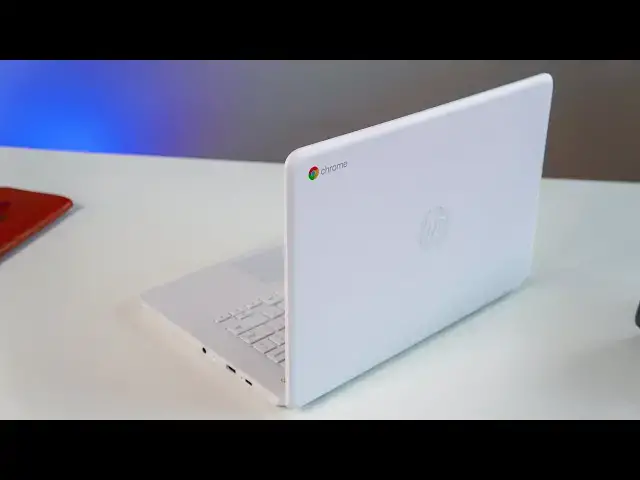
The new breed of AMD-powered Chromebooks are available and ready for your purchase, and the HP Chromebook 14 is one of them. This device does a lot of things really well, and for the $230 current asking price, it feels like it should be an easy recommend. There's something really holding this device back, and it may be a deal-breaker for many users.
Read more: https://chromeunboxed.com/
Join our newsletter: http://bit.ly/2WjCDm7
・・・・・・・
Subscribe to the channel: http://bit.ly/2xFuj6L
Shop Chromebooks: https://fave.co/2OuedYL
The Music We Use - http://bit.ly/31W6PYP
Become a member of Chrome Unboxed to help us make our channel even better, and for access to exclusive perks: http://bit.ly/CU-join
Follow us:
Show More Show Less View Video Transcript
0:00
Chromebooks and affordability those are
0:02
two words that have gone together for a
0:03
long time but in 2019 we started seeing
0:05
a lot more devices in the higher end of
0:08
the price spectrum but make no mistake
0:10
manufacturers are still interested in
0:12
making affordable Chromebooks in this
0:13
device the HP Chromebook 14 powered by
0:16
AMD processors is one of those devices
0:18
matter of fact it can be had right now
0:20
for two hundred and thirty dollars and
0:22
though we a lot of times keep the price
0:24
towards the end of the video price is
0:26
going to have an impact on a lot of the
0:28
things that I talk about with this
0:30
device because although it's pretty well
0:32
put together in a decent package overall
0:34
especially for that price there is one
0:36
part of it that makes it a really
0:38
difficult thing to actually say you
0:40
should go and buy so let's check it out
0:42
[Music]
0:49
but before we get into that this video
0:51
is brought to you by wordpress.com and
0:53
if you've been by chroma and voxcom
0:55
you've seen WordPress technology in
0:58
action it's what we've used since the
1:00
beginning of chrome unboxed and we will
1:02
continue using it because between all of
1:04
the templates thousands of templates and
1:07
thousands of plugins WordPress has the
1:09
ability to deliver what you need whether
1:11
it's a small blog or a large full scale
1:14
business website if you'd like to learn
1:16
more about how to get started and pick a
1:18
plan that's right for you head over to
1:19
Chrome on box.com forward slash
1:21
WordPress today so first up let's talk
1:24
about the build quality here not
1:26
surprisingly again with the price here
1:28
that's gonna dictate a lot of things and
1:30
this is plastic from head to toe
1:32
so there's no aluminum no real metal
1:35
going on here but that doesn't mean it
1:37
feels terrible or cheap even it's
1:39
actually pretty firm and well put
1:41
together it doesn't have a lot of flex
1:42
the hinge feels really good and the all
1:45
white chassis honestly probably hits me
1:47
in a nostalgic spot because my first
1:50
Chromebook review and the first
1:51
Chromebook I used like full time was the
1:53
HP Chromebook 14 that came out and years
1:55
and years ago and it was all white and I
1:58
really liked it and so maybe some of
2:00
this is nostalgia playing on me but in
2:02
general I'm just not really put off by
2:04
the design here kind of feels young and
2:05
fresh it's not something I would put in
2:07
the hands of like an enterprise employee
2:09
or something like that but in general it
2:11
looks great on the table it just has a
2:13
kind of striking aesthetic being all
2:15
white and the outer parts of it don't
2:18
seem to pick up any fingerprints and so
2:20
far haven't picked that much dirt either
2:21
and I would assume could be wiped off
2:23
pretty quickly and then the keyboard
2:24
deck has this kind of like brushed
2:26
translucent white looking ivory finish I
2:29
don't really know what to call it it's
2:30
plastic but it kind of looks nice and
2:32
just in general the the build quality of
2:35
this thing is not something that turns
2:36
me off at all and and though they've
2:38
obviously cut corners and used lots and
2:40
lots of plastic you don't get a lot of
2:42
nasty edges and stuff like that either
2:44
so you know all told I think HP did a
2:46
really good job again especially at this
2:48
budget so the build quality is pretty
2:50
decent here and that continues on with
2:52
the keyboard and trackpad not stand out
2:55
it's not the most amazing things you've
2:56
ever used but HP's kind of got a track
2:58
record now of putting good keyboards in
3:00
their devices every single HP device we
3:03
come across seems to have a great
3:04
keyboard and this is no exception that
3:06
travels good
3:07
click mechanism feels good I would like
3:09
there to be a little bit more click like
3:11
the travel is great but a little bit
3:12
more click we've kind of helped this
3:14
keyboard feel more like the x360 or
3:16
something like that but in general I had
3:18
no issue whatsoever banging out a few
3:20
articles on this thing it feels really
3:22
good to type on and equally said of the
3:24
trackpad the the surface stays nice and
3:27
smooth it's plastic but it's not trying
3:29
to be this nice smooth plastic that's
3:31
like imitating glass like some other
3:32
cheaper Chromebooks this one has some
3:35
sort of like texture on it and at first
3:36
I wasn't really sure about it but after
3:38
hours of use and it not really building
3:40
up any of the oils or at least maybe it
3:42
resists them or something and it stayed
3:44
nice and smooth over that time I kind of
3:46
became a believer it's a decent trackpad
3:48
and the only thing I really didn't love
3:49
about it the click mechanism is just a
3:51
little stiff and I would think over time
3:53
it would probably work itself in and who
3:55
knows with cheaper Chromebooks like this
3:57
you're gonna get a variance in the click
4:00
mechanism on these things so it may just
4:02
be the one that we gots a little bit
4:03
stiff but in general trackpad keyboard
4:06
very nicely done another place hp's done
4:08
really nicely on this device is the port
4:10
selection so you actually get a USB type
4:12
a on both sides and a USB type-c on both
4:15
sides and that seaport can be used for
4:17
charging or display out just like you
4:19
would expect there's a Kensington lock
4:21
headphone microphone slot and there's
4:23
actually a micro SD card slot where the
4:25
card sits completely flush in the casing
4:28
as well so you don't really have to
4:29
worry about if you want to keep one in
4:31
there like this model is a 32 gig will
4:33
talk about internals in a second but if
4:35
you want to keep an SD card loaded in
4:37
there at all times you wouldn't even
4:38
know it's there
4:39
the speakers on this one were kind of
4:41
surprising as well they're just like
4:43
every other HP device marked with a B&O
4:45
branding on them and that just hasn't
4:48
meant much it doesn't seem like you know
4:50
branded speakers on HP devices have kind
4:53
of been disappointing honestly for the
4:54
last few years but these speakers are
4:57
surprisingly loud they're a little bit
4:59
too heavy in the mid-range but in
5:01
general they're loud if you're listening
5:03
to stuff like spoken audio like what
5:05
you're hearing right now on this video
5:06
or podcast or something like that
5:09
they're gonna be really good because
5:10
high mids help with spoken stuff but
5:12
they actually sound pretty good with
5:13
music too you're gonna lose a little bit
5:15
on the high end but
5:16
loud and we put them up against a couple
5:17
other speakers the pixel book
5:19
specifically which the pixel book
5:21
doesn't have great speakers but we put
5:22
it up against it and it just blew the
5:24
pixel book out of the water from a
5:25
volume and a fullness standpoint so
5:27
again on a $230 Chromebook I was kind of
5:30
impressed with the speakers so what
5:32
about those internals the base model of
5:33
this device that we're testing comes
5:35
with 32 gigs of storage four gigs of RAM
5:38
and in the AMD a4 processor and that's
5:41
an important note because we're just now
5:43
starting to see AMD processors hit the
5:45
market there's a handful of
5:46
manufacturers that are making them and
5:48
that's what kind of sets this Chromebook
5:49
apart from other low-end model
5:52
Chromebooks the performance of the AMD
5:54
a4 we're getting about 13,000 on octane
5:57
so that's pretty decent especially
5:59
matched up with you know less pixels on
6:01
the screen it's a 1366 by 768 screen so
6:04
it actually got around pretty well and
6:06
didn't have too many issues now granted
6:09
if I open up a ton of stuff if I had 15
6:11
tabs open and multiple apps yeah I would
6:13
start to see a little bit of slowdown
6:15
but if you come into this thing with you
6:17
know your proper expectations and keep a
6:20
few tabs open and only have a few things
6:22
going one time you're gonna be able to
6:24
browse the internet and do basic
6:25
Chromebook type tasks pretty easily on
6:28
this device and that's encouraging
6:30
because AMD is coming down the road with
6:33
more like flagship level processors and
6:36
Chromebooks we we've seen that we know
6:38
those things are coming but this is what
6:40
we have right now this is kind of AMD's
6:41
toe in the water in the Chromebook space
6:43
and so it's encouraging to see that
6:45
their lowest and processor which is this
6:47
a4 processor we're seeing in this one
6:49
gets all along pretty well and it's not
6:51
one that we're having to look at and say
6:52
don't buy this one with this processor
6:55
and at least we know the worst thing
6:56
that AMD is gonna offer up in this a4 is
6:59
actually kind of usable in Chromebooks
7:00
another note on performance even though
7:02
this doesn't come as a surprise to many
7:04
people I mean it's a new chipset so
7:05
we've got to make sure and talk about it
7:07
is battery life in general every
7:10
Chromebook we review of late seems to
7:12
get that kind of eight to ten hour
7:13
battery life and this is no exception I
7:16
was kind of hoping that AMD and their
7:18
processors would provide some great
7:20
boost in
7:20
life but I'm just not seeing it but in
7:22
general I'm getting eight to ten hours
7:24
of mixed use across the board and that's
7:27
just what we've come to expect from
7:28
Chromebooks and so good on HP for at
7:30
least delivering that so up to this
7:31
point things are sounding pretty good
7:33
especially 230 bucks I mean we're
7:35
talking pretty decent performance and
7:37
good battery life and sure it's plastic
7:39
but it's not creaky and the build looks
7:41
good and it kind of has a cool you know
7:43
aesthetic to it in general and keyboard
7:44
and trackpad kind of pass muster so
7:47
what's not to like well unfortunately
7:50
the screen the screen is what's not to
7:53
like and I not only dislike the screen
7:56
it's the worst screen I've probably ever
7:58
used on any Chromebook and it's a little
8:00
shameful that it's in any device at this
8:03
point in time we're talking about 1366
8:05
by 768
8:06
tn panel you know so HD class that's not
8:11
the biggest problem here the problem is
8:13
the viewing angles and the colors and
8:15
the brightness so multiple problems so
8:18
the viewing angles are so bad that I
8:20
can't find a way to look at this screen
8:22
in any way if you just put a solid white
8:24
block on it there's no way for me to
8:25
find an angle where the whole screen
8:27
actually looks white it's always gonna
8:29
have some sort of blue or yellow shift
8:31
whether you're looking at it from up top
8:33
or from beneath there's no way to see it
8:35
all as a uniform color if there were
8:37
maybe this would be a forgivable thing
8:39
but I couldn't get the thing to lean
8:41
back I mean right now in order to get
8:43
the whole screen to look kind of similar
8:44
I've got to lean it back to about here
8:46
but then I'm losing some stuff at the
8:48
top of the screen and I look forward a
8:50
little bit more and I start losing stuff
8:51
at the bottom of the screen now I'm
8:52
talking about blown out colors just a
8:55
lack of any kind of punch or color depth
8:58
and just absolutely abysmal viewing
9:01
angles I mean this screen is really
9:03
really bad and it's so unfortunate
9:04
because everything else about this
9:06
device is so you know decently good for
9:09
the price but this screen is just not
9:12
forgivable in this case and HP offers a
9:14
way to upgrade this device you can get
9:16
it with all kinds of bells and whistles
9:18
but the problem is on HP site when you
9:20
do so the base price of it jumps up to
9:23
340 or $350 to start with and then you
9:26
start adding things on time you're
9:27
quickly to $400 before you know it and
9:29
at that price I have to tell you to go
9:31
buy something else and so it puts you in
9:34
between this rock in this hard place
9:35
because it's really difficult to
9:37
recommend anyone by device with a screen
9:40
this bad on it so after having said that
9:42
all kinds of good stuff but then one
9:44
really bad thing what's the answer here
9:46
do you buy this for a lot of people I
9:49
have to recommend that you don't for
9:52
some people though I think there are a
9:53
handful of cases where this could be a
9:55
usable Chromebook and especially at a
9:57
$230 asking price there are some general
10:00
use cases it would work so some of those
10:02
would include if you have younger kids
10:04
around the house and you want a device
10:06
that if they beat it up and you're not
10:07
gonna worry about it too much you're not
10:09
gonna have to invest too much and having
10:10
something that can do ABC Mouse or you
10:13
know Disney Junior or something like
10:14
that yeah this will work for that I mean
10:16
honestly kids aren't gonna look at it
10:17
and be like oh these viewing angles are
10:19
terrible I can't stand this screen like
10:21
they're not gonna get that worried about
10:22
it
10:23
I have kids they don't worry about that
10:24
stuff but if you're talking about a
10:26
teenager somebody using it for school I
10:28
don't know that I would put anybody in
10:30
front of this device for six or eight
10:32
hours at a time if you're gonna try to
10:34
use it for work you almost have to
10:36
upgrade the screen and then we run back
10:38
into that problem that if you do that
10:40
you got to go to HP's site to do it if
10:42
you upgrade it you're gonna easily get
10:44
into $400 territory really quick and I
10:46
just can't recommend this device at $400
10:48
so where does that leave us
10:50
that leaves us I think with a subset of
10:52
people that that might find this as a
10:54
good deal but it's really difficult for
10:56
me to recommend so if any of those use
10:59
cases sound good to you or you're one of
11:01
the people that says you know what I
11:02
don't care about screens I really don't
11:04
or I'm gonna hook it in to an external
11:05
monitor or something great it is a good
11:08
deal for those people I just don't think
11:10
that's the general consensus of people
11:13
you know across the board of people who
11:14
are looking to buy a Chromebook so for
11:17
right now I have to say until HP
11:19
delivers at least a better version of
11:21
the screen on this device I just don't
11:24
know that I can recommend it to too many
11:25
of you but guys if this video has helped
11:27
you make a purchasing decision in any
11:29
way give it a thumbs up hit the
11:31
subscribe button down below and don't
11:32
forget to hit the notification bell next
11:34
to that if you'd like to be updated when
11:36
we release new videos just like this one
11:38
until next time we'll see it
11:40
[Music]
#Consumer Electronics