Up next in 10



Check out the new site for all kinds of Chrome OS goodness: http://chromeunboxed.com
Here are the other reviews you might like:
HP Chromebook 11 - http://youtu.be/QmQA9XO04Aw
HP Chromebook 11 vs. HP Chromebook 14 - http://youtu.be/IHNOTPpge6k
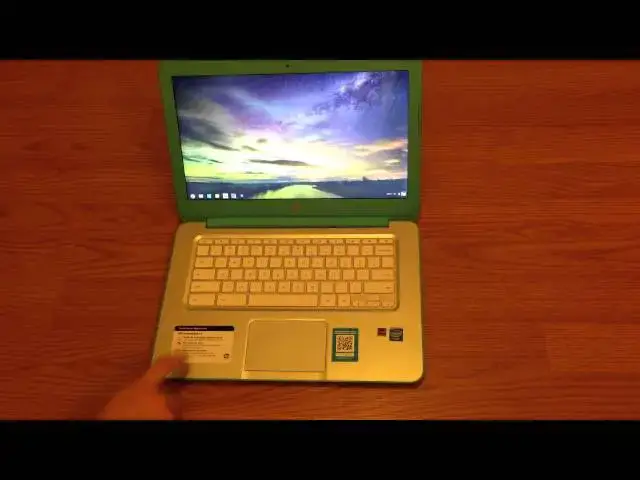
In this video I review the HP Chromebook 14, exploring the hardware both internal and external and showing why I think this is the Chromebook to beat right now!
Show More Show Less View Video Transcript
0:00
hey guys it's Robbie Payne again uh here
0:02
to do a full review of the HP Chromebook
0:06
14 uh for those of you who did watch the
0:10
unboxing uh kind of get kind of gave a a
0:13
quick overview of specs processor ports
0:16
and all that kind of stuff we'll do that
0:17
again here really quickly uh and go
0:19
through those things in case you missed
0:21
that video um and I gave a few of my
0:24
initial impressions and so this is after
0:26
using the device for a few days um and
0:30
actually using it for work purposes um
0:32
so really kind of putting it through its
0:34
paces this device I've actually
0:36
installed
0:37
um Linux on it uh so we can switch over
0:41
environments pretty quickly um so right
0:44
there is a Unity desktop Ubuntu um and
0:48
so for a couple of the things that I
0:50
need on a Chromebook that's a necessary
0:53
evil for me i need a good uh SVG editor
0:56
for instance so Inkscape works on there
0:58
and then I need a good FTP client so
0:59
FileZilla those two are really the only
1:02
thing I switch over into Linux for so
1:03
I'm hoping eventually as Chrome OS picks
1:05
up steam I would say Inkscape will
1:07
probably make a build for Chrome OS and
1:10
FileZilla will as well at that point
1:12
really um for the most part I'll be able
1:15
to almost cut ties with a PC completely
1:18
uh which would be exciting um and I can
1:21
on this as well i hate to have to rely
1:23
on another operating system on here i
1:25
really kind of am rooting for Chrome OS
1:28
in that specific way of saying "Hey this
1:29
is a one-stop shop." You can if you work
1:32
hard enough you can replace everything
1:34
you do on a traditional PC uh that's
1:36
just kind of my thing with these but
1:39
anyway we're going to talk kind of
1:40
through the exterior parts first and
1:42
then we'll talk about the hardware and
1:43
the interior parts uh and you'll see
1:45
kind of that same that same thing with
1:47
the HP Chromebook 11 uh that video I'll
1:50
pop a link up on it as well here as I'm
1:53
talking you should see that pop up and
1:55
you can jump over and check that guy out
1:56
as well
1:58
um overall um the impressions I had when
2:02
I opened the box and and and just got a
2:05
hold of the device the first time a lot
2:06
of that stuff has held up um the the the
2:10
machine has has done really really well
2:12
and so we'll just kind of start from the
2:14
top down here um you've got the uh the
2:16
soft touch um exterior parts and so this
2:21
one is the uh the ocean turquoise I
2:24
believe is it's dubbed and you have
2:26
coral peach and snow white uh my hope
2:29
was to be able to return this within 14
2:31
days uh to Walmart or 15 days that they
2:35
give you my hope was to be able to
2:36
return it uh and turn around and buy the
2:39
white one when they got it in stock uh
2:41
the more I look the more out of stock it
2:43
seems Walmart is and so these guys are
2:44
kind of going quickly um so I'm keeping
2:47
my fingers crossed that HP is going to
2:49
get some more stock especially to
2:51
walmart.com because I was just going to
2:52
bite the bullet and go and take this
2:54
back and order the order the white one
2:57
um we'll see um those planes may be
3:00
completely ruined at this point um and I
3:03
will say that the color of this guy is
3:04
kind of growing on me a little bit um
3:06
it's not very green at all even if you
3:07
get it out in sunlight it's got a slight
3:09
green hue to it uh some people have
3:12
commented that they feel it's a little
3:13
feminine i I probably do feel that way a
3:15
little bit um but I'm kind of getting
3:18
over it um so yeah everybody each for
3:21
each his own um I know some people have
3:23
commented on the white one and said they
3:25
just love the way it looks in person um
3:27
and I feel like I would probably be in
3:28
that boat so if I can get my hands on a
3:30
white one I'm going to try to uh if you
3:33
happen to have a white one and you can't
3:34
find a blue one and you'd like to trade
3:36
maybe we can work something out uh
3:38
contact me on here uh maybe we can make
3:40
something happen anyway um the design is
3:43
is great it is heavy uh at 4 lbs uh it
3:47
it it really definitely feels like a
3:49
laptop it's not u the type of device
3:53
that I reach for when I'm sitting on the
3:55
couch um I'm going to go for my tablet
3:57
for that the the Chromebook 11 kind of
3:59
has more of a tablety type feel it's
4:01
light easy you know it just feels like
4:03
something you pick up and flip open uh
4:05
this one just feels a little bit more
4:08
substantial um for what I'm using a
4:10
Chromebook for uh for a lot of work type
4:12
things that it's honestly better because
4:14
when I'm sitting at a table in a coffee
4:15
shop somewhere um having that 14-inch
4:18
display having a full-size keyboard with
4:21
you know uh uh plenty of space around
4:23
for my palms to rest all that kind of
4:25
stuff it it does make for a better work
4:27
experience and so I'm not attempting to
4:29
make it something it's not uh but if if
4:31
this is just going to be the tote around
4:33
the living room thing for you uh you
4:35
know maybe it' be worth waiting on the
4:36
Acer uh C720 which is going to be uh
4:40
basically same internals as this guy but
4:41
in a smaller lighter form factor um it's
4:44
yet to be seen i' I've reached out to
4:46
Acer to see if there's any possibility
4:48
of me getting a review unit because
4:50
there is nothing online about that
4:51
device um and there's a lot of people
4:54
that want to see some hands-on stuff
4:55
with it so I'm trying to get that um the
4:59
more you guys watch these videos uh the
5:01
more chance that Acer will get that to
5:02
me um but we'll see uh anyway we're
5:06
going to take a walk around the ports
5:08
real quick for those of you who didn't
5:09
see the first video um you've got some
5:12
uh USB ports 3.0 over here on the side
5:15
you got the combo headphone microphone
5:17
jack you got Kensington lock you've got
5:20
speaker ports down here which uh talked
5:23
about in the HP11 this is kind of a neat
5:25
thing with it having the speakers coming
5:26
up out of the keyboard which is pretty
5:28
awesome uh but these are loud speakers
5:31
uh we'll hear it in a sidebyside thing
5:33
later but they put out volume um there's
5:35
no pretty much no difference in it in
5:37
the HP 11 as far as volume goes uh so
5:41
they do the job there's no problem with
5:42
that you got your uh uh vents here for
5:45
the fans and I've had a few questions on
5:47
Google+ as well uh asking if you can
5:49
hear the fans and you can if you get
5:51
your ear right up next to the machine in
5:53
normal use I've yet to hear them uh the
5:56
other night I was working on it it was
5:57
completely silent in the house and I
5:59
heard the faintest were and I got down
6:02
close and heard that it was definitely
6:04
the fans so u in normal use case no
6:07
you're never going to hear the fans and
6:08
it's finished with that same kind of
6:10
soft touch uh there's actually a texture
6:12
to it down here on the bottom on the
6:14
bottom piece um trying to think what
6:16
that would be called u it's a slight
6:18
dimply kind of feel um you know screws
6:21
bumpers all that kind of stuff on the
6:22
other side over here we've got the full
6:24
size SD card slot power uh I had another
6:27
question about that the the power jack
6:29
looks very similar to other HPs I've
6:31
owned i don't think it's anything unique
6:33
uh so you got a brick that basically
6:35
lays on the floor an extension that goes
6:37
to the wall from there and then an
6:38
extension that goes to the computer
6:39
itself uh but it's pretty uh normal size
6:42
you got your SIM card slot another
6:44
question I was asked online you know did
6:46
I have to fill out any paperwork for
6:47
T-Mobile or anything like that no uh
6:49
there was nothing to do i bought it
6:51
walked out the door uh the first time
6:53
you get away from Wi-Fi open it up it
6:55
attempts to connect to T-Mobile you open
6:56
a browser window attempt to navigate
6:58
somewhere and it will prompt you to
7:01
activate the T-Mobile uh broadband i
7:04
used it um actually almost a whole
7:06
working day the other day cuz I figured
7:08
hey what the heck you know I use uh
7:10
hotspot on my phone all the time so if I
7:12
use this all up today it's not a big
7:14
deal worked from it had HSPA plus didn't
7:17
have LTE uh they're in the process of
7:19
rolling that out here uh and it hummed
7:23
right along i did some speed tests and
7:24
it was getting 13 14 megs down so it was
7:27
obviously plenty workable and made a
7:29
joke out of Panera Bread's Wi-Fi so um I
7:33
was up and running when some of my
7:34
colleagues that were working next to me
7:36
uh the Panera Bread Wi-Fi cracked out on
7:38
them and so um it was definitely very
7:41
useful at that point in time had I not
7:43
had a hot spot again uh I think this one
7:45
over here is just a USB 2.0 and as
7:48
you've heard me talk about in other uh
7:50
videos I don't get too bent out of shape
7:52
about USB uh 3.0 2.0 cuz with a
7:56
Chromebook I'm not transferring a bunch
7:58
of movies and stuff to it um so it
8:01
doesn't seem like it's that huge of a
8:02
deal so we'll open it up you notice I
8:05
had to hold down over here um that's
8:07
something I wish that the laptop makers
8:09
could figure out especially one as
8:11
substantially heavy as this one you've
8:13
got a pretty heavy base it seems like
8:15
they could make it to where I could just
8:16
lift the lid up um I know that's
8:18
probably a small thing and it probably
8:19
doesn't matter that much um but it's
8:21
it's a uh it's a neat feature whenever a
8:23
laptop can open that way it just I don't
8:25
know it it portrays a particular quality
8:27
about the build uh that you don't see in
8:30
a lot of Windows 8 laptops especially
8:33
there's only one I can actually think of
8:34
off the top of my head that would do
8:36
that
8:38
um so you can tell uh pretty quickly
8:41
we'll just kind of start moving down the
8:42
the the camera u is a HD uh camera it
8:46
does do a better job than the uh u 480p
8:52
um uh camera on the HP11 this one is
8:56
720p it's a It does look a little better
8:58
does a little better in in darker
9:00
situations uh and then you have a dual
9:03
array uh uh microphone too so uh video
9:06
chatting should be no problem there uh
9:09
moving on to the screen uh the screen is
9:12
you know it's a TN panel um that's
9:16
that's pretty much all you can say about
9:17
it um I know a lot of people are
9:20
concerned about pixelization um on the
9:22
14-inch display with a 13 uh 66 x 768
9:26
resolution um the truth is if you get up
9:29
close yeah I mean it's it's pixely um it
9:32
just is just the way it is but when
9:34
you're normally viewing a screen this
9:36
size you're not right up on it uh you're
9:38
usually back away from it like where I'm
9:39
sitting right now I don't obviously
9:41
don't see pixelization and it looks
9:42
pretty good the left and right viewing
9:45
angles on it
9:48
um left and right viewing angles on it
9:51
uh aren't amazing but they're not bad um
9:54
up and down though you get some
9:56
polarization pretty
9:57
quickly um but like I said it's a TN
10:00
panel that's just kind of comes with the
10:02
territory it gets the job done and it's
10:04
fine as long as you're not viewing it
10:05
next to an IPS panel and if if you're
10:07
doing work that requires uh really
10:10
accurate color reproduction this is
10:12
probably not the device for you uh for
10:14
me if I need a reference panel I've got
10:16
a Nexus 7 it's got a very accurate uh uh
10:19
IPS display on it so th those types of
10:22
things help um so if if if screen is
10:25
what it's all about for you again
10:27
Chromebooks may not even be what you
10:28
need to be using u because you're
10:29
probably into photography or video so
10:32
take that with a grain of salt think
10:34
about that um again on this on the
10:36
inside here we've got matte finish
10:38
around here which is nice cuz you handle
10:39
this area all the time so it's not
10:41
picking up any fingerprints pretty much
10:43
this thing doesn't pick up fingerprints
10:44
anywhere uh this is all matte finish uh
10:46
you get a little bit of fingerprints
10:48
here but not much at all i haven't
10:49
really had to wipe much of anything off
10:51
this guy yet and have not removed my
10:53
stickers yet cuz I'm not sure if I'm
10:54
going to be able to return it yet or not
10:56
i have heard that Intel stickers are
10:58
specifically uh hairy to get off um a
11:02
lot of alcohol and gooby gone and all
11:04
that kind of stuff so unfortunately I'm
11:06
not a fan of all the stickers i
11:08
understand uh it's just the way it is uh
11:11
moving on the keyboard spacious great
11:14
travel great keyboard quiet works well
11:18
uh I can type super fast on it um this
11:21
seems to be a trend in Chromebooks now
11:23
um there haven't been a hasn't been a
11:25
Chromebook out with a poor keyboard on
11:26
it in a while um I had the Acer C710 and
11:30
the particular one I had uh the the
11:32
keyboard was a little mushy um and I
11:35
wasn't a big fan of it but uh every
11:37
other keyboard I've tried even some of
11:38
the older ones they've always had great
11:40
keyboards trackpads though another story
11:42
a lot of a lot of uh Chromebooks I've
11:44
tried the trackpads have been really
11:46
flaky u as far as picking up this is uh
11:50
hands down best trackpad I've had on a
11:51
Chromebook um no comparison really
11:54
smooth uh really responsive you'll hear
11:57
the click very
11:58
quiet so it's not clacking a bunch like
12:01
the Samsung one does um keyboard is also
12:05
pretty quiet so you're not making a lot
12:07
of noise if you work out in coffee shops
12:08
or in public areas a lot um you're not
12:11
making a lot of noise for the people
12:12
around you and like I said a lot of room
12:14
here to rest your hands it's not as
12:16
smooth on the edges uh for your wrists
12:19
uh specifically as the uh Chromebook 11
12:22
is but um very serviceable nice wide
12:25
area for your hands to sit as you're
12:27
typing and stuff so it's a great
12:29
workstation a great uh a great thing to
12:31
sit in front of and work on um so
12:35
hardware-wise really good really really
12:37
good matter of fact everything on it is
12:39
fantastic uh apart from the display the
12:42
display is um mediocre um it gets by um
12:47
and I've used it and the HP11 outside
12:50
and they both they both do okay outdoors
12:52
uh passable you can work on it um but
12:57
it's
12:58
um it's not the best thing in the world
13:01
uh battery life on this guy pretty much
13:03
as uh as demon or as advertised um the
13:07
Haswell uh processor is doing its work
13:10
um it uh I put it through its paces the
13:13
other day and it was still running that
13:14
HSPA plus pretty much most of the day
13:17
and was on track i didn't work that that
13:19
full amount with the with the laptop
13:21
open but uh was easily on track to be
13:23
able to pull eight hours um of activity
13:27
out of it and so that's not standby
13:28
that's eight hours of be actually
13:30
working on it um so really impressed
13:32
with the battery don't have to worry
13:34
about cranking the screen brightness up
13:35
and stuff you just do whatever you want
13:37
to do on it and it just uh hums right
13:39
along now um I'm going to show a couple
13:42
games here just to show you some of the
13:44
processing power of this guy so cut the
13:46
rope uh we're going to open up let you
13:49
hear the
13:51
speakers so it's plenty
13:57
loud and we see no real performance
14:01
issues with this guy
14:08
not a fan of cut the rope with a mouse
14:09
it just doesn't even make sense to me
14:11
but runs nice and smooth no problem and
14:14
you saw if you watch the Chromebook 11
14:16
review that um it it gave me a an error
14:19
message saying it couldn't even run that
14:20
that game very well um another one I'm
14:23
going to run for you just kind of let
14:24
you watch it for a second is a game that
14:26
somebody turned me on to and Google+
14:28
called Murder Files now this won't run
14:30
on an ARM uh an ARM processor
14:33
unfortunately uh it just gives you it
14:35
gets to this point gives you an error
14:36
message up here and it won't work um so
14:39
we're going to put this guy in full
14:40
screen and let it get it takes a minute
14:42
to load up and you will see why here in
14:44
just a
14:46
second so hopefully you can kind of see
14:49
this uh
14:51
um it's actually just going to pan
14:53
around here for a second this is just
14:55
the opening sequence thing it does uh
14:57
but the whole game looks like this you
14:58
know this is actually being rendered
15:00
this isn't a video um so you have a
15:03
really nice 3D environment all rendering
15:06
all running on a Chromebook looks great
15:08
frame rate high i mean this thing's got
15:10
to be running it looks like 60 frames
15:12
per second to me
15:14
um no drag no lag no no drop in frames
15:18
it just looks great and this is a fun
15:21
game it seems like to boot um it should
15:24
be like up featured on the Play Store
15:26
it's a really interesting uh interesting
15:28
take on a murder mystery kind of game
15:30
multiple levels multiple scenarios all
15:32
that kind of stuff uh and it's fun uh
15:34
really interesting game
15:36
um and you can see just runs with no
15:40
problem whatsoever on here and so I
15:42
would assume that's probably as hefty as
15:44
a game is going to get on a Chromebook
15:45
natively uh without running like Unity
15:48
Web Player or something which I hope uh
15:50
eventually they make for Chrome OS would
15:52
be awesome so you could play
15:54
first-person shooters in Facebook and
15:56
stuff like that can't do that just yet
15:59
um and so you can kind of see it it
16:02
really doesn't struggle at anything that
16:04
Chrome can throw at it
16:07
um I'm going to open up a YouTube
16:11
window we'll throw a Google+ oops we'll
16:14
throw Plus in there
16:16
too because that struggles and if
16:19
anybody's ever on an ARM Chromebook
16:21
attempted to open up Twitter you will
16:23
know uh how horrible it is and so I'm
16:27
going to duplicate this YouTube tab a
16:29
couple
16:30
times
16:33
and again I'm going to run a video that
16:36
I that is mine so that
16:40
uh I don't get in any
16:46
trouble so why don't we duplicate that
16:48
one instead
16:50
duplicate
16:53
duplicate
16:55
duplicate
16:57
i'm gonna turn this down it's probably
16:58
going to get
16:59
weird um but you can see and for those
17:03
of you who don't know three fingers you
17:04
can swipe between tabs so we've got this
17:07
guy running in four windows we've got
17:09
Twitter which runs terribly on
17:11
Chromebooks for in general running nice
17:13
and smooth we got Google+ which runs
17:16
generally terrible on Chromebooks
17:18
running nice and smooth and so you got
17:20
that and four simultaneous videos going
17:23
that are running in full 720 um able to
17:28
oops move those
17:32
around minimize the window and you're
17:35
not even seeing frame rate drops there's
17:37
a little frame rate there just a
17:39
bit um but as you can tell the thing
17:42
cooks along it does really really well
17:45
um and so I've been really pleased
17:48
software-wise
17:49
um
17:50
performance-wise um the only thing I can
17:53
I can knock on this is the screen and
17:55
then the color options i I do wish HP
17:57
would have put out as there's a lot of
17:59
people that feel that the blue is a bit
18:00
feminine i wish they would have put out
18:02
you know the the green blue kind of deal
18:05
uh the coral peach and then maybe a
18:07
black and a white or dark gray and a
18:09
white or something like that i know
18:10
those are boring colors and I get that
18:12
um but there's a lot of people that
18:15
don't like a lot of flashy color in a in
18:17
a laptop too so I I think it would have
18:20
been nice to have an option um so I I I
18:24
wish white wasn't the only uh neutral
18:26
color to get a hold of i think they're
18:28
going to have probably stock issues with
18:29
that at first if this Chromebook becomes
18:31
as popular as I expect it to but overall
18:35
I must say hardware great battery life
18:38
great keyboard trackpad awesome camera
18:42
very passable uh performance great uh no
18:46
issues whatsoever
18:48
um connectivity great haven't had any
18:51
Wi-Fi issues no drops i'm just it's just
18:54
been a great experience with this device
18:56
out of the box working with it uh
18:59
full-time has been great um I will say
19:01
if you're one of those that's going to
19:03
put Linux on it uh keep in mind there's
19:05
a couple tweaks you will have to do you
19:07
can reach out to me um on Google+ and
19:10
I'd be more than happy to point you to
19:11
where I found the fixes but the trackpad
19:14
is a little wonky and and doesn't matter
19:16
what interface Unity or XFCE
19:19
um either one of those the trackpad was
19:21
a little weird um it it only worked if
19:23
you put your finger down on it like this
19:25
like the tips of your finger wouldn't
19:26
work it only worked flat uh but there
19:28
are fixes it works uh it's fine the
19:30
mouse was disappearing which is kind of
19:32
weird and so
19:34
anyway it's a great device highly
19:37
recommended um so far of the Chromebooks
19:40
I've messed with and that's pretty much
19:41
all of them it's the best experience i
19:44
haven't touched a Pixel i wish I wish
19:46
that I had um but I don't know where to
19:48
go to mess with one and I don't have
19:51
$1,400 to to to buy one so I wish that I
19:54
had a Pixel um to to compare it to but I
19:59
don't um for me this is absolutely
20:02
without without doubt the best
20:04
Chromebook experience I've had very
20:06
pleased with it very happy with it and
20:09
cannot wait to see uh where Chrome OS is
20:12
going to go in the next year um because
20:14
this slew this this particular
20:16
generation I think is going to be
20:17
monumental in kind of shifting awareness
20:19
of Chrome OS and and I think just we're
20:21
just going to see more and more hardware
20:23
that just uh takes better design cues
20:25
and pushes hardware in internally a
20:28
little bit better but really for what
20:31
it's doing what's in here is plenty so
20:34
now they can really start focusing on
20:35
just kind of the external stuff like the
20:37
HP Chromebook 11 has if we could really
20:40
mush these two guys together and crank
20:42
out like a 12 inch Chromebook with all
20:45
the awesomeness of both of them that
20:47
would be the device to have in my mind
20:50
but for now right now this guy gets my
20:52
vote for uh absolute best Chromebook
20:55
experience uh your money can buy you
20:57
right now so that's it guys uh thanks
20:59
for watching uh feel free to check out
21:02
some of the other videos and I will have
21:03
a um a sideby-side comparison video uh
21:07
upcoming between this and the HP
21:09
Chromebook 11 so stay tuned uh again
21:12
thanks for watching see you later
#Internet Software
#Operating Systems