Up next in 10



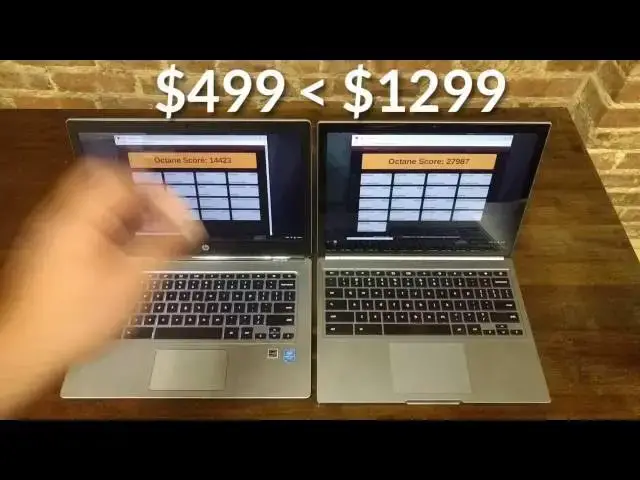
In this video we pit the new HP Chromebook 13 G1 (both the Pentium and Core m5 versions) against the 2015 Chromebook Pixel LS. We talk screens, keyboards, trackpads and everything else.
Check out the video and see more at chromeunboxed.com.
Show More Show Less View Video Transcript
0:01
hey folks Robbie Payne with chrome unbox
0:03
coming at you today with a side by-side
0:05
comparison the 2015 Chromebook Pixel LS
0:08
and the HP Chromebook 13 G1 in two
0:11
variants the M5 and the Pentium so we're
0:15
going to put these machines side by side
0:17
run them through some tests see how they
0:19
do and see which one gives you the most
0:21
bang for your
0:27
buck all right guys so let's take a look
0:29
at the these devices side by side over
0:32
here on the left we have obviously with
0:33
the logo there we have the HP Chromebook
0:35
13 G1 over here we have the Chromebook
0:38
Pixel LS uh additionally we have the M5
0:43
version of the G1 but for the most part
0:47
uh we can talk through with the pennium
0:49
version I'll explain that why here in
0:50
just a few minutes but ultimately uh the
0:53
outside body pieces all the exact same
0:56
the only difference is you got a faster
0:57
processor in the M5 and you also get the
0:59
addition of four more gigs of RAM so up
1:01
to 8 gigs of RAM so let's talk through
1:03
these two devices um ultimately the uh
1:07
the webcam on both of them um pretty
1:10
much the same uh 720p webcam that
1:14
they're not amazing they're not um um
1:18
terrible they're just what they are uh
1:20
hopefully soon we'll start seeing maybe
1:22
some 1080p with some HDR function stuff
1:25
like that for better Hangouts and chats
1:27
but for right now um all the webcams are
1:30
pretty standard and they fair just fine
1:32
um moving down the front uh we have the
1:34
screen and that's that's a big big deal
1:37
because ultimately until now the pixel's
1:39
kind of been in a league of its own when
1:41
it comes to a screen yeah there have
1:42
been some good screens the Toshiba
1:43
Chromebook 2 and Dell Chromebook 13 come
1:45
to mind at
1:47
1080p um IPS displays so that's a lot
1:50
better than the old TN panels we we saw
1:53
on older Chromebooks however um one of
1:55
the unique things about the Chromebook
1:57
pixels is a high DPI display so what
1:59
what what we get here is essentially a
2:01
Quad HD display so we have 2560 by 1700
2:06
so you divide both of those by two what
2:07
do you get you get 1280 by 850 so
2:11
basically rendering things at a 720p
2:14
kind of clip um and and so you'll see
2:17
items and stuff let me make sure we are
2:18
at that so there's the native resolution
2:21
of this guy um and so you'll see objects
2:24
are pretty large uh text renders pretty
2:27
large on the screen which is kind of
2:28
neat um and you get this kind of taller
2:31
display but everything renders as if
2:33
it's 1280 by 850 so um so everything's
2:37
nice and large on the screen it's easy
2:38
to see from a distance almost a little
2:41
bit too much so so a lot of times I'll
2:42
back it out to the 1440 I can't remember
2:45
what it does here uh 1440 by 950 I think
2:50
is what that says um and so that works a
2:53
lot better for me unless it's real far
2:55
away then I go back um the HP I
2:58
technically kind of prefer it's pixel
2:59
Lake lay out so it's 3200 by 18800 uh
3:03
which divided by 2 is, 1600 by 900 so
3:05
you're still getting a 16x9 not the 3x2
3:08
um and honestly before that bothered me
3:11
a bit on 13-in displays but if you do
3:14
the math again you're getting 1,600 by
3:16
900 pixel uh rendering and so um as I
3:19
said in the review and as I'll continue
3:21
to say 1,600 by 900 is about the right
3:23
size for a 13.3 in uh just like I think
3:26
1080P or 4K if you double that both ways
3:30
uh feels good on a 15.6 and up uh but
3:33
beneath that all your elements start to
3:35
get a little bit small and so I think HP
3:37
really absolutely killed it with this
3:39
resolution um it it it to me is one of
3:42
the things that makes this such a
3:43
pleasure and a joy to work on especially
3:45
over the last few days as I've used this
3:47
as my work machine and remember this one
3:49
is the pennium version so it's a $4.99
3:51
price tag we'll come back around to that
3:54
now around the screen uh we do have a
3:56
plastic edging on this one versus glass
3:58
from corner to corner on here this that
4:00
gives the pixel a little bit more of a
4:01
premium feel plus you get touchcreen on
4:04
the pixel so um that is important if I
4:08
can touch anything um for Android apps
4:11
especially in their Inception as as
4:13
they're early and we're waiting for
4:14
developers to really get keyboard and
4:16
trackpad support uh fully utilized in uh
4:19
Android apps as they're coming to Chrome
4:21
OS so um the win probably overall in
4:25
screen probably goes to the pixel but as
4:27
far as viewing quality and color
4:30
and viewing angles will bend both of
4:32
these forward uh as you can see I don't
4:35
have the brightness cranked up cuz it
4:36
blows out on the camera um so you're
4:38
getting some glare the glare really
4:39
isn't that bad these things are just
4:41
really dim right now um you get great
4:44
viewing angles forward and backward and
4:47
side to side on both of these um you can
4:49
see that stuff in the review but the the
4:51
color accuracy see if I can come up a
4:53
couple notches without blowing the
4:54
camera completely out and it's starting
4:57
to blow out already so it's starting to
4:59
look as as if yeah see it's not that
5:02
blown out in real life so I'm going to
5:03
come back down at least a couple notches
5:06
um so you can still see some colors um
5:09
the pixel uh when you come at any angle
5:12
looks perfect it never changes this one
5:14
as we said in the review from from off
5:16
angles uh you get a little bit of washed
5:18
out color so if I bend it forward we'll
5:20
go back actually and kind of come off
5:23
angle here see it's it's uh going a
5:25
little bit white um day-to-day use
5:28
you'll never notice that it's not a
5:30
bother um but it does show that the
5:32
pixel has a little bit better of a
5:33
display but overall in use I found the
5:37
the HP Chromebook 13 to have just a
5:39
wonderful display and and I love the the
5:41
pixel density and the way it's laid out
5:44
uh both of these guys are crazy sharp
5:45
let me see if I can get
5:50
focused you can see no real pixels
5:53
available to be seen um and we'll bring
5:56
the pixel up as well obviously same
5:59
thing
6:06
there tough to focus in that close but I
6:10
can tell you both of them have about the
6:12
same pixel density and you can't see
6:14
pixels on either one of them and so um
6:17
beautiful screens well done for both of
6:19
these guys um talking about the keyboard
6:23
uh the keyboard is spaced well on both
6:26
of them the keys feel great travel feels
6:27
great on both of them not much I can
6:29
show you in the way of that um I can
6:31
show you the brightness of the backlight
6:34
and they both have six-stage
6:36
backlighting the HP does get brighter
6:38
you can probably see that right now tilt
6:40
it back a little bit you kind of see how
6:41
much that comes through same thing
6:45
here so the HP does get a little bit
6:47
brighter I don't know that that's really
6:48
a win in any way shape or form CU you
6:50
don't really want your back lighting to
6:52
be bright uh at night you just want it
6:54
to show your keys so um that's kind of a
6:57
a draw there as well um
7:00
the the the base body here uh different
7:03
types of aluminum but both aluminum um
7:05
so um they both feel great the hp13 is
7:09
quite a bit thinner um so we'll talk
7:12
kind of around the bodies for just a
7:14
minute and you can see as I bring this
7:16
thing in just how crazy thin it is uh
7:19
we'll close it up here and you see your
7:21
ports USB 3.0 two USB C's and a combo
7:25
Jack that gorgeous
7:28
Chrome uh
7:30
hinge here on the side micro SD card
7:33
slot nothing across the front and just
7:36
that nice aluminum um shiny aluminum
7:39
logo and nice flat matte colored Chrome
7:43
logo on the top
7:45
here pixels doesn't strike such a narrow
7:49
uh profile but it's still really good I
7:51
mean it's not thick in any way shape or
7:53
form sometimes on camera this one tends
7:54
to look thick I think cuz it's so boxy
7:57
uh but it doesn't feel super duper thick
7:59
in the hands at all but we have a
8:01
completely Square build right
8:02
everything's squared off um which gives
8:04
it a completely unique look as well so
8:07
we have the combo headphone microphone
8:09
slot we have uh two USB 3s us um USB
8:14
type-c on one side kind of the similar
8:17
hinge I've said this before um it's just
8:20
uh the same kind of aluminum feel as the
8:22
rest so it's not shiny so it doesn't
8:24
stick out as much but that HP hinge is
8:26
definitely pixel inspired which is a
8:28
good thing full full size SD card slot
8:30
another USB on the other side I will
8:32
give the win on ports uh for the most
8:35
part this is going to be a tie 2 we're
8:36
going to talk about a couple things here
8:38
um
8:40
the the layout of the ports I feel like
8:43
is way better on the pixel
8:45
um and so uh the reason being the the
8:49
USBC is on both sides let me sign in
8:51
while I'm talking USBS on both sides
8:54
help whenever you're plugging in
8:55
monitors and all that kind of stuff um
8:58
with the HP you have all of your stuff
9:00
on one side which tends to feel uh a
9:03
little bit crowded uh from time to time
9:06
if you're plugging in USB peripherals
9:08
power display all that kind of stuff so
9:11
uh the layout's better however the SD
9:13
card uh speed between the two and I'm
9:16
not going to take up your time showing
9:17
you this I did some speed tests um the
9:20
the SD card slot on the pixel is
9:22
actually run through um a USB 2.0 bus
9:26
and so it can only achieve 2.0 speeds so
9:28
basically done some testing and gotten
9:30
about 15 Megs uh both ways read and
9:33
write um which is not fast so if you're
9:36
trying to run stuff off of it uh movies
9:38
and all that kind of stuff it's going to
9:39
struggle with some uh higher resolution
9:41
movies um this device actually got about
9:43
40 close I think it's 38 uh megabit per
9:47
second right speeds now granted my SD
9:49
card um it's a Micro SD it's a class 10
9:51
that's about as good as you can get in a
9:52
micro right now um so the port may
9:55
actually be able to go faster if the SD
9:56
card was faster possibly uh but the
9:59
speeds are about the same about 15 Megs
10:01
per second now uh the win you get on
10:03
both of these with a converter or just
10:05
using USBC our USBC or using the USB 3.0
10:09
I have a um a dongle basically it's it's
10:13
as small as the the Logitech uh keyboard
10:16
dongle that would plug in that's 128 gig
10:18
Drive um and it runs as far as right
10:21
speeds on both of these because it's
10:23
going over USB 3.0 um anywhere between
10:26
140 and 180 megabits per second read uh
10:29
right speeds we're pushing around 30 or
10:31
40 so to me that's a better option
10:33
anyway um so SD card slots may be on
10:36
their way out I don't know uh local
10:38
storage is and and some weird flux so um
10:42
who knows but just just so you know the
10:45
port layout on the pixel's better um but
10:49
the ports aren't all better so that SD
10:52
card slot is is definitely a a a kind of
10:55
a bummer when it comes to the the pixel
10:57
if you use SD Storage so if you're
10:58
moving stuff from your camera over to it
11:01
that's that's going to be a decent size
11:03
hang up so moving on down the devices we
11:06
also uh both have you know decent Siz
11:08
trackpads here uh the pixel obviously
11:10
has a much taller one we have a taller
11:12
body as well so if we put them right
11:14
side by side um you get a little bit
11:17
more body here um but we don't have
11:20
speakers up top so the Chromebooks uh
11:22
pixel speakers actually come through the
11:24
keyboard and we're going to demo those
11:25
in just a second so you get a bit of a a
11:27
shallower trackpad over here this one is
11:30
not glass um this one is glass this is
11:32
probably one of the best trackpads I've
11:33
ever used ever period um every device
11:37
ever considered it's it's amazing um
11:39
this one over here is is a decent usable
11:41
trackpad it's pretty good and this
11:43
particular device is better than any of
11:45
the other ones I've used so I've had
11:46
three of these devices so I had the M5
11:48
come in first and you saw in the review
11:50
it had a kind of a wonky trackpad it
11:52
wasn't great so I ordered the pennium
11:54
for review and to see if I could use it
11:57
for my own purposes and the track pad on
11:59
it was absolutely terrible um it was
12:01
almost unusable it just it flopped all
12:04
over the place then we get this one in
12:06
and it's the best of the three HPS I've
12:08
tried and one of the better trackpads
12:10
I've used The Click is nice it doesn't
12:12
like if I tap on it it's not flopping
12:13
around everywhere so it's nice and tight
12:15
I don't know if maybe there was just a
12:16
bad run on the HP who knows still
12:18
nowhere close to as good the the the uh
12:21
pixel wins hands down in the track pad
12:23
pretty much against any device ever um
12:26
and it's a pretty good win over the HP
12:28
here so track has a huge thing to you
12:30
this may be something you want to think
12:32
about um like I said overall weight um
12:35
we're about a pound lighter over here
12:37
and it's noticeable the thing's thin and
12:39
light it feels Ultra portable whereas
12:40
this one feels like a bit of a tank but
12:42
well built um the
12:45
hp13 uh has uh everything is solid so
12:48
there's no moving parts inside so with
12:50
the Skylight chips uh we don't have any
12:53
fans or anything like that Solid State
12:54
Storage so just everything's solid over
12:57
here we have the pixel with fans 4 i7
13:00
but um as we'll see in a second I don't
13:02
know that that's a huge performance gain
13:04
anymore um as far as benchmarks go in
13:06
day-to-day use and uh you have to worry
13:09
about if you bump it to in in a bad way
13:11
the fan may go bad I did have a pixel
13:12
with a bad fan on it so um I know that's
13:15
that's actually a possibility and so um
13:19
let's let's run a couple benchmarks real
13:21
quick uh give you a speaker test and
13:22
kind of get out of this thing all right
13:25
we got Google play music loaded up and
13:27
we'll go full volume with both of them I
13:29
can tell you before we start you're
13:30
going to get a better holistic sound
13:32
here you're going to get a louder sound
13:34
here but I'll try to do my best to give
13:36
you an idea so going to load up some
13:39
John
13:41
Bon
13:51
sure fast forward a little bit here
13:59
[Music]
14:04
so you get some pretty nice
14:10
highs there's no base um and I don't
14:13
know that we could ever expect to get
14:14
that out of laptop speakers if that ever
14:16
happens that would be really neat um but
14:20
don't expect it anytime
14:23
soon you he this the pixel's clearly
14:27
louder I'm having a really RIS my voice
14:29
get over it but it's really muffle
14:31
sounding I don't know if you can pick
14:32
that
14:35
up neither one have lowend the pixel has
14:38
tons of mids now that doesn't sound
14:40
great with music but it's probably going
14:41
to be a lot better on voice calls or on
14:44
Hangouts um usually you um in any kind
14:47
of telecommunications you want to boost
14:49
the mids for voices to kind of project
14:51
both ways so um that's that's probably a
14:54
win in the speaker Department from a
14:56
Hangouts perspective from just listening
14:58
to music I would rather listening to it
15:00
on the HP cuz the highs are nice and
15:02
crisp neither one of them have have any
15:05
lowend and honestly I'm either uh
15:07
casting or bluetoothing to my Bose um um
15:11
Bluetooth speaker anyway so it's not a
15:14
huge win either way but with the HP with
15:17
this really cool bang and Olson branding
15:19
and speaker grills machined in there uh
15:21
it looks really cool and it sounds okay
15:23
just like I said in the review it's it's
15:25
all right um it's just nothing
15:27
mind-blowing um so now let's take a look
15:31
at some octane scores all right so we
15:33
have loaded uh both of these up in guest
15:35
mode and I'm doing the same for the M5
15:38
version as well and you can see in guest
15:40
mode you're getting uh an experience
15:42
that basically has no extensions or
15:43
anything like that running um and the
15:46
reason that's important is extensions
15:47
can slow down the octane scores and so
15:50
to get a better Benchmark it's basically
15:52
giving us a clean slate um for both of
15:55
these and I'm running this test right
15:58
now
15:59
now on the
16:04
M5 so we'll swap it
16:07
out so you can kind of see it run on the
16:15
M5 you hopefully you can probably even
16:17
hear the way that this mouse or the way
16:19
that this trackpad kind of clunks when
16:20
you click it it's one of those like just
16:23
tapping on
16:24
it you can hear it just clicking all
16:27
over the place uh um like I said I think
16:29
it was a a bad run uh from HP more than
16:35
likely but while that is running keep in
16:38
mind for a second that this is close to
16:41
28,000 my guess is this will run 28 to
16:45
29,000 this is the M5 so that lines up
16:47
with the I5 um when you're talking about
16:50
the core I line now granted this is last
16:52
year so this is a Broadwell processor
16:54
but uh it shows that the core M
16:57
processors are legit uh and they really
16:59
can hold their own and so now you have
17:01
this Intel 59 or $499 device a $500
17:04
device yeah it's not getting the the
17:07
scores okay so it's scoring a little
17:08
lower than the pixel but again it's an
17:10
M5 fanless thing with uh competing
17:14
against a core i7 with with double the
17:17
ram in it but going back to
17:21
um the Pentium
17:24
version here's where the rubber meets
17:26
the road right when we're talking about
17:28
these two devices we have $1,300 retail
17:32
and $500 retail um and that's when it
17:36
comes down to Chromebooks a lot of times
17:38
is where the the discussion ends how
17:40
much is this thing going to cost because
17:42
a lot of people will not spend that kind
17:44
of money they're not going to spend
17:45
$1,000 and even the $800 that is the uh
17:49
core M5 version of the HP they're not
17:50
going to spend that either but when we
17:52
start talking about $500 uh people start
17:55
thinking hey that might be a doable
17:57
thing and I want to say this about the
17:59
the penum version there are times like
18:01
if I have it in a secondary monitor and
18:02
this monitor up with pushing that many
18:04
pixels and another display there times I
18:07
saw some hiccups but I spent a majority
18:09
of the day with the lid closed and it
18:10
running to an extended monitor with my
18:12
trackpad or key or keyboard and mouse
18:14
and stuff like that that I normally
18:15
would plug in and I'll tell you
18:17
something I never had any issues not
18:19
even a little bit of an issue uh the
18:21
device performed admirably and I push
18:23
Chromebooks pretty hard I mean there was
18:25
one point I looked up and I had 12 or 13
18:27
tabs open I had Hangouts open I had a
18:30
photo editor pixel open um there was a
18:33
lot of stuff going on and it was just
18:34
scrolling through it like it was no big
18:36
deal and I had to stop for a second and
18:38
remember oh I'm running this off of the
18:40
the Skylake pennium chip here with 4
18:42
gigs of RAM to boot so um I I would say
18:45
that Chrome is getting better and better
18:47
at using that uh RAM swapping the memory
18:50
swapping and the zram and all that kind
18:52
of stuff um and 4 gigs maybe is getting
18:55
to the point where you know it's pretty
18:57
workable in these devices um I really
18:59
didn't have any problems and I'm sure if
19:00
I pushed hard I could run this thing
19:02
into problems with the ram but um I I
19:05
was just really impressed with this
19:07
device over the last couple days working
19:08
with it to the point that I'm you know
19:10
it's got me at least thinking about okay
19:12
can I can I work from this cuz that's a
19:14
huge price difference um so it it's got
19:18
me thinking um because again I've said
19:20
this before but part of the Charming
19:21
Chromebooks is keeping the price down to
19:23
so to get this aluminum build and this
19:25
look this beautiful Sleek look again
19:28
look at these guys side by side um this
19:30
just really really tight looking uh
19:34
device just nice and nice and thin and
19:37
beautiful and light and super portable
19:39
um you start wondering you know can I
19:41
work from this thing and and it's got me
19:43
wondering to be honest with you um and
19:45
I'm considering it I'm not even sure yet
19:46
as of this review but um I'm going to
19:49
keep it around for a little bit longer
19:50
to see and so I hope guys that uh
19:52
showing you this side by side you know
19:54
this is the best on offer really as far
19:56
as performance and build and all that
19:58
kind of stuff the HP has come along and
20:00
really throwing some huge punches here
20:03
uh it's an impressive device it's an
20:05
impressive device across the entire line
20:07
and the more I use it the more I'm happy
20:09
with it especially now that I've got a
20:11
device and hopefully you guys that are
20:12
ordering or thinking about ordering will
20:14
get this newer run I guess of of HPS
20:17
that have that kind of tightened up
20:18
track pad is it really helped the
20:19
experience not feel clunky or cheap um
20:22
and it really enhanced the overall feel
20:24
of using this device I've really really
20:27
enjoyed it and so uh hope I hope this
20:29
has helped you uh make a decision I hope
20:31
maybe you can uh go from this video and
20:33
decide hey that's the thing I'm going to
20:34
order you can get them from hp.com right
20:36
now this model the rest of them are sold
20:37
out right now um or maybe it steered you
20:40
away to say hey well this that or the
20:42
other wasn't quite good enough either
20:44
way guys I hope it's been helpful if you
20:46
like this video please subscribe below
20:48
give it a thumbs up um stick around the
20:50
channel there's going to be lots and
20:52
lots more stuff as always as Chrome OS
20:54
develops Android apps come out all those
20:56
kind of things guys thanks again for
20:57
watching come back for the next one
21:00
until then we'll see you
21:02
[Music]
#Laptops & Notebooks