0:00
Since their beginning, about 10 years ago, Chromebooks have never been known as gaming machines
0:05
and that's for a variety of reasons, and ultimately that's not even where Chromebooks
0:08
are really aimed towards, but things have been changing here in the last six months to a year
0:13
and we've seen the addition of Android apps, and so a handful of Android games finally becoming
0:18
compatible with Chromebooks, and then we've gotten Stadia finally up and rolling back in
0:23
November of 2019, and so that added another gaming dimension, and just lately we know that
0:29
Google has been in talks with Valve to actually get Steam running properly on Chromebooks via Linux
0:35
And because of that effort that we see coming, we're really excited to talk to you today
0:40
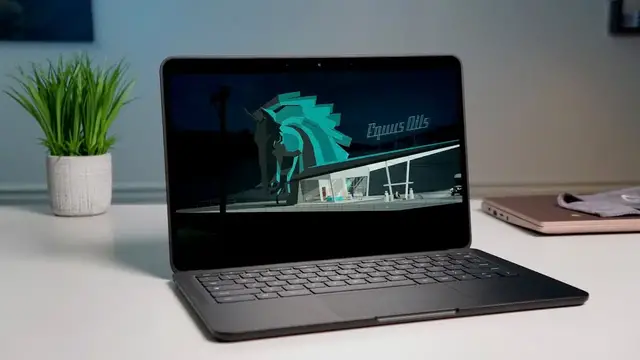
about what is being called the game of the decade being played on a Chromebook
0:46
And we want to show you a little bit about how to go about getting that working for yourself
0:50
today's video is brought to you by nordvpn and they're the vpn of choice for millions of consumers
1:02
including those who game on chromebooks because they're great at what they do and that's keeping
1:06
your browsing secure and safe whether you're at home or out and about if you'd like to learn more
1:10
about their services head over to chromeunbox.com forward slash nordvpn and you can learn more and
1:15
get started today first up let's talk about the game we're actually going to be highlighting
1:19
today. Called the game of the decade by Polygon, I believe it was, and reviewed universally well by
1:27
just about anyone who's played it and used it over the course of the nine years it's been in
1:31
development. Kentucky Route Zero is close to us because, as you know, we're based in Kentucky
1:38
but also because one of the developers of this game the guy that builds most of the levels like the graphic parts the 3D parts all the stuff you see and the way that you interact with the game actually is
1:49
officed right here with us. And we've known Jake for years now and so it's really cool to sit and
1:54
watch his game just kind of get accepted and reviewed so well. And it's really cool to see
1:59
it runs so well on a Chromebook and so we're excited to highlight this game specifically
2:05
because it's a great game, it's fun, and it runs insanely well on just about any Chromebook. The
2:10
process for getting into this game is actually pretty simple, to be honest. All you have to do
2:15
is have your Linux container going. So go into your settings, click on the Linux little icon there
2:22
and tell it you're ready to install Linux apps. That process will take just a couple minutes
2:26
But before you go installing anything, the next step I recommend you take, at least for now
2:31
You may be watching this six or eight months from now. This may not be necessary at that time
2:36
But for right now, GPU acceleration is not turned on by default
2:40
And for those of you who don't know what that is, it just means kicking the GPU on that's
2:44
inside this thing to make graphics a lot smoother is not really turned on for Linux apps
2:49
And so you need to go turn on a flag, go into your flags, search GPU
2:53
You'll see Crostini GPU. You just turn that thing on, let the Chromebook restart
2:58
And then from there, go on to your next step. And that next step has become very simple too
3:03
Used to when Crostini, this entire Linux package thing came out on Chromebooks
3:08
it was a pain in the butt actually to get Steam rolling on Chromebooks
3:12
It's not really that difficult anymore. You actually just go to a random Google search
3:17
just type in install Steam or Steam download. The first result every time will be Steam download page Click on that click the little one that looks like a gear kind of thing So you see Windows you see Mac and then you see this other one It Steam on Linux basically Click that and you be taken to a place where you can download a Debian
3:36
file. So it's a .deb file for Steam. It'll download. Once it downloads, double click it
3:41
right where it sits and Linux will take care of all the rest of it for you. The install script will
3:45
come up. The entire thing will install. A couple times you'll be prompted to hit yes. I want to
3:50
continue and move forward and install this application. But other than that, it basically
3:55
does all of it itself. Once you have Steam installed, if you're not already a Steam game
3:59
player, you're going to need to create an account. It's free. But once you've created your account
4:03
you can go and shop for games. And the game that you can shop for that we're talking about today is
4:08
Kentucky Route Zero. Search for it. It's $24.99. It's well worth it. It wouldn't be getting the
4:14
reviews it's getting if it was a dumb game or it wasn't worth playing. It's really intriguing. The
4:18
artwork is unique. The music is unique. The storyline is unique. It's just a really cool game
4:24
completely worth your money. Go ahead and click that. Click download. Steam will take care of the
4:28
download and install. When it's all said and done, you're actually going to get a Kentucky Route
4:32
Zero icon right in your launcher that you can launch without having to go through any other
4:36
steps. You can get to that at any time by hitting your search button and starting to type Kentucky
4:40
You can swipe up on your app tray and go find it. However you want to do that, you can pin it if you
4:44
want to, and it's highly likely once you start playing, you'll want to do that because you're
4:48
going to want to play this pretty often. But once you do click on that thing, it'll open the Linux
4:53
container and Steam and get the entire game up and running all for you. It does take a few seconds
4:58
so give it some time. But once you've completed all these steps prior to this, there's nothing
5:02
additional needed once you ready to actually open the game Once you to that point and you get in and start a new game you going to quickly see how unique this game is It fun to play It intriguing It a little spooky And I haven played that far into it probably
5:18
about 30 minutes into it. And I'm already kind of hooked and want to sit down and keep playing and
5:22
keep unfolding this storyline because it's just unique. And these are the type of games that if
5:29
Google and Valve end up working things out and making sure Steam runs really well on Chromebooks
5:33
These are the type of games I could see doing well with Chromebook users. It doesn't take up a whole lot of space
5:39
The resources aren't crazy. I mean, it runs perfectly smooth at high frame rates on this $250, $300 Chromebook I have
5:45
sitting next to me, but it also will work on high-end Chromebooks as well, just as well
5:50
as it does here. And so it's a game like this that is going to do well on a Chromebook, and Kentucky Route
5:57
Zero is a perfect example of a game that's unique, fun, and worth your time and your
6:02
money, but can still be played natively on a Chromebook. And we're excited to see more of
6:07
these titles. And I would guarantee you, if you dug around the Steam library and looked around for
6:12
games that aren't high-end 3D shooters, you know, that's what I tend to look for. But if you look
6:17
for games like these, there are going to be lots of them that run pretty well on Chromebooks. And
6:22
so once again, you're going from Chromebooks being things that weren't any good at games at all
6:26
to actually having all sorts of options at your disposal when you're buying a $250 or $300 laptop
6:33
And I don't care who you are. That's kind of exciting. But guys, that's been it for this one
6:37
If you liked it, please give it a thumbs up. Go down there and hit the subscribe button and make
6:41
sure and hit your notification bell if you'd like to be alerted when we make future videos just like this one. Until next time, we'll see you