Up next in 10



Sponsored by NordVPN. For a limited time, grab the 3-year plan with 70% off! Click here: Click here: https://chromeunboxed.com/nordvpn
・・・・・・・
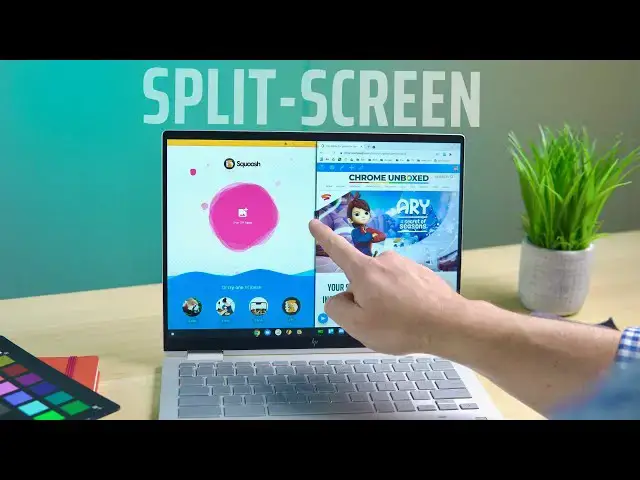
Over the course of the time Chromebooks have been available, they have become very adept at window management. From a useful overview mode to virtual desks to easy window snapping, Chrome OS has quite a few tricks up its sleeve to help you be productive with more than one window at once. Split-screen features have become numerous over that same time, and Chromebooks now have a wide variety of options for seating things side by side. So, with all the features available at your disposal, we wanted to take a few minutes and explain how to fully master split-screen mode on your Chromebook.
Read more: https://chromeunboxed.com/chromebook-how-to-split-screen
Join our newsletter: http://bit.ly/2WjCDm7
・・・・・・・
Join our Patreon community for exclusive extras, an ad-free website experience, access to our private Discord server, and more: https://www.patreon.com/chromeunboxed
Shop Chromebooks on CHROME SHOP: https://chrmshop.com/
Subscribe to the channel: http://bit.ly/2xFuj6L
The Music We Use - PERFECT for YouTube: http://bit.ly/31W6PYP
Show More Show Less View Video Transcript
0:00
over the years chromebooks have become
0:01
increasingly adept at
0:03
leveraging window management from
0:05
overview mode to virtual desk to
0:07
snapping windows to each side of the
0:08
display there's a lot of stuff you can
0:10
do
0:10
with your windows on a chromebook and
0:13
one of the
0:14
often overlooked utilities that
0:16
chromebooks offer is the ability to have
0:17
split screen mode both in desktop and in
0:20
tablet mode
0:20
and so we want to talk about some of
0:22
those tips and tricks that you can
0:23
utilize to be a little bit more
0:27
[Music]
0:28
productive
0:30
today's video is brought to you by
0:31
nordvpn and they're the vpn of choice
0:33
for millions of consumers because
0:34
they're awesome at what they do
0:36
keeping your browsing safe and secure
0:38
whether you're at home or out and about
0:40
on the go
0:40
if you'd like to learn more about them
0:42
and their services head over to
0:43
chromeunbox.com forward slash nordvpn
0:45
where you can learn more and get started
0:47
today all right let's
0:48
let's start with our desktop clamshell
0:50
you know kind of standard split screen
0:52
stuff here
0:53
the way i normally go about doing this
0:55
and i think is probably the most
0:56
beneficial and simplest to get to
0:58
is to start by just grabbing the top bar
1:01
pull down
1:01
and if you push it over to the side
1:03
you'll see that highlight and you let it
1:05
go and you get a perfect
1:06
50 percent width split screen
1:10
then grab the next thing that you want
1:11
and do the same thing on the other side
1:13
boom now you have perfect split screen
1:15
and there's something i'm going to show
1:16
you here in just a second after we show
1:18
you some of the other ways that you can
1:19
get to those split screens
1:20
that is beneficial uh especially on
1:22
desktop but we're going to go full
1:24
screen with that one again
1:25
and we'll go full screen with this one
1:26
again and show you that there's another
1:28
way
1:29
up here where you have your restore and
1:32
minimize maximize buttons
1:34
you can actually long press with your
1:36
mouse
1:37
and you can do the same thing with your
1:38
hand it works either way
1:41
and you'll see arrows pop up on the left
1:43
and right again
1:45
go over whichever arrow you want and it
1:47
will go to that side we'll do the same
1:48
thing with this one
1:49
and boom we have split screen setup
1:51
again additionally
1:53
there are keyboard shortcuts for this so
1:55
let's go full screen with them again
1:58
and you can actually hit alt and your
2:00
brackets so the brackets that are to the
2:02
right of the p
2:03
character on your keyboard so i'll hit
2:05
alt and i'm going to put this one on the
2:06
left side this time i'm going to hit the
2:08
left bracket and it goes
2:09
and then we'll select this window alt
2:11
right bracket boom we have split screen
2:13
once again
2:14
so there's multiple ways to get into
2:15
this mode now once you are in this mode
2:17
regardless of how you got here
2:19
you can actually hover over the divide
2:22
line between the two and you'll see this
2:23
quick little pop-up and this thing has
2:25
been there since
2:26
when i first started using chromebooks
2:28
but a lot of people don't realize it
2:29
because it's not always there and if
2:31
if you go to grab and resize your
2:33
windows really quickly it won't show up
2:35
but if you hover for
2:36
just a second and then go down over it
2:38
it'll actually resize both of your
2:40
windows at the same time
2:41
and i find this to be really really
2:43
helpful if i'm specifically trying to do
2:45
something split screen
2:46
if you grab one window by itself now
2:49
it's like oh crap this one's covering
2:51
over this and i got to try to resize but
2:52
as soon as you lock them together
2:54
they'll snap together
2:56
hover and you can grab this thing and
2:57
resize both at the same time
2:59
and one final trick that they have added
3:01
in the last couple versions of chrome os
3:03
is from the overview screen so once you
3:05
get to this screen and you have your
3:06
windows
3:07
you can actually go split screen with
3:08
them from here as well so
3:10
i can just grab one of these screens and
3:13
you'll see the the spots appear on the
3:14
left and right similar to what you see
3:16
in tablet mode
3:17
and as soon as you drag it you see the
3:18
animation and it's ready to go so i can
3:20
drop that one there and then choose
3:21
whichever other one i want up
3:23
boom same thing supply if i hover
3:25
between the two
3:26
i can multi resize and we can pull them
3:29
right off the top
3:30
and they'll go back to full screen just
3:32
like that
3:33
all right so we've transitioned over now
3:35
to tablet mode so whether it's a
3:37
convertible device you're using or just
3:38
a standalone tablet
3:40
there are some split screen tricks that
3:42
you can use here as well
3:44
and they mimic you know what you had on
3:46
the desktop setup so it's not completely
3:48
different it's just the way you go about
3:49
getting into them when you're only using
3:51
touch
3:51
for right now with chrome os we're at
3:53
chrome os 87
3:55
it looks like an 88 or 89 they're going
3:57
to get rid of this but you have the
3:58
ability to actually move into
3:59
multitasking
4:00
from a swipe down or a swipe up i think
4:03
they're going to get rid of the swipe
4:04
down from the top eventually so
4:06
do know that if you're watching this a
4:08
little bit down the road that it might
4:10
not work going swipe down
4:11
but swipe up would be the only option
4:13
you would have there but either way
4:14
right now
4:15
that's how you get into multitasking
4:17
mode and kind of your overview mode and
4:19
so you can just bounce back and forth
4:20
between windows this way
4:22
well this is also the way that you're
4:23
going to go just like with the overview
4:25
mode in
4:26
in clamshell mode you can swing over
4:28
here to the side
4:29
and boom you got your second your half
4:32
window over here and we can open the
4:33
second window by just touching one of
4:35
the other ones
4:36
and same thing applies here i can swipe
4:38
down or i can swipe up
4:40
on on this side of the screen and choose
4:42
any of my other open applications i can
4:44
choose any of my shelf applications
4:46
it is worth noting if you need something
4:48
else kind of from your main home screen
4:50
that you haven't been working with
4:52
when you flip up to home it's going to
4:53
kind of get rid of all that split screen
4:55
setup so you're going to kind of have to
4:56
start from the beginning again so
4:58
say i open the web store now it's just
5:00
going to open in a full page
5:02
but you can pull your tabs right off and
5:04
then do the same thing with it and boom
5:06
we have our side by side set up again so
5:08
regardless of whether you're going from
5:10
just from the overview or you're going
5:11
from a minimized
5:13
to half screen either one works as long
5:15
as you get that window over to the right
5:16
side
5:17
it's going to pop it into a side-by-side
5:19
view now it's a little bit different
5:20
once you are side by side as far as
5:22
re-sizing these windows they are going
5:24
to resize at the exact same time but a
5:26
lot of people get frustrated with this
5:27
because
5:28
they want to just go grab it and resize
5:29
it and as you see it doesn't do that and
5:31
i think that's for some good reasons you
5:33
don't want to accidentally be resizing
5:34
stuff
5:35
constantly when you're hitting in the
5:37
area that's between the two so
5:38
what you need to do is find this little
5:40
white dash that's right here in the
5:41
middle
5:42
and if you hover your finger on it for
5:43
just a second you see that that
5:45
divider bar splits open a little bit
5:47
once it does that it's ready to resize
5:49
so if i just swipe it doesn't do
5:50
anything but if i hold
5:52
now i can resize things it is important
5:54
to note that
5:56
on tablet mode with chrome os you
5:58
basically get a one quarter three
6:00
quarter
6:00
half and half or one quarter three
6:02
quarter that's the only views you get
6:04
you can't go from here to just like
6:05
right
6:06
there it's going to bounce itself back
6:07
to the closest measurement
6:09
so if i get close to that one quarter
6:11
it's going to drop itself to the one
6:12
quarter
6:12
if i get close to the half it's going to
6:14
go back to the half and so you can kind
6:16
of just play with those and work them
6:17
around
6:18
however you see fit to make your windows
6:20
layout the way that you need them most
6:22
people on
6:23
a tablet are probably going to want your
6:25
main window and something over here on
6:26
the side but you know
6:28
whatever you need you can do and when
6:29
you're ready to switch swipe up or swipe
6:31
down
6:32
pick the other application you need boom
6:34
you got split screen productivity so
6:36
that about wraps up everything you can
6:37
do from a split screen perspective on a
6:39
chromebook whether you're in clamshell
6:40
or you're in tablet mode we really hope
6:42
this kind of stuff helps you all out
6:44
we're trying to do more and more of
6:45
these
6:45
so that whether you've been working on
6:47
chromebooks for years or you're brand
6:48
new to chrome os
6:49
you can learn some of these finer
6:50
details about how to be productive and
6:52
get around the os but that's it for this
6:54
one if you liked it
6:55
give it a thumbs up go down there and
6:56
hit that subscribe button make sure and
6:58
hit the notification bell as well if
6:59
you'd like to be alerted when we make
7:00
future videos just like this
7:02
one and until next time we'll see
7:17
you
#Consumer Electronics
#Software