
How To Adjust The Action on Your Chromebook Trackpad
May 9, 2023


Join our Patreon community for exclusive extras, an ad-free website experience, access to our private Discord server, and more: https://www.patreon.com/chromeunboxed
⚠️ DISCLAIMER: Opening up your Chromebook WILL void your warranty and we do not recommend trying this procedure unless you are prepared to do so. If you are in any way unsure about moving forward, consider a return of your device first.
・・・・・・・
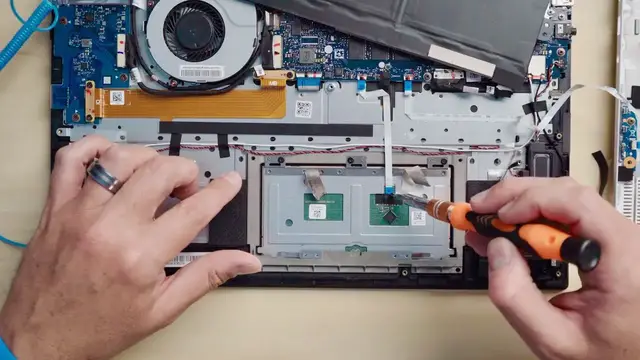
For many years I've been a bit of a trackpad snob. Favoring glass surfaces and sturdy click mechanisms, it is too often I find that Chromebooks don't have quite the right feel to them. Usually this manifests in the trackpad hinge being configured a bit oddly and resulting in what I call a floating trackpad. When the spring mechanism of the trackpad hinge pushes up too harshly on the surface, it creates a scenario where there is travel in the trackpad before it engages the buttons underneath. This means users feel a sort of double-click every time they depress the trackpad. And it drives me nuts.
For many Chromebooks, there is a simple fix that can be done under the hood and with a bit of tweaking, you can dial in the trackpad action and have a far more solid feeling under your fingers. If this is something you've dealt with and been frustrated by, we have put together a video outlining how to fix it in many Chromebooks. Some devices have a slightly-different internal setup, so it won't work on every single Chromebook. From my experience, however, this procedure will work on most devices.
Read more: https://chromeunboxed.com/trackpad-adjust-chromebook-diy-repair/
Join our newsletter: http://bit.ly/2WjCDm7
・・・・・・・
Fueled by Fresh Roasted Coffee: https://chromeunboxed.com/coffee (15% off with code CHROMEUNBOXED)
Shop Chromebooks on CHROME SHOP: https://chrmshop.com/
Show More Show Less #Computers & Electronics
#Computer Hardware
#Electronic Accessories
#Home Automation