Up next in 10



Join our Patreon community for exclusive extras, an ad-free website experience, access to our private Discord server, and more: https://www.patreon.com/chromeunboxed
・・・・・・・
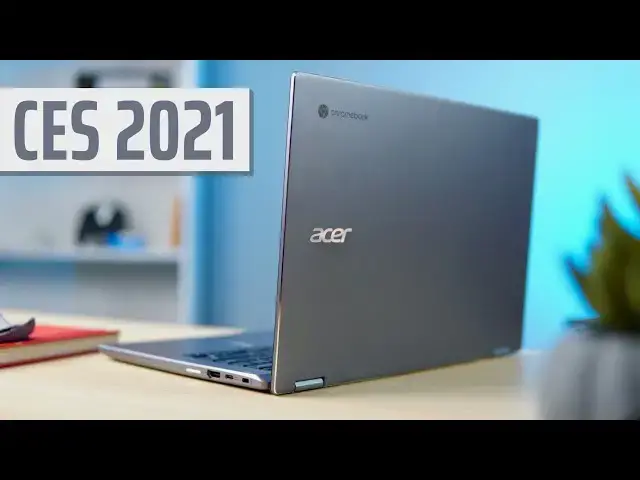
Day 3 of CES 2021 and we have a little surprise for you thanks to a little package that Acer sent our way. Alongside the Samsung Galaxy Chromebook2, the Acer Chromebook Spin 514 is the second Chrome OS device to come out of this year's virtual tech event and we have our hands on a pre-production model of the AMD Ryzen-powered convertible. While we can't report on performance at this time, we wanted to put together a quick video to give you a brief rundown of what the new Chromebook has to offer and our initial impression of the device.
Read more: https://chromeunboxed.com/ces-2021-hands-on-with-the-acers-ryzen-powered-chromebook-spin-514/
Join our newsletter: http://bit.ly/2WjCDm7
・・・・・・・
Shop Chromebooks on CHROME SHOP: https://chrmshop.com/
Subscribe to the channel: http://bit.ly/2xFuj6L
The Music We Use - PERFECT for YouTube: http://bit.ly/31W6PYP
Follow us: https://www.instagram.com/chromeunboxed
https://twitter.com/chromeunboxed
Show More Show Less View Video Transcript
0:00
hey what's up everybody gabriel here
0:01
from chrome unboxed today we're
0:03
continuing our coverage of ces
0:04
2021 and uh acer sent us over their
0:07
latest chromebook it is the amd
0:09
ryzen powered chromebook spin 514.
0:12
we're going to take a look at it
0:18
[Music]
0:27
uh this is by no means the first amd
0:29
chromebook on the market but it is one
0:31
of the first devices to come out with
0:33
the new c
0:34
series chips made by amd that were
0:36
specifically designed for chrome os
0:38
hp and lenovo announced theirs a couple
0:40
of months ago and lenovo's is actually
0:42
available now
0:44
acer just announced theirs this week at
0:46
ces and it'll be available
0:48
probably february march but this would
0:49
be the first one that's actually aimed
0:51
at the consumer market
0:53
and the enterprise market alike and why
0:55
that's a big deal is because
0:56
amd offers comparable processing power
0:59
to the intel
1:00
cpus that we see in chromebooks right
1:02
now but you get those radeon vega
1:04
graphics and that means
1:06
better gpu power which means better
1:08
linux apps
1:09
hopefully better android apps and just a
1:11
better experience
1:12
at a lesser price because amd generally
1:14
comes in
1:15
forty to a hundred dollars cheaper
1:17
depending on which uh cpu
1:19
you're talking about that's enough about
1:21
amd let's talk about this chromebook if
1:23
it looks familiar to you that's because
1:25
it's very similar to its cousin the acer
1:27
chromebook spin 713 that was
1:30
our top pick of chromebook of the year
1:31
of 2020.
1:33
it has an aluminum bottom aluminum lid
1:36
the keyboard deck is
1:37
either magnesium or plastic or something
1:39
like that and the overall build quality
1:41
feels
1:42
very similar to the 713 it doesn't feel
1:45
cheap and in some ways it actually feels
1:47
like the fit is tighter than the 713 and
1:50
that's probably because this one comes
1:52
with
1:52
a mil-spec rating it is drop tested it's
1:55
spill resistant and uh
1:57
taking 132 pounds of downward pressure
1:59
on the lid because
2:00
even though they're going to be
2:01
marketing this to consumers it's also
2:03
going to be marketed directly to
2:05
enterprises and they need devices that
2:07
will hold up
2:08
so overall the build quality is similar
2:10
to the 713 but it's definitely more
2:12
rugged
2:13
but it doesn't feel bulky it's about a
2:15
millimeter thicker than the 713 so it
2:17
doesn't feel unwieldy or anything like
2:19
that
2:20
but overall the design quality is very
2:23
very similar
2:24
and in some ways it might even be better
2:25
like the 713
2:27
this is a convertible hence the spin
2:29
nomenclature
2:30
you can use it a two in one form factor
2:32
as a tablet tint mode for presentation
2:35
all of that it has a touch enabled
2:36
display acer didn't specifically say
2:39
it's usi compatible but we grabbed a pen
2:41
here in the office and i grabbed one at
2:43
home and it worked with it so we're
2:44
presuming that it is
2:45
usi compatible acer is not offering a
2:48
pin with this acer doesn't have their
2:50
own usi stylus
2:51
as far as i know but it worked with the
2:53
usi pin so
2:55
we're just gonna say it's usi compatible
2:57
until we hear different
2:58
so speaking of the screen it is
3:00
different from the 713
3:02
as this one is a 16 by 9 aspect ratio so
3:05
you have a 19
3:07
20 by 1080 screen full hd
3:10
you just don't get that three by two
3:12
more vertical space like you do on the
3:13
713 but it's
3:15
plenty bright i'm going to say it's
3:16
probably 280 to 300 nits of course like
3:19
i said touch screen
3:20
it's gorilla glass so it's made to be
3:23
tough and stand up to dings and knocks
3:25
and things like that
3:26
but overall the display is very good the
3:28
colors are really good the viewing
3:29
angles are really good and this would be
3:31
a great device to have sitting on your
3:33
desk at home
3:34
or if you are a business type and you
3:36
have to you're out on the go and you're
3:38
in different lighting
3:39
this screen is going to be a good one to
3:41
use for the inputs on the acer uh the
3:43
keyboard is really good it's a
3:45
standard run-of-the-mill acer keyboard
3:47
which is good i like acer's keyboards
3:49
their keys are good they're clicky they
3:51
have good travel but they're not loose
3:52
and rattly like
3:53
some other devices the back lighting is
3:56
optional on this version so if you get
3:58
the base
3:58
entry level model it will not have the
4:00
back lighting but as you go up the tiers
4:02
it's added as an option and the
4:04
but the keys are black so the keyboard
4:07
light
4:07
looks good it's not like some of these
4:09
devices that have gray keys and
4:11
everything looks washed out
4:12
it just works i mentioned the track pad
4:14
is not glass
4:16
it but it is mylar or some sort of
4:19
really good composite so it's not floppy
4:22
it doesn't flex a whole lot it has a
4:24
good click on it it's not glass
4:26
you can tell it's not pixelbook go it's
4:28
not
4:29
galaxy chromebook but it's good it's
4:32
good enough that when you're working on
4:33
it it doesn't feel cheap
4:35
then around the sides because this is
4:36
aimed at enterprise and consumers
4:38
they've kind of mixed up the ports a
4:40
little bit you will get two
4:41
usbcs for a displayport power delivery
4:44
all of that
4:45
get a usba for legacy devices chargers
4:48
and things of that nature
4:49
if you go for one of the higher models
4:52
now this isn't necessarily restricted
4:54
just to the chrome os
4:55
enterprise upgrade but if you get a
4:56
ryzen 5 or a ryzen 7
4:58
it comes with an hdmi port when we
5:01
talked to acer they said the decision
5:03
for that was because
5:05
the the bigger processors are probably
5:07
going to be
5:08
the ones that the enterprise guys are
5:10
interested in and they're the ones that
5:12
are going to
5:12
want an hdmi port because they're
5:14
traveling to the office they want to be
5:15
able to hook up to a display or a screen
5:17
or whatever
5:18
and it just it's a more productivity
5:21
focused feature
5:22
so if you want that you're going to have
5:24
to get the ryzen 5 or the ryzen 7.
5:27
and speaking of ryzen back to the
5:29
processors
5:30
this is ryzen's 3000 series so the
5:33
processors aren't exactly new but
5:35
they've rebranded them the c
5:36
series because they were tweaked
5:38
specifically for chrome os
5:40
so the selection is going to be in
5:41
athlon gold horizon 3
5:43
horizon 5 and a ryzen 7. i've looked
5:46
around for some benchmarks and i'm
5:47
really honestly not sure which one's
5:49
more powerful the ryzen 3
5:51
or the athlon gold but if you're trying
5:53
to put it in terms of
5:55
intel chromebook just think pentium gold
5:58
celeron u series that you find in a
6:00
chromebox ample enough power for the
6:02
average consumer but also
6:03
probably not what you're going to want
6:05
to buy if you're looking for
6:07
something that's going to run linux apps
6:08
and stuff for that you're going to want
6:10
to look to the five or the seven
6:11
because those are quad core they have
6:14
eight threads so you can use hyper
6:16
threading and all that plus
6:18
all four of these processors have radeon
6:21
vega graphics which
6:22
we haven't been able to do benchmarks on
6:24
this because it's a pre-production model
6:26
but we really believe that that gpu once
6:29
chrome os is able to leverage it
6:31
is going to offer a lot more gpu power
6:34
than
6:34
intel's uhd graphics and until tiger
6:36
lake and xe graphics come along
6:39
that means that the amd apus could be
6:42
the better option for people who need
6:44
more processing power so price
6:47
starting out the entry level device is
6:50
going to be 479
6:52
when it's released here in february or
6:53
march but that's going to get you
6:55
64 gigs of emmc storage 4 gigs of ram
6:58
and either the ryzen 3 or the athlon
7:01
processor
7:02
we don't have pricing on the higher
7:04
tiers yet but the one we have in house
7:06
is the ryzen 5 8 gigs of ram and 256
7:10
gigs of nvme storage which that's the
7:12
top tier option for the storage
7:14
you can go all the way up to horizon 7
7:17
and 16 gigs of ram
7:19
and your storage options range from 64
7:22
all the way up to 256.
7:24
other than that there's not really
7:26
anything else to talk about its
7:27
configuration so until we know pricing
7:30
who knows i'm really hoping that this is
7:32
going to fall somewhere in
7:34
around the 800 to 900 range but if we're
7:37
looking apples to apples
7:38
lenovo c13 yoga with the same processor
7:41
and same ram as this device costs twelve
7:43
hundred dollars
7:44
i really hope that acer does not price
7:47
himself out of the ball game with
7:49
this device um probably do a little more
7:51
hands-on with this one and share what we
7:53
can about it but next month when we can
7:55
get our hands on one of the retail units
7:57
then we'll do a full review and let you
7:58
know whether or not amd's new processors
8:01
stack up against the current intel
8:02
choices
8:03
that's about it for this one guys i hope
8:04
you like this video
8:06
don't forget to hit that thumbs up click
8:08
the subscribe button and hit that
8:10
notification bell so you get an alert
8:11
next time we put a video out
8:13
we'll see you
#Computers & Electronics