Up next in 10



Join our Patreon community for access to our private Discord, an ad-free website experience, and more: https://www.patreon.com/chromeunboxed
・・・・・・・
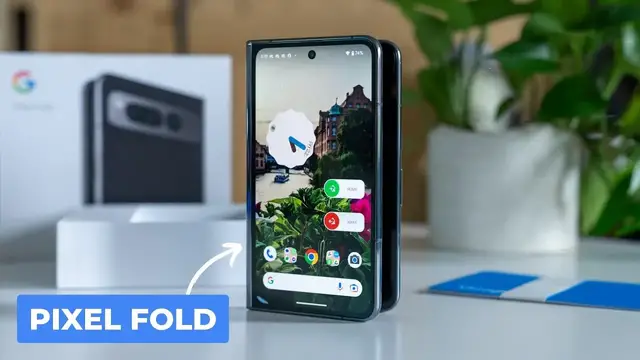
It is finally here! The phone I’ve been waiting on for years at this point is not just a figment of my imagination any longer and we have it here in the office after such a long, long wait. Though my excitement was palpable, I was able to hold it together on the morning the Pixel Fold arrived here in the studio, patiently waiting until the cameras were rolling before even thinking about taking it out of the box.
Many times devices come to us already opened or we’ve previously had some hands-on time at an event, but this time around that wasn’t the case at all. Instead, in this video, you’re not only seeing my reaction to the packaging; you’re seeing my real, first time reaction to the device itself. And there’s no denying my reaction.
Read more: https://chromeunboxed.com/google-pixel-fold-unboxing-first-impressions-video/
Join our newsletter: http://bit.ly/2WjCDm7
・・・・・・・
Fueled by Fresh Roasted Coffee! Buy the special edition Chrome Unboxed bag here: https://chromeunboxed.com/coffee
Shop Chromebooks on CHROME SHOP: https://chrmshop.com/
Subscribe to the channel: http://bit.ly/2xFuj6L
Show More Show Less View Video Transcript
0:00
finally
0:04
if you can't tell by the probable smirk on my face right now i am so excited uh it's not very
0:17
often anymore i get to unbox stuff that i've literally never touched or that i've been waiting
0:22
on for basically years at this point i don't i don't know that there's any portable consumer
0:28
electronic that I've waited on longer than this device right here, the Pixel Fold. You've probably
0:36
if you're watching this video, you've at least heard about it. You know what's going on here. It's a folding phone, big screen on the inside, usable screen on the outside, and it's got Pixel
0:46
software on it. I do have a case here too, but I am so wildly excited. This has been sitting on the
0:51
table this morning since it got here. I cannot wait to open this thing and see what it feels like
0:58
to actually hold this device that I've been waiting so, so long to get my hands on because
1:03
we weren't able to make it out to Google IO back in May. And I know that a handful of people got
1:09
their hands on this thing for a very limited amount of time, but now this one's here for us
1:13
to review. It literally just got here again. You can see I have not opened this thing up. So every
1:18
bit of reaction you get here is going to be raw. Hopefully it's a good reaction. I feel like it's
1:23
going to be. Uh, but yeah, this is, this is Google's first take on a folding phone and we know
1:28
more coming. There are other devices that are coming. OnePlus is getting ready to drop one too
1:33
Uh, but, uh, I am very, very excited to have a folding phone that will have this kind of camera
1:38
system on it and what looks like a amazing build quality, but you know what, just cause it's fun
1:44
to heighten the anticipation. Let's, let's open the case first. Um, see if there's anything I can
1:48
do to not destroy this box. Maybe. Oh, good. There we go. All right
1:56
Another big reveal time here. What's cool about this is that real quick, I at least get to know kind of what the size of the
2:03
phone is going to actually feel like. Because again, I've read about, I've written about
2:08
talked about this phone for so long, for so, so long. Let's see. Yeah. So this has some adhesive
2:14
liners too, like most foldable foam cases do. Yeah, you peel those things off. We'll do that
2:20
after this video. I'm not going to mess with that now, but you get a good idea of what in the hand
2:25
this phone is going to look like. And so I've got my Pixel 7 Pro here for reference, and it
2:31
obviously is nowhere near as big as that in the hand one-handed use, but it's nice and wide
2:37
And I love the idea of that because it basically is going to give me a very usable one-handed
2:41
experience when I don't want to open up the screen. And then when I do, I get this nice
2:46
massive tablet size experience. It'll be about this big, which is super exciting, but yeah
2:52
it's the, uh, it's kind of that new, um, uh, material they've got that they did for the seven
2:56
a. So, uh, it's been possible for you to see this, but this is still like that kind of slick
3:02
material that I don't particularly care for. Uh, I like the cases. I just, I feel like it's really
3:07
slick. This has that grip to it. I love that. And for a phone that's this expensive, remember
3:11
at $1,799. You definitely want a case that's going to be able to stay in your hand, but let's move
3:18
on to this. I've been waiting for this moment, man, a long time. I mean, we've been talking about
3:24
this phone for two years, maybe longer than that. I've tried foldable phones. I've tried the Galaxy
3:31
Z Fold and the Galaxy Z Fold 3 and the outer screen is what killed me with those. The Samsung
3:36
software is not great. So that's a big perk here. A usable outside screen that's wide enough to do
3:42
normal stuff. But anyway, I'm going to stop talking and open this. There it is. It's really
3:50
hard for me to believe it here I just can believe I actually have it here I waited for this thing for so so long Let see
4:08
Wow. Yeah, that feels as good as it looks. Substantial, definitely not light
4:15
but good, like balanced. It doesn't feel like awkward or weird in my hand. The Z Fold phones
4:24
that I used before, like they're so thin and they're very, very heavy. I don't know that
4:29
they're any heavier than this, but since they're so thin, I don't know, it felt weird. It's not a wild difference between the two here. So I really like that, obviously. And then the
4:39
build quality. I mean, this thing just looks and feels like luxurious. You got kind of the soft
4:45
touch, uh, uh, gloss or not glossy, but a matte finish kind of glass on the back here, which looks
4:51
just fantastic. I hope it's doing it justice on camera, man. This thing is pretty and gosh
4:57
the sides of that look how thin, so this, this is not a thick case, but I mean, look how thin
5:03
comparatively it is with the pixel seven pro. And this is basically two phones, uh, squished in half
5:10
and it's more pronounced down here where there's no camera hump. But I might have to, let's see, I'm going to try to power it on real quick
5:17
just to see if we get any juice here. It is going to turn on. All right, and you just see real quickly how wide that screen is
5:25
And are we good with exposure? It's probably going to be blown out. Once we get in here, I'll be able to turn it down just a little bit
5:31
And we might just break away real quick just so I can set up so I can actually show you something other than setup screens
5:36
But while it's booting up, man, that thing just feels so good
5:42
And it should. Google took their time making this thing. Hopefully they've thought about all of this stuff leading up
5:48
And I know you're waiting for me to open this thing up, but at least I want to let the software kind of load and get going here
5:54
Real quick, in the box, what do we got here? Does it feel like they have stuff in them
6:02
They're heavy. you know you feel like you should get like everything with a phone that costs this much
6:06
oh man it's just more box probably the same thing on the other side oh well that's just padding
6:12
that is like really heavy cardboard uh your basic stuff there and then charging cable i mean this
6:19
is straight up pixel uh you got a usb-c cable obviously um you've got a usb a to c adapter
6:26
and honestly i feel like with a phone that's expensive you should get a charging brick
6:31
that's just me. Um, but I think you should have a charging brick with a phone that costs this much
6:36
but it does not come with one. Uh, you're getting the same stuff you would normally get with any
6:40
other pixel phone. So that is what it is. But as you can see, welcome to your pixel
6:46
I guess is let me crack this open. Yeah. Full screen there. Welcome to your pixel. So let me
6:52
get in here and set this up. Cause again, I don't want to talk about this with welcome to your pixel on the screen the entire time. I'd like to at least have it logged in so we can kind of show
6:59
around the home screen and stuff. So let's break away real quick. I'll get this thing set up and
7:03
then we'll talk a little bit more about it. All right. So I've now spent what a grand total of
7:07
like 10 minutes with this thing, but I can tell you, I love it. I love everything about it. The
7:13
the use of the outer screen is what I've wanted in a foldable for a long time. You know, it's
7:19
it's not a huge screen, but it's wide enough to do simple things like sending a text message
7:26
Sorry, I haven't logged into that yet. I'll just click into that so the keyboard comes up
7:30
That keyboard is completely usable versus a really tiny thin screen where the keys are
7:35
all squished together. It's been just super comfortable to type on. So for answering a text message or doing a quick search query, that's no big deal on
7:44
this screen. And I won't feel the need when I pull it out of my pocket to open the whole thing up
7:48
And that just changes the way that you go about using a device like this But when it closed up I mean this is pretty standard Pixel fare Like there nothing that different about what they doing with the software here
8:01
I mean, if you've used a Pixel phone, you're right at home. Obviously, the change comes whenever you go to open this thing up
8:09
And one thing I figured out already is that, so say you set your
8:13
this is kind of your home screen on your main phone. This is your second home screen
8:17
it's just going to put those two side by side, then your next two side by side and so on and so
8:20
forth. So, you know, as you're laying your phone out for the big screen, you can kind of keep that
8:24
in mind for the outer screen as well. It's kind of one and the same. You can dock just like you
8:30
can on Android tablets. You can dock things down here so I can bring it down into that space. If
8:35
you leave any of them open, it kind of auto generates that kind of with that thick circle
8:39
there, it'll auto generate what it thinks you might want to be doing next. So similar to in
8:43
your app tray on a Pixel phone where it kind of has some suggestions up here at the top. It'll do
8:49
that down there at the bottom. And that's just part of the kind of the Pixel tablet experience
8:54
I have had my hands on the Pixel tablet, so I can confirm it's a very similar way of going about and
8:59
doing all your UI and moving things around. The same is true. So if I go, say, here, and I go up
9:06
and click split, then I can pick another app. We'll go Google News. They will split next to each
9:12
other. You can drag that divider line, no big deal. And then if I go into my multitask view now
9:19
they're kind of connected together at the hip until I do one of these numbers and close that
9:24
all the way out. And now they're no longer connected. And so, you know, all the stuff
9:28
that you would expect it to do from a multitasking standpoint, it's doing, and it feels very tabletish
9:33
in this setup. The screen looks gorgeous. And yes, there is a crease in the middle. If I kind of
9:39
I'm sure if I do this number somewhere, one of these two cameras, uh, we'll get that. That's
9:44
just the way foldable phones are. I've used them before. And even using this for just a couple
9:48
minutes, it literally just kind of disappears. You don't really see it or notice it, but you're
9:53
getting 120 Hertz screen on the inside as well as the outside. Um, we already launched the camera
9:59
and did the little trick so you can, let me hit the button here. So yes, I want to switch screens
10:03
and you'll see now this is my viewfinder here. So I can use my big cameras for selfie pictures
10:09
So I'm pointing it right at Joe, take a picture of him, and I'm using my main shooter in order to
10:14
do that. And then when you're done, just click that and you flipped right back around to your
10:18
inner screen. Not always what you need to do for a selfie. I mean, it's got a selfie camera up here
10:23
obviously. And so if I switch just to there, you can see the selfie cam is, is working. And then
10:30
there is a selfie cam on the front as well. If you're wanting to use those, they're fine too
10:35
But ultimately, you know, if you want to really get that awesome selfie, you want that really
10:40
wide shot. I don't even have the specs on the front cameras. I think they're 13 megapixels
10:44
on both of the selfie shooters. I don't have all those specs in front of me. Literally
10:49
I just wanted to get it out of the box and kind of get my reaction to this thing initially
10:55
because I've waited so long for this device. There's so many things I want to try and test
11:01
I will say the fingerprint scanner works very quickly. So I think I put this thumb in
11:06
Yeah. So if I click the power button and just touch, it opens right up
11:10
It's a capacitive fingerprint scanner, nothing under the screen. So that means it's going to work really well
11:15
If for whatever reason you have it open and you lock your screen, obviously it works there too
11:20
So if I click and just touch. So basically, as soon as you click that power button
11:24
if you've registered that finger as the fingerprint, it just unlocks immediately. So
11:28
I'd love to see that. For those of you asking about and thinking about the bezels on this thing
11:34
yes, it does have sizable bezels on the top and bottom. Until I just thought to mention it
11:40
I haven't even thought about them. So they've not been a problem. The screen is just kind of
11:44
mesmerizing to look at And when you doing things like I don know reading a book with you know the dual sided pages that is just a really cool thing to do I read books a lot on my phone This takes that whole thing to another level I love that I do
11:59
want to hear the speakers. I haven't even listened to the speakers yet. So I'm going to pull up one of our videos real quick. Let me crank this up. Nice and loud. It's louder and fuller than some
12:13
Chromebooks we've tested. Wait to this intro track rolls here. Not sure. Let's check it out
12:25
Quite good. I don't know that I would say they're like the best speakers I've ever heard on any
12:30
phone. They're up there. That's really nice. It's a really nice stereo experience. And obviously
12:36
you know, if you're watching content on a screen, this is a landscape screen, but it's still pretty
12:41
square-ish. So you're going to get some of the, uh, the, the black bars on the top and the bottom
12:45
Uh, but it's going to be a great tablet for putting in some headphones and watching content
12:50
Um, another thing I'll address real quick. Um, some of the early hands on, they said it didn't
12:55
fold flat. I don't guess it does. You can push it all the way to being flat. Um, I can stretch it
13:01
It'll go there, but I want to say they, they Google said, yeah, it's best for the screen for
13:06
it to be just ever so like it feels like it's like 179 degrees maybe or something uh holding it even
13:12
when it's quote unquote not flat it doesn't feel not flat uh that makes sense it still feels
13:17
completely flat in my hand so but when i look at it i mean it may be just shy those early hands on
13:23
it looked like it was sitting like this to me um that's just not the case it is ever so maybe one
13:29
degree shy of being wide open but closing it you get that nice reaffirming sound when it closes
13:36
which is really nice. And it just feels so, so nice. So premium, so well put together
13:44
Even little things like the corners down here, you know, when you're holding it in one hand
13:48
you know, a lot of times with foldables, they won't really think about that part right there
13:52
And so when it's digging into your hand, it's almost annoying to hold it one handed. Not the case here. It's ever so slightly rounded. Like using this doesn't feel very weird in a
14:01
one-handed mode. And so this now becomes, I have a small smartphone in my pocket. And when I'm ready
14:06
to have a tablet to play some games, consume some content, then I can move to this inner screen
14:11
and take advantage of those things while also not sacrificing pixel software or pixel cameras on the
14:18
back. Obviously we've got to test those things, but I have no doubt these cameras will be top
14:22
notch. The speakers sound great. Tensor G2, um, 12 gigs of Ram, uh, 256 gigs of internal storage
14:30
I mean, this thing's a beast in every way, shape and form, and I can't wait to start using it and to get into a review process with this thing, because this is the type of phone I've been after for a long, long time
14:43
And just from the early, early hands on I've had here with it just in these few minutes, I can tell you it already is meeting the expectations that I've had for it
14:52
It's first blush. Obviously, I need to spend time with it. I do love that it closes completely flat, which is also nice
14:59
It reminds me of the Surface Duo. I just have so much to say about this phone and so many things I need to try and experiment
15:08
with and all that kind of stuff. But man, first impressions are just fantastic
15:12
It's everything I hoped it would be. It just feels really, really well made, really awesome
15:18
Can't wait to spend more time with it. But for now, that is it for this one
15:23
If you like this video and want to see follow-up videos like it, please get subscribed
15:27
Give us a thumbs up. head down there, hit that, uh, the, the notification icon as well. If you want to be
15:31
alerted when those types of videos come out in the future and until next time, we'll see you