Up next in 10



Sponsored by NordVPN. Buy a 3-year deal at 70% off, get an extra plan on top! Click here: https://chromeunboxed.com/nordvpn
・・・・・・・
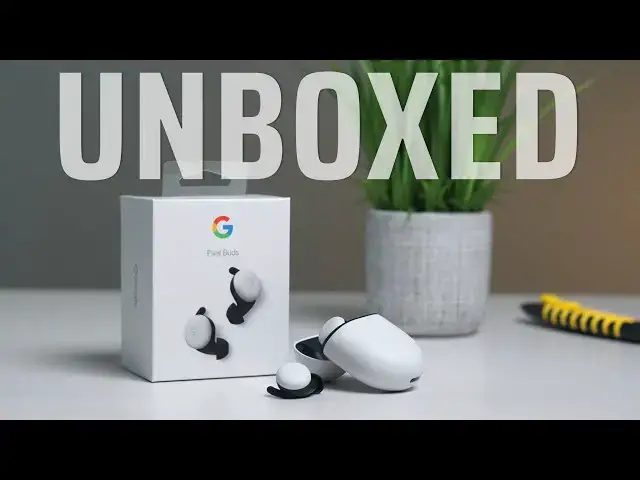
Yesterday was finally the day! We've been waiting since October of 2019 to get our hands on Google's latest take on the truly wireless earbuds and after over 6 months of anticipation, they are finally here and ready to get the unboxing treatment with a full tour of the setup process in real time.
Read more: https://chromeunboxed.com/google-pixel-buds-unboxing-set-up-first-look/
Join our newsletter: http://bit.ly/2WjCDm7
・・・・・・・
Shop Chromebooks on CHROME SHOP: https://chrmshop.com/
Subscribe to the channel: http://bit.ly/2xFuj6L
The Music We Use - PERFECT for YouTube: http://bit.ly/31W6PYP
Become a member of Chrome Unboxed to help us make our channel even better, and for access to exclusive perks: http://bit.ly/CU-join
Follow us:
Show More Show Less View Video Transcript
0:00
they're finally here before we get in
0:07
the box this video is brought to you by
0:08
Nord VPN of the VPN of choice for
0:11
millions of consumers it's because
0:12
they're awesome at what they do keeping
0:13
your browsing safe and secure whether
0:15
you're at home or out and about once the
0:17
pandemic is all finished up if you'd
0:19
like to learn more about them head over
0:21
to Chrome inbox comm forward slash Nord
0:23
VPN and you can learn more and get
0:24
started today alright so you probably
0:27
already know from the title or the size
0:29
of the box what this is and this is a
0:31
set of headphones I've waited on longer
0:34
than just about any other piece of tech
0:35
I've ever reviewed or been excited about
0:38
they are the pixel buds and it's version
0:41
2 the pixel buds this isn't the
0:42
quartered terrible version this is the
0:44
one we sell back in October 2019 and it
0:47
has been months so let's let's do the
0:50
math here October so November December
0:52
January February March pushing into
0:56
April and then May so six and a half
0:59
yeah six and a half months since they
1:02
announced these things they're finally
1:04
here just a couple days ago they went
1:06
live for sale and multiple retailers as
1:08
a matter of fact as we're filming this
1:09
already we got these a couple days later
1:11
they're already sold out everywhere say
1:14
it's either crazy demand or Google just
1:16
didn't have enough stock we're not
1:18
really sure what the case is but we're
1:19
excited we have a set of them and we're
1:22
gonna unbox them and there's not a ton
1:24
of surprise here so it's not like I
1:27
don't know what's gonna be in this box
1:28
not like you don't know what's gonna be
1:29
in this box but we haven't actually
1:32
physically held these things since the
1:35
launch event in October so it's been a
1:37
long time since we've had any physical
1:40
contact with these things and look
1:41
it is a little box so I think too
1:47
interesting on the outside just you know
1:49
classic really awesome looking Google
1:53
branding and boxing here so it's just
1:56
interesting to think about like going to
1:57
a Best Buy at some point in the future
1:59
when all that's normal again and these
2:01
just like dangling on a shelf just like
2:02
randomly yeah there's some pixel buds
2:04
because we've waited so long for them
2:06
and so I don't know it creates a very
2:08
strange feeling about a product when
2:12
you've spent so long just waiting for it
2:14
to be available to you so without
2:17
further ado let's just just see if they
2:19
feel like we're gonna cut away and kind
2:21
of set up a different shot in a second
2:22
and actually go through the pairing
2:25
process because that's that's kind of
2:27
important too these things are not just
2:30
small and light and and supposed to
2:32
sound really nice and fit in your ear
2:34
very comfortably like all that stuff's
2:35
great but there's tons of wireless
2:37
earbuds that do that what these do is
2:39
they have some touch controls on the
2:40
outside they allow you to pair very
2:41
simply with Android devices if you have
2:44
a standalone app that allows you to
2:46
change some things but you know I've got
2:47
some touch controls and outside swiping
2:49
for volume control tapping for track
2:52
control and then Google assistant
2:54
obviously is going to be baked in to
2:56
this entire thing so opening it up we
2:59
get this nice little pill shape I think
3:02
Michael Fisher compared it to an egg and
3:05
it kind of does like they'll wait and
3:06
everything the roundness of it it feels
3:08
feels a bit like an egg so let's pop
3:11
this open and yeah it's a just like I
3:16
remembered it from the from the Google
3:17
event just a really good click if you've
3:23
ever had air pods you know what this
3:26
feels like
3:27
I think it is reminiscent of like Zippo
3:29
lighters back in the day
3:31
it's just something really nice about
3:33
that and again nice and tiny this will
3:36
fit easily in your pocket no problem
3:38
whatsoever
3:39
Google's claimed in 5 hours of battery
3:41
24 hours total with the case so battery
3:44
life should be really nice and there
3:47
they are wow it's a nice little magnetic
3:49
snap that holds them down in place this
3:51
is really cool
3:53
and then you've got a little LED on top
3:56
that I'll tell you hey it's pairing or
3:57
it needs charge or whatever the case may
3:59
be and before we pair them up or
4:02
anything I just want to see because it's
4:03
been a while yeah that's crazy
4:06
comfortable that's really nice and part
4:10
of what what Google is doing with these
4:12
that's gonna be really cool is that
4:14
there's a lot of pass-through
4:15
availability here so there's gonna be a
4:17
me and noise that can kind of come in so
4:18
you don't feel like your ears are
4:19
plugged up so it'll be interesting to
4:21
see how once you turn the hop on and and
4:24
really get them connected what that is
4:26
all gonna sound like and feel like but I
4:27
can tell you just like everything else
4:29
Google makes I mean you can knock them
4:31
for whatever you want but when it comes
4:33
down to like just precision and quality
4:34
and craftsmanship like that's
4:37
immediately you just feel it with these
4:39
things like it just feels great in the
4:40
hand let's see what else is in the box
4:43
so there's the the other nubs so it
4:47
comes with the medium size on there is a
4:50
small and a large also I don't know
4:52
about you all but I tend to be of the
4:54
sort I think my ear canals are slightly
4:56
different sizes so I'll probably like
4:57
with a medium in one and a small in the
4:59
other or something I can't remember
5:00
which ones which but it's nice that
5:02
those are in there so that you can kind
5:03
of adjust that so that you get the best
5:05
possible seal in the ear it's gonna give
5:07
you the best bass response and all that
5:08
kind of stuff
5:09
again there's pass-through venting going
5:12
on with these so you're gonna get some
5:13
ambient sound and that's on purpose and
5:15
Google is touting that they'll actually
5:17
be able to like ramp up the volume and
5:20
stuff as you walk outside it's a little
5:22
more you know loud and then when you
5:23
come back inside it's quieter it'll I
5:25
don't know it's supposed to adjust all
5:26
that stuff we're gonna review these
5:28
obviously and spend a lot of time using
5:30
them on a day-to-day basis and then give
5:32
some of those ideas but that's that's
5:33
the stuff they're saying it can do yeah
5:36
so this is probably normal paperwork
5:38
stuff and then just a charging cable so
5:40
there's no block in here so you will
5:41
need to provide either a computer for
5:43
that USB type a or some block that you
5:45
have sitting around that you can charge
5:46
it with and again we don't know I have
5:49
no idea how long it will take to get a
5:50
full charge or any of those things this
5:52
isn't a review I'm just getting it out
5:54
of box and reminding myself how
5:56
beautiful and how well-crafted these
5:58
things are so we're gonna cut away and
6:01
get a different shot set up so that we
6:02
can actually go through the pairing
6:03
process real quick cuz I just want to
6:05
see how quick and how
6:06
well it works with a pixel phone okay so
6:10
we're going to try the pairing process
6:11
again this is right out of the box I've
6:13
not used fast payer on android
6:15
successfully before so look at the buds
6:18
we got the pixel for let's see what
6:20
happens boom just like advertised tap
6:25
tap here it'll be tied to my account and
6:28
that's really what we want to see with
6:31
fast fare is that the the Bluetooth
6:33
device gets tied to the account one of
6:35
the things we're going to test with
6:37
these is whether or not they'll start
6:38
showing up on our Chromebooks so if I'm
6:41
logged in this should be available as an
6:43
audio source for the Chromebook which
6:45
would be pretty cool so if we're looking
6:47
let's see connected to to have to finish
6:51
setup okay we a little welcome screen
6:55
here so it's kind of helping you say hey
7:00
rotate get these things in place find
7:04
the best fit so they're you know kind of
7:06
walking you through some of the that
7:08
your tip placement and then they're
7:10
gonna walk you through all the shortcuts
7:12
too so you got volume control so raise
7:15
volume it looks like tap the to play
7:18
pause or answer a call skip is a double
7:22
tap or reject a call I'm gonna be
7:26
careful with that one
7:27
you've got a double tap an accidently
7:28
single tap and pick up a phone conk you
7:30
didn't want to pick up play previous
7:32
track is a triple tap that'll probably
7:34
take practice and then drop it in for
7:38
charging so there's a LED right there
7:43
obviously that shows you where you're at
7:45
and that's really nice the little pop-up
7:47
that gives you a quick battery info
7:50
let's see if that's yep so that's always
7:52
there persistent shows me that they're
7:54
at 100% the case and the left and right
7:57
earbud are all at a hundred percent so
7:59
that's a that's a nice touch there as
8:01
well probably a nod to Apple my ear pods
8:05
have done that with iOS for a while so
8:07
it's nice to have something that can do
8:09
this oh this is fun yeah just kind of
8:13
swing around you see all your your
8:15
different things you can do so
8:16
multi-touch surface you've got the dual
8:19
microphones
8:20
in ear detection and one thing I didn't
8:22
mention earlier too is the fact that
8:24
these have wireless charging so if you
8:25
have a wireless charging pad of some
8:27
sort
8:27
you just drop them on there and
8:28
wirelessly charge as well I'm sure we're
8:32
gonna get some info on them
8:34
it could help from your assistant of
8:36
course so I'm gonna have to put them in
8:39
my ear go through the whole setup for a
8:42
google assistant but that's kind of the
8:43
final step to getting these things up
8:45
and running so under device details
8:46
instead of just getting the customary
8:48
you know HD audio phone calls and stuff
8:50
now you have all this extra stuff with
8:52
the pixel buds
8:53
I would assume we'll see that stuff too
8:55
as well with other Android phones and
8:58
part of this stuff will get carried
8:59
through with the the pixel buds Android
9:02
app so from what I understand the pixel
9:05
devices the pixel phones kind of have
9:08
this app built-in as a default app and
9:10
so we're getting a lot of this stuff
9:12
here in the normal Bluetooth screen that
9:14
might not be the case with other Android
9:16
phones some of this stuff you might have
9:17
to do and you open up the actual pixel
9:19
Budds app and go and see it in there so
9:21
again we're going to review all the
9:23
stuff there's just a lot of stuff I'm
9:25
not even clear hung at this point right
9:27
now I just know the setup process was
9:28
super simple these things feel like
9:30
they're you know a million bucks they
9:32
feel great in the hand they feel great
9:34
in the ear but we'll do a review and
9:36
we'll talk about sound quality we'll
9:38
talk about ease of pairing with other
9:39
devices we'll talk about all sorts of
9:41
stuff and how they work with Chromebooks
9:43
and and all those things but right now
9:44
we're just super excited that they're in
9:46
the office that we can start actually
9:47
testing these things after so many
9:49
months have gone by as we've really
9:51
awaited their arrival but guys that's it
9:53
for this one
9:54
if you like this video give it a thumbs
9:57
up go down there and hit that subscribe
9:57
button and make sure to hit the
9:59
notification bell if you'd like to be
10:00
alerted when we make future videos just
10:03
like this one until next time we'll see
10:05
you
10:07
[Music]
10:10
you
#Audio Equipment
#Gadgets & Portable Electronics