Up next in 10



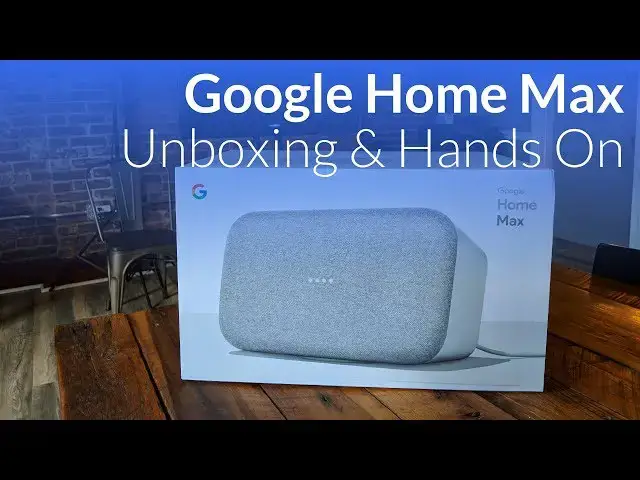
Google has sent us over the Google Home Max and we're getting it out of the box, set up, and playing a sample. Is this thing worth $399?
Leelbox Wifi Socket on Amazon: http://amzn.to/2DHFWiL
Shop Google Products on Amazon: http://amzn.to/2DDJHlh
Music by Otis McDonald - https://www.youtube.com/audiolibrary/music
Show More Show Less View Video Transcript
0:00
[Music]
0:07
hey folks probably paying with chroma
0:09
and boxed and today we're gonna be
0:11
unboxing the Google home max now Google
0:14
has sent this to us it's actually a
0:15
brand new box I thought we were gonna
0:16
get just a review unit but it's actually
0:18
brand new so we're gonna open it up and
0:20
take a look and kind of get first blush
0:22
and this is really my first blush take
0:24
because even with the events we've been
0:26
to I haven't really spent any time with
0:28
this device so I really have no idea
0:30
what to expect but the boxing the the
0:32
branding on it is very similar there we
0:35
go oh wow it's really heavy up top okay
0:42
there's nothing else in there wow it's
0:46
really heavy so I think on the spec
0:50
sheet it says it weighs somewhere around
0:51
12 pounds and it feels like it all of it
0:54
but very well-constructed probably some
0:57
good size magnets in that bad boy now
1:00
one of the cool things about this is the
1:03
little pad on the bottom is magnetic so
1:05
it actually just kind of comes off and
1:09
flops around I'm not really sure how
1:11
they have a magnet that's that bendable
1:14
but cool and so that becomes the foot it
1:18
also should work I think down the side
1:20
yeah so if you have a pair of them and
1:23
they pair up they realize that they're
1:25
stereo speakers so you can have that
1:26
your DJ table or whatever but for us
1:29
we're happy to have just the one here
1:31
and really put that foot back on again
1:35
that gives it a little bit of separation
1:37
from the table dampens any sound that
1:40
would reverberate down into whatever
1:42
surface you set it on so it serves quite
1:43
a few purposes that does not mean that
1:45
if you were to take it off here I like
1:48
it's gonna stop working but it slides
1:49
around much easier without that there
1:51
and again it's probably going to sound
1:54
better with it on there that's a pretty
1:57
cool thing
1:59
let's look around here real quick
2:00
there's not much going on it's you know
2:02
it's Google home it's meant to be simple
2:04
but we have a slide bar right here
2:06
across the top and basically you can
2:09
slide this for volume control all the
2:12
way across and obviously tap here in the
2:13
center for play pause that's it that's
2:15
all that serves for but if it looks good
2:17
and it's very simple you know no one's
2:19
gonna get this out of box and I wonder
2:21
what this does I mean they're gonna
2:22
figure that out pretty quick we're gonna
2:24
try it out in a second well you also
2:25
have is multiple microphone holes so
2:28
there's two over here and two here I
2:31
think that's it basically what those
2:34
serve as and what Google has touted and
2:37
what they're saying this will do we're
2:38
gonna review it and really put it
2:39
through some paces to see but it's a
2:41
$400 speaker so if you're just gonna use
2:44
it to control smart home stuff it seems
2:47
like kind of a poor investment however
2:49
this is really really a nice speaker
2:52
unit as well so this is for the people
2:53
that want Google home but they want it
2:56
in a very very nice set of speakers and
2:58
so what it does is it uses these
3:00
microphones to actually hear how bass is
3:03
reverberating through the room and then
3:05
it adjusts the way that the speaker's
3:07
function on behalf of the room and so
3:09
within 20 or 30 seconds you can take it
3:12
into a different room it's too close to
3:14
this wall or it's farther away it's in
3:15
the middle of the room or it's outside
3:17
and it should actually adjust for the
3:19
best settings for that room again we're
3:21
gonna test that we're gonna we're gonna
3:22
move it into different rooms and and
3:24
kind of try to trick it basically and
3:26
see how it works but for today we're
3:28
just taking a look yeah and around the
3:30
back let's talk about that real quick so
3:32
you get the the power here USB see I'm
3:38
not actually real sure right off the top
3:40
of my head exactly what you would do
3:41
with that maybe you could just use it as
3:43
a charging dock perhaps that'll be a
3:45
further use down the road and then
3:47
probably a hard reset button would be my
3:49
guess on there and and then this is your
3:53
mic switch so you can actually mute the
3:54
microphone if you feel like there's any
3:56
issues where it's listening too much but
3:59
for the hardware I mean that's that's
4:01
really good I mean it's pretty
4:01
straightforward unassuming and it's
4:04
really gonna come in just blend in
4:05
wherever you put it the rest of the box
4:07
here
4:08
again very nice packaging they're just
4:10
not much in it power cable and kind of a
4:13
get started
4:14
card but again we're going to turn it on
4:16
and basically open the Google home app
4:19
and it'll set itself up pretty much it's
4:21
if you've ever set up any Google home
4:23
device many any of those things they're
4:26
they're real straightforward and simple
4:27
so we're gonna take a quick break and at
4:29
least go ahead and get it set up because
4:31
that's not really a unique thing to the
4:33
Google home acts that was the Waco home
4:40
to get started download the Google home
4:43
app on a phone or tablet alright so
4:45
we're back and we got it set up within
4:47
just a couple minutes and honestly could
4:48
have almost just kept rolling because
4:49
it's so simple the Google home app sees
4:52
the device walks you through the setup
4:54
and and you're good it's on the Wi-Fi
4:56
now we can talk to it hey Google what's
4:59
the weather like outside currently in
5:02
Elizabethtown it's 51 and sunny today
5:05
it'll be clear with a forecasted high of
5:07
51 and a low of 33 so right you know it
5:10
does all the same thing that Google how
5:11
many regular Google home big ones they
5:14
all that stuff's gonna be the same so
5:15
it's gonna be able control all the same
5:16
stuff all of that the same what sets
5:18
this apart is its prowess as a speaker
5:20
now we did figure out the hole in the
5:23
back is an auxiliary port so you know if
5:25
you got like a cool vinyl set up and you
5:27
want to run something like that
5:28
something that's analog out into the
5:30
speaker you can take advantage of it
5:31
that way too
5:32
the other one it's just a hard reset
5:34
button and that kind of stuff so down on
5:37
the bottom just because people really
5:39
get into this will peel the sticker off
5:44
and that's where your little magnet goes
5:47
but that's really not the sound we're
5:49
here for so before we move on to
5:51
anything else I just want to show you or
5:53
let you hear technically how good this
5:55
thing sounds no setup no EQ nothing we
5:58
just downloaded one of the tracks off
6:00
YouTube you're allowed to use without
6:03
attribution or anything like that but
6:05
I'm going to give some attribution if
6:06
you ever search in that it's the artist
6:09
name is Otis and most his stuff on there
6:12
is really awesome we use it in a lot of
6:13
our videos anyway so I'm just gonna hit
6:16
play and hopefully if you got some
6:18
earphones on hopefully our our mic setup
6:19
is picking this up pretty well but
6:21
this thing sounds incredible
6:26
[Music]
6:38
[Music]
6:49
so as you can see I'm kind of sliding my
6:51
hand across the top and we saw that
6:52
earlier in the video just a big volume
6:55
slider in the center and I don't know if
6:58
this is gonna pause I'm playing this
6:59
from like a web browser and then casting
7:01
it so the play/pause probably won't work
7:03
quite properly but I kind of like this
7:06
is background audio I finished talking
7:08
look this is $399 and we're gonna put it
7:11
through its paces and give it proper
7:13
review treatment and do all that kind of
7:15
stuff so that you can decide whether or
7:16
not this is for you but here's what I
7:18
can tell you right now if you're not
7:20
really into speakers and really in the
7:21
sound and and really care how a speaker
7:24
sounds particularly I really don't think
7:27
this is a device for you maybe if it
7:29
comes down to like three hundred or two
7:31
hundred fifty dollars maybe what I tell
7:33
you is I am really into speakers I am
7:35
really in having awesome sound and so
7:38
one of my fears is with this device is
7:40
after reviewing it I'm gonna want it and
7:42
once Google wants this one back I'm
7:44
gonna be out four hundred bucks to go
7:45
buy one but it's it sounds just amazing
7:48
and it's cool that you can have a device
7:50
that looks this good kind of blends in
7:53
Auto eq's does all that kind of cool
7:55
stuff but then can also hopefully you
7:58
can see this light over in the corner
7:59
can do things like this hey Google turn
8:02
off the big light kind of cool and you
8:08
know as more smart-home things show up
8:10
by the way that's a leo box we we put
8:14
that in a review in another video we'll
8:15
put the link down below and in the
8:17
description so you can kind of see it's
8:19
just a Wi-Fi socket that you can tell
8:21
Google home to control but as more
8:23
things become available to use with
8:26
Google home it's just gonna be able
8:28
control more and more stuff but again
8:30
remember it's a great great speaker with
8:33
some cool other features built in we
8:35
will get to everything and we'll try it
8:37
multiple rooms and all that kind of
8:38
stuff in the floor view but just know
8:40
it's it's a smart speaker that does what
8:43
other smart speakers do from Google but
8:45
it sounds really incredible at first
8:47
blush and so it'll be interesting to
8:50
spend more time with it and of course
8:51
after we do we'll put out a review so
8:53
that you maybe make a purchasing
8:54
decision based on it guys if you like
8:56
this give it a thumb
8:56
hit that subscribe button below until
8:59
next time we'll see you
9:01
[Music]