Up next in 10



Sponsored by NordVPN. Try it out and get 75% off a three-year plan for a limited time! Click here: https://chromeunboxed.com/nordvpn
Shop Brydge: https://fxo.co/1121837/youtubebrydge
・・・・・・・
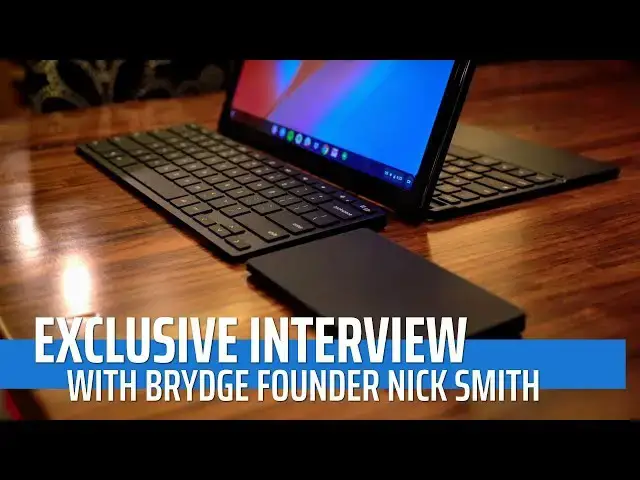
Probably our favorite thing at CES 2019 was the time we got to spend with the fine folks from Brydge. In our time together, we got to really delve deep into what it took for them to bring the G-Type to life, the hurdles that had to be overcome to see the project through, and the benefits that are the byproduct of their hard work and unique architecture.
In this interview, we let Nick Smith, the founder of Brydge, speak about all these things from his hands-on experience behind creating these fantastic accessories.
・・・・・・・
Subscribe to the channel: http://bit.ly/2xFuj6L
Shop Chromebooks: https://amzn.to/2NE2wKq
Read more: https://chromeunboxed.com/
Follow us:
Show More Show Less View Video Transcript
0:00
[Music]
0:07
here at CES 2019 we got the unique
0:10
opportunity to sit down with the founder
0:14
and co-ceo of bridge Nick Smith and talk
0:18
with him about what prompted them to
0:20
even start making products for
0:22
Chromebooks
0:22
specifically talking about the bridge
0:24
g-type that's already available for the
0:26
pixel slate and the upcoming wireless
0:29
keyboard and wireless touchpad and in
0:32
our time with him getting to talk
0:34
through all the hurdles and all the
0:36
interesting things they had to work
0:37
through and figure out to make their
0:39
stuff work the right way with
0:41
Chromebooks it's pretty fascinating so
0:43
join us but before we get into all that
0:46
this video is brought to you by Nord VPN
0:48
it's the VPN of choice for millions of
0:50
people including chromebook users if
0:52
you'd like to learn more about them and
0:54
their services go to Chrome on box comm
0:55
forward slash Nord VPN to get started
0:57
today so we're here with Nick Smith
1:00
thanks guys for joining us and coming
1:03
over to our place we're at CES and
1:05
there's crazy stuff going on and hours
1:08
of work to be done and yeah you all took
1:10
some time to get over here and talk with
1:12
us about some new products some existing
1:13
products but more than anything you know
1:15
we just we want for our viewers and
1:17
readers to get a sense of some of the
1:20
things that we've gotten to discuss
1:21
since we've gotten to know you and your
1:24
products and and some of the things that
1:26
go on behind the scenes so thanks thanks
1:28
a time so for those of our viewers that
1:33
don't know that that are watching this
1:36
thing going on we watch everything so
1:38
we're just going to check this out and
1:39
they're thinking who is bridge what what
1:41
do you guys do be like what are you all
1:43
about
1:43
so we're obviously really I suppose
1:48
young consumer electronics brand we
1:51
started the business about four years
1:52
ago we have a legacy in Kickstarter
1:54
which takes it back to 2012 really the
1:58
business started in 2014 and the whole
2:01
idea behind it is was originally just to
2:03
create an awesome aluminium keyboard for
2:06
iPad of course we had some initial ideas
2:11
of to where the
2:12
sort of could potentially go but you
2:13
know fast forward four years on and
2:15
we're now a business that's really
2:18
focused on creating amazing accessories
2:20
for the leading tablets that create a
2:24
really simple easy to use device that
2:28
makes it better that's the whole idea
2:30
behind it and and now of course that
2:33
started to expand beyond just the tablet
2:35
into a desktop environment which really
2:38
just is the whole idea being we just
2:40
want to create a great experience in the
2:42
desktop or on the road whether it be the
2:43
cafe in your office or in home just to
2:46
create a seamless experience and and
2:48
that's what we build our business on
2:49
awesome awesome
2:51
and I'm assuming most of the people
2:53
watching this probably know that you
2:55
guys made a stellar keyboard that was
2:58
actually right alongside the pixel slate
3:01
at Google's launch event so when when
3:03
when we went up there and got hands on
3:05
the slate right along with it was the
3:07
bridge keyboard and the interesting part
3:10
with that is you know there's all this
3:12
made by Google stuff everywhere and then
3:15
the bridge keyboard of the G type and so
3:18
it begged the question for us especially
3:21
like we knew you all as a company who
3:24
made stuff for iPad it made stuff for
3:27
surface premium brands not not every
3:31
Windows laptop gets a bridge keyboard
3:34
not every single a know Android devices
3:36
get them its premium stuff and so now
3:40
you're showing up on the scene kind of
3:41
making Chrome OS Chromebook stuff so the
3:45
question is why well it's a good
3:47
question you know obviously you know the
3:50
business has been build original on
3:52
Apple and iPad which has been a
3:54
fantastic experience for us that's
3:56
allowed us to really hone and hone our
3:59
DNA of our products and to make them so
4:03
stable and beautiful and the way they
4:05
are but when we look at what Apple are
4:08
doing and what Windows are doing and now
4:10
what Google are doing in the Chrome OS
4:12
space it just made an awful lot of sense
4:14
to us because you know I sort of liken
4:17
it to Apple do both the software and the
4:20
hardware Microsoft did both the software
4:22
in the hardware
4:23
and now seeing the way Google are
4:25
focusing on not just making any hardware
4:28
they're making beautiful hardware that
4:30
works and functions exceptionally well
4:33
it made sense for us to say okay well we
4:37
can take what they're doing from a
4:39
tablet perspective and and bring our
4:41
special sauce to it and create a
4:44
keyboard that particularly with the
4:46
pixel slave that creates that perfect
4:48
laptop experience when the G type is
4:50
connected to it but not inhibit that
4:52
beautiful tablet experience and that's
4:54
sort of the secret behind what we're
4:55
trying to do and something that we that
4:57
we're very selective with with who we do
4:59
it for for various reasons but you know
5:03
when we do do we want to make sure we do
5:04
it properly and that's what we've done
5:05
with the G time awesome yeah it's it's
5:07
it's exceptional if you haven't already
5:09
checked the the review on on the website
5:12
and on YouTube you can see a little bit
5:15
more in depth about about it there so
5:17
we've talked a little bit about who you
5:19
guys are why you're getting into the
5:20
space but one of the most interesting
5:22
things for us was getting to talk with
5:24
you guys on the phone and hear about
5:26
some of the technical stuff behind the
5:28
scenes about some of the hurdles you
5:32
guys had to go through a little bit to
5:33
make this thing work with with a Chrome
5:36
OS device because some of those hurdles
5:38
it seems showed a little bit about why
5:41
Chrome OS is kind of a cool architecture
5:44
in general it doesn't mean it made it
5:46
easy for you but I think I think some of
5:49
our readers and viewers would would like
5:51
to hear some of that stuff what exactly
5:54
you guys had to do to make the G type
5:56
work sure I look at you know not
6:00
necessarily competitive companies but I
6:02
look at a lot of other similar peer
6:05
companies who are obviously much bigger
6:06
than us but one thing when it comes to
6:09
creating you accessory you can sort of
6:12
build something that's that's done
6:15
separate to the device that it's meant
6:17
to be for and often they create great
6:20
experiences or good experiences so I
6:22
should say but they don't create amazing
6:24
experiences and and I suppose when it
6:26
came to Chrome OS one of the things that
6:28
we wanted to do and this is such a
6:30
wonderful part of the main
6:31
for Google program that allowed us to do
6:33
this which was really revisit the
6:37
architecture of our device and how it
6:39
was actually going to talk to Chrome OS
6:40
you know in really simple terms when you
6:44
often create a keyboard with a trackpad
6:48
you can only pair one device so
6:51
something's got to win
6:52
it's either the trackpad or the keyboard
6:54
and with every Windows or Mac OS often
6:58
the keyboard pairs and the mouse just
7:02
the trackpad sorry pairs is a mouse and
7:04
basically what that means is that even
7:06
though it's a track that the old way
7:08
still thinks it's got a scroll wheel
7:09
which is really really ordinary when it
7:12
comes to a trackpad experience because
7:14
it literally wants to do steps its
7:16
everything's jaggedy there's limited
7:19
control the user can't you know tune
7:21
their gestures they can't turn it off
7:23
they can't do anything like that so for
7:25
us when we looked at the way that we
7:26
wanted to work it took the g-type and
7:28
particularly the trackpad
7:30
you know working with chrome Chrome OS
7:33
it made it very very clear that we
7:36
needed to go that extra step because we
7:37
wanted this thing to stand out we wanted
7:39
to make sure you know when we sat down
7:42
to look at the entire development
7:45
process we knew that obviously there was
7:48
going to be a Google keyboard and we
7:50
knew what we were doing at keyboard but
7:52
the whole idea was to be able to offer
7:53
choice it's not like our keyboards the
7:55
best and the only not about that at all
7:58
it's about being able to offer the
8:00
customer with that experience who they
8:02
might want to follow keyboard they want
8:04
something that's got full protection or
8:06
there's that customer that wants that
8:07
perfect laptop experience and just the
8:09
tablet so it was very important for us
8:12
that when we decided on the architecture
8:15
and how we were going to do the firmware
8:16
and the software and how it interacted
8:17
with Chrome OS that we did it exactly
8:19
the same as the Google keyboard because
8:21
we wanted to take all of that out of the
8:23
equation it can be under choice and
8:26
that's what we did so at the end of the
8:28
day what we've done is we have created
8:30
basically the first tablet keyboard that
8:34
it's connecting via bluetooth that
8:35
allows all of the gestures and all the
8:37
data points from the trackpad to
8:39
communicate directly with Chrome OS
8:41
often what you do
8:44
you know the icy or that the the the
8:46
main board in the keyboard would
8:48
actually do that computation on the
8:50
gestures and just throw or well that's a
8:53
letter that's a movement right that's a
8:55
gesture they do whatever on my cable but
8:57
we don't do that we pass everything
8:58
through to Chrome OS and Chrome OS
9:01
interprets it so the experience you get
9:03
on the G type from a trackpad
9:05
perspective is identical to any other
9:08
Chromebook on the market yes the glass
9:10
might feel a bit different but it's the
9:13
actual way it's done is an integral
9:14
which is pretty crazy when you think
9:16
about just the state of Chrome OS and
9:19
keyboards and accessories and stuff like
9:20
that we we always end up using leftover
9:23
Windows stuff and I use Logitech stuff
9:25
and and nothing against Logitech but
9:28
there's just nothing wireless that works
9:30
with Chrome OS the way that the G type
9:33
that I've experienced works with with
9:36
the slate and one of the other cool
9:38
parts that when when we were talking
9:39
before that you were telling me is that
9:40
since you all architected everything in
9:43
this particular way like the idea that
9:46
if Google decides tomorrow that a four
9:48
finger swipe up left or right does I
9:50
don't know have multiple desktops
9:53
fleshes lives yeah
9:55
you know if then you're also we're just
9:57
doing it exactly exactly it kind of
10:00
future proofs it you know although we do
10:03
have the ability to update the firmware
10:04
through Chrome OS and so on it kind of
10:07
negates the necessary need of that
10:10
because it doesn't matter what happens
10:13
at the Chrome OS site it just pushes it
10:15
interprets what we what we give it and
10:17
we give it everything right whether it
10:19
is or not it's a different story yeah
10:21
and the beauty of that to be honest is
10:22
whether it be on on the pixel slate or
10:26
say on the Acer chrome tab the the the
10:31
experiences is identical yeah same so
10:34
which is great yeah and that's one of
10:35
the beauties of Chrome OS just in
10:37
general is that you know users get the
10:39
same experience you know it's a
10:40
different form factors different
10:41
hardware and there's varying levels but
10:43
when they sign in you know that that
10:45
desktop is their desktop and it just
10:47
follows them and it's it's it's cool to
10:50
hear an accessory hardware manufacturer
10:53
kind of deciding the okay that
10:55
it's worth something and we're gonna do
10:57
that too with our hardware so that it's
10:59
this kind of transparent thing that just
11:01
works to be honest it makes our life
11:02
easy it's it's difficult as you're doing
11:06
it but now that we've done it we can now
11:09
rinse and repeat to a certain extent
11:11
because it's a you know from a Chrome OS
11:13
perspective it's very forward-thinking
11:15
and forward vision from an enterprise
11:17
architecture perspective it's very
11:19
different to everything else that's out
11:21
there we know that it does not matter
11:23
whether it the the new HP that's just
11:26
launched or the pixel book we know that
11:29
our devices will work exactly the same
11:32
on those devices which is fantastic so
11:34
speaking of other devices we had the
11:37
pleasure of getting exclusive on these
11:39
two devices that are sitting here so the
11:41
keyboard and wireless trackpad from
11:44
bridge for Chromebooks and I can't tell
11:47
you I we're excited about the exclusive
11:49
I'm probably more excited about that
11:51
right there I've been waiting for a
11:53
proper Bluetooth trackpad for
11:56
Chromebooks and so my curiosity then is
11:59
you know coming from a history of making
12:02
devices for specific devices kind of
12:05
what pushed you in the general direction
12:06
of going with something like this I
12:08
think it's twofold you know one is as a
12:12
business we're obviously getting into
12:15
mobile productivity and and we call the
12:17
connected desktop you know whether it be
12:19
in the office or in the cafe or on the
12:22
bus and being the mobile office it's
12:24
about creating a seamless experience
12:25
from from one to the other but more so
12:28
we wanted to do it for for Google and
12:31
for Chrome OS really because my
12:34
personally we're just so excited about
12:36
the vision that they have in terms of
12:38
what they're the capabilities of the OS
12:42
you know we've got two massive
12:44
incumbents being Windows and Mac OS and
12:46
iOS sorry and the way that chrome is is
12:51
growing
12:52
obviously in education in the enterprise
12:54
and also at the consumer level why
12:56
should it miss out why should we should
12:58
chrome users miss out from having that
13:00
awesome amazing desktop experience yeah
13:03
a Chromebook as a label that's you know
13:06
traditionally been for a chrome OS based
13:08
lat
13:09
and we've now got tablets that have got
13:13
called Chromebooks but their tablets
13:15
yeah I didn't think that no I didn't
13:17
think that through but but it is what it
13:18
is and so for us you've got you've got a
13:22
tablet here which literally can be your
13:24
single device and therein lies the key
13:26
you know two-in-one devices are probably
13:29
the fastest-growing sub-segment of the
13:30
PC market yeah I don't want to be
13:33
carrying a laptop around and a tablet
13:35
and a phone you know I've got to carry
13:37
my phone around I do need to type I just
13:40
want a single device and for me it's
13:41
it's this and that's coming from a guy
13:44
that's had a macbook for the last
13:46
probably 12 13 years since they they
13:48
came out and and what this has done for
13:51
us is you know I want to be able to have
13:54
my dual monitors at my desk so I just
13:57
one USB in and bang zoom on just pop up
13:59
and admittedly I've been using these for
14:01
a couple of weeks now so I've had the
14:03
benefit of it but it gives me that
14:05
desktop environment and and that's what
14:06
I love and you know there are other
14:08
hopefully you know many users out there
14:10
that are Chrome OS fans that don't want
14:12
to just be tapping away on a on a laptop
14:14
when they're sitting at their desk bang
14:16
they want to be able use a monitor so
14:18
this is the perfect complement to it
14:20
awesome well we're super excited to get
14:24
to use these and review them you know I
14:27
think you're saying sometime in the
14:29
spring
14:29
oh yeah well we'll be able to actually
14:32
get hands-on like the the full
14:34
production units
14:35
but they're you know gorgeously made
14:37
just like everything else and we're not
14:38
gonna review all this stuff sitting here
14:40
right now but we're excited about it I
14:42
know a lot of people that watch this
14:44
channel will be very excited about it
14:46
and so I'm just glad we got to spend the
14:49
time and talk through some of this stuff
14:50
and I hope it was beneficial for for you
14:52
guys I know it was beneficial for us and
14:54
very interesting and it's just
14:55
appreciate the time not absolutely
14:57
pleasure looks a yes is a is a pretty
14:59
busy time for everyone so I thank you
15:01
guys for sitting down and listening to
15:02
us we're really excited about these you
15:05
know the idea of the the Google Chrome
15:09
user having to use a windows-based
15:11
keyboard it just doesn't make sense it
15:13
it's like everything that we do having a
15:15
beautiful aluminium or aluminum laptop
15:18
and sorry tablet and putting a plastic
15:20
cable with it also
15:21
make sense so everything that we do just
15:23
try and keep it simple and on point and
15:25
and that's what we've got here so really
15:27
appreciate the opportunity to share it
15:29
with you again appreciate you taking the
15:30
time out you're scheduled to sit down
15:31
but if if our viewers want to know more
15:34
about you guys where it's the best place
15:35
to do that all right absolute pleasure
15:37
just go to breach calm everything's
15:40
there these two new devices actually go
15:43
live tonight sign up register your
15:46
interest on them we're going to be
15:48
shipping in spring but everything you
15:51
need to know about these two devices and
15:53
also the G type and a whole Google range
15:55
can be found there awesome awesome
15:57
thanks again man pleasure mate thank you
15:59
so thanks for joining us for that let us
16:02
know in the comments if you'd like to
16:03
see more stuff like this in the future
16:04
from chrome unboxed we're kind of
16:07
interested in continuing to pursue these
16:08
kind of interviews and this kind of
16:10
content moving forward but that's it for
16:12
this one and if you liked it hit the
16:14
thumbs up subscribe below and until next
16:16
time we'll see you
16:18
[Music]
16:21
you
16:22
[Music]
#Consumer Electronics