Up next in 10



Sponsored by NordVPN. Try it out and get 75% off a three-year plan for a limited time! Click here: https://chromeunboxed.com/nordvpn
・・・・・・・
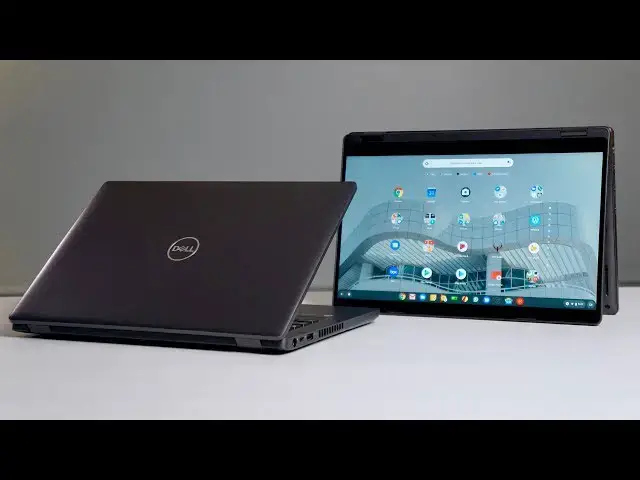
Two new devices from Dell have put me in probably the oddest position I've ever been in as a reviewer of tech devices. For the first time ever, I'm forced to tell general consumers across the board that a device isn't a good fit for them. The strange part is these Chromebooks aren't bad and aren't average. They're probably just not for you.
Read more: https://chromeunboxed.com/dell-latitude-chromebook-enterprise-review-expensive-consumers
Join our newsletter: http://bit.ly/2WjCDm7
・・・・・・・
Shop Chromebooks on Amazon: https://fave.co/2OuedYL
Subscribe to the channel: http://bit.ly/2xFuj6L
The Music We Use - PERFECT for YouTube: http://bit.ly/31W6PYP
Become a member of Chrome Unboxed to help us make our channel even better, and for access to exclusive perks: http://bit.ly/CU-join
Show More Show Less View Video Transcript
0:00
it's not often we do a review where at
0:02
the end of it I'm gonna tell you you
0:04
probably don't need to buy the device
0:05
but that is the case with both the Dell
0:08
Latitude chromebook enterprise 50 350
0:12
400 so let's just get into it today's
0:22
video is brought to you by Nord VP and
0:23
other VPN of choice for all sorts of
0:25
users including chromebook users because
0:27
they keep your data safe and secure
0:29
whenever you're out and about or at home
0:32
if you'd like to know more about them
0:33
and about their services go to Chrome on
0:35
box comm for it slash Nord VPN and you
0:38
can get started today these two
0:39
Chromebooks if you just look at a spec
0:41
sheet are gonna look insanely impressive
0:43
I mean we're talking things like the
0:45
latest Jenner will not lay this
0:47
generation latest generation in a
0:48
Chromebook until Core i5 i7 nvme storage
0:53
you know we're talking 128 gigs 256 512
0:56
there's all sorts of different
0:57
variations you can buy them in 8 and 16
1:00
gigs of ram all kinds of great stuff
1:02
that on a spec sheet look really
1:03
impressive and may make you think as a
1:05
consumer that you're going in to buy the
1:07
absolute best Chromebook you can buy
1:09
because it's expensive and it has really
1:12
good stats but that's just not the case
1:14
with these devices they are meant 100%
1:17
to be deployed in the enterprise I mean
1:19
it's in the name they're Dell Chromebook
1:20
Enterprise and so because of that google
1:23
has kind of launched this new enterprise
1:25
focused thing where they're creating
1:27
Chromebooks that have some additional
1:29
things in them for security additional
1:32
pieces in there so that you have
1:34
licensing built in as soon as you buy
1:35
the device and they are meant for
1:37
enterprise customers to buy and easily
1:39
deploy to their workforces some of those
1:41
perks that Dell built in here are you
1:43
know the built in VMware system that
1:45
Dell owns and that gives them the
1:47
ability to take machines and hand them
1:49
to employees and let their IT guys
1:51
decide what goes on in that environment
1:54
for that employee and what better to do
1:56
that kind of cloud computing setup than
1:58
Chrome OS and that's exactly where these
2:00
things are aimed at they want to give IT
2:04
professionals a quick ability to deploy
2:07
Chromebooks and give them the VM setup
2:10
so the virtual machine set up in their
2:12
hands ready to go with
2:13
less fuss less update problems less
2:16
security issues that they get with
2:17
Windows machines and that's really the
2:19
aim of these Chromebooks however from a
2:21
consumer standpoint even though the
2:23
hardware is good here I mean we're
2:24
talking nvme storage lots of RAM 8 16
2:28
gigs of ram really late gen I saw their
2:31
8th gen their whiskey Lake processor so
2:34
they're basically the 8th gen processors
2:35
we've seen in other Chromebooks but they
2:37
have LTE compatibility and these both
2:39
can take a SIM card and give you LTE
2:41
data on the go all of those things look
2:44
super impressive and then you see the
2:45
price and it's easy to think if I want
2:48
to buy the best possible Chromebook
2:49
these have to be it it's just not quite
2:52
the case especially for consumers that
2:54
aren't going to leverage all of that
2:56
enterprise stuff that these Chromebooks
2:58
are meant for for general consumers
3:00
honestly I just don't think these are
3:02
ones that you need to buy and that's
3:03
honestly the purpose for this video
3:05
we're not doing a full review here
3:06
because it's almost impossible for us to
3:08
do so we don't work in an enterprise
3:10
environment we don't have IT specialists
3:12
rolling out Dells VMware to these
3:14
machines I'm just using these like
3:16
regular Chromebooks I'm just opening it
3:18
up logging into my account and you're
3:19
free to do that if you want to spend the
3:21
money and get these kind of things I
3:23
mean there's some perks here don't get
3:24
me wrong you can open it up and change
3:26
out the RAM you can change out the the
3:28
solid-state storage in them all of those
3:30
things are user serviceable and those
3:32
are perks and that's really nice stuff
3:34
they're built like tanks they feel great
3:35
they're milspec rated they have you know
3:37
drop resistance and all that kind of
3:39
stuff so there are benefits not gonna be
3:41
wrong and they're crazy fast but there
3:44
are some drawbacks to first up would be
3:46
the screens
3:47
both of them have 1080p screens the 5400
3:50
is a 14 inch device the 5300 is a 13.3
3:54
inch convertible device and the screens
3:56
on both of them are average at best they
3:59
are not very bright 118 it's on the 14
4:02
inch version and 220 nets on the 13 inch
4:04
version so not terrible viewing angles
4:07
are great and colors look really good
4:08
the 14 inch version is non-touch but it
4:11
is a matte finish so it's anti glare and
4:13
they're not the worst screens I've used
4:15
but when we're talking 14 or $1500
4:17
Chromebooks I absolutely expect the best
4:20
screen experience I can get and these
4:22
are far below what you can get out of
4:24
any of Google's made Chromebooks or
4:26
handful of other
4:27
books that are literally 1/3 to 1/2 of
4:29
the price of these devices additionally
4:31
on the 13 inch device the keyboard
4:33
actually is really cramped the keys I
4:35
compared them to other keys are kind of
4:37
small and push together and really know
4:39
why that's the case there's plenty of
4:40
room for a full size keyboard deck and
4:42
on both of them they have solid-state
4:45
trackpad so the trackpad is just non
4:47
moving and then there's two big clunky
4:49
buttons underneath and I get that's the
4:51
way latitude devices have been made for
4:53
ever and maybe there's purpose to that
4:55
and I guess probably when you get into
4:57
VMware and leveraging Windows apps in
5:00
the virtual space a left and right
5:02
buttons fine but they're kind of smushy
5:04
and honestly when I've come from using a
5:07
trackpad with you know double clicking
5:09
with two fingers for a right-click and
5:10
just a nice solid surface these have
5:13
been a huge step backwards for me so now
5:14
you've got kind of a crummy screen
5:16
experience a squished keyboard
5:18
experience both the keys are a little
5:19
mushy on both of them and the trackpad
5:22
that honest I just never got used to
5:24
using and all of a sudden using these
5:26
things honestly felt more like a chore
5:27
than what it should feel like to use a
5:30
$1,500 Chromebook so I say all of that
5:33
to say this basically if you're a
5:35
consumer if you're a person who's
5:36
watching YouTube videos to decide which
5:38
Chromebook you should buy I don't think
5:40
you should buy either one of these even
5:42
if they get on sale and they probably
5:44
won't honestly you can only buy them
5:45
from Dell themselves and there's little
5:48
reason they have to mark these down
5:50
they're not marketing them towards the
5:51
people that generally watch our stuff
5:53
but we wanted to make this video so that
5:54
if you were thinking hey I'm gonna get
5:57
the absolute best experience I can get
5:59
and I've got the the money to go do so
6:01
you really need to look elsewhere there
6:03
are other devices that are going to give
6:05
you a much better experience from a
6:07
Chromebook perspective than these
6:09
devices will now I'm not dogging these
6:11
devices I think they have great use case
6:13
and I think for the right people people
6:16
in enterprise people in IT departments
6:18
they're going to love these devices
6:19
because people clearly already love the
6:21
Dell Latitude line of laptops and so
6:23
this is just those machines with Chrome
6:26
OS so for IT guys that's less overhead
6:29
for them to deal with and they can just
6:31
deploy these things at will and so those
6:33
things are great I'm not knocking these
6:34
at all please don't hear me saying that
6:36
please don't hear me saying they don't
6:37
perform well they actually kind of
6:39
looked
6:39
they're a little bit clunky but then
6:41
they have tons of ports on them too so I
6:43
mean there are some positives here there
6:44
are just no where near enough positives
6:46
for me to tell you to go spend 1,500
6:48
bucks to buy either one of them if
6:50
you're naughty professional hey check
6:52
them out go talk to Dell and see if
6:53
these would be the right fit for your
6:54
company but if you're just a consumer
6:56
looking for a great Chromebook I think
6:58
you need to look elsewhere guys that's
7:00
it for this one if you liked it give it
7:01
a thumbs up go down and hit that
7:03
subscribe button and make sure and hit
7:04
the notification bell if you'd like to
7:05
be alerted when we make future videos
7:07
just like this one until next time we'll
7:09
see you
7:09
[Music]
#Business & Industrial
#Enterprise Technology
#Technology News