Up next in 10



Sponsored by NordVPN. Try it out and get 75% off a three-year plan for a limited time! Click here: https://chromeunboxed.com/nordvpn
Purchase the Dell Inspiron Chromebook 14 from Dell: https://fxo.co/1121837/dellyoutube
Purchase the Dell Inspiron Chromebook 14 from Best Buy: https://fxo.co/1121837/dellyt
・・・・・・・
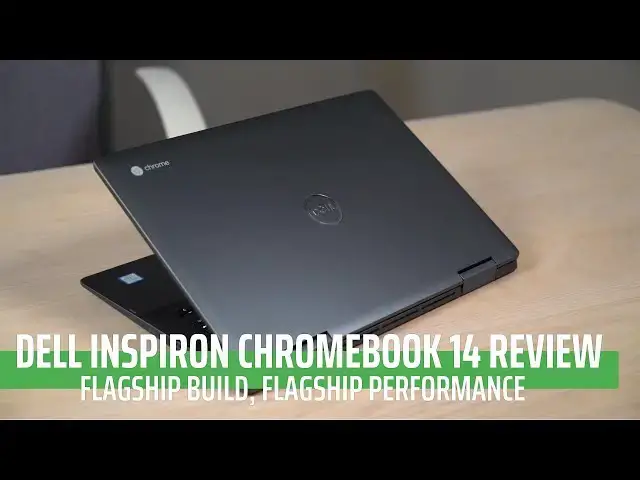
As 2018 came to a close, we saw a rise in the more premium Chromebooks from manufacturers. The Dell Inspiron Chromebook 14 is Dell's entry into this emerging space.
With a substantial, all-aluminum build, great screen, included stylus, and fast internals, is this Chromebook worth the $599 asking price?
Let's find out!
・・・・・・・
Subscribe to the channel: http://bit.ly/2xFuj6L
Shop Chromebooks: https://amzn.to/2NE2wKq
Show More Show Less View Video Transcript
0:00
[Music]
0:13
since their inception Chromebooks have
0:15
been thought of as cheap computers cheap
0:18
laptops just a browser a cheap way to
0:20
get something that can get you online
0:22
and while there are plenty of those
0:24
affordable Chromebooks still available
0:27
one change we're seeing is the
0:28
introduction of more mid-range mid to
0:31
upper range Chromebooks and Google
0:34
started this with the introduction of
0:36
the pixel book now the pixel lines that
0:38
came before it tried to start this
0:40
precedent and never really caught on but
0:41
the pixel book seems to have started
0:42
something that's changed manufacturers
0:44
ideas of what it means to build a
0:46
Chromebook and one of the devices that
0:48
we're seeing kind of follow this new
0:50
trend is this the dell inspiron
0:52
Chromebook 14 the MSRP on this is 599
0:56
dollars and so I feel like that puts it
0:58
kind of right in the upper mid-range of
1:00
Chromebooks because there's not a lot
1:02
you can buy for $600 it's built as well
1:04
it's this thing that brings all of the
1:07
great flares that this device brings to
1:09
the table and so we want to take a
1:11
deeper look at what makes the dell
1:13
inspiron Chromebook 14 a really good
1:16
contender in the space before we get
1:17
started this video is brought to you by
1:19
Nord VPN they are the VPN of choice for
1:21
tons of users including chromebook users
1:24
if you'd like to learn more go to Chrome
1:25
on box comm forward slash Nord VPN to
1:28
get started today
1:29
so let's start off just like we do with
1:30
most reviews and talk about the screen
1:32
this is a 16 by 9 so pretty standard
1:35
display 14 inches diagonal but with
1:38
pretty small bezels on on three of the
1:40
sides and it's full HD so 1920 by 1080
1:43
none of those specs stand out or make
1:45
you think oh wow this is a unique
1:47
experience but it's just a really good
1:49
panel the brightness is really good
1:51
somewhere around 300 nits viewing angles
1:53
are great an IPS display and things just
1:55
look really good
1:56
1080p I've long said all the way up to
1:59
fifteen point six inches or so is gonna
2:02
remain pretty sharp and now that Chrome
2:04
OS scales really well it doesn't matter
2:07
if you want to make things a little
2:08
larger on the screen or a little bit
2:09
smaller everything's gonna stay nice and
2:11
sharp and look really really great so
2:13
no complaints whatsoever about the
2:15
screen as I use this device as my main
2:18
device for a few days I mean didn't use
2:20
anything else but this it never once did
2:23
I think man I can't wait to get back to
2:25
my pixel book display because this
2:27
display is terrible because I've done
2:29
that before in certain circumstances
2:30
this was not one of those circumstances
2:32
this thing performed really really well
2:34
colors are really really good the blacks
2:36
are nice and rich and the bezels are
2:38
small enough that it just it feels good
2:40
it feels modern and it displays big
2:42
enough if you're gonna use it on its own
2:44
at 14 inches it's it's actually big
2:46
enough to get a lot of work done on this
2:48
this display alone and the horsepower as
2:50
we'll talk about in a second is plenty
2:51
if you want to push it to a secondary
2:52
display as we move on down to the
2:54
keyboard and trackpad I'd give them like
2:57
a 7 out of 10 they're not the worst
3:00
thing I've ever used they're also not
3:02
the best so a lot of times I judge this
3:04
stuff against the pixel book because
3:05
Google put together a package there that
3:07
it's just great the keyboard feels great
3:09
in the trackpad feels great on the on
3:11
the pixel book and this device is ok
3:14
it's serviceable the keyboard to me
3:17
feels a little bit mushy the the travel
3:18
on the keys is great but the click on
3:21
them leaves a lot to be desired and so
3:23
sometimes I would miss keystrokes and
3:25
you just can't tell when the the clicks
3:27
not really good so if you're in the
3:29
market for just the best keyboard you
3:30
could possibly get this probably isn't
3:32
gonna be it but it's backlit and a lot
3:34
of people get upset about non backlit
3:36
keyboards especially when we approach 5
3:38
and $600 devices this one's got
3:40
backlighting multiple stages for stages
3:42
the trackpad while not being glass is
3:45
pretty good the click mechanism feels
3:46
pretty good it did overtime so over the
3:50
course of a full day maybe tend to build
3:52
up a little bit of oil on it which tells
3:53
me it's probably not etched glass
3:55
sometimes it's just difficult to tell
3:56
I'm not exactly sure what material it's
3:59
made out of but it performs really well
4:01
so most of your gestures and all that
4:03
kind of stuff they work just fine one
4:04
thing I really do like about what Dells
4:06
done here is port selection and so it's
4:09
funny we moved through a phase where
4:10
everybody just wanted to do USBC so the
4:13
pixel book only has USB see and
4:14
sometimes that's a little bit of a
4:15
hang-up and I've got a search for a
4:17
dongle or some sort of adapter the
4:20
Samsung Chromebook plus and pro did the
4:21
same thing the HP Chromebook x2 so some
4:23
of these newer devices they want to keep
4:25
things slim and
4:26
USBC is great I love USBC just sometimes
4:30
I need in a port to actually plug
4:31
something into it it doesn't happen a
4:34
ton for me but I know for certain users
4:35
that's that's a big deal and having to
4:37
carry a downlo around annoying so with
4:40
this device you get the addition of a
4:41
USB a with a USB C on both sides that
4:45
will do display out and charging on both
4:47
sides so whichever way you want to use
4:48
it if you're gonna dock it into a
4:50
keyboard and a monitor setup it can work
4:53
with that you also have a micro SD card
4:56
you've got headphone microphone jack
4:58
which pretty much everything has but you
5:00
know having an SD card having a USB a
5:03
slot it's just a nice port selection I
5:05
never really felt the need to go and get
5:07
a bunch of dongles and figure out how I
5:08
was gonna hook stuff into this one and
5:10
while we're talking about ports the
5:12
speakers on this thing are actually
5:13
really really good
5:14
they are downward firing and usually
5:16
when I see that when I see speaker
5:18
grilles on the underside of a device I
5:20
automatically think yeah they phoned
5:22
this one in it's just they're gonna be
5:24
crapping speakers but the Dell managed
5:26
to pull off something pretty nice here
5:27
while there the speaker's don't actually
5:30
like you know direct themselves at your
5:31
face some like something like the Acer
5:34
Chromebook 15 for instance would do
5:35
they're they're really rich and really
5:38
full and really nice sounding I was I
5:41
was really surprised by it and had to
5:42
watch a few things and think man think
5:44
like these are these are really good
5:45
speakers because there had been some
5:47
devices where I would have figured hey
5:49
this is gonna have great speakers and
5:51
they've just been really mediocre really
5:53
full of mid-range and kind of muddy
5:56
sounding and these just aren't that they
5:58
sound really really good so like if
5:59
you're watching you know video or
6:01
something are you gonna watch
6:02
feature-length movies on here and enjoy
6:04
the speakers and Dolby surround sound
6:05
no let's not be crazy you know but as
6:08
far as like watching a quick video or
6:10
showing something to someone when you're
6:11
holding the device that the speakers
6:13
actually sound really good another thing
6:14
I really like about what Dell is
6:16
offering here is the stowable stylus and
6:18
the reason I like styli styluses I don't
6:23
you can let me know in the comments
6:24
which one you think it is but the reason
6:26
I like device is with a stylus that can
6:27
be put into the machine is that I don't
6:29
ever have to worry about whether it's
6:31
there or not and I've talked about this
6:32
before but that can be really really
6:34
convenient now it is weird this one and
6:37
the Acer Chromebook 13 both share the
6:39
same place where they put it so it's
6:41
right up underneath the front and you
6:42
pull it out and it's great when it's
6:43
sitting here as a as a laptop but when
6:46
actually I have it folded up as a tablet
6:48
all of a sudden the the spot where you
6:50
get the stylus now it's a little quirky
6:51
that that's a small nag but it's
6:54
something to think about like if you're
6:55
gonna use it in tablet mode a lot that's
6:57
that's probably something worth noting
6:58
but the stylus works really great it's
7:00
EMR just like Samsung's offerings and
7:02
Acer and probably multiple other people
7:06
its EMR so there's no need for a battery
7:08
and it's small so it can stay inside the
7:10
device and it works like you'd expect it
7:12
to and what we're talking about styluses
7:15
and convertibles and all that kind of
7:17
stuff one thing you need to know about
7:19
the dell is it's really heavy
7:21
now some people look at that as a bad
7:23
thing and some people look at it as a
7:24
good thing I'm kind of on the fence to
7:27
be honest with you because in in the bad
7:29
way it's just flat-out heavy it's almost
7:31
four pounds and yeah it's a 14 inch
7:34
device so it's it's gonna weigh a
7:35
substantial amount but this feels like
7:38
it weighs extra like they put an extra
7:40
like piece of lid in it or something
7:41
like it just feels really heavy but on
7:44
the flip side it feels substantial and
7:46
so there can be heavy like clunky junky
7:49
heavy so there can be just like
7:50
substantial heavy and we haven't really
7:53
talked about the build yet of this
7:54
device and I wanted to hold it
7:55
specifically for this because it is
7:57
heavy but it's really really well built
7:59
it's really well put together and I
8:01
think that has something to do with Dell
8:02
putting Inspiron on the device Inspiron
8:05
has been a brand that Dell has used for
8:08
four years I know at least 10 12 14
8:12
maybe even longer than now I remember
8:14
buying an Inspiron Windows PC I'm it's
8:17
huge big thick monster of a device but
8:19
they were using the Inspiron Brandin
8:21
back then and so for them to actually
8:23
put a Chromebook out that has that
8:24
branding on it it's important because
8:26
it's telling consumers hey we're
8:28
bringing Chrome OS into the fold here
8:30
you know they have the XPS line we
8:32
haven't seen a Chromebook with XPS on it
8:34
yet that's their premium line but they
8:36
make Windows and Linux or obutu versions
8:39
of the XPS line so maybe this is the
8:42
first step and then maybe making like a
8:43
Dell XPS with Chrome OS on or something
8:46
like that but it's important note
8:47
they're putting that branding on there
8:49
that they've reserved only for Windows
8:50
PCs up to this point and now
8:52
we have Chromebooks and so I say all of
8:54
that to say Dell knows how to put
8:56
together a PC they've done it for a long
8:57
long time and so yeah it's a little
8:59
heavy but it's made out of solid
9:01
aluminum and the thing feels like a tank
9:03
so if you're looking for something you
9:04
like that like I like a heavy device
9:06
that feels substantial and I know that I
9:08
have it and it feels just SuperDuper
9:10
solid and I'll share this with you guys
9:12
I actually dropped it off my chair a few
9:15
days ago it hit a wood floor no worse
9:18
for wear whatsoever I mean no dents no
9:20
scratches no nothing
9:21
this thing's gonna hold up because it's
9:22
built really really well and I think
9:24
that is part of them bringing that
9:26
Inspiron Brandin over to this particular
9:29
Chrome boat so we've talked about all
9:30
the exterior parts so what's on the
9:32
inside interestingly Dell only offers
9:35
one configuration of this one and for
9:38
some users they're not gonna like this
9:40
for me and having used it for a little
9:43
bit of time now I really like what
9:45
they've put together here so let's talk
9:47
about what's inside here so you have the
9:49
core i3 so it's an eighth gen KB Lake
9:52
core i3 8130 you processor so blah blah
9:56
blah what does all that mean it actually
9:57
just means that this is the fanned
9:59
version so the kind of the desktop class
10:01
version of this processor and you see it
10:04
in benchmarks this thing gets a 96 on
10:07
speedometer which is pretty dang high if
10:09
you do speedometer 1.0 it gets like a
10:11
140 which is actually off of its what it
10:14
ridges are 160 I'm sorry it off of the
10:17
140 that it registers the thing is fast
10:19
and it's faster than my core i5 7th gen
10:22
pixel book and it gets a octane score of
10:26
33 34 thousand depending on when you run
10:29
it it's really really really fast
10:32
however that processor even though
10:34
somebody people would want a 1 an i-5 or
10:36
I want an i7 trust me with Chrome OS the
10:39
i3 is plenty this thing blazes it's
10:41
really really fast it's paired with 4
10:44
gigs of ram and some of you are going to
10:46
I'm out I don't want that and that's
10:48
fine it's not for everyone and luckily
10:50
for you there's tons of other options
10:51
just like we said at the beginning of
10:53
this video there are a bunch of devices
10:55
in kind of this class that are hitting
10:57
the market right now so you've got some
10:58
other options but this one comes paired
11:01
with 4 gigs of ram and that's the only
11:02
option and I'll be honest with you I
11:04
used to be in the 8th
11:05
of RAM camp I used a pixel book all the
11:08
time it's got eight gigs of RAM so I
11:09
just assumed that's what I need but
11:11
using this and doing all of my work in
11:14
multiple tabs and music players and
11:16
messengers and Android apps and
11:18
everything open I'd really never ran
11:21
into any issue and so while I would like
11:23
eight gigs of RAM for future proofing
11:25
sure I think in general the way that
11:28
Chrome OS is getting better and better
11:29
at handling ram is less and less of an
11:32
issue and the other thing that they'll
11:33
did with this particular model is that
11:35
they paired that those specs with a 128
11:38
gigs of internal storage and yes it's
11:40
emmc
11:40
and we can argue all day about whether
11:42
or not you need a SSD versus emmc versus
11:45
nvme if you don't know what any of those
11:48
things mean it doesn't really matter
11:49
because Chrome OS doesn't necessarily
11:51
need super super fast hard drive speeds
11:54
emmc is actually fast enough when you're
11:56
talking about using a Chromebook on
11:58
Chrome OS and so paired with 128 gigs of
12:01
storage you don't have to worry about SD
12:03
card storage and all that stuff you've
12:04
got plenty of room for all your stuff
12:06
the core i3 blazes and as fast and 4
12:09
gigs of ram is enough to get by on like
12:11
I really didn't notice any issues here
12:13
and so they just put together a really
12:15
compelling package that $5.99 I think
12:18
it's I think it's a good price for this
12:19
device this thing is just an easy easy
12:22
recommendation it checks so many boxes
12:24
and so hopefully we've helped you make a
12:27
purchasing decision with this video and
12:29
with all the stuff that we've talked
12:30
about with this device because it's
12:32
great it's easy to recommend if you
12:34
liked it give it a thumbs up subscribe
12:36
below and until next time we'll see
12:40
[Music]
#Computers & Electronics
#Laptops & Notebooks
#Consumer Electronics