Up next in 10



Sponsored by NordVPN. Try it out and get 75% off a three-year plan for a limited time! Click here: https://chromeunboxed.com/nordvpn
・・・・・・・
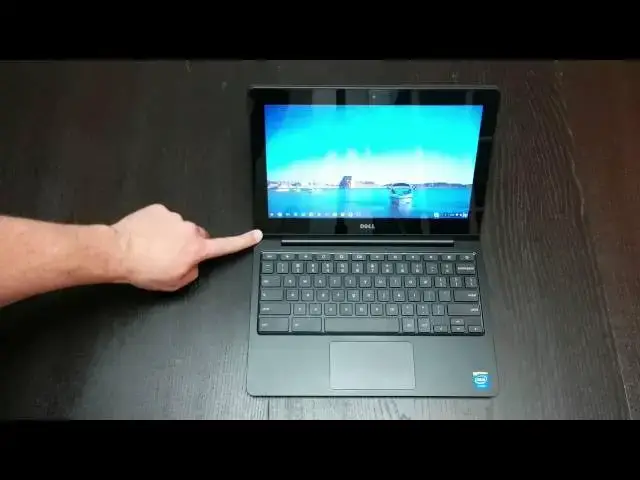
In this one, I review the Dell Chromebook 11. Solid, well-built and sturdy, does the Dell come in as the Chromebook to have? We'll see!
・・・・・・・
Subscribe to the channel: http://bit.ly/2xFuj6L
Shop Chromebooks on Amazon: https://fave.co/2OuedYL
Read more: https://chromeunboxed.com/
Follow us: https://www.instagram.com/chromeunboxed
https://twitter.com/chromeunboxed
https://www.facebook.com/Chromeunboxed
https://plus.google.com/+Chromeunboxed
Show More Show Less View Video Transcript
0:01
[Music]
0:12
hey folks Robbie pay with Chrome on box
0:14
coming at you today with an a full
0:16
review of the Dell Chromebook 11 now
0:19
this device has an interesting history
0:22
uh it actually began as just an
0:24
education uh device it was it was geared
0:27
completely towards schools then they
0:28
said okay you know seems like pretty
0:30
good uh device and there seems to be
0:33
quite a bit of interest in it let's go
0:34
and make it public facing and allow the
0:36
general consumer to get a hold of it
0:37
they did so uh demand was overwhelming
0:40
so they pulled it back off and so the
0:41
only way to get a hold of one still
0:43
technically through Dale is to have a
0:46
Dell representative get one for you and
0:48
so most of us including myself don't
0:50
have one of those or don't know anybody
0:52
that has one as well so ended up buying
0:55
it through somebody else selling it on
0:56
Amazon that kind of thing um and kind of
0:59
went all in on this device after reading
1:01
a lot of reviews deciding okay um for
1:04
the time being probably for the next few
1:06
months at least until a Broadwell uh
1:10
processor processing Chromebook comes
1:12
out uh I'm probably going to be sticking
1:14
with Haswell and so i' like something
1:16
that's a little more mobile than the
1:17
hp14 I just want something different
1:19
I've had the hp1 14 for almost a year so
1:21
I sold it to a friend uh he's rocking
1:23
out Linux and um he's got Steam and
1:27
doing all kinds of cool stuff with it so
1:29
he's enjoying that uh and I'm really
1:31
enjoying this Dell I really am U but
1:33
before we uh move on let's
1:37
uh there this is my uh work device I'm
1:40
doing all my work from um at this point
1:43
so it is holding its own it uh around
1:46
the sides here we've got um super speed
1:48
ports they not blue but they do have SS
1:50
so they're 3.0 uh combo Jack here full
1:53
size HMI nice large charging port which
1:55
I like uh they feel more robust I don't
1:58
have to worry about them breaking uh SD
2:00
card slot it fits pretty flush uh here
2:04
we go kind of see it sticks out just a
2:07
little bit just enough um and so I don't
2:09
know if that would bother most of you
2:10
but doesn't bother me at all uh nice
2:13
wide hinge back here then we have the
2:15
fan vents screws and two large feet
2:18
instead of the little Nubs so an
2:21
interesting tape really industrial
2:23
looking design going on here so you kind
2:25
of have this these sharp Corners kind of
2:27
coming around here and instead of the
2:29
rounded stuff so you kind of have a
2:31
breake there and speakers are in that
2:33
kind of tilted up section there so that
2:35
it does project pretty well again
2:37
they're mediocre um I haven't seen a
2:39
Chromebook other than the pixel and the
2:41
hp11 that have speakers that are any
2:43
worth any note whatsoever however this
2:45
device does have a very nice um higher
2:48
end I don't want to use the word premium
2:51
uh premium to me is Chromebook Pixel
2:52
it's MacBook Air you know that kind of
2:54
thing uh it's not quite there but it's
2:57
very solid no creaking it feels good it
2:59
is a little on the thick side and on the
3:01
heavy side but it's not something that
3:03
you know you couldn't grab and take with
3:05
you throw it in a backpack it's
3:06
definitely that size of device so uh for
3:09
me most times I'm plugged into a 24 in
3:12
1080P Monitor and I don't use it but
3:14
every once in a while I want to open
3:16
this thing up have it as a secondary
3:17
monitor and sometimes I'd like to take
3:20
it home and be able to do some Computing
3:21
from the couch and maybe work uh not at
3:24
a desk every once in a while not very
3:26
often and so that's why I kind of
3:27
thought well the 11in formfactor gives
3:29
me a a little bit more versatility plus
3:31
I've read glowing reviews of this device
3:33
and a lot of people saying of all
3:35
Chromebooks it's it's the best one out
3:37
there right now so I really wanted to
3:39
give it a try like I said kind of went
3:40
all in because I didn't buy it straight
3:42
from Amazon so a return is not going to
3:44
be easy uh it's actually going to be
3:46
difficult so um the question then
3:49
becomes well what do I think about it
3:51
because internally it's not doing
3:52
anything different so we have the hp14
3:55
with 4 gigs of RAM we got the AC C720
3:57
with that has 4 gigs of RAM it's not
4:00
doing anything different it's a Haswell
4:01
class Celeron Processor 4 gigs of RAM
4:03
blah blah blah 2995 U you've heard it a
4:06
thousand times and so we're we're in
4:09
that that same Hardware malaise that
4:11
we've been in for a while we kind of had
4:12
this this whole slew of Celeron
4:14
Processor Chromebooks come out now we're
4:16
kind of in that bay trol mode which I'm
4:17
not a fan of at all uh with a little bit
4:20
of tiger K1 uh sprinkled in there for
4:22
good measure and that's it that's kind
4:24
of what we got to choose from so for me
4:26
right now the Haswell is still the top
4:28
dog uh when we're talking about normal
4:30
consumer class uh Chromebooks the uh
4:33
obviously with the pixel excluded from
4:35
that and so day-to-day operation I'm not
4:38
going to go through showing you what it
4:40
does go look at the hp14 review go look
4:42
at the C720 review that it's the same
4:45
thing Chrome boxes they all run the same
4:46
internal Hardware so it's going to do
4:47
all the same things all the same ways so
4:50
what sets this thing apart what makes
4:51
this thing different what makes it
4:52
better or worse uh in my opinion I will
4:55
start off with the screen I like the
4:57
fact that it's not matte it's not an
4:58
anti-ar screen you can see reflection in
5:00
it um some people think that's good some
5:02
people think that's bad I tend to think
5:04
it's good I think the screen looks
5:05
clearer through clear plastic um I also
5:08
don't like the the the grit that anti-
5:11
glair puts on on the screen I think it
5:14
takes a low resolution to makes it look
5:15
even more crummy um and so that is not
5:18
the case with this device I don't care
5:20
for the huge bessels I think they almost
5:22
could have put a 12in monitor in this a
5:24
12-in display in this uh and easily
5:26
gotten away with it no problem I mean
5:28
these bezels are huge so that seems a
5:30
little bit wasteful uh makes it look a
5:32
little cheap so I'm not a huge fan of
5:34
that but I've done a few days of work
5:35
with this in my lap no problem again
5:38
it's no better or worse necessarily than
5:40
any other Chromebook on the market the
5:42
colors are washed out the viewing angles
5:43
are terrible it's a TN panel um there's
5:46
just nothing to say for them they're
5:48
terrible terrible place and so um I'm
5:51
not a fan of the fact that it's glossier
5:53
around here but it's not glossy plastic
5:54
like uh an extra piece here it's
5:56
actually one solid piece all the way
5:58
across almost as if that we're going to
6:00
have a touchcreen it does
6:01
not uh the keyboard is fantastic typing
6:04
on this thing and just you know holding
6:06
it it's it's solid uh when you hold it
6:08
from the corner it doesn't Creek and
6:10
bend and twist and all that kind of
6:11
stuff and typing on the keyboard the
6:13
keys travel well they're
6:15
quiet uh they feel great Dell did a
6:17
great job there again you have even in a
6:20
small form factor a nice large trackpad
6:22
all five fingers for the cross it it's
6:24
about as big as let pull this one over
6:27
here the much larger 13in um Acer uh
6:32
Chromebook 13 it's actually almost exact
6:34
same size trackpad and so they they
6:37
crammed a large trackpad in here which
6:39
is which is really awesome um actually
6:42
let me back
6:45
up let me bring this
6:47
over so you have basically the same size
6:50
trackpad that's in the Acer Chromebook
6:53
13 so uh they did a good job in cramming
6:55
a large trackpad into a small device and
6:58
so those two things cou together when we
7:00
talk about input uh it's as good of an
7:02
experience as I've had on Chromebook it
7:04
really is an enjoyable experience to
7:05
type as you can kind of see the keys are
7:07
nice and well spaced they didn't waste a
7:09
lot of room on the sides um you have a
7:11
decent decent size over here and this
7:12
inside here is like a rubberized kind of
7:15
plastic uh so it feels really good on
7:16
the hands the trackpad is is slightly
7:19
textured but moves really well it's very
7:21
responsive and has a nice quiet
7:23
click um so the whole thing input wise
7:26
feels great again I'm not a fan of the
7:28
screen um and there haven't been too
7:31
many Chromebooks where I am a fan of the
7:32
screen so I'm not really surprised by
7:35
that um and I did before I got this I I
7:38
think when I did the unboxing I
7:39
mentioned this I really thought there
7:41
was a chance I was going to be able to
7:42
turn this open the screen up and
7:43
actually replace it with the hp1 IPS
7:46
panel I've since found out they use a
7:49
different pin format uh and there is a
7:51
thing that could possibly convert it but
7:54
I have no clue how that would fit in
7:55
there and I'm not really a fan of
7:56
opening the stuff up and maybe breaking
7:59
something and not going back together
8:00
and blah blah blah all that stuff I'd
8:02
like to be able to sell it because I
8:03
really feel like when betra processors
8:05
come out uh I'm going to go with a
8:07
Chromebook that has an IPS display in a
8:09
bet or not bet Trail Broadwell processor
8:12
uh in it and so that's kind of my hope
8:14
that somewhere early in the year we're
8:16
going to see something like that for
8:17
right now I've got uh you know I've got
8:19
Ubuntu with gnome running on it uh in
8:22
here just fine why I say that I think my
8:27
battery might have just died
8:37
perhaps not sure what I just
8:41
did I likely have upset it because I had
8:43
it plugged into an external monitor
8:45
while Linux was open um so I've done
8:48
this a couple times where I've yanked
8:50
the HDMI cable out before taking the
8:53
time to shut down Linux in the
8:56
background you're asking Chromebook to
8:57
do quite a bit there but um I do have uh
9:01
Linux uh with a BTU 1404 running in the
9:06
background
9:07
um and it does so flawlessly no problems
9:11
I mean obviously if I do something silly
9:12
like what I just did we run into issues
9:15
but I will show you that up and running
9:16
real quick right this back up
9:21
here so for those of you who have not
9:23
taken the dive and done this yet uh you
9:26
only have to do all this kind of command
9:27
stuff upon
9:30
restart to start the ubu environment up
9:34
but 1404 runs just fine I have not had
9:37
any issues with it and gnome is actually
9:40
pretty nice little operating system so
9:42
actually got you know Google Chrome
9:43
running over here as
9:45
well it's nice and quick and it does
9:48
just fine and so we can switch
9:51
environments
9:53
just like that so it's nice and quick
9:56
again I'm we're not going to sit and get
9:59
stuck on um how things run but we see
10:02
things moving back and forth really
10:04
quickly and chrome all on put stuff in
10:08
there you go be
10:16
happy so we can bounce back and forth
10:18
between environments nice and quick
10:21
which is pretty awesome um and so
10:24
overall the the experience of this thing
10:26
I I have to agree with most of the
10:28
reviewers is very nice they've done a
10:29
good job of making a very solid feeling
10:31
Chromebook uh it's it's impressive in
10:34
most ways and and in all the ways that
10:37
you would expected to be with the same
10:38
internals as the hb14 H6 720 it's it's
10:41
as good as performance is going to get
10:43
right now that being said um I still am
10:48
waiting for the Chromebook that's really
10:50
going to make me feel like I'm not
10:52
sacrificing something um and I was so
10:55
excited when I saw the Toshiba
10:56
Chromebook 2 coming with an IP s panel
11:00
and and then I saw it was going to be
11:02
Bay
11:03
Trail um eventually I think we're going
11:05
to get one that that ticks all the boxes
11:08
hopefully um fantastic display uh
11:11
something in that 12 to 13 inch range
11:14
great keyboard trackpad a little bit
11:16
more memory maybe a 32 gig hard drive at
11:20
least four gigs of RAM um and all the
11:22
connectivity that we're looking for
11:24
hopefully we'll see that in a package
11:26
soon um I can't imagine they can't pull
11:29
that together for around 400 bucks I
11:31
just it I can't imagine that's not
11:34
possible maybe 450 and so I think
11:36
there's a lot of people that would
11:37
gladly pay especially as Chrome is
11:39
starting to be able to run Android apps
11:41
and we're starting to see more and more
11:42
functionality day in day out from Chrome
11:45
OS uh it it is becoming a legitimate
11:48
alternative to other operating systems
11:50
people are making the switch I've got
11:52
lots of people in my family that are
11:53
doing it but granted I'm a huge
11:55
Chromebook Trumpeter but um people in my
11:58
office are you know I'm lending them
11:59
Chromebooks and letting them try them
12:01
and and they're more and more impressed
12:03
each and every time Chrome gets better
12:05
and better and better and faster over
12:07
time and it's just so unlike most
12:09
operating systems and so while Adell is
12:12
a great computer and I would dare say um
12:15
I like it better than HP because that's
12:19
1366 X 768 resolution over 14 inches on
12:22
the hp14 was always worrisome to me and
12:25
the screen was terrible um the screen's
12:27
a little better uh and at least when we
12:29
crunch the pixels down a little bit it
12:30
looks a little sharper but uh overall
12:33
the performance is the same and I like
12:36
the HP4 keyboard trackpad I like these
12:39
better um this is probably one of the
12:41
best input experiences I've ever had uh
12:44
feels really good um typing on it and
12:46
obviously it runs really well um with
12:48
with this processor but hopefully in the
12:51
next few months we're going to start
12:52
finally seeing the next generation of
12:55
Chromebooks really I think Bay Trail was
12:56
kind of I don't know stop Gap kind of a
12:59
filler kind of thing and I think betra
13:01
has a place those processors I think can
13:04
can fill that 00 $250 thing of hey I
13:07
need something on the on the couch
13:09
around the house but for those people
13:10
that really want to start using Chrome
13:12
OS to do a lot more stuff uh myself
13:14
included I think there is a market um
13:18
for one that that doesn't sacrifice
13:20
anything really that's in that $400 to
13:21
$500 range that again you could spend
13:25
$400 to $500 probably on a comparable PC
13:28
but now we're we're finally starting to
13:29
get to the place where we can start
13:31
having the conversation about I choose
13:33
Chrome OS because I like the way it
13:36
operates not because I can get a cheap
13:38
uh device and so hopefully um we're
13:41
going to see some of those things start
13:42
to take fruit or start to take hold some
13:44
of that fruit come in the next six
13:46
months especially with uh Broadwell
13:48
processors coming down uh soon and so if
13:53
you have any other questions feel free
13:54
to put them in the comments as I've said
13:56
in the last couple videos um I apologize
13:58
if I haven't gotten back to some of you
14:00
all in a timely manner uh I've just been
14:02
incredibly busy with work you even hear
14:04
notifications going off right now um I
14:07
I've just been really really swamped
14:08
with work so even just getting these
14:10
videos done is is pushing it for me and
14:12
so I will try to get back to your
14:13
questions and comments uh I enjoy the
14:16
fact that people comment back and forth
14:17
to each other down beneath them a lot of
14:19
a lot of you guys are just as
14:20
knowledgeable as I am about this stuff
14:22
and so you can answer some of those
14:23
questions and it's awesome uh if you
14:25
like this video give me a thumbs up
14:27
appreciate it subscribe to the channel
14:29
the more subscriptions hopefully the
14:30
more Chromebooks I'll start seeing some
14:32
Chromebooks without having to pay for
14:33
them um that will just help me do more
14:35
reviews and help me get more stuff to
14:36
you guys more often so appreciate you
14:39
all for watching and until next time
14:41
have a good one