0:00
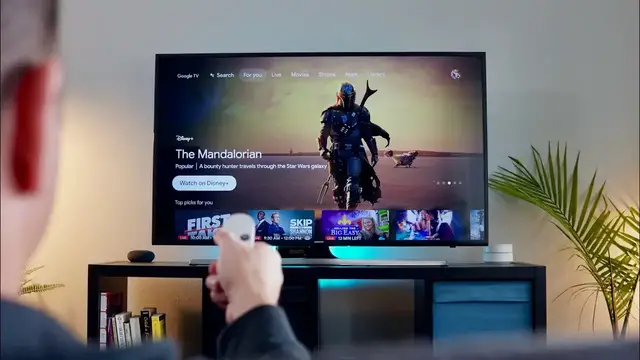
This is the new Chromecast with Google TV
0:04
And though it bears a lot of resemblance to the four Chromecasts that came before it
0:08
like this one, the Gen 3 Chromecast, there are a few things about this one that set it apart from those older Chromecasts
0:15
and two things in specific that make it easy to recommend as kind of the Chromecast for everyone
0:22
Let's check it out. before we get into all that today's video is brought to you by nordvpn they're the vpn of
0:31
choice for millions of consumers because they're awesome at what they do and that is keep you safe
0:36
and secure whether you're at home or out and about on the web if you'd like to learn more about them
0:40
and their services head over to chromeinbox.com forward slash nordvpn and you can learn more and
0:44
get started today before we get rolling into those two things that i mentioned i do want to preface
0:49
this was saying this video is not going to be a full walkthrough of the entire Chromecast with
0:54
Google TV experience. And if you want to see more about that and details about the outside of the
0:59
Chromecast that honestly is going to sit behind your TV and you're never going to look at it anyway, you can check out our unboxing. We really kind of got into the details about what the thing
1:07
looks like, it feels like, and all that kind of stuff. We'll link that in the description below
1:11
But right now, we really just want to talk about what it's been like to use the Chromecast with
1:17
Google TV on a daily basis in our homes and why it is we feel like this is honestly the Chromecast
1:23
for everyone. So reason number one that this Chromecast is better for almost everybody than
1:29
the old Chromecasts is this guy right here, a remote. And honestly, I've been the type of person
1:35
that for the longest time never really understood why people made such a fuss about having a remote
1:40
for stuff on their television. After all, for years, I've been the type of person that had a
1:45
Chromecast on every TV in the house and just got used to picking up a device and casting stuff up
1:49
My kids do it. My wife does it. We switch to YouTube TV. So literally everything we watch
1:54
on a television has gone through a Chromecast. But when we've handed a Chromecast off to family
1:58
members we find that they might use it for a handful of things but ultimately they always come back to whatever device they have around that has a remote So a Roku stick Amazon Fire Apple TV something like that And it always just been kind of curious to me why people can make that transition over to
2:15
Chromecast alone. But after using the new Chromecast with Google TV for a couple of weeks
2:21
I kind of get it now. I get the convenience of being able to just pick the remote up and turn
2:25
the television on or change the channel or adjust the volume or change the input or whatever I need
2:31
to do. I can do all of it with this one remote. As long as you go through the setup process that
2:35
they take you through when you first turn it on, everything's set up and ready and you can control
2:40
everything with this one remote and put your other remotes away. No lie, since I've got this thing
2:45
set up in my house, I've not picked up my other TV remotes at all. I sit down, I pick this up
2:51
I don't hunt for my phone anymore. I pick it up, turn the TV on, it switches inputs, I can adjust
2:56
volume on the soundbar that's connected to my TV. Everything just works with one remote. And even
3:02
if I don't know exactly what it is I'm going to go watch, I can navigate this UI and get to what I
3:06
want to see. And then if I can't find it with the UI, I just hold that Google Assistant button down
3:11
and say what I want into the remote and boom, it's up on the screen before I have much time to even
3:16
think about it. So that's a big change and a big departure from old Chromecast experience. Doesn't
3:21
mean that the Chromecast stuff doesn't work. I can still cast, I can still create speaker groups
3:25
but the addition of a UI and a remote to navigate the system is a massive change and it's a right
3:31
step in the right direction from Google. Speaking of that interface, that's kind of the big second
3:36
reason why this Chromecast is so much better than the Chromecast that came before it. You can have
3:41
a remote and that's all fine and well, but if there's no UI on the screen that actually allows
3:46
you to control anything, that remote's really not that great. Fortunately for the Chromecast with
3:50
Google TV, Google has rolled out this new skin for Android TV called Google TV that is kind of
3:56
taking the place of Google Play Movies and TV. It sounds really confusing, but in the end, the end
4:03
result of what they've created here is actually pretty nice. Once you fire up this new Chromecast
4:08
and start looking around what you start seeing is all this content that is slowly but surely geared toward your viewing preferences So there a For You tab that has suggestions on new shows and new
4:19
movies for you to watch. In the TV and in the movies section of this interface, there's new
4:24
stuff and stuff that you've watched and stuff that's in your library. You can view live TV if
4:28
you're a YouTube TV subscriber. You can see your DVR. You can see stuff that's new in your DVR. You
4:34
see your entire DVR, like all of it, all your content that you're going to want to stream. And
4:39
by the way, almost every streaming service is already a part of this thing because again
4:44
it's Android TV. So these apps have been around for quite some time. It's just all there for you
4:49
And I love the fact that Google has taken the time to create an interface that focuses not so
4:54
much on the individual apps and scrolling through a bunch of apps, but more on the content itself
4:59
because ultimately this is a thing that is supposed to deliver content to you and
5:04
shows and movies, not a bunch of applications. Now, don't get me wrong. It doesn't mean you can't
5:08
install apps and go to the individual apps. You can go to the apps tab and scroll down to Netflix
5:13
and click in and move around Netflix if you want. That's the flexibility that you have here. You can
5:17
install some games if you want. There's not a ton of storage. It's only got four gigs on there
5:22
And clearly this thing is meant to install apps like Netflix or Hulu or HBO Max that don't take
5:26
up a ton of storage on here. But again, it goes back to this ultimate flexibility. It's a Chromecast
5:31
You want to cast stuff up? You want to make speaker groups? Great. You want to navigate to an app and look around their stuff
5:37
Great. You want to just let Google tell you what it thinks you want to watch
5:42
Cool, that's fine. You want to ask Google Assistant to watch something? Great, that works too
5:46
There's so many different ways you can consume content on this thing. The UI is already well thought out, and I'm sure in the coming months
5:53
Google will continue to refine it into something really, really awesome. Now, those two reasons alone are good enough reasons to say
6:00
this Chromecast is going to be great for just about everybody. But I do have to say just about
6:05
everybody still because there is a small contingent of people who are buying Chromecast
6:10
specifically to play games on Stadia which is Google streaming gaming platform Well right now it doesn quite work Again because this isn a Chromecast Ultra which is what it works on right now Google taking a different approach with it and saying hey we going to make sure the Stadia app for Android TV which is Google TV now is going to
6:29
work well on this Chromecast. And they're working on it and they said it will be out early in 2021
6:33
So when that does happen, then this kind of becomes the Chromecast for everyone. But apart
6:38
from that group of people that need a Chromecast in order to play Stadia games, this really is the
6:43
Chromecast for everyone. It's so much better than every Chromecast that's come before because it
6:48
adds all this extra utility, all this extra UI, a remote, an ease of use that just can't be matched
6:54
by anything that's come before it. And I think it's going to do a great job competing with the
6:59
likes of Roku and Amazon and Apple TV in this space, especially because it comes in at $49
7:05
And this isn't like the budget version that Google's put out and you're incentivized to go
7:10
buy the nicer ones. This is the one and it behaves really well. The UI moves around fluidly
7:15
and it would just easily sink into anyone's usage patterns if you bought it for them as a gift or
7:20
something like that. They just have to sign in with a Google account and start using all the
7:24
services they're accustomed to using on whatever other streaming platform they've been using
7:28
It's just thoughtfully put together and has all kinds of tools, you know, Chromecast ability and
7:33
Google assistant that all come together in one package that honestly just feels like it's worth
7:38
more than 49 bucks. So Google has killed it with this. We wholeheartedly recommend this device and
7:43
look out for new videos down the road where we'll experiment and see what other things we can get
7:47
away with. But ultimately, if you want a good streaming dongle that has a remote, a great UI
7:53
and a great experience, you can't go wrong with Google's new Chromecast. Guys, that's been it for
7:58
this one. If you like this video, go down there and hit the subscribe button. Make sure to give us
8:02
a thumbs up as well. Be sure and hit the notification bell if you'd like to be alerted when we make future videos just like this one
8:07
Until next time, we'll see you