Up next in 10



Be sure to check out my new home on the web for everything Chrome! http://chromeunboxed.com
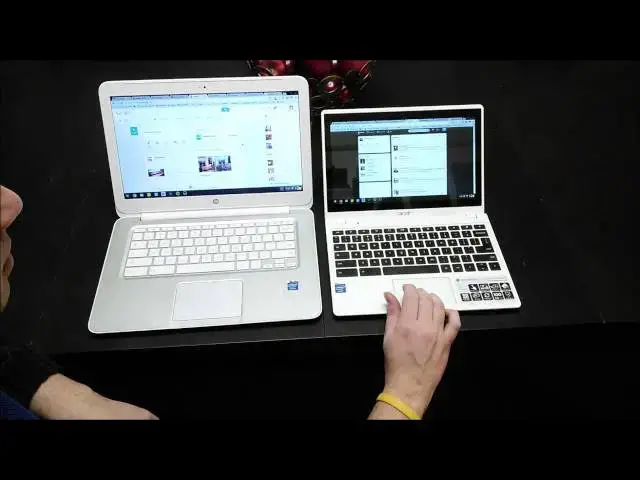
In this video I compare two Chromeboooks with identical internals, except for the RAM. The HP 14 has 4GB while the Acer C720P has 2GB. Without any extras running in the background, I put them through their paces to see how different the RAM limitations really are.
Show More Show Less View Video Transcript
0:00
hey folks Robbie payt here with chrome
0:02
bump box again today uh we're going to
0:05
be doing a comparison specifically um
0:08
pitting the ram differences against one
0:11
another between the HP Chromebook 14 and
0:13
the Acer c720p I had a few comments uh
0:16
between YouTube the website Google+
0:19
asking if I would do this particular
0:20
comparison without having crew on
0:24
running in the background so for those
0:26
of you who haven't seen the other videos
0:27
who don't know uh there's a an AB ility
0:30
to with Chromebooks because it's running
0:31
on a Linux shell to actually install
0:34
untu through the use of a script called
0:36
Crouton and it actually allows you to
0:38
Just Bounce right back and forth between
0:39
the two I do have a video uh detailing
0:42
how to get that done so if that this
0:44
perks your
0:45
interest and you want to get that done
0:47
I'll put the link in the video or in the
0:49
description of the video
0:50
below um but what we're really
0:53
concentrating here on um I do have a
0:54
fresh install on the Acer I'm getting
0:57
ready to send my review unit back um and
1:00
so I just power washed it and then
1:01
remembered to do this video so it's a
1:03
fresh a fresh install and then I have
1:05
logged out of um out ofu on the HP
1:10
Chromebook 14 and so we are just running
1:14
Chrome OS at this point on both of these
1:15
machines and so the
1:17
hp14 uh over here has 4 gigs of ram
1:21
versus the 2 gigs here and so a lot of
1:24
people were curious whether or not that
1:25
was going to cause performance issues um
1:28
and with with everything else closed
1:29
down if we're just in the Chrome OS
1:31
environment so what I've done to kind of
1:33
cut down cut down time on this video is
1:35
I've opened up quite a few uh tabs let's
1:38
see got 1 2 3 four 5 six seven nine tabs
1:41
on each one the exact same web pages uh
1:43
I also have running down here at the
1:46
bottom we have um keep I have the file
1:49
explorer I have pocket text which is
1:51
just a simple text editor and on one
1:54
I've got uh Google play music The Other
1:55
I've got Spotify running so we've got
1:57
music actually playing you can hear that
2:01
maybe it's not playing
2:13
now okay so we're are playing music here
2:17
I'm going the mute see if we're still
2:19
[Music]
2:24
going and
2:26
then so got music playing over here too
2:28
so uh just so you know that music is
2:30
playing in the background on both so
2:32
that's going to chew into some of that r
2:34
on both of them and that's kind of part
2:36
of the reason we're doing this so just
2:38
to show you really quickly I do have
2:40
some pretty uh intensive websites up we
2:43
got the Verge Android Central and Gadget
2:46
I've got a video running in the
2:47
background I'm going rewind that on both
2:49
of these so we don't
2:57
stop got Google+ we got Twitter Facebook
3:02
Cloud9 which is IDE and chrome unboxed
3:06
you know this one I need to get to
3:07
YouTube
3:12
here we'll drag that into the fourth
3:15
spot
3:31
sorry
3:35
guys like I said I want to have the
3:37
exact same things running between the
3:38
two of them you can already see uh this
3:41
is kind of giving you some indication
3:43
for the most part it's uh it's doing
3:45
okay it's a little laggy on YouTube but
3:48
I've got a lot of stuff going right now
3:51
so um that's not shocking at all okay so
3:54
we've got that video running in the
3:56
background
3:57
um and so there's a lot of things going
3:59
that are that are killing Ram um and so
4:02
that's that's kind of the point of this
4:03
video is to see uh for those of you who
4:05
don't know you take three fingers and
4:06
swipe up and see uh the open
4:17
programs well there it
4:19
goes there's a there's a perfect
4:21
performance example um again I'm putting
4:23
both of these machines and really heavy
4:25
load
4:27
um but that three fingers there it goes
4:30
here buttery smooth um and we're running
4:33
all the same stuff I take that with a
4:35
grain of salt some of that could be I
4:37
think the track pad on the Acer isn't
4:38
quite as responsive as the one on HP so
4:42
that could be part of it um another
4:44
thing you'll notice you do three fingers
4:46
left and right you can actually swipe
4:48
through the tabs hopefully you can see
4:49
that but there's a little white
4:50
highlight that just kind of back and
4:53
forth um and it's nice and smooth again
4:55
on the HP I just kind of swing through
4:58
and jump to any any one of these and the
5:00
moment I jump to it uh scrolling is
5:03
responsive so that's a big deal um if
5:05
you roll to something and youve got to
5:07
wait five or six seconds for it to load
5:09
uh that can be a little bit annoying and
5:11
so really we're seeing these long web
5:14
pages we're not seeing any Checker
5:15
boarding which is indicative of memory
5:17
running low uh Android Central is a big
5:20
page no Checker boarding there so the
5:22
whole page is loaded in The Verge oops
5:26
The Verge no Checker boarding there we
5:28
do have a drop in frame rate as far as
5:30
how it's scrolling uh that's not
5:31
completely surprising on either one cuz
5:33
we have some of this Parallax stuff
5:34
going on here um that stuff tends to be
5:37
heavy even if that's the only thing open
5:39
but ultimately it is responsive swing
5:41
all the way over chrome unboxed and
5:43
again nice and smooth whole page is
5:45
loaded no problem switching through
5:46
these guys no problem getting multiple
5:49
tabs open uh none of those issues uh we
5:52
really see some pretty nice performance
5:54
going on here with the
5:56
HP back over here again we we saw the
5:58
three finger Swip
6:01
um come
6:06
on select one U not working so well
6:11
um we'll use the keyboard shortcut here
6:15
the keyboard one's fine see I mean it's
6:17
nice and smooth no issues at all so I'm
6:19
really thinking it could be trackpad
6:21
responsiveness going on here uh with the
6:23
Acer um let's do some three finger
6:26
swiping and we
6:28
see you see it really lagging again um
6:32
just being scientific about it it could
6:34
be a mix between the processor the ram
6:37
um or the the tactilus of the of the
6:41
touchpad so I'm not sure so let's go to
6:44
Android Central and do quick scroll and
6:46
see a lot of Checker boarding happening
6:47
it's catching up pretty quickly um a
6:49
little bit of Checker boarding let's
6:51
move over to gadget same thing just
6:54
Checker boarding but the scrolling is
6:56
responsive uh which is interesting the
6:58
two- finger scrolling is perfect ly
7:00
responsive um so that the three finger
7:02
gesture is not happening is kind of
7:04
strange um let's look at the the YouTube
7:07
videos here um frame rates are good
7:12
here it looks like frame rates are
7:14
holding up just fine over there as well
7:15
that's a good thing uh let's move over
7:18
to Google+ again usually pretty wretched
7:21
um on Chromebooks and we're dropping
7:23
some frames here on the hp14 it's not
7:25
terrible but there was a couple skips
7:27
and jumps
7:31
check Google Plus here and again yeah
7:34
dropping some frames but really not
7:36
unusable at
7:38
all little issue in responsiveness there
7:41
but again not not bad not unusable but
7:43
right there you saw about a second
7:45
delay let's check out Facebook getting
7:48
you kind of seeing the same thing kind
7:49
of a
7:50
jumpy um jumpy scrolling let's try
7:54
Facebook or Twitter here a little bit
7:56
jumpy there too as well
8:01
Facebook no issues
8:03
here uh IDE I just have this loaded just
8:06
because it's something I actually use so
8:10
I probably never going to have all these
8:11
particular tabs open but I wanted to
8:14
make sure we're not loading uh simple
8:16
pages with nothing on
8:18
them saw a little checker board Happ in
8:21
there not
8:22
much and so overall
8:25
um really what I have to say you know
8:27
switching between if you're using
8:29
keyboard shortcuts you saw a little jump
8:31
there not bad um but really no issues
8:35
here um switching between between stuff
8:40
uh between programs between tabs is
8:43
smoother on the hp14 looks like it does
8:46
keep stuff in here a little bit longer
8:48
and my guess would be if I started
8:50
piling on another 10 or 12 tabs um we
8:53
would start to see some some lag um and
8:57
I'll just do I'm just going to duplicate
8:59
it
9:02
out about five or six more of these
9:05
guys them all get loaded we'll do the
9:09
same thing over here kind of as our our
9:10
last test and so my guess is if you
9:16
um if you're a type of person that has
9:18
20 tabs open at a
9:21
time um a 2 gig Chrome book's probably
9:23
not going to be for
9:27
you so we have one two three four five
9:30
six instances 2 three four five six so
9:33
look at the same
9:35
here and you starting to see on HP like
9:38
that kind of Jumpy you know it's not
9:40
nice and smooth like it was a few
9:42
minutes ago it's having some issues uh
9:45
page dat is loading fine this is still
9:49
responsive so that's good to
9:53
see see how our forward and back
9:56
work so those you don't know two fingers
9:58
across can actually um take you back
10:02
that works just fine there
10:07
so again three finger scrolling is
10:09
working okay and this may be a poor test
10:13
simply because it's the same page loaded
10:15
in so it may be cheating a little
10:20
bit a little bit of lag but I mean we
10:22
got a lot of tabs open we got a lot of
10:23
programs open so I mean the Acer is
10:25
really holding its own I think in terms
10:27
of two gigs now I did see some
10:28
performance issues if you're running
10:30
Crouton and so for me uh professionally
10:33
speaking I I need to have for now I
10:35
still need to have Crouton running in
10:37
the background I don't do a lot in it I
10:38
usually just have inkscape running in it
10:41
but I do have to have it and so uh these
10:43
are things for you to think of if you're
10:45
going to have a Chromebook and you're
10:46
going to try to make it your daily
10:47
driver your main device um and that's
10:50
going to require a couple things in that
10:52
Linux environment it may be worth
10:55
thinking through hey right now
10:56
regardless of what uh some of these
10:58
companies put in their devices a toiba
11:01
upcoming Toshiba Chromebook or a
11:03
touchcreen on the Acer and these things
11:05
seem really compelling if lots of tabs
11:07
and needing Linux open are going to be
11:09
workflow issues for you those are things
11:11
to Think Through um because those things
11:13
are going to become frustrating in a
11:14
short amount of time whenever your Tabs
11:17
are jumping around and stuff won't load
11:19
and you know pages are having to reload
11:21
but I have to say uh not having Linux
11:23
going in the background uh the Acer
11:26
fared a whole lot better uh than it did
11:28
earlier when cruit uninstalled so thanks
11:30
you guys for kind of pointing that out I
11:32
didn't even think about that when I was
11:34
when I was doing the review and kind of
11:35
brush that off and so I think this
11:37
hopefully this will be a little bit more
11:38
helpful if you plan on staying in the
11:40
Chrome OS operating system and not not
11:42
leaving it I really think there's an
11:45
argument for saying that two gigs is is
11:47
enough right now um is it is it the
11:50
greatest performance possible no not
11:52
really um you do get a little
11:54
performance bump out of the four gigs
11:56
but only when you're heavily
11:57
multitasking whenever you're keeping it
11:58
down to 4 five tabs and and the music
12:01
player open I really don't think you're
12:03
going to see too much of a difference
12:04
between the two devices and so uh it
12:07
makes me look forward to seeing what the
12:08
Toshiba can pull off uh with two gigs of
12:10
RAM as well so um hopefully that device
12:13
will become uh fully available actually
12:15
to order within the next 3 or four weeks
12:17
and I'll get my hands on that and we'll
12:19
get a review of that going but um check
12:21
out the other videos uh you can
12:23
subscribe below if you like this video
12:24
give me a thumbs up um also you'll see
12:27
in the description uh a web address
12:29
Chrome unbox dcom it's where kind of we
12:31
can pile all the stuff together any kind
12:33
of latest Chrome news that I think needs
12:35
to be put out there I try to get on the
12:37
site and so uh the more people that that
12:40
come the the more probability I'm going
12:41
to start getting more devices to review
12:43
and and more stuff I can pass on to you
12:45
guys so um so subscribe like the video
12:49
uh share the website check it out do all
12:51
those kinds of things and thank you so
12:52
much for watching uh thanks for
12:54
subscribing thanks for uh just being a
12:56
part of all this and uh I'll see you
12:58
next time thanks
#Laptops & Notebooks