live_tv
Livestream Starting Soon
00
Hours
:
00
Minutes
:
00
Seconds
Up next in 10



Sponsored by NordVPN. Try it out and get 75% off a three-year plan for a limited time! Click here: https://chromeunboxed.com/nordvpn
Shop Chromebooks on Amazon: https://fave.co/2OuedYL
・・・・・・・
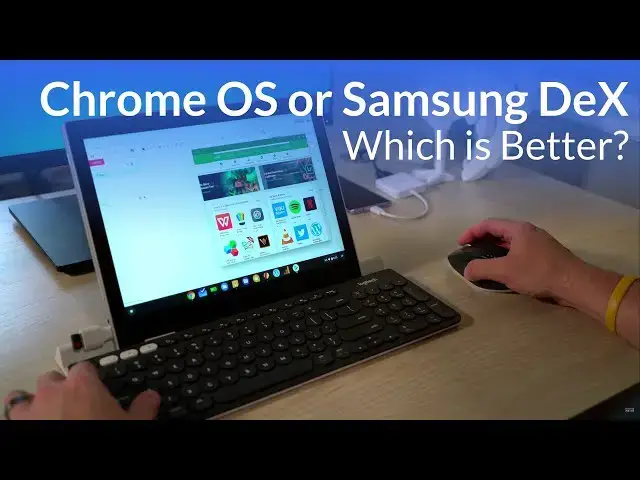
With Samsung having its desktop UI DeX on the market for over a year now, the introduction of the Galaxy Tab S4 has brought new questions to the table; mainly causing users to wonder whether or not DEX on a tablet is like a Chromebook.
We don't think so, and we think Chrome OS is the better platform all around, and we want to show you why. Read more: https://chromeunboxed.com/
Join our newsletter: http://bit.ly/2WjCDm7
・・・・・・・
Subscribe to the channel: http://bit.ly/2xFuj6L
The Music We Use - PERFECT for YouTube: http://bit.ly/31W6PYP
Become a member of Chrome Unboxed to help us make our channel even better, and for access to exclusive perks: http://bit.ly/CU-join
Show More Show Less View Video Transcript
0:00
[Music]
0:08
we tend to get a lot of email and
0:10
comments in the comment section asking
0:12
the same question maybe in different
0:14
ways
0:14
should I get a Chrome OS device some
0:17
sort of tablet or convertible or would I
0:19
be fine with an Android tablet and that
0:22
question comes up a lot of times and
0:23
sometimes it's it's hard to communicate
0:25
the difference between the two right
0:27
because now we have Chromebooks that run
0:29
Android apps and you have Android
0:31
devices that now have desktop type modes
0:34
and so that's what we kind of want to
0:36
talk about a little bit today really
0:37
quickly because Samsung now has had
0:39
their Dex UI available for over a year
0:42
and they've brought out a new tablet the
0:44
Galaxy Tab s four if I'm correct that
0:46
has a keyboard and you can actually dock
0:49
it in the keyboard and then turn on Dex
0:51
which is their desktop UI and use it
0:54
like a desktop and so a lot of users are
0:57
gonna look at that and think huh well
0:59
it's in that the same isn't that kind of
1:00
like Chrome OS because Chrome OS has
1:02
Android apps and Chrome OS has Windows
1:04
and we can move them around and you'd be
1:06
forgiven to think that they're the exact
1:08
same but in reality they just aren't
1:10
they aren't the same thing and there are
1:12
pros and cons to both things and really
1:14
what it amounts to is you've got
1:16
companies trying to solve the same
1:18
problem coming from different sides so
1:20
you've got people using Android OS and
1:24
iPads using iOS that are tablets first
1:28
there are mobile operating systems and
1:29
that's what they are first that's what
1:31
they were designed and built to do then
1:33
you have things like Chrome OS and
1:34
Windows that were built first and
1:36
foremost to be a desktop operating
1:37
system and so both of these sides kind
1:40
of want to meet in the middle to where
1:42
you have these devices that can be
1:43
perfect hybrids that can do both things
1:45
right they can be a mobile device that I
1:47
can carry on a plane and watch a movie
1:48
and listen to music and play some games
1:50
but then when I'm ready I want to turn
1:52
it into a Productivity machine and
1:54
you've got two different ways of going
1:55
about getting kind of to that same
1:57
middle point and I would make the
1:59
argument that I think Chrome OS does
2:01
that way better and it's positioned in a
2:03
way that it's going to do it better than
2:05
any other OS in the coming months
2:07
between hardware and software coming
2:09
together but let's dig into a couple
2:10
things of what makes Dex specifically
2:13
Sam
2:14
you eye different from using a
2:16
Chromebook so before we move forward
2:18
let's talk about what Dex is and
2:20
probably more specifically what it isn't
2:21
Dex is basically an app it's an app that
2:25
runs on phones and now you have the
2:27
Galaxy Tab s4 also utilizing Dex and all
2:30
Dex really is if you remember remix OS
2:32
if you don't you can forget about this
2:34
part but remix OS was just a skinned
2:37
version of Android it was taking what
2:39
ain't had already did which was you know
2:42
run apps and give you a basic home
2:45
screen and launcher but then give you
2:47
the ability to dock things to have a
2:49
Settings tab to have window to
2:51
applications running and so it helped
2:54
people feel a little more comfortable
2:55
when they're trying to be productive
2:56
well Dex does that and I think it does
2:58
it better than most other things we've
2:59
seen it to this point from an Android
3:01
perspective it feels more productive
3:03
because now you see Windows when you see
3:05
quick screen grabs of what Dex can do
3:08
it's really compelling to think this
3:10
could answer the mail I could sit down
3:11
and get really productive with this
3:13
because you get window to applications
3:14
you get a settings bar it doesn't look
3:16
like a phone blown up on a big screen
3:18
and so it's compelling to think hey with
3:20
with this application I could get a lot
3:22
done here I see Windows I see a lot of
3:24
familiar things this is something I
3:26
could probably get work done on but then
3:28
when you dig a little bit deeper that's
3:30
not quite the case so first off I don't
3:31
want to come off as bashing Dex or
3:34
saying that it's a terrible thing it
3:35
isn't it actually works pretty smoothly
3:37
in most instances I mean honestly if I
3:39
was stuck either working just from a
3:41
phone or being able to utilize Dex I
3:43
would take Dex every time no no doubt
3:46
about that but we have to back up and
3:48
think about what it is we're talking
3:49
about when we get into a desktop work
3:52
scenario why is it that you want to sit
3:54
down to a larger screen and window taps
3:56
and all those kind of things what what
3:58
is the purpose of doing that and it's
3:59
it's pretty simple if you really boil it
4:00
down you want the ability to multitask
4:02
and handle all the things you need to do
4:05
for work and productivity because
4:08
honestly I don't sit down at my desk and
4:10
get a mouse and keyboard out and
4:11
extended display so that I can watch a
4:13
movie I want to sit on my couch and
4:15
watch a movie or I want to lay in bed
4:17
and watch a movie I don't I don't sit
4:18
down at my desk and and get out the
4:20
mouse and keyboard and read a book you
4:22
don't do that you hold a tablet you you
4:24
do something with an interface that uses
4:25
your fingers and I don't
4:27
to see a hundred things at the same time
4:29
I want to see the one thing I'm looking
4:30
at because I'm in consumption mode but
4:32
the minute I sit down with a mouse and
4:33
keyboard I'm ready to be productive and
4:35
so that's kind of the divided line
4:36
between the two right and that's that's
4:37
what Dex is trying to basically say hey
4:39
look your phones your phone but then you
4:41
can plug it in and now you've got this
4:43
desktop experience and unfortunately it
4:45
starts breaking down pretty quickly
4:48
the minute you start opening Google
4:50
Chrome for instance well you don't have
4:52
any extensions so if you rely on
4:54
extensions to get any of your work done
4:55
well that's done so that's a deal
4:57
breaker pretty quickly for a lot of
4:59
people you don't have regular updates
5:01
like Chrome OS does so it's not nearly
5:03
as secure it's Android and there's gonna
5:05
be issues and things are gonna arise so
5:07
those are just initial things to think
5:08
about and we could make literally make
5:11
an hour or two long video if we wanted
5:13
to start opening multiple apps but a
5:15
quick example I can click on a link for
5:17
a Google Doc to go open it while I'm in
5:19
Google Chrome and it won't open because
5:22
it wants me to open the application
5:23
because Dex is after all just a reskin
5:26
version Android but if I open it in
5:28
Samsung's browser it would open the
5:31
desktop interface even though there
5:33
would be some lag and some of the
5:34
buttons didn't always work but then if I
5:37
opened Google Calendar in Samsung's
5:39
browser it looked like something from
5:41
1995 like no CSS it was just this kind
5:44
of broken thing turn around and open it
5:46
up on Chrome and it works just fine and
5:48
so it it's just inconsistent it's you're
5:51
not really sure what you're going to get
5:52
and that's kind of what it boils down to
5:54
you're right when it comes to work I'm
5:56
not really so much worried about how the
5:58
UI works or whether it's touch friendly
6:00
or any of those things I just need to
6:01
get the job done and that's where Chrome
6:04
OS shines because Chrome OS is after all
6:06
first a desktop operating system and so
6:08
Chrome OS has the ability to have window
6:11
taps and have true multitasking I can
6:13
drag tabs around and I can move things
6:14
and things behave exactly like would
6:16
expect them to but the bottom line is
6:17
this Dex wants you to open up the app to
6:20
do that thing I had a lot more success
6:22
when I opened up the Gmail app for
6:24
instance than trying to go to Gmail in a
6:26
Chrome or Samsung browser Dex is trying
6:29
to basically give you this perception of
6:33
productivity without actually delivering
6:34
it because there's all kinds of missing
6:36
pieces and sometimes you're in a browser
6:37
and sometimes you're in an app
6:38
they don't always talk to each other and
6:40
there can be all kinds of issues that
6:42
you're not really sure what's gonna
6:43
happen when you go to get work done
6:44
Chrome OS for most people that are going
6:47
to be productive they're usually going
6:49
to use the browser version of most
6:50
things so when I mess with Google
6:53
services when I'm messing with my email
6:55
when I'm messing with social media when
6:58
I'm doing my job as a web developer I'm
6:59
constantly inspecting things and that's
7:01
again well another thing you can't do in
7:03
hand roid you can't do on decks I can't
7:06
run my IDE on an android you know again
7:08
the list kind of keeps going of all the
7:10
things I can't do over here on decks but
7:12
Chrome OS comes at it from first a
7:15
desktop perspective and they've done
7:17
that pretty well and a lot of people
7:19
would say yeah well it's just a browser
7:20
but it does a lot of things well
7:22
especially with extensions pwace coming
7:24
tons of web apps the web has just moved
7:26
so far forward in the last five years
7:29
and Chrome OS has moved along with it
7:30
and it's ready for that now you add
7:32
Android apps on the side and it took a
7:34
little while but they're getting to the
7:35
point where it feels very native to run
7:37
Android apps on Chrome OS and so now
7:40
you've got Chrome OS moving more towards
7:42
the centralized place and in just a week
7:44
we fully expect Google to launch the
7:46
first Google made Chromebook Chrome OS
7:49
tablet in nocturne or what we're
7:52
thinking is gonna be called the Google
7:53
pixel slate and so you're gonna have the
7:55
hardware that you're after with a
7:57
consumption device a media consumption
7:59
device you're gonna have the app
8:00
ecosystem with Android that will help
8:02
you do your gaming and and consumption
8:04
things and reading and all those kind of
8:06
things but then the minute you dock it
8:08
the minute you drop it into something at
8:10
work at the office you're also gonna
8:11
have all the desktop UI that Chrome OS
8:15
was built from the ground up for right
8:17
at your fingertips and so now you have
8:19
kind of the best of all the worlds you
8:21
have a single UI a single operating
8:25
system that can kind of do all of these
8:28
things all at once and it's going to be
8:29
able to do them really well if Android
8:31
apps continue to move forward the way
8:33
that we're seeing them move forward and
8:34
then throw in progressive web apps on
8:36
top of that Chrome OS starts becoming
8:38
the thing that can run most things and
8:40
and do most things and maybe just maybe
8:43
gets to the point where we have one
8:46
device that can actually behave as both
8:49
consumption device and productivity
8:52
device
8:52
and do it really really really well but
8:56
guys that's it for this one thanks for
8:58
watching hit the thumbs up if you liked
8:59
it subscribe down below and until next
9:01
time we'll see you
9:03
[Music]
#Software
#Business & Productivity Software