0:07
since I first started using Chromebooks
0:09
years ago it's been one thing that's
0:11
really been bothering me the entire time
0:13
and that's the lack of a proper wireless
0:16
keyboard and trackpad for Chromebooks
0:18
just don't exist and to be fair they
0:22
don't exist in a lot of other OS is
0:24
either you know tell me a proper
0:26
wireless trackpad for Windows
0:28
there isn't one Microsoft doesn't even
0:30
make one and so we're left with Apple
0:32
who makes a trackpad for their stuff and
0:34
ensure we're starting to see developers
0:37
poured in the things that we need to
0:38
make that one work for Chromebooks but
0:40
I've just wanted one that is made for a
0:42
Chromebook and I've also wanted a proper
0:45
Chrome OS keyboard with all the chrome
0:47
OS keys in a Bluetooth keyboard fashion
0:50
I just have one of those things to exist
0:52
for a long time and I'm sure if you're
0:54
watching this video you probably have -
0:56
the good news for both of us is at this
0:58
point Bridge has stepped in to fix the
1:01
issue but before we get into all that
1:02
this video is brought to you by Nord VPN
1:05
it's the VPN of choice for millions of
1:07
people including chromebook users if
1:08
you'd like to learn more about them and
1:10
their services go to Chrome on box comm
1:12
forward slash Nord VPN to get started
1:14
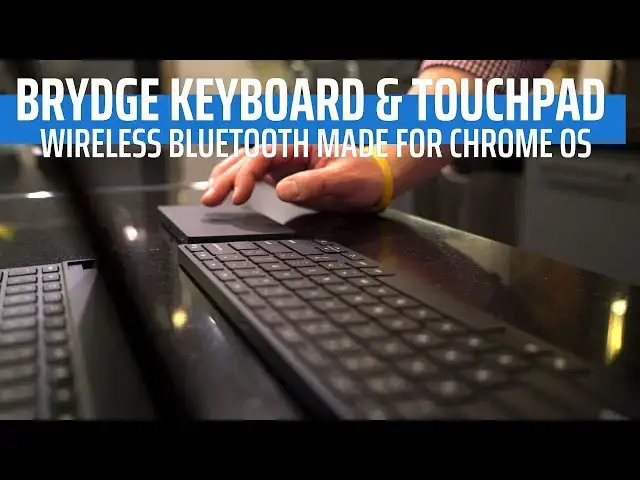
today so what we have with what bridge
1:17
is offering here is pretty
1:18
straightforward and pretty simple it's a
1:20
wireless trackpad and it's a wireless
1:21
keyboard and they kind of carry the
1:23
aesthetics of the pixel slate and that's
1:27
for obvious reasons but the beautiful
1:28
part about what they're making here is
1:30
these are accessories made for Chrome OS
1:32
in general so it's not like they're
1:34
going to work with the slate they'll
1:36
work with any Chrome OS device because
1:38
that's the way that they made them they
1:40
took all the special sauce and all the
1:42
things that they had to figure out to
1:43
make the G type keyboard which is the
1:45
keyboard that goes with the pixel slate
1:47
all of that stuff that they figured out
1:48
there they took in then just used it and
1:51
and made it work with two other
1:52
accessories and so instead of being some
1:55
Windows keyboards they've maybe changed
1:57
the keys up on and are trying to make
1:59
hook up this thing is made from the
2:00
ground up for Chrome OS and that means
2:03
all of your chrome OS keys and including
2:05
the assistant key are all going to be on
2:07
this keyboard and when it pairs up and
2:09
and hooks up to your machine everything
2:13
from this keyboard to the OS exactly the
2:15
way it would is if it was an attached
2:17
keyboard on a Chromebook and because of
2:20
that and same thing with the trackpad
2:22
because of that feature it doesn't
2:24
matter what Google changes over time
2:26
with keyboard shortcuts or gesture
2:29
support any of those things any of those
2:30
things that change this thing can just
2:32
change right along with them because
2:34
it's behaving just like a hardwired
2:36
keyboard and trackpad would on a
2:38
Chromebook and so they've done some
2:40
really really cool stuff and in building
2:42
this thing up all the way from the
2:44
ground and it works unlike anything else
2:47
that we've seen before and it's a big
2:48
step forward to see a maker like bridge
2:51
show up and make things just for
2:53
Chromebooks the devices look great all
2:55
around they carry again the aesthetic of
2:57
the pixel slate but they may come in
3:00
different colors we're not quite sure
3:01
yet but we have a luminol surrounding on
3:04
both of them glass obviously on the top
3:06
of the trackpad and the keys just feel
3:08
incredible on the keyboard we're gonna
3:10
see $100 99 dollars on each of them so
3:15
they're not outrageously priced and they
3:17
feel premium and they feel awesome they
3:19
look great and they work really really
3:21
well so one point of note with the
3:23
trackpad is the the models that we have
3:26
in our hands right now don't have this
3:28
but we are assured that they are going
3:30
to get this they're gonna have haptic
3:32
feedback in the trackpad so no moving
3:34
parts think Apple Magic Trackpad - and
3:36
you're gonna feel a click a simulated
3:40
click just like you would on a magic
3:42
trackpad and this is all gonna be making
3:44
it to work cleanly and simply with
3:47
Chrome OS and I just can't tell you how
3:49
happy I am to see these products come
3:51
along we should see a release sometime
3:52
in the spring so give it a few more
3:54
months before we'll see these things
3:55
come to market but it is SuperDuper
3:57
exciting to see a device maker like
4:01
bridge who make stuff for premium
4:03
devices like iPads and surface to keep
4:06
expanding their portfolio of products
4:08
specifically for Chromebooks and Chrome
4:10
OS devices guys that's it for this one
4:13
though if you liked it give it a thumbs
4:14
up hit the subscribe button below and
4:16
until next time we'll see you