0:00
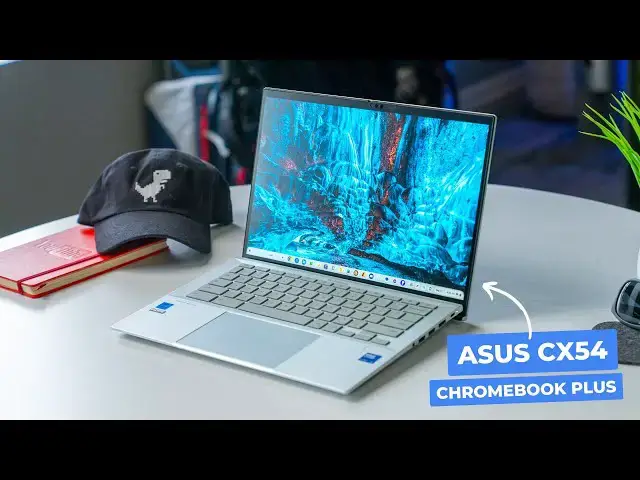
the Asus Chromebook plus cx54 has taken
0:02
a very strange path to get here while we
0:05
had hands on it in December of last year
0:07
prior to CES in 2024 it didn't arrive at
0:10
that show and didn't really show up at
0:12
all for real until May at Google's
0:14
Chromebook Showcase in New York but it
0:16
was worth the wait in a lot of ways and
0:19
I'm pretty excited to show you exactly
0:20
why that is so let's get into
0:26
it when we first saw this device I was
0:29
super pumped that Asus was back to
0:31
making a higher end Chromebook it's
0:33
Sleek thin light all metal and just a
0:36
Chromebook that feels great to hold and
0:38
to look at sure it's kind of angular but
0:41
it pulls it off far better than the CX9
0:43
from a few years back and I really do
0:45
like the overall aesthetic of the cx54
0:48
in a lot of ways and even though the
0:50
body of this Chromebook is really thin
0:52
at only 1.69 cm it's really rigid too
0:56
and there are still a ton of ports all
0:58
along the outside I love that so much
1:00
and it just makes life easier all around
1:02
when you can hook up stuff and not
1:03
really have to think too much about
1:05
finding a port or a dongle speaking of
1:07
those ports you get uh two USB type C's
1:09
two type A's fulls size HDMI 2.1 Port
1:13
micro SD card slot headphone microphone
1:15
Jack and a Kensington lock and the USB
1:17
type-c ports are also Thunderbolt 4 so
1:19
you can get better multim monitor
1:21
support and faster data transfers and
1:23
stuff like that too but cracking this
1:25
one open is where the magic really
1:27
happens right up front there's a
1:28
fantastic 8 megap pixel camera with a
1:31
privacy shutter and under that is one of
1:33
the best screens we've ever had on a
1:34
Chromebook it's 14 in Quad HD 16 X10 and
1:39
500 nits the bezels are tiny the screen
1:42
feels large and the animations because
1:44
of the 120 Herz refresh rate or just
1:47
buttery smooth I just I don't have
1:49
anything negative to say about it I love
1:51
nearly everything about this screen but
1:53
it's not a touchscreen and I found that
1:56
generally doesn't bother me too much but
1:58
I know that's a bummer for some of now
2:00
the review unit that we have does come
2:02
with a touchcreen but the standard model
2:04
that you're going to find at like Best
2:06
Buy it doesn't and that one's the one
2:09
that's $699 and it's the one I'd
2:11
recommend most of you go buy if you're
2:13
interested in this Chromebook now you
2:14
can search for and find upgraded
2:16
versions out there in the wild but
2:18
inventory the delivery the customer
2:20
service have been an issue for those in
2:22
our Chrome unbox plus Community who have
2:24
tried to get one of those outside of a
2:26
Best Buy so I just have a little bit of
2:28
a hard time recommending that you go and
2:30
buy one from like a B2B place like CDW
2:33
and speaking of our Chrome unbox plus
2:35
Community I wanted to take just a second
2:38
if you're unaware of it uh to let you
2:40
know about it um it's a place where you
2:42
can rub shoulders and talk with other
2:45
like-minded people who enjoy Chromebooks
2:48
and Google products um it gives you
2:50
access to um our site with a adree
2:53
experience and it's only two bucks a
2:56
month it's one of those places that I
2:58
love hanging out I love being around the
2:59
people that are in there I learn stuff
3:01
from them um and we are having new
3:04
people join every day it's a fantastic
3:06
Community it's something that I uh think
3:08
that you'd probably be really interested
3:10
in if you enjoy Chromebooks and Google
3:12
products so if you'd like to learn more
3:14
about that uh just head over to Chrome
3:17
jooin and you can get all the info there
3:20
to uh become a part of chrome unbox plus
3:23
so the screen's awesome but under that
3:25
screen you also get a superb keyboard
3:27
and a huge glass trackpad and a
3:29
fingerprint scan and all of it works
3:31
beautifully and I have basically no
3:32
gripes with any of it except for one
3:35
thing I hate asus's gray key caps with
3:37
backlighting most of the time when the
3:39
cx54 boots up the keyboard backlights
3:42
around like 30 or 40% and that's just
3:44
bright enough to make the key symbols
3:46
the same kind of gray color as the key
3:48
caps and I have to either Crank It Up to
3:50
Max or turn it all the way off to
3:52
actually see any of the symbols on the
3:53
keyboard why ASU struggles to get this
3:56
right year after year is a mystery to me
3:59
but it's a thing again here with the
4:01
cx54 now on the inside with the Intel
4:03
Core 5 125 U 8 gigs of RAM and 128 gigs
4:07
of storage you're getting all the
4:08
performance you'd want out of a
4:10
Chromebook plus device again there are
4:12
upgraded models out there with more RAM
4:13
and storage but getting them delivered
4:15
can really be a chore for 95% of you out
4:17
there the configuration you'll find at
4:19
Best Buy is plenty fast with performance
4:21
Headroom to spare and you can enjoy that
4:24
performance for like seven eight hours
4:26
on a charge and push maybe even closer
4:28
to that nine or 10 hours if you can
4:30
manage to keep that big beautiful
4:32
display crank down just a little bit my
4:34
only real gripes with this Chromebook
4:36
are the speakers and one Comfort issue I
4:39
run into quite a bit so the speakers are
4:41
fine and sound decent but they're
4:43
downward firing and they don't quite
4:44
live up to what Asus has been doing in
4:46
the speaker department on their
4:47
Chromebooks for you know like the past 2
4:49
or 3 years I still Marvel a lot at the
4:51
quality of sound my wife's Asus CX5 puts
4:55
out it's a few years old when she plays
4:57
a video for me like they sound awesome
4:59
the speakers on the cx54 are fine
5:02
they're just not remarkable and that
5:04
angular chassis I talked about at the
5:05
beginning of the video Bears its teeth a
5:07
bit when it's sitting in your lap
5:08
specifically the Nubs on the back of the
5:10
top panel as you open it that rest on
5:13
your knees when you set it in your lap
5:14
just kind of grind into your legs and
5:16
the discomfort really does set in just
5:18
about immediately trust me if you have
5:20
your lower thighs exposed at all beware
5:23
of longer lap sessions and if those Nubs
5:26
don't get you the sharp edges of the top
5:28
panel will now I will that a pair of
5:30
jeans basically undo this entire issue
5:33
but I've not loved it during the summer
5:43
season and that is the Asus Chromebook
5:46
plus cx54 it's not perfect no Chromebook
5:49
is but it does get a lot of the equation
5:51
right if top-notch build quality a rigid
5:54
chassis a fantastic screen incredible
5:57
typing experience expansive trackpad
5:59
Mass massive Port selection fast
6:01
internals sound like your thing I think
6:03
it's most of our things I think $6.99 is
6:06
frankly an incredible price for this
6:07
Chromebook I have a few Hang-Ups yeah
6:09
but those are minimal when you consider
6:11
how good this device is overall and I
6:14
think anyone paying this price for an
6:15
experience this good that gets updates
6:19
2034 is going to be very very happy with
6:22
their purchase but guys that's it for
6:24
this one if you enjoyed this video give
6:25
us a thumbs up head down there hit that
6:27
subscribe button and be sure to ring the
6:28
notification icon as well if you'd like
6:30
to be alerted when we make future videos
6:32
just like this one until next time we'll