Up next in 10



Sponsored by NordVPN. Buy a 3-year deal at 70% off, get an extra plan on top! Click here: https://chromeunboxed.com/nordvpn
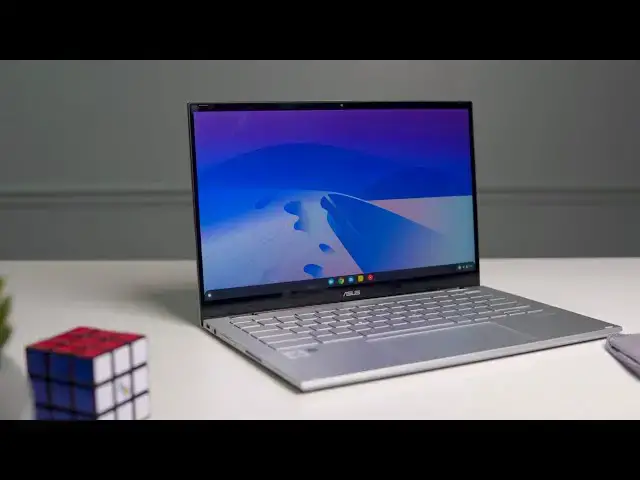
Shop the ASUS Chromebook Flip C436 at Chrome Shop: https://chrmshop.com/asus-chromebook-flip-C436/
・・・・・・・
Since our time with the ASUS Chromebook Flip C436 out at CES 2020 in Las Vegas, we’ve all been eagerly awaiting the arrival of the new wave of Chromebooks. From the Samsung Galaxy Chromebook to the Lenovo IdeaPad Duet Chromebook to the aggressively-priced Lenovo Chromebook Flex 5, all the new Chromebooks we experienced at the annual tech show bring new features to the table that we’ve yet to see on Chromebooks to date.
Things like updated connections with Bluetooth 5 and WiFi 6, fingerprint scanners as normal fare, and NVMe storage all look great on a spec sheet and promise to deliver a better end-to-end user experience for consumers on Chromebooks than ever before. With all the hype and excitement around this new generation of Chromebooks (there are plenty more on the way), it is easy and tempting to get the cart before the horse and begin crowning new superlatives without really spending the time to prove those titles out. So, with that in mind, I tried my best to temper my expectations and take the ASUS Flip C436 for a standard testing period just like any other Chromebook, and the results were a bit surprising.
There’s a lot of good here, and some things that are under the hood that may not fully reveal their benefits until down the road. But there’s also some bad as well, and with Chromebooks in this price bracket, I have to admit I’m more disappointed than I expected to be. Let’s dig in to all the parts that make up the first in a long line of next-gen Chromebooks and hopefully help you decide if this is the right one for you.
Read more: https://chromeunboxed.com/asus-chromebook-flip-c436-review/
Join our newsletter: http://bit.ly/2WjCDm7
・・・・・・・
Shop Chromebooks on CHROME SHOP: https://chrmshop.com/
Show More Show Less View Video Transcript
0:00
we are now a few months in after
0:02
spending time with all this
0:03
next-generation hardware at CES 2020 and
0:07
one of the devices we got our hands on
0:09
back at that show was this device right
0:11
here
0:11
the Asus Chromebook flipsie 436 and
0:14
along with it were other Chromebooks as
0:16
well that kind of promised to deliver
0:18
this next generation Chromebook
0:20
experience and so going into reviewing
0:23
the first one of those spending every
0:25
day with it over the course of you know
0:26
a couple weeks it was very tempting to
0:29
go ahead and start crowning it the best
0:30
this and the best of that without even
0:32
thinking about things too much but I had
0:35
to temper my expectations just a little
0:37
bit as excited as we are for this next
0:39
generation of Chromebooks to get here
0:40
this is the first of many and we need to
0:43
really look at it in lieu of its price
0:46
tag and lieu of the Chromebooks that's
0:48
come after and in lieu of the
0:50
Chromebooks that are coming afterwards
0:51
and so we wanted to take a look a full
0:54
look at the flip C 436 and try to help
0:57
you decide if this is the right next-gen
1:00
Chromebook for you
1:02
[Music]
1:07
today's video is brought to you by Nord
1:09
VPN and that's a VPN of choice for
1:11
millions of users including chromebook
1:13
users because they're awesome at what
1:14
they do and that is keeping your
1:15
browsing safe and secure whether you're
1:17
at home or you're out and about on the
1:19
go if you'd like to learn more about
1:20
them head over to chrome unbox comm
1:23
forward slash Nord VPN to learn more and
1:24
get started today
1:25
with this device there's a lot of good
1:28
stuff going on and there's frankly some
1:30
bad stuff too but before we get started
1:32
into our normal review process I want to
1:34
get a couple things out of the way first
1:36
yes this is the successor the proper
1:38
successor to last year's flip ce 434 in
1:42
every way this is the next version of
1:44
that chromebook so we don't want to make
1:46
light of that and we want to make a
1:47
video comparing the two but I'm not
1:49
going to spend this entire video
1:51
comparing this curl book to that one and
1:53
then second we got to talk about its
1:54
price so right up front I'm going to
1:55
tell you the device we're using is seven
1:57
hundred and ninety nine dollars there's
1:59
a version of this device coming that's
2:00
gonna be nine hundred and ninety nine
2:01
dollars and that price informs the way
2:04
that we look at this chromebook because
2:05
when we talk about expensive top-tier
2:08
flagship Chromebooks we have to be a
2:10
little bit more nit picky especially
2:11
with all the great Chromebooks that are
2:13
available currently and will be
2:15
available in a much lower price bracket
2:18
so as long as you know those two things
2:19
going in let's dig in and start with the
2:21
screen the reason I wanted to skip right
2:23
to the screen to start this one out is
2:25
because it's one of the parts of this
2:27
Chromebook I'm actually least impressed
2:29
with and so I kind of want to get that
2:30
out of the way right off the jump it is
2:32
the same 14 inch panel as its
2:34
predecessor and it's a 16 by 9 panel
2:36
it's IPS it's got good viewing angles
2:38
and you know it looks good in general
2:41
the problem is brightness and frankly I
2:44
just didn't think we're gonna have to
2:45
talk about brightness with expensive
2:47
Chromebooks in 2020 I just was hoping
2:49
that wasn't going to be a thing but here
2:51
we are again talking about dim displays
2:53
and the best I could get out of this one
2:55
was about 220 nits which means in
2:58
regular lighting it's it's okay it's
3:00
fine but the minute you get by a window
3:02
or god forbid you take it outside it's
3:06
just almost unusable and that's just
3:08
frustrating for a Chromebook in this
3:10
kind of price bracket on a positive note
3:12
this device still carries those nice
3:14
thin bezels on three sides which is very
3:16
nice because you get basically a 14 inch
3:18
screen and what feels like a 13-inch
3:20
Chromebook so that
3:22
and again the colors and viewing angles
3:24
are fine it's an IPS panel it's a
3:26
touchscreen so there are good things
3:28
about this screen it's just not of the
3:30
quality you would expect for an 800 or
3:32
$1000 Chromebook
3:34
it also comes built in with usi stylus
3:36
support and that's been a little
3:39
frustrating as well unfortunately
3:41
actually as it turns out they've somehow
3:44
fixed the u.s. I stylists issues with
3:47
this device there was an incremental
3:48
update to Chrome OS 80 I'm guessing
3:51
maybe that update also carried along
3:53
with it I fix for the stylus input on
3:56
this device and as we were filming
3:58
b-roll in attempting to catch the
4:00
frustrations I was having with this they
4:02
were basically gone so the stylus
4:05
behaves exactly like you would think it
4:06
picks up all the pressure points and all
4:08
the tilting and all that kind of stuff
4:10
just like you would expect so yeah usi
4:13
stylus works just like we'd expect
4:14
moving on to build quality this is
4:16
something asus has done both well and a
4:19
little bit poorly so let me explain the
4:21
overall build the look the feel the the
4:24
thinness the lightness of this device
4:25
those are all very good I like the way
4:28
it looks on a desk it feels pretty good
4:29
in the hand honestly it's thinner than
4:31
its predecessor it's much lighter and
4:34
overall it just looks really good and
4:36
kind of futuristic the problem kind of
4:39
for me comes in with this magnesium
4:40
alloy material while it does make the
4:42
device lighter and I appreciate that it
4:45
feels a little bit less rigid than
4:46
aluminum and for me personally I would
4:49
take the weight and rigidity over having
4:51
something that's lighter and feels a
4:53
little bit less rigid and less firm and
4:56
more flexible overall it just makes the
4:59
whole thing feel a little cheap the
5:00
hinges are just as good as they've been
5:02
from other Asus devices the one finger
5:05
lift is here and that's I think an
5:07
achievement on a convertible device so
5:09
when you have to have the hinges strong
5:11
enough to stand up and not wobble all
5:12
around on the table whenever you're
5:14
touching this touchscreen and but then
5:16
still be light enough to lift up on a
5:18
device that's lighter than other devices
5:20
that have come before it kudos to them
5:22
for figuring that part out on a lighter
5:24
device but again when we look at the
5:27
build as a whole yes it's thinner
5:29
yes it's lighter but the build material
5:32
in general is what you're going to
5:33
every time you're using it and just for
5:36
me at this point I feel like it's a
5:37
little bit of a step backwards moving on
5:39
the keyboard and trackpad on this device
5:41
I think are pretty good the trackpad is
5:45
great actually it's the nice large
5:47
trackpad Asus has been using and like
5:49
the 425 and 433 that came out later in
5:51
2019 but it's done away with the plastic
5:54
so it's a nice glass trackpad the click
5:57
mechanism is great everything feels
5:59
buttery smooth I really can't fault this
6:02
thing in any way shape or form however
6:03
we're gonna move on to the keyboard and
6:05
while it's not bad it's a good keyboard
6:08
I feel like it's a step backwards from
6:10
its predecessor and compared to some of
6:12
the other Chromebooks on the market
6:14
they've Shalit out the keys a little bit
6:15
and while that doesn't bother me I kind
6:17
of like shallower keys they didn't add a
6:19
lot more click or tactile feel to them
6:22
so I missed some keystrokes here and
6:24
there and wasn't as accurate as I am on
6:26
something like the pixel book go but you
6:28
know I kind of want again Chromebooks
6:30
that cost this much money to measure up
6:32
to a lot of those types of metrics and I
6:34
just don't feel like this one does the
6:36
really unfortunate part of this keyboard
6:37
is in its backlighting or the way it's
6:40
been implemented now with the 434 a lot
6:43
of people complain that they had silver
6:45
keys and when they would add some
6:46
backlighting to it the symbols on the
6:48
keys that almost disappear and that was
6:50
the case for all of those users I always
6:52
told them just if you're in a lit
6:54
environment turn the backlighting off
6:56
and the keys and the symbols work you
6:58
know the symbols are dark enough gray
7:00
over that light gray key you can see
7:02
everything just fine that problem seems
7:04
completely exacerbated on the 4:36 I
7:07
don't know what the difference is it
7:09
almost feels like the backlighting
7:10
component is up closer to the key or
7:12
something I'm not sure but this thing
7:14
catches all kinds of sunlight and all of
7:16
the symbols on the actual keyboard and
7:18
so what happens is I constantly when I'm
7:20
looking for the function keys so I'll go
7:22
to reach for it and I'll kind of have to
7:24
move around and get an angle just right
7:26
so that I can actually see which one is
7:28
brightness up or down or volume up or
7:30
down and that's a weird thing to have to
7:32
do constantly if I turn off all the
7:34
backlighting in a sunny environment I
7:37
should be able to see my keyboard just
7:39
fine and that's just not the case from
7:40
certain angles with certain keys and it
7:43
can't be fixed by turning up the
7:44
backlighting because it's not really
7:46
bright enough to come
7:47
at the Sun so you just make the problem
7:49
worse by doing that so if you're not a
7:50
touch type and you're relying on looking
7:53
at your keyboard all the time that's
7:55
going to be a significant issue for you
7:57
move around the side of the device we
7:58
see a pretty common selection of ports
8:01
and that kind of stuff I mean we've got
8:03
a USB type-c on either side and those
8:05
are going to handle all your audio
8:06
visual data transfer charging all that
8:09
kind of stuff like we've started to see
8:10
and there's also a headphone microphone
8:12
jack and you know power button volume
8:15
rocker on the sides but there's also two
8:17
ports on each side for speakers and
8:19
that's important to note because this
8:21
one has ports on each side for speakers
8:22
there and then there's also a set of
8:24
speakers right up under the screen and
8:25
they are marketed as Harman Kardon
8:28
speakers and so you see that marketing
8:31
you see all these grilles and all this
8:32
space for speakers and frankly I
8:34
expected there to be just this symphonic
8:37
delight come out of this device and you
8:40
know it was it was good it was okay
8:43
I hate being hard on new Chromebooks I
8:46
really do but the the speakers were just
8:48
okay and again to take up this much real
8:51
estate and to be this prominently spaced
8:53
and stuff I I was just expecting a
8:55
massive step forward and what we got was
8:58
kind of a tiptoe forward the last port
9:00
you'll notice on here and I hope this is
9:02
always a trend with Chromebooks I hope
9:03
we don't see all Chromebooks start
9:05
ditching SD card slots as no micro SD
9:08
card slot and for those of you who are
9:09
wondering the SD card will fit in there
9:11
almost completely flush just enough of
9:13
it sticks out for you to be able to push
9:15
it back in and get the card back out so
9:16
if you need to expand storage more and
9:18
more Android apps are starting to use
9:20
that expandable storage Linux is
9:22
starting to let you leverage it so it's
9:23
nice to see them leave that on here
9:25
moving on to internals and performance I
9:27
can say is tough as some of these
9:29
sections have been this one's not one of
9:31
those this thing is crazy fast I mean
9:35
like I think it's probably the fastest
9:37
Chromebook experience as a whole I've
9:39
had and we've done some benchmarks on
9:40
and if you know pushes in the high
9:42
thirty thousands in octane and you know
9:45
synthetic benchmarks are one thing but
9:47
using this device it just it hasn't even
9:50
thought about even coming close to
9:51
hiccuping on anything it doesn't matter
9:53
how many tabs or apps I've got open or
9:55
how many virtual desktops I'm running or
9:57
extending displays it doesn't matter it
9:59
just doesn't have an issue with any of
10:01
them and again this is the $800 model
10:03
with the core i3 is a 10th gen core i3
10:05
they're gonna have the 10th gen Core i5
10:08
come out later at some point in time
10:11
with kind of all the extra bits and
10:13
pieces that will make it a full project
10:15
Athena laptop at that point
10:17
this one technically isn't that but it
10:19
still has nvme storage inside 128 gigs 8
10:21
gigs of ram and again that core i3 that
10:24
10th gen core i3 so everything about
10:26
this thing is absolutely fast for all
10:29
that speed however there is a bit of a
10:31
dark side this thing does come equipped
10:33
with some fans and yes they turned on
10:35
and yes when they did I heard them I've
10:38
had Chromebooks in the past where I had
10:39
to actually get down and listen and be
10:41
really vigilant to hear the fans because
10:43
they were so small and very delicate in
10:45
their sound that this isn't that you
10:47
need to know from time to time these are
10:50
gonna kick on and you will hear them
10:51
when they do battery life not
10:53
surprisingly is great I mean Chromebooks
10:56
in general have great battery life this
10:58
one's constantly telling me anywhere
10:59
from 8 to 12 hours somewhere in that
11:01
room so you're gonna get you know normal
11:04
use of about 8 to 10 hours probably
11:06
realistically and that's with me
11:08
cranking the brightness up on the sink
11:09
all the time because again the screen
11:11
isn't that bright so it's not like I'm
11:13
running around with 50% screen
11:15
brightness this is cranked up 100%
11:16
brightness with its fans kicking on
11:18
every once in a while me putting it
11:19
through its paces you're gonna get a
11:21
full day's work out of this thing no
11:23
problem whatsoever before you got to hit
11:25
the charger there's a handful of
11:26
features I want to mention before we
11:27
wrap up and they're kind of internals
11:29
based and there are new things for this
11:32
Chromebook and for Chromebooks in
11:33
general and while this is the only one
11:36
that has some of them other Chromebooks
11:38
in 2020 we'll have them as well and
11:40
those three things are Wi-Fi six
11:42
Bluetooth five and a fingerprint scanner
11:44
now a fingerprint scanner you're gonna
11:46
notice the benefit of it right away
11:48
so the minute you open this Chromebook
11:50
up you're going to get to love the fact
11:53
that you can open the lid and touch a
11:54
button and be logged in I love that but
11:57
the other two things Wi-Fi six and
11:58
Bluetooth five aren't something that
12:00
you're going to necessarily get to take
12:02
advantage over right now Wi-Fi six is
12:04
objectively better than Wi-Fi five it
12:06
does all kinds of stuff better you can
12:08
read stuff on the web about all the
12:10
benefits of Wi-Fi 6 but you don't get
12:12
many of those
12:13
unless you're using a Wi-Fi six piece of
12:15
hardware with a Wi-Fi six router and
12:18
most of you I would bet don't have a
12:19
Wi-Fi six router yet you will probably
12:22
in the next couple years so that's a
12:24
future thing that's a thing that's gonna
12:25
you know be better over the time and
12:27
over the course of your ownership of
12:29
this device and same thing with
12:30
Bluetooth five it's better than
12:32
Bluetooth 4.1 ever and a lot of
12:34
different ways it has a lot of new
12:36
technology and a lot of new benefits but
12:39
you're not necessarily going to notice
12:41
those things right out of the gate the
12:43
minute you open this box up though of
12:44
those three things the fingerprint
12:46
scanner is really the only one that
12:47
you're going to be going yes I love
12:49
having this right here right now Wi-Fi
12:51
six and Bluetooth five while I'm so glad
12:54
we're starting to see Chromebooks with
12:55
it inside you're not really gonna be
12:58
able to take a ton of advantage of at
12:59
this moment all of this is important to
13:01
note because those two things that I
13:03
said you may not be able to take
13:05
advantage of right now you will be able
13:07
to take advantage of over the course of
13:09
the years you own this Chromebook and
13:10
that's gonna be a lot of years because
13:12
this is one of the first ones shipping
13:14
with an aue that's Google's way of
13:16
saying into life of june 2028 so that
13:19
means if you buy this Chromebook in the
13:21
next few months it's a chance you'll be
13:23
using it for eight years so don't hear
13:26
me saying that Wi-Fi six and Bluetooth
13:28
five aren't important I just don't think
13:30
that you're gonna notice them right now
13:31
but they're great because they're
13:32
future-proofing you for the long future
13:34
you stand to have with a Chromebook
13:36
built in 2020
13:44
so as we always do we come down to the
13:47
question of whether you should buy this
13:48
Chromebook right now for some of you
13:50
maybe maybe you should but there are so
13:54
many Chromebooks on the horizon it makes
13:56
it very difficult for me to say yes this
13:59
Chromebook right now I'm not saying this
14:01
is a bad Chromebook it's just not so
14:04
simple whenever it's $800 for me to just
14:06
say yeah go buy it you'll love it
14:08
because there are some nitpicky little
14:10
things wrong with it and at $800 as a
14:12
Chromebook buyer you should be expecting
14:15
a really great Chromebook experience I
14:19
don't want you to think that I'm saying
14:20
this is the best Chromebook go buy it
14:22
spend your $800 and you'll love it
14:23
because I don't know that that's the
14:26
case but I also don't want to say that
14:27
it's the worst Chromebook ever made it
14:29
just has some issues and at this price
14:31
you need to think really hard about
14:33
whether or not this is the right
14:34
Chromebook for you but guys that's it
14:36
for this one if you liked it give it a
14:38
thumbs up go down there and hit the
14:39
subscribe button and make sure and hit
14:40
that notification bell right next to it
14:42
we'd like to be notified when we make
14:43
future videos just like this one and
14:46
make sure and hit that joined button if
14:47
you'd like to see all the stuff that our
14:48
members get like behind-the-scenes
14:50
footage and custom emojis until next
14:52
time we'll see
14:54
you
14:57
[Music]
#Consumer Electronics
#Product Reviews & Price Comparisons