Up next in 10

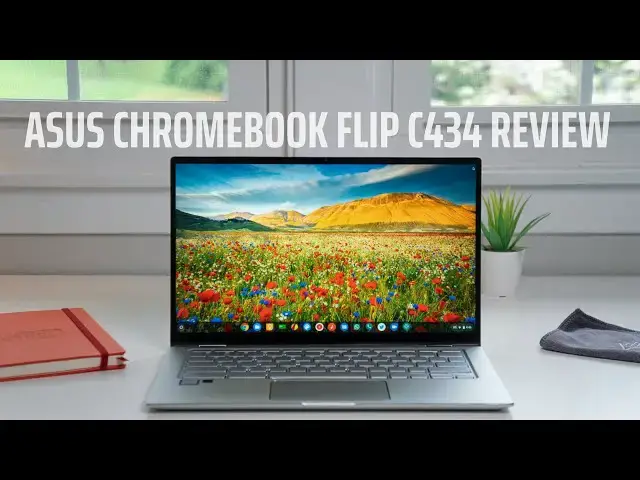
ASUS Chromebook Flip C434 Review
May 1, 2019


Sponsored by Forma Supply Co. Get clean, crisp, comfortable premium tees delivered to your doorstep! Get 25% OFF your first supply here (promo code CHROME): https://chromeunboxed.com/forma
・・・・・・・
Shop ASUS Chromebook Flip C434 on Amazon: https://fave.co/32RgrUT
When you review devices, being picky is part of the job. I tend to look for the best parts of any Chromebook, but that way of looking at things isn't always the most helpful for prospective buyers. While I don't see the need to incessantly bash devices just for kicks and giggles, I do see great value in taking the time to put each and every Chromebook under a microscope to pick out all the potential issues future users may run into.
This is usually a pretty simple job, honestly. It is normally pretty easy to find issues with gadgets, but with the ASUS C434, finding fault was more of a task than it usually is. And, for someone in the market for a Chromebook under $600, that is really good news. So, let's get into what makes this latest offering from ASUS one of my favorite Chromebooks on the market.
Read more: https://chromeunboxed.com/
・・・・・・・
Become a member of Chrome Unboxed to help us make our channel even better, and for access to exclusive perks: http://bit.ly/CU-join
Subscribe to the channel: http://bit.ly/2xFuj6L
Shop Chromebooks: https://fave.co/2OuedYL
The Music We Use - PERFECT for YouTube: http://bit.ly/31W6PYP
Follow us:
Show More Show Less View Video Transcript
0:00
as a reviewer it's my job to be critical
0:02
and nitpicky of chromebooks
0:05
with the asus chromebook flip c434 that
0:08
i've been reviewing for the past week
0:09
however
0:10
i've been having a hard time finding
0:12
those nitpicks
0:14
it's a great device and it does a lot of
0:16
things really really well is it perfect
0:19
not quite let's talk about it
0:21
[Music]
0:28
but before we get into this review this
0:30
video is brought to you by forma supply
0:32
company and if you're anything like me
0:34
shopping is not up there on your list of
0:36
things you enjoy doing luckily there is
0:38
forma supply company and they will drop
0:41
a new supply of t-shirts on your front
0:43
porch whether it be monthly bi-monthly
0:45
or quarterly you choose the frequency
0:47
you just give them a little bit about
0:48
your style preferences and they'll hook
0:50
you up all you got to do to get started
0:52
is go to chromeunbox.com forward slash
0:54
forma to get 25 off your first supply
0:58
today so let's get started talking about
1:00
what makes this such a great chromebook
1:02
we'll start with build quality like we
1:04
always do
1:05
and asus has done a fantastic job here
1:08
you got these nice chamfered edges all
1:10
around the the outside of the body and
1:12
around the track pad you've got these
1:14
nice chromed out hinges but more than
1:16
anything else you've got this aluminum
1:18
that feels nice and sturdy
1:20
it does not pick up fingerprints
1:22
basically at all i literally just wiped
1:24
it off for the first time on the outer
1:26
part of it before we did this review and
1:28
didn't really have to clean it up too
1:29
much but it just looks great on a desk
1:31
it feels great in your hand because of
1:32
the narrow bezels the entire body has
1:35
been brought down for what a normal 14
1:36
inch device would look like down to more
1:39
closely resembling a 13 inch chromebook
1:41
it's light at just three pounds and only
1:44
15 16 millimeters in thickness i mean it
1:46
just is super portable it's super well
1:49
put together it just feels premium on
1:51
every front and asus absolutely killed
1:53
it with the build quality here so let's
1:55
talk about that screen
1:56
the screen itself isn't that amazing
2:00
it's a great screen it's about 300 nits
2:02
of brightness it's got nice punchy
2:03
colors great wide viewing angles 14
2:06
inches diagonal
2:07
16 by nine so it's not doing anything
2:10
out of the ordinary it's full hd it's a
2:12
1920 by 1080.
2:14
those things are pretty stock and you
2:16
know kind of becoming normalized across
2:18
chrome os in the last i don't know six
2:20
months or so we've seen a lot of devices
2:22
with really good 14 inch full hd
2:25
displays it's not really the display
2:27
panel itself that really is doing a lot
2:30
of justice for this device it's the
2:32
small bezels they put around it and
2:33
because of those tiny little bezels when
2:35
you open this thing up on the desk
2:37
there's just something that draws your
2:38
eyes to it and i know bezels don't
2:41
really matter in the grand scheme of
2:42
things it's not like it makes it more
2:43
productive or anything it just makes it
2:45
nicer to look at and because of those
2:47
small bezels just like i said in the
2:48
build section before this
2:50
it's smaller it literally is physically
2:53
a smaller device than most 14 inch
2:55
devices and so it just feels great it
2:57
looks great and
2:59
normally i wouldn't talk about bezels
3:00
being that big of a deal on a device but
3:02
they changed the way that you perceive
3:04
this one and so the entire thing feels
3:07
smaller and lighter because of it and
3:09
it's more attractive it makes you just
3:11
want to use it more moving down from
3:13
that screen and getting into the
3:14
keyboard and trackpad bits this is
3:16
probably the
3:17
one of the only areas i really have
3:19
anything bad to say about this device
3:21
and it's not even that bad it's just
3:23
kind of mediocre the keyboard feels
3:25
great there's plenty of travel on the
3:26
keys they're backlit and they're kind of
3:28
silvery gray in color now i've had some
3:31
questions asking if they're aluminum
3:33
they're not aluminum keys they're
3:34
plastic but the the overall feel of them
3:37
the travel is really good i wish for a
3:39
little bit more click in it but overall
3:41
after using it for about a day i got
3:43
really used to it and was able to type
3:45
really fast on this and it was
3:46
comfortable and i enjoyed the typing
3:47
experience in general the track pad is
3:50
mediocre at best it picks up oils a
3:53
little bit and it just doesn't feel as
3:55
substantial as the rest of the device i
3:57
really feel like they should have put a
3:59
nice glass track pad to go with the
4:01
aesthetic of the rest of this device
4:02
they did not do that it is plastic
4:05
but it's serviceable it's good the click
4:07
mechanism feels good it just kind of
4:08
feels a little thin and just not quite
4:10
up to par with the rest of this device
4:12
on around the side of this device the
4:15
port selection is becoming pretty common
4:16
here we got a usb type-c on both sides
4:19
and those can be used for charging they
4:21
can be used for audio and video output
4:24
whatever you want to use your usb-c for
4:26
if you want to dock that all that kind
4:27
of stuff
4:28
but it also has a usb type a and a
4:30
headphone microphone jack on the left
4:32
side which came in really really handy
4:34
for us we were trying to record some
4:36
audio we had a macbook we had a pixel
4:38
slate and we were running into issues
4:40
with dongles and all this kind of stuff
4:42
and we brought the c434 in removed all
4:44
the dongles plugged everything directly
4:46
into what needed to be plugged into and
4:48
everything just worked the way it was
4:49
supposed to so it was a really practical
4:51
example of why a standard usb type a and
4:54
headphone microphone jacks still have a
4:56
place even in devices that are thin and
4:58
light additionally on the right hand
5:00
side of the device we get an sd card
5:02
slot and in some of the higher end
5:04
models like the pixel book and pixel
5:06
slate you don't get that either and so
5:07
it's nice to have that along with all
5:09
these other ports to expand your storage
5:11
if you'd like to it comes with 64 gigs
5:13
of internal storage but a lot of people
5:15
want to store movies and all that kind
5:16
of stuff locally this gives you the
5:18
option to do that and underneath you get
5:21
some pretty good speakers here asus
5:23
actually talked about these speakers on
5:25
the website on the landing page for this
5:27
particular chromebook and rightly so
5:29
they sound really really good they're
5:32
not quite as good as what the pixel
5:33
slate does but it it kind of set the bar
5:36
really high for thin and light devices
5:38
having great speakers but this comes in
5:41
at a close second and i really really
5:42
enjoyed watching a few shows and lots of
5:44
youtube videos and stuff on this device
5:46
because those speakers are really really
5:48
nice to listen to finally let's talk
5:50
about internals because all the outer
5:52
pieces can be great and if the internals
5:54
are slow or laggy it can ruin the entire
5:57
experience it doesn't matter how good
5:58
your screen or aluminum are
6:00
thankfully that's just not the case with
6:02
the c434 while the internals aren't
6:04
perfect they're very very good so let's
6:07
start with the core m3 that is the
6:09
processor here 8th gen 30 000 on octane
6:12
the thing just gets along really really
6:14
well
6:15
for reference the
6:17
core i5 pixel book that i have that i
6:19
work from all the time it gets about 27
6:22
000 on octane so if you're looking at
6:24
synthetic benchmarks it gets along
6:26
really well
6:27
but i can just tell you from day to day
6:28
use hooking it up to my external monitor
6:30
and writing articles and doing all sorts
6:32
of stuff on this device
6:34
no issues whatsoever with performance
6:36
ram however could be a little bit of an
6:39
issue and we'll come right back to that
6:41
it's paired up with 64 gigs of internal
6:42
storage that again can be expanded via
6:44
the sd card slot so that's really not
6:46
that big of a deal either i'd love to
6:48
see 128 gig for what it's worth
6:50
but the ram could be a sticking point
6:52
for some people and probably could be a
6:53
reason that some people would choose not
6:55
to buy it and i get it if you're a
6:56
person that has
6:57
30 40 tabs open all the time it's really
7:00
annoying to see those tabs refreshed
7:02
when you go back to revisit them for me
7:04
that only happened one time but i'm
7:06
usually between 12 and 15 tabs and a
7:08
handful of other applications open so
7:10
maybe i'm not the best use case there
7:11
and your mileage may vary and asus has
7:14
said that we'll see eight gig versions
7:16
of this device down the road we just
7:17
don't know when so right now this is the
7:19
version you can buy and if you're
7:21
looking at this chromebook and thinking
7:22
whether or not it's for you remember
7:24
four gigs of rams all you get right now
7:26
and if that hasn't worked for you in the
7:27
past it's probably not going to work for
7:29
you right now either so with all that
7:30
being said the question always comes
7:32
down to should you buy this chromebook
7:34
it's 569 dollars right now and that
7:37
price can fluctuate a little bit here
7:38
and there but at msrp should you go buy
7:42
it i can confidently say that this is
7:44
the best chromebook experience you can
7:46
get right now for under 600 and that's
7:48
counting every chromebook that we've
7:50
reviewed on this channel and everything
7:52
that i've come into contact with there's
7:54
just something a little bit nicer about
7:56
the asus chromebook flip c434 it just
7:59
feels a little more premium than
8:01
everything else in this price bracket
8:03
and i think if you go spend your money
8:04
on it that you're going to feel like you
8:07
put your money towards something that's
8:08
a little bit more premium a little bit
8:10
nicer and you're going to enjoy the
8:11
overall experience of using this
8:14
chromebook but guys that's it for this
8:16
one hopefully we helped you make a
8:17
purchasing decision if we did give it a
8:20
thumbs up hit that subscribe button down
8:22
below and until next time we'll see
#Consumer Electronics