Up next in 10



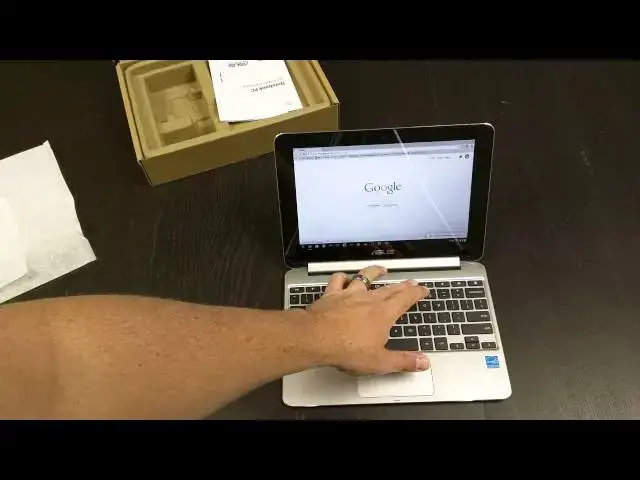
I finally get my hands on the highly-anticipated ASUS Chromebook Flip.
Show More Show Less View Video Transcript
0:02
[Music]
0:18
hey folks Robbie pay here with chrome
0:20
unbox coming at you today with an
0:22
unboxing of the Asus Chromebook Flip or
0:26
the
0:27
c100 uh this one has been much talked
0:29
about much anticipated uh since back at
0:33
uh was it
0:35
CES um I'm not I actually can't remember
0:38
when it was that this thing was broken
0:40
uh and Asus kind of pulled the wrappers
0:43
off of it and said hey look this is what
0:44
we're going to make uh everybody's been
0:46
kind of anticipating this device and so
0:48
it's starting to be uh starting to hit
0:50
the channels uh so you can get it uh the
0:52
2 gig version which is this one here is
0:55
available through Amazon there's a
0:56
handful of retailers that are seeing the
0:59
4 Gig come in
1:00
um but I've got one of those as well on
1:03
order from
1:04
CDW um I'm going to be able to at least
1:08
kind of look at the difference between
1:09
the two um and I talked to them and it
1:12
looks like uh first or second week of
1:14
July is when those are going to hit so I
1:16
wanted to go ahead and get my hands on
1:17
this one uh cuz the hardware obviously
1:19
isn't going to change so uh we have the
1:21
c
1:23
100p um see if we can get Focus there
1:27
there we
1:28
go uh we got the rock chip same thing
1:30
it's in the Asus uh c201 that I've
1:33
reviewed
1:34
previously uh two USB 2.0 um and all the
1:39
normal goodies inside but what sets this
1:41
guy apart as most of you know who are
1:43
watching this is the form factor and the
1:46
build
1:46
materials um and the way that this guy's
1:49
going to be made I really like how Asus
1:51
is doing this uh kind of thing with the
1:54
box it's very cool only let you open it
1:56
so far um again for a cardboard box it's
1:59
pretty cool
2:01
we know this is the star of the show I'm
2:02
going to set him to the side for just a
2:03
second just see what's in the box
2:05
warranty information you know whatever
2:09
again it's a chrome
2:10
box or a Chromebook uh I kind of I wish
2:15
that Asus would have one that folded in
2:17
cuz it's a really small plug it'd be
2:20
very nice uh that kind of adds a lot of
2:22
width seemingly unnecessarily and we've
2:25
got that same connector it's almost like
2:26
the pseudo USB um but it's a little
2:30
blockier um anyway uh it's a proprietary
2:34
charger
2:35
unfortunately would have been cool to
2:36
see USB type-c on this bad boy but at
2:39
this time frame and this price range
2:41
who's complaining right so it's 250 for
2:43
the 2 gig
2:45
version set that back there and pull
2:49
this guy out of bit its
2:52
cloth and wow yeah that feels great
2:56
aluminum top and bottom very nice nice
2:59
little chain Fort Edge if you can see
3:02
that on camera or
3:03
not little shininess around its edges
3:07
hinge back
3:08
here we take a tour around we got the
3:11
speakers on the
3:12
bottom some screws you can open up doubt
3:14
there's much you're going to be able to
3:15
do with it you got that uh um
3:19
proprietary power volume up and down and
3:21
power here cuz obviously probably going
3:23
to be using this as a tablet a lot
3:25
nothing across the front edge and then
3:27
we've got two USB 2.0 micro us B uh
3:30
micro HDMI as well combo headphone
3:33
microphone Jack and again nothing across
3:36
the b b back uh and top is pretty clean
3:40
um just nice aluminum cool
3:43
feel let's set this guy
3:52
down very striking uh first appearance
3:55
and I'm probably going to plug it in to
3:57
get some power likely
4:04
okay we'll do that in just a second kind
4:06
of take it to around the inside of the
4:07
device as well again aluminum here
4:12
trackpad hard to tell if that's plastic
4:14
or metal uh feels good feels very
4:17
similar to the c201 but for a device
4:19
this small nice uh nice spacing
4:23
there um very thin as you can see from
4:26
the side just as thick as the USB port
4:29
basically and even thinner up top uh and
4:32
that nice little silver lining I didn't
4:34
notice that before just a little
4:35
chamford Edge there just adds a real
4:38
Touch of Class to it um keys are pretty
4:42
good travels uh pretty decent relatively
4:44
clicky uh not as satisfying feeling as a
4:47
c201 I've been really happy with that
4:48
keyboard but doesn't feel bad at all no
4:51
give whatsoever it's aluminum so that
4:53
helps a ton there's no given the
4:55
keyboard um we have a glass panel here
4:59
and
5:00
and looks like probably a cut out for a
5:03
microphone I don't if you can see that
5:05
or
5:08
not yeah just barely there that looks
5:10
like probably a microphone I don't see
5:12
any other front-facing
5:15
one then these little rubber buttons
5:19
here I guess they're just there for
5:22
looks uh webcam up top and as you can
5:24
see this guy is crazy thin crazy thin
5:30
and we'll Fold It on Back get the feel
5:33
from a tablet perspective Weight Wise
5:35
It's very good um so you know holding
5:38
this it's going to be a little heavier
5:39
than holding a u an iPad or something
5:42
like that but all said I mean it's very
5:44
thin uh very realistic that you could
5:46
use this as a tablet this way and
5:48
obviously that's what they wanted out of
5:50
it so ideally you could then use it in a
5:54
kind of a tent mode like
5:56
so um you can also do kind of a
5:59
presentation mode like
6:03
this bend that thing way back uh Hing is
6:06
hinge is pretty sturdy um so you can see
6:08
if as it's like this giving it some
6:10
really good Taps it's getting a little
6:12
bit of wobble but that's nothing at all
6:14
to be concerned about flip it closed and
6:17
it is Tiny and Sleek so we're going to
6:19
cut away real quick plug this guy in and
6:22
we'll be right back all right we are
6:24
back and started up I'm going to crank
6:26
the brightness up a little bit on this
6:28
guy actually I'm going to turn it back
6:33
off just so you can see how quickly it
6:38
boots interestingly again because it's
6:41
mainly a tablet power is located over
6:43
here on the side um and then the you
6:46
still get a lock key up here so if you
6:47
just want to lock your desktop I would
6:49
assume by closing it you're going to get
6:50
the same effect let me get it off camera
6:53
here sign in you saw there uh just as
6:57
quick as anything else bet boy loads up
7:00
just
7:03
fine I want to say it's not the
7:04
brightest screen in the world uh it full
7:07
it full ticks it's it's okay um not too
7:10
bad now granted you got to give it cut a
7:13
little bit of slack it's in the process
7:14
of installing all my extensions and all
7:16
that kind of stuff right now um track
7:18
pad's pretty good um nice and clicky uh
7:22
feels good screen looks uh looks looks
7:25
pretty sharp we're going to bend it back
7:27
into tablet mode here um
7:30
see if we can get
7:32
focused you can see text looks
7:36
good let's see if it'll focus there a
7:38
little too
7:43
close come
7:47
on yeah so you can see text is perfectly
7:49
readable we're dealing with a 1280 by
7:52
800 panel here so 16 by10 it's a little
7:55
taller than your normal 16x9 resolutions
7:58
um so some interesting things uh that I
8:00
haven't seen anybody cover and I knew
8:02
we're kind of part of it come on Focus
8:03
here all right when you're in tablet
8:05
mode obviously it's got accelerometer so
8:08
it knows um knows how to how to orient
8:12
itself but apps actually open in full
8:15
screen mode now so if we open up Gmail
8:18
for instance it's going to open up full
8:21
screen and I'll open up the files app as
8:26
well and so everything opens initi sorry
8:29
about that everything opens full screen
8:32
and so they actually put the task
8:33
switcher right down here um if you're
8:35
not using that mean you're missing out
8:37
uh cuz it's really awesome uh the
8:39
ability to jump between tasks um you can
8:41
swipe up three fingers on the trackpad
8:43
normally um and so that allows you to
8:45
kind of switch between uh between tasks
8:48
up here everything else is still handled
8:50
like the desktop so I mean to close out
8:52
of something you're still going to hit
8:53
your X at the top um so those things are
8:55
still handled the same and again some of
8:57
the performance here uh give it uh give
9:00
it a little bit of slack we are uh it's
9:03
it's doing some stuff in the background
9:04
getting things installed and all that
9:05
stuff so uh keep that in mind um the
9:09
full review obviously see here will come
9:11
all my extensions um the full review
9:14
will U have a better idea and if it
9:16
performs as I expected to just like the
9:19
c201 uh there's really nothing to fear
9:21
here as far as performance
9:23
goes um there was something else
9:25
interesting I was going to say about
9:28
it um obviously you can swipe um swipe
9:32
up from the bottom to get your taskar
9:34
there and gone I believe if you get a
9:36
hold of it yeah you can just swipe it
9:38
down um and I've read that pinch zooming
9:40
is really good so
9:45
let's let's just go to
9:48
uh on on screen keyboard oh that's what
9:51
I was going to say on screen keyboard's
9:52
very responsive and it's kind of cool
9:54
like when I was going to pass type in my
9:56
password it actually put the number keys
9:58
right up there at the top top um in that
10:00
in that grayish area there which is
10:02
really cool um it didn't take up a huge
10:05
chunk of the of the screen up there and
10:08
this is awkward I've never done a review
10:10
while holding the device in my hand uh
10:13
but I kind of want want you to get that
10:15
uh tablet feel out of
10:17
it so we're struggling through a little
10:19
bit of stuff right now again it's it's
10:22
still going through some of the setup
10:23
stuff in the
10:24
background um but here we got pinch to
10:27
zoom works really well and again certain
10:29
sites rendered in desktop menus and
10:32
things like that may not be ready for it
10:34
but but the pinch Zoom is really really
10:36
responsive which is really nice uh
10:39
especially if you're going say like this
10:40
and going to
10:41
read
10:46
um there's an interesting article I
10:48
wanted to read so here's something
10:49
that's a little less image heavy um so I
10:53
can scroll through this no big deal I
10:55
play golf enjoy Golf and this uh this uh
10:59
article got my attention the death of
11:01
golf and they're making the the
11:04
statement that uh the game of golf is
11:06
dying and uh it may be so we're reading
11:09
here so we want to zoom in not sure what
11:12
a double tap does okay see long
11:16
press and you get your Android is uh
11:20
selection bars uh so all in all I mean
11:23
it's doing a pretty decent job for
11:25
something that most people say is no
11:26
good at at uh
11:29
um at touch interface all this stuff's
11:33
good I'm sure they've been working on
11:34
the stuff with the pixel quite a bit so
11:37
uh there's that there um so yeah overall
11:40
already I'm quite impressed and it jumps
11:42
back into the desktop mode no problem
11:44
it's not like Windows 8 where there's
11:46
stuff popping up on the screen oh you've
11:48
switched to tablet mode or you've
11:50
switched to this mode it just kind of
11:51
does it um without asking I'm curious
11:55
what the at what angle um
12:00
it switches back and we'll know by that
12:02
little multitasking in the bottom right
12:04
corner so right about there so just past
12:07
180 open it switches back to your uh
12:10
keyboard
12:11
orientation so guys that's it for right
12:14
now uh hit me up with questions I still
12:16
got to do my
12:17
Asus c201 review so I'm probably going
12:20
to be doing that actually today um and
12:22
I've got some questions in the unboxing
12:24
that I'm going to answer at the end of
12:26
the review and I'll start doing that as
12:27
a normal thing so hit me up in the
12:29
questions you have about this device um
12:31
and as I'm using it uh I'm going back to
12:34
Chrome box and then a uh or Chrome yeah
12:37
Chrome box for the desktop and then kind
12:39
of letting this be my mobile uh
12:41
companion all over the place so we'll
12:44
see how that works out um and over the
12:46
next few weeks hopefully I'm going to
12:48
end up keeping this guy around probably
12:49
will opt for switching out with the 4
12:52
Gig version might give this into my
12:53
daughter or something like that so we'll
12:55
see uh how that all pans out it'll be
12:57
interesting to see how uh Chrome is
12:59
doing I haven't used a 2 gig device in
13:01
some time so it'll be interesting to see
13:03
how it's doing with that anyway till
13:05
next time guys uh if you like the video
13:06
give it a thumbs up subscribe to the
13:08
channel and uh look for the review in
13:10
just a week or so talk to you later
#Laptops & Notebooks
#Consumer Electronics