Up next in 10

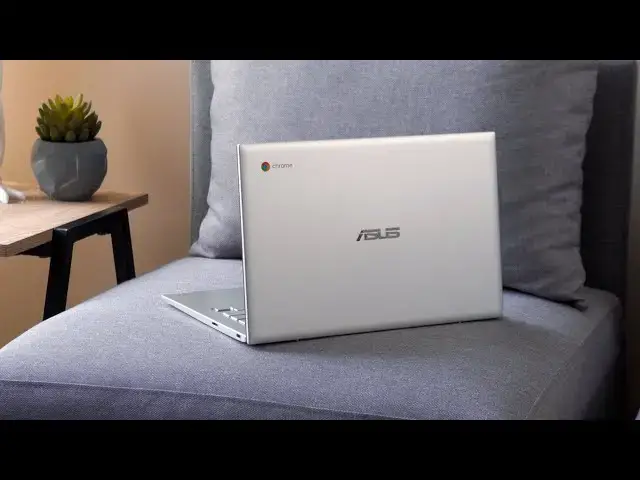
ASUS Chromebook C425 Review
Sep 23, 2019


Sponsored by Brydge. Premium aluminum keyboards for Google Chrome, iPad, and Surface Pro. Shop here: http://bit.ly/brydge3
Buy ASUS Chromebook Flip C425 on Amazon: http://bit.ly/334CXJRZ
・・・・・・・
We're getting to the point with Chromebooks where there are so many new ones hitting the market that new models simply pop up out of nowhere and are on sale before we even know they exist. That's the case for the ASUS C425 as it simply appeared a few weeks ago in an Amazon listing without as much as a warning from ASUS. We've since seen ASUS announce an additional Chromebook to their growing family in the Flip C433, so with that device and the excellent Flip C434 available, where does this device fit in? And is it worth your consideration? Let's find out.
ASUS Chromebook Flip C434 Review: https://youtu.be/hZQb2MZy56w
Read more: https://chromeunboxed.com/asus-chromebook-c425-review/
Join our newsletter: http://bit.ly/2WjCDm7
・・・・・・・
Shop Chromebooks on Amazon: http://bit.ly/chrmbooks
Subscribe to the channel: http://bit.ly/2xFuj6L
The Music We Use - PERFECT for YouTube: http://bit.ly/31W6PYP
Show More Show Less View Video Transcript
0:00
not long ago out of the blue asus
0:02
dropped a brand new chromebook on
0:03
everybody by just listing it on amazon
0:06
out of nowhere the asus chromebook c425
0:10
now you'll notice i didn't say flip c425
0:13
as in like the flip c434 this is a
0:16
clamshell only but it actually looks a
0:19
lot like it's c434 brother and if you've
0:23
not watched our review on that i would
0:24
say go and watch that we'll link it in
0:26
the description below
0:27
because that review is going to inform a
0:29
lot about this particular device mostly
0:32
on whether or not you should buy it and
0:34
i would assume if you're watching this
0:35
video that's what you're thinking about
0:37
you're trying to decide
0:39
can i save a little bit of money and get
0:40
a device that's pretty close to the 434
0:43
well yes and no you can get a device
0:46
that's pretty close to it but make some
0:48
serious trade-offs and you need to
0:49
decide whether or not those trade-offs
0:51
are worth the savings you're gonna see
0:53
at amazon or any other retailer so let's
0:56
dive in and find out
0:57
[Music]
1:04
today's video is brought to you by
1:05
bridge and if you're not familiar with
1:07
them we think you should be their stuff
1:09
is awesome well crafted and they make
1:11
keyboards for just about any device you
1:13
would want to slap a keyboard on from an
1:15
ipad to microsoft surface line of
1:17
devices to the pixel slate and matter of
1:19
fact they have a chrome os keyboard that
1:21
works on any chrome os device if you'd
1:23
like to learn more about their premium
1:24
products and how they're backlit and
1:26
made of aluminum and just work with the
1:29
things that you already have to extend
1:30
their functionality go to the link in
1:32
the description and you can find out
1:34
more about bridge today all right let's
1:36
start off with the build quality
1:38
overall this is a good feeling nice
1:41
feeling chromebook but again it's going
1:43
to be compared to the c434 a lot and
1:46
that is a fantastic feeling chromebook
1:48
that's made out of all aluminum this one
1:49
starts with aluminum the lid's aluminum
1:51
and that's very nice and it looks nice
1:53
and it's resistant to fingerprints but
1:55
the minute you move past the lid we're
1:57
talking all plastic plastic surround
1:58
around the screen plastic keyboard deck
2:00
plastic bottom and unfortunately
2:02
regardless of what your feelings are
2:04
about plastic it feels a little bit
2:07
cheaper than its c434 brother and
2:10
in general that's got to you know inform
2:13
your purchasing decisions when it comes
2:14
down to using the thing on a day-to-day
2:16
basis there's some benefits of plastic
2:18
for instance it's 2.8 pounds versus the
2:20
3.1 pounds of the 434 so it's nice it's
2:23
nice and light and it doesn't look bad
2:25
on the table it doesn't pick up
2:26
fingerprints but it just feels a little
2:29
bit cheaper than it should i think
2:31
another thing you'll notice that's a
2:32
little bit different here is that this
2:33
is a clamshell only so the hinge doesn't
2:36
have the normal hinges you would see on
2:37
a convertible it's not meant to fold
2:39
back 360 degrees it will fold flat
2:42
however
2:43
and you know if you're someone who likes
2:45
that or gets into that then great it'll
2:46
do that for you
2:48
for me i just generally don't fold
2:50
devices open flat on the desk and don't
2:53
see a whole lot of need for that so with
2:55
that full flat hinge in general i would
2:57
assume the people that do use that and
2:58
like that would fold it flat in order to
3:00
you know draw or touch or share
3:02
something across a table
3:04
but the problem is with this one you
3:06
don't get a touch screen and that's kind
3:08
of unfortunate and i didn't realize how
3:09
unfortunate it was until you know having
3:11
it around and using it i thought well
3:13
you know i use touch screens every once
3:15
in a while maybe if it's a tablet or
3:17
convertible yeah i'm all into touch
3:18
screens but what i found is even on just
3:21
a standard claim shell my brain now
3:23
expects there to be a touch screen there
3:25
multiple times i reached up and poked
3:26
the screen and obviously nothing happens
3:28
and that's kind of a bummer and
3:30
you know the plastic surround around the
3:32
screen i mean i know it's anti-glare and
3:34
it's matte finish and those things are
3:35
nice but it makes the screen a little
3:37
different it's a little bit inset and
3:39
there's a plastic surround around it
3:41
kind of looks a little bit cheap when
3:42
compared to you know the c434 and other
3:44
you know full glass
3:46
display panels and then the brightness
3:48
just isn't good and i've said this about
3:51
a lot of chromebooks here lately and i
3:52
hate saying it and i hate having to nag
3:54
on this but
3:56
manufacturers need to fix this this
3:57
thing gets to about 170 to 180 nits
3:59
brightness and it's just not great i
4:02
don't care if it's mac finish anti-glare
4:04
none of those things help when it's just
4:05
not bright enough and there's multiple
4:07
lighting situations including being on
4:09
my desk in the afternoons where it's
4:11
just not quite bright enough and so then
4:13
i'm left leaving it at 80 90 100
4:15
brightness all day just to be able to
4:17
kind of see and navigate the screen and
4:20
all of those things honestly are just
4:21
kind of unfortunate now that's not to
4:23
say this screen is a complete and utter
4:25
failure it's not like some disaster it's
4:27
1920 by 1080 you know full hd 16x9 good
4:31
viewing angles really nice colors it
4:33
does a lot of things right and in you
4:35
know normal to slightly dim rooms you
4:38
know you're not going to notice it and
4:39
the screen is nice to use it's just all
4:42
of those other instances where you're in
4:44
brighter light where you're going to run
4:45
into some trouble with the screen
4:46
unfortunately so up to this point we've
4:49
been a little hard on this device but
4:51
it's okay it's actually going to get a
4:53
lot nicer from here on out because the
4:55
rest of this device i like quite a bit
4:57
actually so let's talk about keyboard
4:58
and trackpad so first off they've
5:00
expanded the trackpad size and it feels
5:02
like it's almost the same size as like
5:04
the hp trackpad in the x360 which i love
5:06
it's nice and wide it's huge it's not
5:09
made of glass which kind of stinks and
5:11
would be an odd departure for them at
5:12
this point honestly because the c434
5:15
that's all aluminum has kind of a
5:16
plasticky track pad
5:18
so i didn't expect a glass trackpad here
5:20
we didn't get one the surface does feel
5:22
better than the 434 though i
5:24
enjoyed using it more it didn't seem to
5:26
build up oils quite as quickly it's
5:28
still not glass and so it's still a
5:29
little inferior in that way but the size
5:31
of it's really nice the click mechanism
5:33
is nice and i really just enjoyed using
5:34
it and ultimately on a device without a
5:37
touchscreen it needs to have a good
5:38
trackpad experience and and this one
5:40
delivers the keyboard as well is
5:43
excellent it's the same keyframe that's
5:44
in the c434 and
5:46
though when i reviewed that device i
5:48
said yeah i like the keyboard a lot
5:49
maybe it's one of my favorite keyboards
5:51
it's backlit and you know well spaced
5:53
and has tons of travel and click and all
5:54
that kind of stuff
5:56
what i realized as i was reviewing with
5:58
this one
5:59
i spent some time you know writing
6:00
articles and doing all the normal things
6:02
i would do and ended up
6:04
for some reason i've got my pixel book
6:06
back out and i was doing something on it
6:08
shut the pixel book down and got this
6:10
back out to finish the article i was
6:12
writing it was a long article i had to
6:13
do a lot of typing there's something
6:15
super comfortable about this particular
6:17
keyboard so i i think i have to
6:20
relinquish my favorite keyboard title at
6:22
this point
6:23
back to the 434 slash the c425 excellent
6:27
excellent keyboard so if that's kind of
6:29
your thing and you're really into having
6:30
a good keyboard this one definitely
6:32
delivers around the outsides of the
6:34
devices we have what i would love to
6:36
just label as like standard chromebook
6:39
port selection because so many
6:41
chromebooks have this port layout but
6:44
it's great i love it i hope it sticks
6:45
around for a long time and i hope this
6:47
becomes increasingly standard as the
6:49
next wave of chromebooks comes out usb
6:51
type c on either side usb type a so that
6:54
you can still use some of those type a
6:56
peripherals you have a kensington lock a
6:58
headphone microphone jack micro sd card
7:01
slot so all the i o you need to kind of
7:03
plug anything you need in there it's all
7:05
here and then it's flanked with a couple
7:07
speakers that though they're down firing
7:09
speakers it sounds like they're the same
7:11
ones and probably the same size chamber
7:13
as well that came with the c434 and
7:15
those are honestly some of the best
7:16
speakers we've heard in any chromebook
7:18
to this date the only speakers i would
7:20
put above them are the pixel slate
7:22
speakers and so far no one's really
7:24
gotten close to that but honestly if you
7:27
come a close second to that which these
7:28
do you're getting a pretty nice audio
7:30
experience and listening to music and
7:33
watching some videos actually sounds
7:34
really nice on this thing internally
7:36
this device packs a setup that i would
7:38
like to see more standard on chromebooks
7:40
2. it's the core m3 8th gen processor so
7:43
plenty of horsepower to do really
7:45
anything i threw at it between extending
7:47
monitors and having multiple tabs and
7:49
apps and all sorts of things running
7:50
there's literally not one time i stopped
7:52
to think i wish i would have upgraded
7:54
this to a different processor if i could
7:55
have you know it handles everything just
7:58
fine but it's paired up with eight gigs
7:59
of ram and 64 gigs of internal storage
8:01
and if i could hop on a soapbox for just
8:03
a second i really think that devices in
8:06
this price range so anywhere between
8:07
four and six hundred dollars eight gigs
8:09
of ram should be the the bottom line
8:11
there should not be four gig devices out
8:13
there in this price bracket and 64 gigs
8:16
of internal storage should be the bottom
8:18
line as well
8:19
i would love to have seen this one with
8:20
128 gigs of storage since you're kind of
8:22
lacking in a couple other areas it'd be
8:24
nice that 128 was just kind of thrown in
8:27
there it's not and you can expand via
8:29
the sd card slot but in general the
8:30
internals here performed very very well
8:33
had no issues with them and when you
8:35
pair all that with a 1080p screen the
8:37
chromebook doesn't have to work quite as
8:39
hard and i was able to get plenty of
8:41
battery life as well easily in that 8 to
8:43
10 hour range i don't know where they
8:45
rate this i think they might rate it a
8:46
little bit higher than that and i'm sure
8:48
if you turn the screen brightness down
8:49
which with the dim screen is kind of
8:51
hard to do for me
8:53
you could probably get better than that
8:54
but once you're hitting that 8-10
8:56
barrier i think you know this is the the
8:58
norm that we should expect from
8:59
chromebooks it's going to get you
9:00
through a day no problem you're not
9:02
going to have to go hunting for a
9:03
charger and finding electric outlets
9:05
wherever you're working it does really
9:06
great so performance wise internal wise
9:09
i had no issue whatsoever with this
9:10
chromebook
9:13
[Music]
9:23
[Applause]
9:27
so at the end we've got a lot of good
9:28
stuff and we got some downsides here
9:31
who's this for should you buy it that
9:33
depends on a couple things mainly just
9:35
like it seems to always come down to is
9:37
going to be price this device is msrp
9:40
4.99 at that price do not buy it matter
9:43
of fact when i bought it at 4.99 i was
9:45
kind of bummed because it went on sale
9:47
right after that but more troubling
9:49
honestly was i bought this at 500 to
9:51
review it i bought it and immediately
9:54
the 8 gig c434 that still has a
9:58
touchscreen has a brighter screen is all
10:00
aluminum and has the convertible form
10:02
factor went on sale for 560 dollars so
10:06
for 60 more dollars i could had all of
10:08
those things
10:09
and it has none of the downsides of this
10:11
device so if it's that kind of a price
10:14
difference no way would i say that you
10:15
need to purchase this device however
10:18
this one dropped to 3.99
10:20
i don't know six seven days after it
10:22
came out and it stuck there ever since
10:24
it came out so at 400
10:26
where the c434 the 8 gig version we got
10:29
to compare apples to apples here has
10:31
gone back up to 600 600 plus
10:33
pretty much anywhere you can get it
10:35
that's almost 200 difference at that
10:38
point
10:38
yeah if you can deal with the drawbacks
10:40
and you know them going in you know
10:42
exactly what you're getting here you
10:44
know you're going to lose touch
10:44
functionality you know you're going to
10:46
get a slightly dimmer screen well a
10:47
little bit more than slight but a dimmer
10:49
screen and you're going to get mostly
10:51
plastic in the build quality if you know
10:53
that stuff going in and you're like hey
10:55
that stuff doesn't bother me too bad
10:57
it's still an enjoyable chromebook to
10:58
use and i would say once you've saved
11:00
200 bucks
11:02
it's going to be very enjoyable for you
11:03
to use but just know that going in when
11:06
you go to buy this make sure you do your
11:08
homework and you look online and you
11:10
check prices of the 434 because if you
11:11
compare them and they're somewhere
11:13
around 100 bucks difference for the same
11:15
amount of ram in both of them
11:17
go with the 434 that's what you need to
11:18
do but if not if you're going to save a
11:20
couple hundred bucks and you can be okay
11:22
with some of the trade-offs here i think
11:24
this could be a good device for a lot of
11:26
people again i did enjoy using it but
11:28
guys that's it for this one if you
11:30
enjoyed it give us a thumbs up down
11:31
below hit the subscribe button as well
11:34
and please hit that notification bell so
11:36
you can be alerted when we make new
11:37
videos just like this one until next
11:39
time we'll see
11:44
[Music]
#Laptops & Notebooks
#Consumer Electronics