Up next in 10



Sponsored by NordVPN. For a limited time, grab the 3-year plan with 70% off! Click here: Click here: https://chromeunboxed.com/nordvpn
・・・・・・・
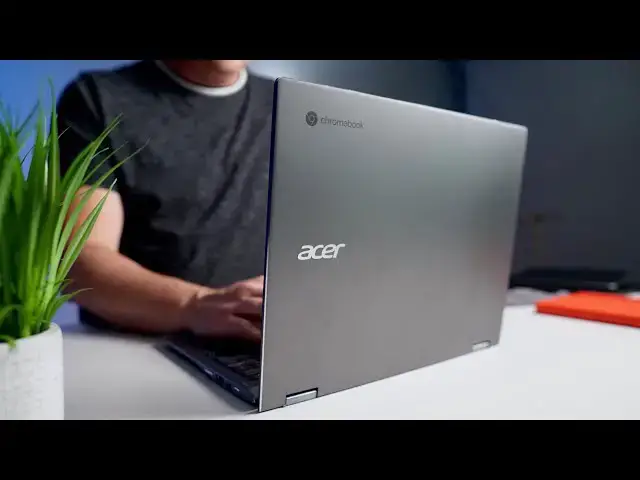
This year, Acer released a couple new Chromebooks at their NEXT@Acer press conference and one in particular was lent to us to get a bit of hands-on time with in lead-up to the event. The new version of the Acer Spin 13 is refinement of the older version in nearly every way and so far, my impressions are extremely good.
Read more: https://chromeunboxed.com/new-acer-chromebook-spin-13-713-impressions-hands-on/
Join our newsletter: http://bit.ly/2WjCDm7
・・・・・・・
Shop Chromebooks on CHROME SHOP: https://chrmshop.com/
Subscribe to the channel: http://bit.ly/2xFuj6L
The Music We Use - PERFECT for YouTube: http://bit.ly/31W6PYP
Become a member of Chrome Unboxed to help us make our channel even better, and for access to exclusive perks: http://bit.ly/CU-join
Follow us:
Show More Show Less View Video Transcript
0:00
hey guys we are here live from acer's
0:02
global press
0:04
oh no we're not just kidding acer
0:06
obviously isn't having an in-person
0:07
press event but the press event is going
0:09
on right now
0:10
and they were nice enough to send us
0:12
this the new spin 13 chromebook
0:15
and we've had a few days to take a look
0:16
at it and get our hands on it and we
0:18
want to give you our initial impressions
0:20
[Music]
0:24
so we're going to take this whole thing
0:26
as if we're at the event
0:27
because honestly we miss going to new
0:29
york and we miss being a part of these
0:31
things so
0:32
acer again sent this over to us kind of
0:35
as if
0:35
you know to look at as if we were at the
0:37
event so outside we have a fully
0:39
aluminum chassis here again this is the
0:41
spin
0:42
13 so we're talking about a 13 inch
0:44
device 13.5 inches specifically
0:46
and this is a new version of what they
0:48
had last year
0:50
uh in the spin 13 minus a couple things
0:53
adding a couple things we're going to
0:54
kind of go through that but around the
0:55
sides here
0:56
we have a micro sd card slot headphone
0:59
microphone jack
1:00
usb type a super speed there so it's a
1:03
3.0 port
1:04
and then the usb type c port on the
1:06
other side
1:07
and then flip it around and surprise
1:09
surprise we get a full
1:10
hdmi slot which is honestly pretty rare
1:13
these days
1:15
in any chromebook so it's kind of nice
1:17
to see that there no dongles required to
1:19
get out to an extended display
1:21
another usb type-c and then your power
1:23
and volume rocker there on the side
1:25
you'll also notice fan ports here and
1:28
here
1:29
again this is an all-aluminum chassis uh
1:31
acer tells us this is
1:33
mil-spec rated so it's rated for drops
1:36
and
1:36
corrosion and all that kind of stuff so
1:38
that's that's a nice touch and a device
1:40
that does not look
1:41
mil-spec rated uh so that's pretty cool
1:44
and then you have your speaker jacks
1:45
here as well this is obviously it's a
1:48
spin device so we've got the 360 degree
1:50
hinge here so you can open this thing up
1:53
and then flip it all the way over into
1:54
all the modes that you're accustomed to
1:56
with you know convertible devices and
1:59
this year acer
2:00
has chosen to kind of go with this scoop
2:02
here uh
2:03
and i like this this is kind of a call
2:06
back to
2:06
some of the older acer devices and it
2:08
just gives the thing a
2:10
smoother just better constructed feel it
2:12
just looks thinner
2:13
technically when it's sitting on a desk
2:15
it looks a little bit thinner than it
2:16
really is
2:17
and overall the construction compared to
2:19
last year's version
2:20
of the spin 13 just feels a lot more
2:23
cohesive the whole thing feels like it's
2:25
put together with a lot more thought
2:27
the hinges feel really good when you
2:29
open it you can actually almost get a
2:30
one finger lift here
2:33
which is nice and then the way the hinge
2:35
actually goes down at the bottom
2:37
gives you kind of that ergonomic lift a
2:39
little bit with the keyboard so
2:41
that again is just a really nice touch
2:44
once we open the device up again we're
2:46
met with a 13.5 inch
2:48
3x2 display i honestly don't remember
2:51
off the top of my head the resolution
2:53
it's a real oddball resolution
2:55
it's approaching uh 1440p
2:58
so it's approaching the quad hd
3:01
resolution here so think uh pixelbook
3:04
uh think the pixel slate that kind of
3:06
resolution
3:07
but you're getting a 13.5 inch screen
3:10
and one thing that struck me with this
3:11
particular display
3:13
when i looked at it i worked from it for
3:14
a couple days and i realized why i like
3:17
it so much
3:18
is that vertically it almost is the same
3:20
vertical space
3:21
as a 15.6 inch 16 by 9 panel
3:24
obviously you're losing some space over
3:26
here on the sides but for most things on
3:27
the web
3:28
the side is kind of throwaway space so
3:31
when you're talking about web browsing
3:32
and web apps and that kind of stuff
3:34
you almost feel like you're working on a
3:36
15.6 inch display
3:37
and it's a 13.5 inch device and so the
3:40
entire thing doesn't feel that much
3:41
bigger than like a 13 inch device so
3:44
it's a it's very compact for the screen
3:46
real estate you're getting here
3:48
and then additionally it's high-res and
3:50
it's very very bright we have it turned
3:52
down quite a bit so that it doesn't blow
3:53
out the camera but we were measuring
3:55
this thing somewhere around like 450
3:57
nits in brightness so
3:58
it's crazy bright the screen is an
4:00
absolute win here
4:01
uh the keyboard feels really nice it is
4:04
backlit as well and then down below that
4:06
you get a glass track pad
4:08
and they fixed this from last year last
4:10
year there was a huge space down here of
4:11
metal
4:12
beneath the track pad and i constantly
4:14
would click or attempt to click
4:16
on the actual frame of the device
4:18
instead of hitting the track pad and
4:19
this year they brought that track pad
4:21
down it's
4:22
huge it's all glass again this is
4:24
gorilla glass on the screen gorilla
4:26
glass on
4:27
the track pad as well and the entire
4:29
thing just feels like it's just
4:30
more thoughtfully put together than it
4:32
was last year the one that acer sent us
4:34
to test is the core i5 model but there
4:36
are quite a few models actually that are
4:37
going to be available going all the way
4:39
down from a pentium
4:40
all the way up to a core i7 all the 10th
4:43
gen core eye chips
4:44
uh from intel and we're going to get
4:46
anything from 4 gigs all the way up to
4:48
16 gigs of
4:49
ram and then additionally 64 gigs to 256
4:53
gigs
4:54
of nvme storage the lower end models
4:56
will come with emmc
4:58
storage this device here has the nvme
5:00
storage
5:01
and so far i can tell you this thing
5:04
feels great
5:05
it looks great on the table and
5:07
additionally what acer is telling us is
5:09
it's going to start
5:10
this model so the core i5 8 gig of ram
5:13
128 gigs of storage
5:15
is going to start at 629 dollars so
5:18
compared to the
5:19
the old spin 13 that came out and was
5:21
priced 900 to a thousand dollars
5:23
this is a very aggressive price point
5:26
from acer and for the machine that
5:27
you're getting here
5:28
the workspace you're getting from the
5:30
screen the the vibrancy and the
5:32
brightness of the screen the backlit
5:34
keys the glass track pad the all
5:36
aluminum build the 360 degree hinge
5:38
the 13.5 inch measure which is unique in
5:41
the chromebook space
5:42
there's a ton here oh and it's also usi
5:45
stylus compatible as well
5:46
there is a ton here for 630 dollars and
5:49
i've
5:50
enjoyed the few days that i've gotten to
5:51
spend with this obviously
5:53
we're going to get a full-blown unit
5:55
here in the office in the next week or
5:57
so to do a full review on this is not
5:59
that
6:00
but the initial impressions are honestly
6:03
really
6:03
impressive for this device i think acer
6:05
has put together a winner here
6:06
they're going to offer it in a consumer
6:08
model and in an enterprise model that
6:10
will come with a chrome enterprise
6:11
license but this will be available
6:14
and distributed in all the normal
6:16
consumer spaces as well so you're not
6:18
going to have to kind of go through
6:18
hoops like you did with the
6:20
old spin 13 they're going to offer it at
6:22
places like best buy and all that kind
6:23
of stuff
6:24
along with the enterprise version as
6:25
well so it's going to be nice to be able
6:27
to see this thing arrive sometime in
6:29
july is what acer is telling us
6:31
it's a great looking device again i want
6:33
to hold off on saying anything more than
6:35
that until we have really more time to
6:37
review this thing
6:38
but so far this thing looks like a
6:40
killer chromebook but guys that's it for
6:42
this one if you like this video
6:44
hit the like button go down there and
6:45
hit subscribe and also hit that
6:47
notification bell if you'd like to be
6:48
alerted when we make future videos just
6:50
like this one and don't forget to try
6:51
that join button as well if you'd like
6:53
to see
6:53
all the cool stuff our members get like
6:55
behind the scenes footage and custom
6:57
emojis till next time
6:59
we'll see
7:02
[Music]
7:06
you