Up next in 10



Join our Patreon community for access to our private Discord, an ad-free website experience, and more: https://www.patreon.com/chromeunboxed
・・・・・・・
This week, Google took the cover off a new Chromebook initiative that brings together the big three game streaming services (R.I.P. Stadia), ChromeOS, and some new hardware to deliver what they feel is the best overall way to experience game streaming. While streaming your favorite titles from GeForce NOW is certainly possible on nearly any Chromebook out there, Google wants to differentiate these devices by providing things like high-refresh screens, great speakers, RGB keyboards, and high-end internals to make sure your gaming experience is top-notch.
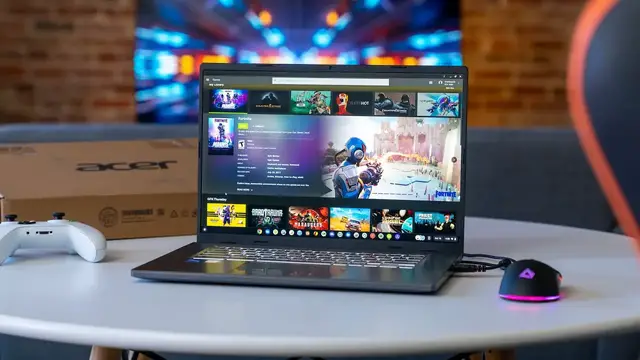
The first of these new Chromebooks we're getting our hands on is the Acer Chromebook 516 GE, and it brings together all the things you want in a gaming-focused Chromebook while simultaneously being a solid device for day-to-day tasks, too. Google has said these devices are optimized for cloud gaming and that they worked closely with GeForce NOW, XBOX Cloud Gaming, and Amazon Luna to make sure the hardware stack is primed for game streaming out of the box.
Read more: https://chromeunboxed.com/unboxing-first-impressions-acer-chromebook-516-GE-cloud-gaming/
Join our newsletter: http://bit.ly/2WjCDm7
・・・・・・・
Fueled by Fresh Roasted Coffee! Buy the special edition Chrome Unboxed bag here: https://chromeunboxed.com/coffee
Shop Chromebooks on CHROME SHOP: https://chrmshop.com/
Subscribe to the channel: http://bit.ly/2xFuj6L
Show More Show Less View Video Transcript
0:00
This is the new Acer Chromebook 516GE, a Chromebook built from the ground up specifically to take
0:06
advantage of cloud gaming. We're excited to see what's in this box and see how this thing performs
0:11
so let's get into it. Not surprisingly, this comes in a pretty standard box here and we're
0:20
going to get it out of the way as quickly as possible because really what we're excited about
0:24
is what's inside this thing. And we're looking at a 16-inch Chromebook here, but there are some
0:30
very specific things about this Chromebook that are exciting. Yeah, it's built from the ground up
0:35
for cloud gaming, and that's cool. We're not going to be able to obviously test out that stuff
0:40
really specifically in this particular video. We're going to do some videos down the road on that
0:44
but it's got a 16-inch, 16 by 10, 120 hertz screen. So we want to see how that looks. It's
0:50
got some pretty sweet looking speakers. We want to see how those look. It's got an RGB keyboard
0:53
We're going to obviously see how that looks. We want to see what the build quality kind of looks like and all that stuff
0:58
Because ultimately, if it can't do those things right, then it's not going to be a very good cloud gaming Chromebook
1:04
It's not going to be a very good Chromebook at all. So these are some specific things that this Chromebook does that other Chromebooks before it don't
1:11
And there are three total in this new line of cloud gaming Chromebooks
1:16
One from Lenovo and one from Asus as well. This is the first one we're getting our hands on
1:21
Charging cable here. largely the same thing you would normally see power brick with an extension cable here
1:30
so let's get all that out of here and get to this thing so this is an interesting two-tone
1:37
look from Acer here we don't generally see this a lot with them but it's actually got the
1:42
brushed aluminum look here and this is aluminum top and aluminum on the bottom which is nice so
1:48
it gives it a very nice firm feel. But you can tell it's a little bit thick, but even though it's
1:53
a 16 inch Chromebook, not crazy heavy. I want to say it almost comes in at like three pounds or
1:58
something like that. We'll have to look up that for the review. But yeah, the idea here being
2:05
this is a Chromebook built for cloud gaming. And even though cloud gaming doesn't require a whole
2:10
lot of resources to be on hand here, this one comes with a Core i5-1240p processor, which is
2:16
like 16 threads, I think, 8 gigs of RAM, 256 gigs of NVMe storage. So this thing's going to be a
2:23
performance monster for sure. And even though it's built for cloud gaming, it doesn't mean that
2:28
you know, once the Steam gaming comes along on Chromebooks, that this one wouldn't be one that
2:33
would take full advantage of that. And so obviously Acer has built this to do just that
2:37
Around the bottom, we've got some fan ports like we would expect on a device with this much power
2:43
Around the sides, we've got an Ethernet port right here, which again, cloud gaming, this is an important thing
2:50
If you're really going to get serious with it, if you want to get competitive with it, you probably want to be plugged directly into your modem or your router
2:56
USB Type-C port over here, headphone microphone jack. Here on the other side, we've got a USB Type-A, which looks like a USB 3.0 at least
3:07
HDMI slot here and another USB Type-C port. And then your Kensington lock there as well around the back, some more ports for fans
3:16
And that's about it from the front. Again, I know it looks a little bit thick, but it feels nice and
3:20
solid Sometimes these Chromebooks that get larger kind of have a flimsy feel to them So it nice to see this one kind of have this nice firm chassis here And I just noticed I don know if you picking that up Can you pick that color change up on camera there It almost like an RGB logo there which is kind of cool
3:38
because we're going to see that obviously transfer once we get inside the chassis here
3:44
And so as we lift this up, we have a nice small hinge all the way around the display. We'll power
3:49
it up and get it going here in a minute. Uh, Oh, it's coming on. Oh, that's right. It's a
3:53
it's, it's already had hands on. Um, so not a full, uh, retail unit here, but I'm going to turn
3:58
it off just so we're not having to worry about the screen for right now. We'll get that exposed in a second. Uh, but you're getting a 16 by 10 quad HD screen here. So it's actually a 2560 by
4:09
1600. So plenty of pixels here. Uh, IPS 120, uh, Hertz full sRGB, all that good stuff. So it should
4:18
be a really good looking panel. It is not touch. Uh, so, uh, we'll see kind of how that plays out
4:23
when we kind of do the review period. Uh, but the keyboard has a unique thing going on. Hopefully
4:29
you can kind of pick that up. It's almost like there's a white lining around them, uh, each key
4:34
And then the, uh, W A S D keys have, uh, just a different look to them so that they kind of stand
4:39
out just a little bit. Uh, and then there's going to be RGB lighting under here and we'll
4:44
we'll take a look at how much or how little you can control that. Um, the upper chassis here is
4:50
plastic, kind of like you would see on the Chromebook spin seven 13, seven 14, something like
4:54
that. Um, and then I believe this is an ocean glass trackpad here. And again, great click mechanism
5:01
I mean, Acer has been killing it with trackpads lately. So, uh, this one feels really, really nice
5:06
A lot like the 514 that has the MediaTek chip in it
5:13
We've got upward firing speakers here. The landing page for this Chromebook has quite a bit about the audio and how good it sounds
5:19
So we're hoping for some good sound there. As you can see there, Core i5 and Iris Xe graphics on the inside
5:25
And then a 1080p webcam up top. So no real surprises from a just general Chromebook standpoint
5:32
And this thing just kind of looks boxy and ready to go here
5:35
So I want to get it fired up, get everything logged in and ready to go, and actually go
5:41
ahead and sign into a couple of the cloud gaming services as well, because I want to
5:45
be able to show you at least loading it up. We want to test this fully, so I don't want to pass judgment on cloud gaming sitting here
5:52
in front of the camera. But we'll spend some time with that, obviously, in the next couple weeks
5:58
But what I do want to show you at least is, hey, these services running on here is PWAs
6:03
listen to the speakers just a little bit kind of get an idea what the screen looks like and all
6:07
that kind of stuff and in general performance so let me get logged in and we'll be right back
6:11
okay we've got everything all logged in and in the time that I spent logging everything in and
6:16
typing on this a little bit really great keyboard I do enjoy that and I found something fun with the
6:22
the way that the RGB keyboard settings present themselves so I'll show you that here in just a
6:26
second and again trackpad is excellent it's not glass it's ocean glass which is like a recycled
6:32
plastics from the ocean, but it is fantastic. I don't care if I ever mess with a glass trackpad
6:38
again. If plastic trackpads can be this good, I don't really feel the need to have glass on them
6:43
This thing's fantastic. But let me, let's start with the speakers on this one. So I've got a video
6:47
queued up here It our Pixel Watch review or unboxing So let me just turn that on probably picking up on the kind of fullness of that track underneath there it hit here in a
7:07
second but even sitting right here I can hear lots of stereo separation which is really nice
7:13
good crispy eyes finally this is google's new pixel watch i've had it on my wrist for a few
7:22
now it's not uh the most base full uh speaker setup i've heard but i do really like these
7:29
speakers um they they sound really good the stereo separation is nice they have a lot of highs a lot
7:34
of mids and some decent punchy lows i mean obviously you're getting like the subwoofer range
7:38
It runs out of audio space there. But in general, the speakers do sound really good, which is awesome because we see companies tout their speakers a lot
7:49
And then we get the Chromebook in hand and it's like, that's not the best thing I've ever seen or ever heard
7:54
So that's one good thing. The second I want to show you, because this shot's exposed really well, thanks to Joe and Andy Cam
8:02
I'm going to turn up the settings on this to Quad HD. Boom
8:07
and then I'm going to turn myself down because I don't want to listen to myself talk. But man, look at the colors on that screen
8:13
That looks fantastic. And what you can also see here is as I, well, you're not going to be able to totally see
8:20
it because we film in 30 frames per second. So you're not going to be able to catch how smooth all these transitions look
8:26
But man, the UI looks so good in 120 hertz. Now, I'm a little bit used to this
8:31
My extended monitor, I always push it to 120 hertz on Chromebooks that will push it
8:35
it's the first time I've had a Chromebook that does it with the internal screen. So this is super
8:40
exciting to me because I love seeing those high refresh rates on the screen. The viewing angles
8:45
look awesome on this thing. Hopefully the light glare isn't killing anything there, but viewing
8:50
angles are great. The colors look great. The dark levels look great. Contrast looks awesome. And then
8:55
that just crazy high refresh. This is a great panel. One of the favorites I've ever looked at
9:01
on a Chromebook. So, uh, the, the small bezels around the edges look fantastic. And since it's
9:06
not a convertible, we've got a nice small bezel on the bottom edge as well. I do wish it was a
9:11
touchscreen. It's not, but when we're talking about gaming with controllers and mice and keyboard and
9:15
stuff like that, obviously that's not probably the most important thing for Acer to have put in this
9:20
thing, but, uh, the screen is fantastic. So you got great screen, great speakers, and I will go
9:25
ahead and say a great keyboard. Um, it's, it's not the best keyboard I've ever used. Um, but it's
9:31
it's very solid. There's a lot of travel. They're nice and quiet. Um, and, and ultimately it's
9:37
obviously the, the, the Chromebook's big enough for there to be plenty of space. So the keyboard
9:40
feels fantastic. Great keyboard, great trackpad, great screen, and great speakers. Not a whole lot
9:46
more you ask for in a Chromebook. And then obviously, uh, the performance is just off the
9:50
charts because of the 12th gen core i5, eight gigs of RAM and 256 gigs of NVMe storage. So
9:55
you're not going to have any problems with performance whatsoever. So, so far, so good with
10:01
this thing. Before I show you a little bit of cloud gaming gameplay on this, which it's not going to
10:05
look that wildly different than what you've seen before on Chromebooks or PCs or whatever, I do want
10:10
to show you the fun little trick with the keyboard. So, if I go to adjust keyboard brightness, you can
10:15
see right down here it might be difficult to see there a little icon down there that shows that It looks like a little paint tray So if I quick enough to click on that then I can actually click and it brings up the personalization hub which is
10:30
where you set your wallpaper and all that kind of stuff. But as part of it on devices like this
10:35
you get some color picking here down at the bottom. And we may have to splice in a B-roll
10:40
with all this light shining down. This might be a little bit difficult to see, but as I click
10:43
through this, you can see the colors underneath the keyboard actually changing to match obviously
10:49
what I'm choosing here. And then there's a preset RGB kind of different zones of different colors
10:56
My hope is that down the road just a little bit, they allow you to maybe customize some of these
11:01
things or do some different stuff with them because clearly all the colors are under there. It's just a matter of the software telling it what color to turn what. But it's a fun little thing
11:09
with these gaming keyboards to see how these companies actually put RGB lighting in these
11:14
devices to, I don't know, just make them feel a little bit more gamer centric. Finally, I've got
11:19
Fortnite running on GeForce Now and it's worth noting Xbox's xCloud or Cloud Gaming or whatever
11:25
they're calling it now and Amazon's Luna are both available via PWA so you don't need Android apps
11:31
or anything to get up and running. GeForce Now obviously is running in PWA as well but I just
11:37
wanted to show you how responsive this is. As soon as I touch this, you can see he jumps
11:42
And I will jump out of the bus here, but you can see quickly, I mean, just how responsive this all
11:49
is. And so this is running at Quad HD, 120 hertz, all that good stuff in the cloud. And again
11:56
we're hooked in with Wi-Fi and I'm not plugged into anything. So I mean, this is, I'm pushing
12:01
this as hard as it's going to get pushed. Obviously things get easier if you plug it into the wall
12:05
and you hook the ethernet cable in. But as soon as I hit that, boom, you see it goes
12:11
Everything's nice and smooth. You're not dropping frame rates. And it's taking full advantage of the 120 hertz on the screen
12:17
which is really cool because at the end of the day, this is a Chromebook because of its speed
12:22
because of its screen, because of its keyboard and speakers and trackpad
12:26
that I'm going to be able to easily get lots of work done. It doesn't look bad
12:30
It looks relatively professional. It's not crazy and garish and trying to look so hard like a gaming laptop that I'd be embarrassed
12:37
to take it into a meeting. But in the evening when I get home, I can sit down and I can jump into a game of Fortnite
12:45
or whatever with my kids and really take advantage of these cloud gaming platforms
12:49
And then down the road, when Steam fully launches, this is going to be one of those Chromebooks
12:53
that handles that pretty well as well. So if you're looking for a gaming Chromebook, I think Acer's done a really good job putting
12:59
this 5.16 GE together. I like what I'm seeing so far. Obviously, I need to spend some time with it
13:05
I need to play more games on it. I need to work from it for a little bit and see that, you know, if everything kind of
13:11
comes together and it works well as a Chromebook, but it starts at $649 for this configuration
13:17
And this thing's a monster. So I think they've put together a really great package here
13:21
And obviously, it just needs to be evaluated a little bit. But guys, that's it for this one
13:26
If you enjoyed this video, give us a thumbs up, head down there, hit that subscribe button
13:30
and be sure to ring the notification icon as well if you'd like to be alerted
13:33
when we make future videos just like this one. Until next time, we'll see you
#Computer Hardware
#Laptops & Notebooks
#Virtual Reality Devices
#Gaming Reference & Reviews