Up next in 10



Sponsored by NordVPN. Try it out and get 75% off a three-year plan for a limited time! Click here: https://chromeunboxed.com/nordvpn
Shop Acer Chromebook 15 and Read More: http://bit.ly/33Ufquw
・・・・・・・
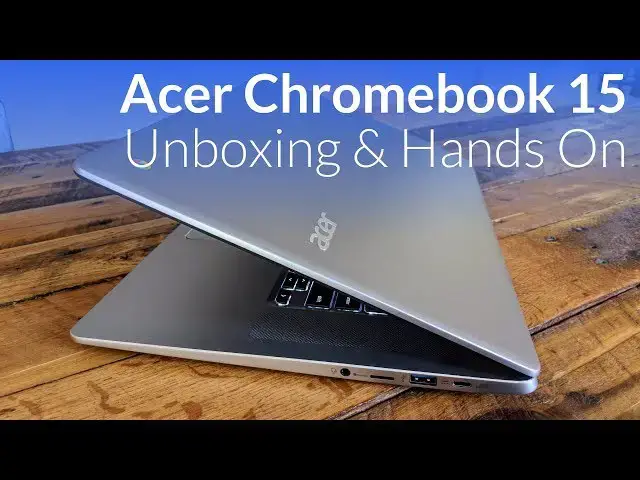
In the post-Pixelbook era, I was really interested to see what my reactions would be to the first Chromebook that crossed my desk. That first Chromebook? The new Acer Chromebook 15.
My reaction? Very good!
All clad in aluminum, this Chromebook improves on all the stuff Acer got right the first time around with the 15.6-inch Chromebook. Last year’s model was all plastic, heavy, and not the most impressive looking thing that has come through the office. They've done it right this time around.
Read more: https://chromeunboxed.com/
Join our newsletter: http://bit.ly/2WjCDm7
・・・・・・・
Shop Chromebooks on Amazon: https://fave.co/2OuedYL
Show More Show Less View Video Transcript
0:00
[Music]
0:08
hey folks I'll be paying with chrome
0:10
unboxed and today we're gonna be
0:11
unboxing a sirs latest Chromebook it is
0:14
the Chromebook 15 it is the one that is
0:16
mostly aluminum big 15.6 inch display
0:19
touchscreen Intel Pentium and 4200 chip
0:24
32 gigs of internal storage four gigs of
0:26
RAM so let's take a look see what's in
0:29
the box I get some of the first
0:31
impression stuff out of the way and
0:41
special thanks to a sir for giving us
0:43
this thing to take a look at and this
0:47
one's boxed up just like most Xers are
0:51
nothing new going on here some basic
0:53
paperwork we got some a little bit more
0:55
colorful stuff here with the how to get
1:00
started kind of stuff which is which is
1:02
nice welcome as we all know Chromebooks
1:06
are easy a quick to set up but it's
1:08
always nice for that kind of stuff to be
1:10
in the box
1:12
nothing surprising when it comes to this
1:14
except we do have USB C charging we're
1:17
seeing that pretty much across the board
1:19
in general and it's nice to see because
1:22
ultimately this charger you can put in
1:24
your bag and you can carry it everywhere
1:27
and it can charge your phone assuming
1:28
your phone's USB to charge or any other
1:30
devices USB C and slowly but surely
1:32
we're finally starting to see USB C
1:35
become the standard that is meant to and
1:37
one get all this stuff out cuz I'm
1:38
probably gonna have to plug this guy in
1:40
to get it to boot for the first time and
1:43
then we're going to get all this junk oh
1:51
yeah
1:52
such an upgrade just right here just
1:55
looking at this massive upgrade from the
1:58
Acer 15 of last year technically it's
2:01
like two years ago really the Chromebook
2:04
15 has gone through multiple different
2:06
stages there's all sorts of different
2:07
versions of it and
2:09
it's been hanging around as the same
2:11
plastic model for a while what's
2:15
interesting about this one is we carve
2:17
off quite a bit top to bottom so the
2:20
device is actually quite a bit thinner
2:22
than it was the last go-around and it's
2:25
almost a full pound lighter too and I
2:27
want to say it's three quarters of an
2:28
inch thinner something like that
2:30
and the old one was just bulky and large
2:33
and from what I've seen online this
2:34
almost looks like a 15-inch version the
2:37
Chromebook 14 if you want a better frame
2:39
of reference but just first blush across
2:41
here I love this brushed aluminum look
2:43
they've got the nice metallic Acer logo
2:46
on there and nothing else really going
2:47
on we'll kind of go around the sides
2:50
here we've got USB see over here a super
2:53
speed so 3.0 type-a port micro SD card
2:58
slot and headphone microphone jack and
3:01
then additionally we have another USB
3:03
3.0 another USB see so it's kind of the
3:06
same layout we're seeing on a lot of
3:08
Chromebooks right now
3:08
and your Kensington lock across the
3:12
bottom now this is where we get into
3:13
some plastic where we were talking
3:14
earlier it's mostly aluminum so the deck
3:16
of the device in the top or aluminum but
3:19
this bottom portion is plastic it's a
3:21
nice soft touch plastic too so that's
3:23
kind of cool the one thing that's a
3:25
bummer a lot of times about plastic is
3:26
sometimes it doesn't do as good at heat
3:28
dissipation but with the Pentium in 4200
3:30
it's not a super high powered chip I
3:32
don't foresee us having any issues with
3:34
heating at all so we'll open it up and
3:40
take a look and again yeah lots and lots
3:45
of stuff from the Acer 14 so a lot of a
3:48
lot of the same feel hey and it's gonna
3:49
boot without me I'm gonna plug it in fun
3:51
times so we'll get into logging in and
3:56
all that kind of stuff in a minute but I
3:58
want to talk through some of the cool
4:00
parts of them the way this thing looks
4:01
so you've got the nice chiclet style
4:02
keyboard you've got these nice machined
4:05
holes for the speakers which is really
4:07
cool upward firing speakers are always
4:09
welcome the pixel book and the pixels
4:12
before it and a few other Chromebooks
4:14
have had the Toshiba Chromebook 2
4:15
speakers that come through the keyboard
4:17
and that's hit or miss sometimes it's
4:19
it's really awesome sometimes it's not
4:21
so great when
4:22
speaker grilles and speakers in here
4:23
you've got some chambers to put the
4:25
speakers hopefully they're gonna sound
4:26
pretty good
4:27
usually if you've made space for them
4:29
that that helps and so if you get a nice
4:32
chamfered edge around around this here a
4:35
little like shiny glossy looking part it
4:39
just kind of adds a nice touch and $399
4:42
we don't even said that yet though I
4:43
says 399 bucks I mean it's a it's a big
4:46
Chromebook with a lot of good stuff
4:47
going on 1080p display touch screen it
4:50
is not matte finish like the old one
4:51
used to be because it's a touch screen
4:52
we've seen some touch screen matte
4:54
finish devices there they're few and far
4:57
between usually you get a bit of a
4:58
glossy a glossy panel here nice large
5:01
trackpad feels general acer fair this
5:06
kind of feels like the Chromebook 14
5:07
you're gonna you're saying that a lot
5:08
but you get a backlit keyboard here and
5:11
we'll look at that here a little bit
5:12
more in a second but as we tilt it up
5:15
you can probably see some of that that
5:18
backlighting coming through we obviously
5:19
have all the big lights on so it's hard
5:21
to see those things but overall just
5:23
like just looking at the device from
5:25
this angle right here really really
5:26
stunning looking Chromebook that's uh
5:30
yeah so the trackpad feels tight heard a
5:33
couple reports of a floppy trackpad you
5:36
know this thing wouldn't be hard to take
5:37
apart and kind of adjust that thing but
5:39
ultimately you shouldn't have to do that
5:41
when you open up a brand new device so
5:42
if you do have one of those faulty track
5:44
pads I would suggest going in and
5:46
exchanging that thing so let me get
5:48
logged in real quick here all right guys
5:51
we're all logged in now turn back around
5:54
cut so you kind of see it now keep in
5:56
mind we're into some pretty severe
5:57
studio lighting here so hopefully we're
6:00
not getting too much glare but it's not
6:02
the brightest display I've ever seen but
6:04
it's on its own in here and that's
6:06
saying something so we've had some
6:07
Chromebooks under these lights that
6:08
think the display becomes so muted it's
6:12
hard to get on camera and so display is
6:14
pretty good again like I said you've got
6:15
touch so all your touch elements work as
6:18
you would expect let's go anything we
6:22
can school we can move here so and
6:26
performance so far pretty good
6:28
pinch-to-zoom works works well you don't
6:32
want that
6:33
as I was signing in just you know
6:35
initial thoughts on the keyboard not bad
6:37
Acer to me a lot of times has keyboards
6:40
that feel a bit mushy I've heard reports
6:43
of people saying this one feels too firm
6:44
and so I mean maybe that means I like
6:46
firmer keyboards I guess I don't know
6:47
but this one felt pretty good and the
6:49
fact that it's backlit again it's just a
6:51
really really nice bonus and the
6:53
trackpad feels good kind of like general
6:55
a surf air for for trackpad so it's not
6:58
the smoothest thing the world but it
6:59
picks up all your gestures and all the
7:01
normal things quite well feels good the
7:04
click feels good it's not wobbling
7:05
around and all that kind of stuff so
7:06
again when we start talking about sub
7:08
$400 Chromebooks these are kind of
7:09
things we got to think about like is is
7:12
it put together well enough it's not
7:14
going to irritate users and so far so
7:16
good
7:16
everything feels good it looks good
7:18
again there's touches that we're always
7:20
going to know with this one that's not
7:22
quite up to these super premium devices
7:25
but again 400 bucks so we want to run a
7:28
couple quick things so I am actually
7:30
going to run the outdated benchmark of
7:34
octane and I know a lot of you may say
7:37
oh well you know octane is not a not a
7:38
thing anymore and it's it's not being
7:41
updated anymore sure it's not
7:42
speedometer takes a while and so we can
7:45
do that maybe for the review because
7:46
performance is a question mark on this
7:48
thing we haven't seen a Chromebook with
7:49
the and 4200 chip in it so it's a
7:52
Pentium not the same Pentium that is in
7:54
the Asus C 302 which performed really
7:56
really well when we had it almost a year
8:00
ago so this is a different Pentium chip
8:03
it's more in the line of like the Apollo
8:05
like and kind of chips and to be honest
8:08
with you I can't even begin to explain
8:10
some of the nomenclatures and naming
8:12
systems and Intel uses and what what
8:13
chips go with what
8:15
so these benchmarks actually help quite
8:18
a bit
8:18
when we run them so we are gonna ruin
8:21
octane real quick again I know it's
8:24
outdated and hopefully my hope is a
8:26
little bit that even though it's
8:28
outdated now we won't have any
8:30
manufacturers actually attempting to
8:33
make their devices work better for
8:35
octane since now it's like oh well you
8:37
shouldn't use octane so well hopefully
8:39
octane actually becomes a little bit
8:41
more relevant to what real-world usage
8:44
would be like again speedometer
8:46
something will run
8:47
at a different time for right now we're
8:49
not going to do that so while it's
8:52
running a couple last notes because the
8:54
last thing I want to do is just hear
8:56
what these speakers sound like overall
8:59
I'm very pleased it does have a lay flat
9:01
screen I don't really know what you do
9:03
with that but it does that maybe lay it
9:06
down and play game or something like
9:07
that I don't know different one's
9:09
different Chromebooks say different
9:12
stuff about you know saying that that's
9:14
like a feature I'm not sure what to do
9:17
with that but it does that so there you
9:19
go well here the speakers in just a
9:22
second but man the keyboard feels pretty
9:23
good and the trackpad feels pretty good
9:25
and overall aesthetic looks pretty good
9:27
and the screen looks pretty good so 11
9:31
to 57 that's not terrible to be honest
9:33
with you usually once we see stuff get
9:36
around 12,000 to 13,000 we're in the
9:38
realm of not really thinking about
9:40
performance anymore
9:40
so we'll run more of those before the
9:43
review but in general I'm hoping that
9:46
turns into some real-world performance
9:47
I'm not expecting to get like 25-30 tabs
9:50
and ten different Android apps running
9:52
and anything like that but I bet we'll
9:54
get some decent performance for
9:55
day-to-day usage where you have five or
9:57
six tabs open maybe a music player and
9:59
running a video here and there that kind
10:00
of stuff
10:01
general usage things it seems like it's
10:03
actually going to perform really well so
10:05
last thing we're going to do I'm just
10:08
gonna pull up YouTube real quick here we
10:11
go I'm just clicking on some no
10:12
copyright music cuz we got trouble for
10:14
an old video about some copy written
10:17
music that we played so this is this is
10:19
open source stuff
10:24
[Music]
10:26
may or may not be able to pick up this
10:29
really well but got a little bit of
10:31
thump to the base it's kind of man no
10:36
idea what this is
10:36
oh there's random people dancing on the
10:41
screen that's fast-forward a little bit
10:47
there we go
10:50
[Music]
10:53
that's actually really good
10:59
maybe a little bit muddy in the mids but
11:01
again 400 bucks and these are laptop
11:04
speakers yeah probably the best
11:13
Chromebook speakers I've heard so yeah
11:18
that's that's a nice surprise and you
11:20
hope to hear that the the last year's
11:22
model had upward firing speakers and
11:23
they were there okay these are really
11:26
good sounding I wish my pics will book
11:29
had that much low-end response to it and
11:31
I get it super slim laptops just don't
11:34
make room for speakers so this isn't the
11:36
slimmest thing in the world but it's
11:37
also not the thickest thing in the world
11:38
so I mean we look at this thing on axis
11:41
here I mean it's it's relatively thin
11:44
you're not gonna forget it's in your bag
11:46
by any by any stretch of the imagination
11:48
it's it's a large Chromebook but I think
11:52
this could be again review pending one
11:55
of those really good Chromebooks that
11:56
becomes a really easy recommend for a
11:58
lot of people that don't want to spend
11:59
pixel book price but also don't want the
12:01
super bargain device and it's like hey
12:03
how spend you know 400 bucks on the
12:05
device again review pending I don't I
12:08
don't want to say too much right now but
12:09
man first blush first first sight on
12:13
this thing first hands on I'm pretty
12:15
impressed and so we'll give it a week
12:18
week or two spend some time with it
12:20
passed around the office let some other
12:21
people weigh in on it and I know some
12:24
people that have used the the older
12:26
version of this device pretty
12:27
extensively so it'll be cool to hand
12:28
this to them and let them use it for a
12:30
minute and see what they think about it
12:31
but guys that's it for this for this
12:33
unboxing if you like this video hit the
12:35
subscribe button I think it'll be right
12:38
up here as well and give us a thumbs up
12:41
on the video and make sure and stick
12:43
around for upcoming videos that will
12:45
just keep coming well obviously we'll
12:47
have the review so be subscribe see you
12:48
if you're interested in this device here
12:50
you're notified when the review comes
12:52
out bye guys until next time we'll see
12:54
you
12:56
[Music]
#Laptops & Notebooks
#Consumer Electronics