Up next in 10

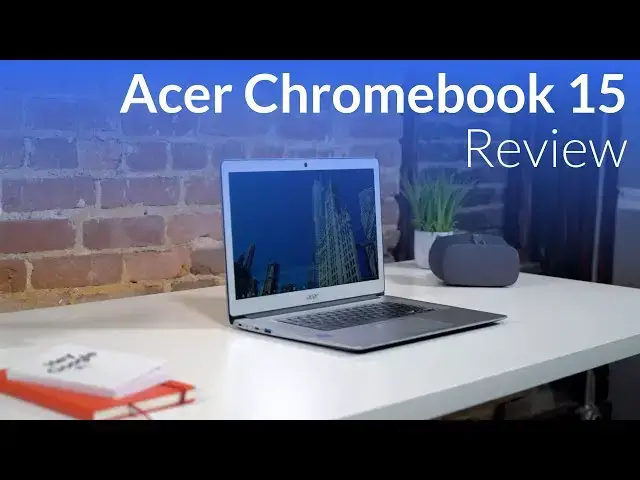
Acer Chromebook 15 Review: Greater Than the Sum of its Parts
Mar 12, 2018


Sponsored by NordVPN. Try it out and get 75% off a three-year plan for a limited time! Click here: https://chromeunboxed.com/nordvpn
・・・・・・・
Shop Acer Chromebook 15 on Amazon: https://fave.co/2MwlOTW
The title up there was written on purpose. The Acer Chromebook 15 is nothing if not underwhelming on the spec sheet. As we go through the specifics of this device, it would be easy to consider writing off this machine based individual stats. Other than one area, this Chromebook isn't the best at anything.
Not one thing.
And yet, despite this nagging fact, the Acer Chromebook 15 delivers an experience far better than you would expect for a Chromebook with this spec sheet in this price range. I'm not going to spoil it for you, but I think you can see where we are going here.
I like this one. A lot. And I feel like many of you will, too.
Read more: https://chromeunboxed.com/
Join our newsletter: http://bit.ly/2WjCDm7
Show More Show Less View Video Transcript
0:00
[Music]
0:06
a lot of times we look at Chromebook
0:10
spec sheets and we get excited about
0:12
screens or processor speeds but with the
0:15
Acer Chromebook 15 what we're gonna be
0:17
talking about today
0:18
none of the spec sheets actually get
0:20
anybody excited most of the stuff is
0:22
kind of middling it's got a decent
0:24
processor a decent keyboard and a decent
0:27
screen and all those things and none of
0:30
them are bad and none of them are best
0:31
it's not the best at really anything
0:33
however what Acer is done here with this
0:36
device has take a bunch of decent things
0:39
and put them together to make a really
0:41
really excellent solid holistic package
0:44
so we want to dive in and show you why
0:45
so first up let's talk about build
0:47
quality thanks we've done a really
0:49
really great job here most of the device
0:51
is aluminum so the lid the surround
0:53
around the screen and the deck and the
0:55
sides of it are all all aluminum and
0:57
it's a powdered finished aluminum not
0:59
the brushed finish so it doesn't pick up
1:00
a lot of fingerprints and all that
1:02
aluminum makes for a nice sturdy chassis
1:04
while coming in at a full pound lighter
1:06
and three quarters of an inch thinner
1:08
than its predecessor which was all
1:10
plastic and should have been lighter so
1:12
acer has done a really great job with
1:13
that now the bottom is plastic and
1:15
honestly that's okay we don't turn the
1:17
device over and look at it that often
1:19
and it serves its purpose just fine
1:21
just like the HP Chromebook 13 g1 did
1:23
overall I'll give a search terms up here
1:26
they didn't do anything groundbreaking
1:27
or anything mesmerizing with the build
1:29
of this device but it works and it looks
1:32
good and it feels nice and firm and
1:34
solid and substantial in the hand next
1:36
up let's talk about the screen so we're
1:38
dealing with a 1080p screen here on a
1:40
15.6 inch display so 16 by 9 again
1:43
nothing out of the ordinary it is a
1:45
touchscreen and it is IPS so you get
1:47
nice wide viewing angles it's not the
1:49
brightest thing I've ever seen somewhere
1:51
around 250 to 300 nits so it's not
1:54
completely disappointing it's also not
1:56
amazing so you get it outside and direct
1:58
sunlight you're probably going to run
1:59
into a few issues but overall again
2:02
Acer's put a decent panel in here the
2:04
viewing angles are really good the
2:06
colors are really good the touch
2:08
sensitivity is really good I really
2:10
don't have too many complaints about it
2:11
sure when I set it up next to my pixel
2:13
book I noticed the difference but
2:15
overall 1080p on a 15.6 inch display is
2:18
the right resolution for this display I
2:20
are the right size on the display and it
2:23
just kind of gets out of the way it
2:25
feels good it looks good and it behaves
2:27
just as you would expect it to next up
2:28
we need to talk about the keyboard and
2:30
the trackpad because once again acer has
2:32
done some pretty cool stuff here the
2:35
keyboard feels similar to what other
2:37
Acer offerings feel like a tad bit mushy
2:40
not the clicky a thing in the world but
2:41
a good amount of travel what's really
2:44
cool here is at this price point they've
2:45
included a backlit keyboard so you get
2:48
multi stage backlighting six stages and
2:50
all and it's really nice to have if
2:52
you're in a dimly lit environment if
2:54
we're seeing Acer put in a 299 to $399
2:58
Chromebook backlighting at this price
3:00
point I just don't see why it is that
3:02
most Chromebooks don't come with it at
3:05
this point they don't so it's still kind
3:06
of a perk and Acer did well to include
3:08
it additionally the trackpad is pretty
3:11
good-sized again it's very similar to
3:13
other Acer devices the Chromebook 14
3:15
last year's 15 it's plastic it blends in
3:19
pretty well with the Chromebook overall
3:20
and the aesthetic looks good but this is
3:23
probably my biggest pain point with this
3:25
device and I've read online that other
3:26
people have had the same thing the multi
3:29
click thing that I've talked about in
3:30
other Chromebooks is present here so the
3:32
the trackpad kind of floats just a
3:34
little bit before you push it down then
3:36
it hits the mechanism and then clicks
3:37
and so you get that weird kind of
3:39
floating thing that's happening and
3:41
sometimes when you're typing you can
3:42
even hear it moving around it's just
3:44
loose grey in it I could open up the
3:46
Chromebook and fix this it's not that
3:48
difficult to fix but it's not something
3:50
you should have to fix and I've heard a
3:51
few people complain about the same thing
3:53
so bear that in mind if you're really
3:55
picky with your trackpad that could be
3:57
something that turns you off with this
3:58
one but overall the tracking of it the
4:00
smoothness of the gestures I mean we
4:02
kind of go over this a lot and Chrome OS
4:04
does really well with that stuff as far
4:06
as getting through the UI this one does
4:09
just fine I just don't really care for
4:10
the click mechanism next up let's talk
4:12
about input and output and so this
4:14
device actually has what has become
4:16
pretty standard at the end of 2017 for
4:18
Chromebooks and then what looks like
4:20
it's going to stay standard through
4:21
probably the early parts of 2018 at
4:23
least so usually you have Chromebooks
4:24
with either just a couple USB CS or you
4:26
have this layout which is two USB sees
4:28
two US bas
4:30
there's usually one on each side and for
4:33
me personally it's my favorite layout so
4:35
you get all the benefits of USBC like
4:37
your monitor out going straight through
4:39
that plus your power and you can use
4:41
either side whichever one is more
4:43
convenient but then you also have USB a
4:45
for those peripherals that need some
4:47
sort of dongle and you don't actually
4:48
have to have a dongle with you so it's
4:50
kind of a nice setup and I I do wish
4:52
that they had that on some of the other
4:54
premium Chromebooks additionally you
4:56
have a micro SD card slot and a
4:58
Kensington lock this one comes with 32
5:00
gigs of internal storage and we'll talk
5:02
about that in a minute but the micro SD
5:04
card slots again is a nice addition to
5:06
have now that Android apps are available
5:07
on these devices and you're going to
5:09
download a little bit more movies more
5:11
pictures that kind of stuff it's nice to
5:13
have some additional storage and this
5:14
one's very very easy to just slide an
5:16
extra card in the side to expand your
5:18
storage additionally you have a audio
5:21
jack that serves just like every other
5:23
Chromebook so you know microphone
5:25
headphone jack but you have some really
5:27
great speakers and and some really cool
5:29
machined holes that are on both sides of
5:31
the keyboard and it just looks really
5:33
great but additionally it sounds really
5:35
great and well actually let's let you
5:38
have a test and hear it right now so
5:54
yeah the speaker's sound amazing and by
5:58
far of any Chromebook probably any
5:59
laptop I've actually heard these are the
6:01
best sounding speakers so if that's
6:03
something you know most times when I
6:05
review these devices that's honestly the
6:07
least of my worries I will say and I've
6:10
said throughout this video there's a
6:11
bunch of middling specs this is where
6:13
they actually are proficient they're the
6:16
best speakers i've heard on a laptop in
6:18
a long long time so well done for that
6:19
Acer and we can't talk about Chromebooks
6:21
without talking about what's inside of
6:22
them and with this device you get again
6:26
some pretty middling specs but they work
6:28
and we're going to discuss why they work
6:30
here in just a second what's inside is a
6:32
pentium n 4200 four gigs of ram 32 gigs
6:36
of internal storage 32 gigs of internal
6:38
storage is enough to get most people by
6:41
if you're going to be downloading lots
6:42
of movies slap an SD card
6:44
inside but otherwise 32 gigs is probably
6:47
enough to get most people by on a
6:48
Chromebook four gigs of RAM again it's
6:50
enough for most people on a Chromebook
6:52
take the Samsung Chromebook pro for
6:54
instance it still only comes with four
6:56
gigs of RAM and honestly for most
6:59
people's day-to-day use is plenty the
7:01
Pentium and 4200 now it's a step up from
7:04
like say the Apollo Lake processor so
7:07
it's not in that core I line it is a
7:09
Pentium processor that's in more of the
7:11
Braswell Apollo Lake line but it
7:14
performs pretty well and we were seeing
7:16
benchmarks on octane around twelve
7:18
thousand eleven thousand on most days
7:20
somewhere in between there but it gets
7:22
along just fine and you know benchmarks
7:25
are synthetic real world use that's
7:27
that's where the rubber meets the road
7:29
and this device gets along really really
7:31
well I actually used it for a few days
7:33
as my only work device with an extended
7:36
display and doing all the things I
7:37
normally do on my pixel book and really
7:40
wasn't too frustrated with it it
7:41
performs it gets along way way better
7:44
than the spec sheet would have you
7:46
believe
7:46
and so again Acer's done a good job here
7:48
of putting in the the resources it needs
7:51
to get by on without breaking the bank
7:54
so without any special sections here in
7:58
this review we've covered all of it and
8:00
relatively quickly and that highlights
8:03
one of the things that makes this
8:04
Chromebook kind of unique and that seems
8:06
odd to say that there's generic features
8:08
about a Chromebook that make it unique
8:09
but what Acer is done with this device
8:11
again I said it earlier is they've taken
8:14
a bunch of specs that don't look very
8:15
impressive on a spec sheet put them
8:17
together in a Chromebook that make a
8:19
holistic package that is actually really
8:21
impressive and great to use like it it
8:24
is one of my favorite Chromebooks that
8:25
I've had in the office since we started
8:27
this channel it's just enjoyable
8:30
I love the speakers I like the backlit
8:32
keyboard trackpad annoys me a little bit
8:34
but it's got a touch screen for those
8:36
Android apps that really need touch
8:37
still it really just covers so many
8:40
bases pretty well he doesn't have the
8:43
best anything except for the speakers
8:45
and yet it's probably one of my favorite
8:47
Chromebooks for overall use and then we
8:50
had to talk about the price right now in
8:52
Amazon as of the filming of this before
8:54
we started I looked and it was three
8:55
and $14 now that can fluctuate the the
8:59
set price for it is $399 so anywhere
9:02
between their from 300 to 400 dollars
9:04
it's a great deal for this device
9:06
especially if you get down close to 300
9:08
bucks I can't recommend this device
9:10
enough it's really great
9:12
it gets along way better than the spec
9:14
sheet would show you and it's really
9:15
affordable and it encourages me to know
9:18
that affordable Chromebooks are getting
9:20
really really good because we're in an
9:22
era now of pixel books and Samsung
9:24
Chromebook pros we're six to eight to
9:26
$1000 devices are becoming the norm it's
9:29
great to see companies still investing
9:31
in devices that don't cost an arm and a
9:33
leg and that are getting really really
9:35
good at doing so guys if you like this
9:38
video subscribe down below hit the
9:41
thumbs up and until next time we'll see
9:43
you
9:44
[Music]
#Computers & Electronics
#Shopping