Up next in 10



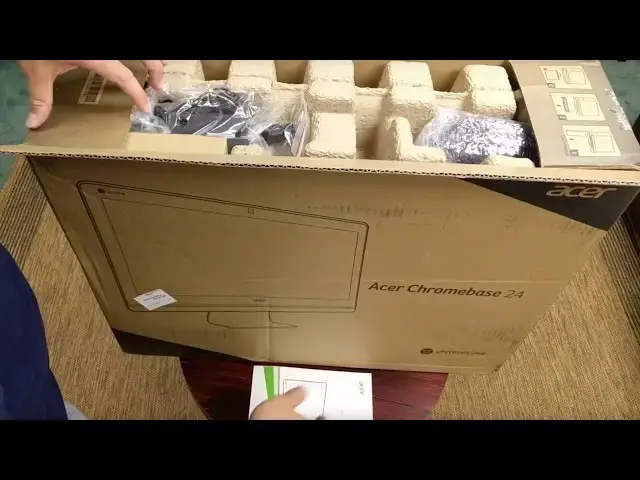
The Acer Chromebase 24, announced back at CES in January, is now available to general consumers and we have it in the office and we are ready to put it through the paces.
Stay subscribed to see the full review when it drops and check out the rest of the Chrome OS videos on the channel!
Also, check out chromeunboxed.com for all the latest Chrome OS news!
Show More Show Less View Video Transcript
0:00
hey folks Robbie pay with chrome unbox
0:02
coming at you today with an unboxing of
0:04
the acter Chromebase 24 this is a 24in
0:08
all-in-one Chromebook that was announced
0:10
way back in January at CES and hasn't
0:13
been available to the public until just
0:15
now we got ours from Walmart it's
0:17
available for multiple Outlets this is
0:19
the base model with the Celeron 16 gigs
0:22
of internal storage and 4 gigs of RAM it
0:25
goes all the way up to an i5 with 8 gigs
0:27
of RAM but this guy comes in at 4 $29 if
0:31
you find it in the right place and in
0:33
stock so we're excited to see how it
0:34
performs under real world use but first
0:36
we got to get it unboxed so let's get at
0:38
it
0:40
[Music]
1:13
we've got keyboard uh Island style Keys
1:17
uh huge travel on these things
1:46
oh goodness gracious yeah so it's it's
1:48
heavy
2:16
oh interesting I'll turn this
2:20
around so you can actually see um right
2:24
here at top there's a a little
2:27
adjustment here for your webcam so uh
2:30
because we have a big screen and that
2:31
thing's probably not always going to be
2:32
pointed right at your face you can
2:34
quickly tilt and lean your webcam um it
2:37
feels like the screen uh can can
2:39
actually move uh what do we want to say
2:42
about 30° there straight up and down to
2:45
90 so um you get a decent amount of tilt
2:47
there cuz it is a glossy panel
2:51
um so there is going to be some
2:53
reflection uh for some people as they
2:55
set this thing up
3:12
uh just from a hardware perspective uh
3:15
got to say it's it's very attractive um
3:17
so the the assuming glass this might be
3:21
plastic when glass gets thin it's hard
3:23
to tell but the glossy part goes all the
3:25
way to the edge so there's no real uh
3:27
plasticky bezel save for right up here
3:29
here and you got kind of this nice
3:31
machine speaker grills across here we'll
3:33
obviously take a look at those in the
3:34
review and um talk about how good or bad
3:38
those
3:39
are let's look across the back
3:42
here and we've got Acer and blazing nice
3:45
and
3:46
large across here we got this nice metal
3:50
feeling um yeah I'm pretty sure that's
3:52
solid aluminum uh the base is really
3:55
sturdy which is very nice uh no
3:57
plasticky cheapness going on here
4:00
um you've got a fulls siize ethernet
4:02
port uh HDMI out this is no not an input
4:05
here uh two USB 3s and USB 2 power
4:09
Kensington lock and that's about it it
4:12
looks like for the ports uh this is
4:14
probably fan Grill down here at the
4:16
bottom oh we got a couple more things
4:18
here on the side see let me tilt this up
4:22
oh
4:23
gosh it's really heavy um another USB
4:26
3.0 so that makes three um headphone
4:30
microphone full sizee SD card
4:33
slot and some more fan fence right
4:35
across the top there as that looks like
4:38
about it as far as the hardware is
4:40
concerned we're going to break away real
4:42
quick and power this guy
4:45
up all right guys we're back um after
4:48
getting this thing powered on uh signed
4:50
in all those kind of things we are
4:52
running in guest mode um we have not yet
4:55
reviewed a Celeron in the Skylake family
5:00
so a six gen Celeron Processor yet so
5:03
I'm a little eager to see how octane
5:05
runs on this thing um couple quick notes
5:09
um and and we'll we'll kind of wrap this
5:11
thing up for today uh the keyboard and
5:14
mouse as expected are really cheap
5:16
feeling uh real plasticky and light but
5:18
the travel on the keyboard is not that
5:20
bad so if you're using this for a kiosk
5:22
kind of setup or it's going in a library
5:24
or that kind of thing I think the uh
5:26
usability of both would be just fine
5:28
they're nothing to
5:30
um remark about they're just uh decent
5:33
in general um the screen looks great
5:36
1080p IPS uh viewing angles are really
5:38
good so I'll turn this just a little bit
5:40
to the side so you can kind of
5:42
see we don't really see any issues as we
5:46
turn from side to side and then as I
5:47
tilt It Forward uh and back really you
5:51
don't lose too much color just a little
5:52
bit of brightness that you're kind of
5:53
detecting on the camera there we got
5:56
1,600 or
5:58
16,25 5 which is Pretty stinking good um
6:02
if you think back to uh fourth gen I3
6:05
that's in the um Asus Chrome box that
6:08
does really well and has really no
6:11
issues whatsoever with performance gets
6:13
around a 16,000 so uh we're seeing the
6:16
cerons come up the uh the couple
6:18
generations of processors from Intel
6:21
have gotten better 16,000 to me guys get
6:24
you in a Range where this is um
6:26
completely acceptable performance and
6:28
again we're going to talk about this
6:29
stuff in uh full review after I've had
6:31
some time to work from this device but
6:34
um pretty pretty encouraging honestly um
6:37
let me get logged in real
6:40
quick because I would like to play these
6:43
speakers real fast and see how they how
6:45
they
6:47
perform uh the screen is rated at 250
6:50
nits of brightness uh and it's getting
6:52
all of that uh really really bright nice
6:55
vibrant colors as IPS panels are in
6:58
general uh 1080p looks great on this
7:01
size if you get up close yeah you see
7:03
some pixels but you're not going to be
7:04
working with your face right in this
7:05
device so shouldn't be an issue um the
7:09
HDMI out gives you the ability to set a
7:11
second screen to the side of it really
7:13
have a nice huge workpace which I'm
7:16
looking very much forward
7:18
to
7:19
um we did this in the last review but
7:22
we'll play a little John
7:27
Bellon I tell you the speakers are loud
7:36
[Music]
7:39
um as you would expect a little mid
7:47
[Music]
7:50
heavy plenty loud though so if we're
7:52
talking about doing things again in
7:54
Kiosk mode or in some sort of public uh
7:57
venue the the speakers are going to be
7:59
plenty loud enough it's probably going
8:01
to make for a really really great um
8:03
Hangouts machine that kind of thing and
8:05
so um really good there um I I don't
8:08
really have much bad to say about those
8:10
um we're going to go a and wrap this up
8:12
um good looking screen kind of cheap
8:15
peripherals decent speakers uh really
8:17
nice base that can be detached so you
8:19
can hang it on a wall if you want
8:21
adjustable webcam beautiful screen nice
8:23
and bright um my office sits right next
8:26
to a window so I'll get a really good
8:27
feel about how the glare and all that
8:29
kind of stuff works as I work from this
8:30
for a little while um and we will get
8:33
back to you with a review and and tell
8:34
you whether we not uh we expect this
8:36
thing to be something that can replace
8:37
your desktop uh or or be a machine that
8:40
you can kind of go to on a day-to-day
8:42
basis um it is a 6G um core processor so
8:47
uh or at least in that family anyway so
8:49
it will be getting Android apps uh
8:51
whether it's on that page or not it will
8:52
be getting Android apps at some point in
8:54
time so um this thing could be a pretty
8:56
awesome thing for a lot of people's
8:58
homes uh schools tools Works libraries
9:00
that kind of stuff so um keep it posted
9:03
if you haven't yet subscribe to the
9:04
channel just down below and hit that
9:06
subscribe button give us a thumbs up if
9:08
you like this video uh keep it locked to
9:10
the to the channel we're going to be
9:12
reviewing a lot more things uh there's a
9:13
few things in the shoot here coming up
9:16
um in addition to obviously uh getting a
9:18
full review out of this device thanks
9:20
guys for watching until next time we'll
9:22
see you
9:24
[Music]
#Computer Hardware
#Consumer Electronics