Up next in 10



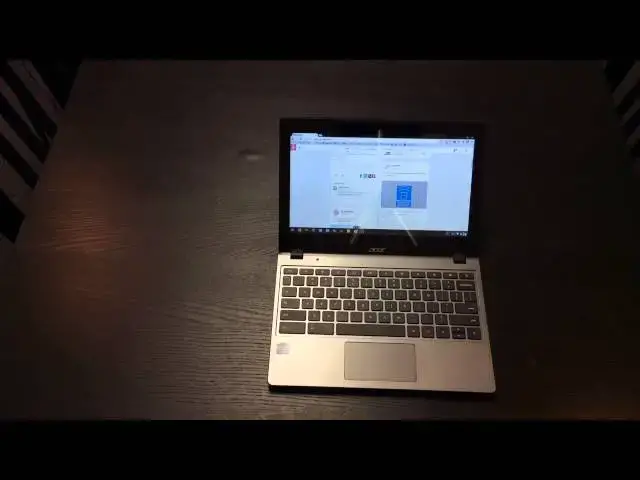
In this video, I give my full review of the Acer C720P.
Show More Show Less View Video Transcript
0:01
hey folks robby payne with chrome
0:03
unboxed
0:04
today coming at you with a full review
0:06
of the acer
0:08
c720p
0:10
i did do a review of the c720p in white
0:13
months ago you can see that on the
0:15
channel i also did a review of the c720
0:19
that looks very similar to this a couple
0:21
different hardware changes
0:23
this is the c720p in the gray and black
0:26
but it also has four gigs of ram so the
0:28
one that i reviewed before i had two
0:30
gigs
0:30
and i wanted to give a quick overview
0:32
you can reference those two for
0:34
probably a little more in-depth uh look
0:36
at the way it performs and all that kind
0:37
of stuff
0:38
i just wanted to give you a quick uh
0:40
overview and a few months later
0:43
uh retry at life with the c720p
0:48
get logged in here and so
0:54
a couple different hardware things uh it
0:58
looks a lot like the
0:59
just the original out of the box c720
1:01
obviously gray body
1:03
black keys all that kind of stuff so i'm
1:05
not going to go crazy on that but we'll
1:07
do it so take a quick look if you
1:08
haven't seen the other videos
1:10
uh on the side here we've got
1:13
hdmi charging
1:16
your combo headphone microphone jack usb
1:19
3.0
1:20
flip side usb 2.0 full size sd card slot
1:24
kensington lock back side we got fans
1:27
and it looks like there is a tray there
1:29
for a sim card slot you know like they
1:31
could build that in at one point
1:33
i have yet to see one personally but
1:36
that i'm sure could happen you got a
1:38
couple leds show when you're charging
1:39
that kind of stuff up here
1:41
other than that nothing else here top
1:43
does if you can catch any of that stuff
1:45
you can see some of the fingerprint
1:47
stuff up here i literally just wiped it
1:49
down
1:49
it takes about two seconds a good hot
1:51
breath and your shirt or whatever takes
1:53
that off so
1:54
it's really not bad like you can see
1:55
it's not picking it up now but when your
1:56
hands get oily
1:57
as they tend to do during the day and
1:59
you get your fingers on it you can start
2:01
to leave some fingerprints they wipe off
2:03
easily the bottom doesn't collect much
2:04
at all
2:05
lots of fans lots of screw ports you
2:08
can't open this guy up there's some
2:09
videos from other people
2:10
on the web where they have opened it up
2:13
added
2:14
ssd unfortunately i don't believe you
2:16
can add any more ram to it as it is
2:18
soldered
2:19
onto the board another important
2:22
hardware change
2:23
that you'll see in this one versus the
2:24
c720 that's the same thing in this one
2:27
in the c720p
2:28
so don't confuse that but the white one
2:30
that i reviewed before but this one
2:32
versus just the standard c720 if you set
2:34
them side by side you would notice a
2:36
difference in the bezel
2:38
because the screen is different hey the
2:40
screen is not matte finish so it is
2:42
reflective you can actually see that in
2:43
the video you can see the tripod
2:44
reflecting in there
2:46
and so that's worth noting um
2:50
because the bezel actually the the
2:52
covering of the screen actually comes
2:53
all the way to the corner so
2:55
it's it's just as fingerprint prone as
2:57
the original c720 that has just
2:59
the glossy plastic bezel uh just it's a
3:03
small difference but it's an easy way to
3:04
tell a c720p from a c720
3:06
so um and obviously this guy's touch
3:09
screen
3:10
um we've covered that everybody knows
3:11
that um a couple things that i want to
3:13
point out from
3:15
my time with the c720p this go around
3:18
with four gigs of ram i noticed zero
3:21
performance difference not one
3:22
edbd performance difference from the the
3:25
hp
3:26
14. and that's considerable because um
3:29
the hp 14 honestly i feel performs
3:32
day-to-day stuff work stuff uh browsing
3:35
internet type stuff watching movie stuff
3:38
those kind of things uh stood toe to toe
3:40
honestly
3:41
uh with the the chromebook pixel that i
3:44
had
3:44
like i don't i don't feel like when i
3:46
moved to the c7 or the
3:48
the hp 14 or the c720 with four gigs of
3:51
ram
3:51
i don't feel like either way that i'm
3:52
taking some sort of step back
3:54
in performance matter of fact if you
3:57
haven't already
3:58
it's fun to check out there's a game
3:59
called age of ascent
4:02
age of ascent and you actually do age of
4:03
ascent.com
4:05
age of and then a-s-c-e-n-t.com
4:09
um go to that website there there it's
4:11
it's in super duper alpha mode right now
4:14
so it's it's not even close to being
4:15
released they're talking about a whole
4:16
year of development on it but
4:18
what they're doing is some crazy like
4:19
spaceship multiplayer
4:21
real-time strategy thing
4:25
and so you can get in there with
4:27
literally hundreds of people being there
4:28
playing it
4:29
at four o'clock on saturdays you go to
4:30
age of ascent.com the kicker
4:32
of it is it all runs in a web browser
4:35
and
4:36
and so i wanted to put my chromebook to
4:38
the test and so i loaded this up on
4:40
saturday i forget every week so last
4:42
week i happened to be at home and i was
4:43
like oh
4:44
i'm going to try this and see what
4:45
happens and honestly i was really
4:47
expecting because it's
4:48
it's not crazy 3d graphics but you know
4:50
there's a lot going on there's a lot of
4:52
other people in there
4:53
the thing has no load time you go you
4:56
hit launch and you're in
4:57
you're playing and so it's really
4:59
brilliant to see what's happening with
5:01
web-based computer or game programming
5:04
at this point anyway so i loaded up
5:06
expect to see a lot of jitters a lot of
5:08
stutters running from a chromebook
5:10
because
5:10
they never said hey this is chrome
5:12
chromebook specific they just said hey
5:14
this is
5:15
a web-based cloud-based um
5:18
game that we're trying to develop and so
5:20
i honestly went in expecting it to
5:22
stutter all over the place
5:23
it was so pleasantly surprised that it
5:25
loaded up it rained in 60 frames per
5:27
second there were
5:28
hundreds of 3d rendered ships being
5:31
played by other people
5:32
with tons of shots and stuff firing all
5:34
over the place and these big
5:35
ships other you know big mega ships
5:37
flying around
5:39
not a frame dropped i mean it was it was
5:41
so buttery smooth it was so impressive
5:43
and that was on
5:44
uh i want to say that was on the hp but
5:46
these are all the same internals they're
5:48
all celeron bays
5:49
two or four gigs of ram you know it's
5:51
all the same kind of stuff so
5:52
they'll have the 29.95 u haswell class
5:56
celeron processor and so i was so
5:59
pleased with it and so i say all that to
6:01
say
6:01
that the performance for me is not a
6:03
huge step back and and this one is
6:05
completely
6:06
exactly on par which you would expect it
6:08
to be with the hp 14 which i've been
6:10
very very happy with
6:11
uh for months now and kind of still
6:14
waiting patiently for something to come
6:15
and supplant that as my daily driver
6:17
i actually thought and bought this
6:19
computer with the if the intent of this
6:21
being my new daily driver because i
6:22
thought
6:23
having it in my lap being able to kind
6:26
of type and just reach up and touch
6:27
something
6:28
to scroll web pages it is nice it is
6:31
nice to do that and if you don't have a
6:33
tablet
6:34
and you don't really have a need for
6:35
getting a tablet and this is going to be
6:36
your primary
6:37
sit on the couch uh scroll around the
6:39
internet kind of device
6:41
and you can see pinch to zoom works then
6:45
by all means it would be honestly really
6:47
great for that and when i would remember
6:48
to get it out of my bag
6:50
and open it up and use it on the couch i
6:51
really i really enjoyed it
6:53
and so the touchscreen works really well
6:56
chrome os is slowly but surely
6:57
developing some decent touch
6:59
sensitivity things it's not quite a
7:01
full-fledged touch os at this point but
7:04
it is it is a decent experience in a lap
7:06
on a couch
7:07
for sure but i also have an ipad and i
7:10
have a galaxy note 3. so i've got two
7:11
tablet-esque
7:13
other devices that tend to if i'm going
7:15
to do that kind of
7:16
browsing and surfing those tend to
7:18
dominate my time at home
7:19
and so i ended up using this thing for
7:21
work which kind of brings me to some of
7:22
the cons of it
7:24
the screen is is rough it really is it's
7:27
not bright at all it's cranked up to
7:29
full brightness right now
7:30
as you're looking at it and um
7:33
you know it's serviceable but for me i
7:35
ended up usually i have my
7:37
my chromebook plugged into a secondary
7:38
monitor so a nice you know 24 inch
7:41
hd monitor and so i don't think about it
7:43
too much it's a second screen but
7:45
for whatever reason this last week there
7:46
were multiple times i actually had to go
7:48
meet a client
7:49
uh either at a restaurant or something
7:50
like that and we're talking you know
7:52
sunlight rooms and we were really having
7:54
some issues
7:55
seeing this anything on the screens it
7:57
was so dim
7:58
and then it's it's small you know it's
8:00
11.6 inches so
8:01
portability is the game here not really
8:03
usability uh
8:05
in a work kind of scenario and so that's
8:07
where something like a
8:08
toshiba or the samsung chromebook 2
8:11
something with a 13 to 14 inch screen
8:13
uh really for me for my use cases works
8:16
out a little bit better so know that
8:17
going in the screen's dim
8:19
it's it's not the easiest thing to see
8:21
in the world and
8:23
you may run into some issues if you're
8:25
using it out and about if you're hooking
8:26
it to a secondary screen you never think
8:28
twice about it but
8:29
if you're not you run into some issues
8:31
similar similarly
8:33
the keyboard is a bit cramped and the
8:35
keys can feel a bit mushy from time to
8:37
time it's very serviceable i'm not
8:38
saying it's terrible keyboard it's not
8:40
that at all
8:41
it's it's a mediocre keyboard and the
8:43
keys are a little
8:44
little squished and so if you're used to
8:46
a full space keyboard sometimes it can
8:48
feel a little constricting
8:49
uh same goes with the trackpad the
8:51
trackpad works just fine i mean there it
8:53
it doesn't have any issues like one of
8:55
the c720s
8:56
i can't remember if it was the pe or the
8:58
c720 i had some issues with the trackpad
9:00
so i believe
9:01
probably due to the cost they're a bit
9:03
hit and miss but this one multi-finger
9:05
gestures i had no problem with
9:07
it does collect oil real quick and so it
9:10
can kind of have a
9:11
stuttery feel like when you're scrolling
9:13
through stuff and so that was a little
9:15
troublesome but other than that
9:17
uh the mouse was serviceable it's just
9:19
small and so i mean it's a small machine
9:21
so it's just part of it
9:22
and so sometimes it felt a little uh
9:25
condensed here again i was using this
9:27
device
9:28
uh off of a tether way more than i
9:30
normally do and so
9:31
these things really started bothering me
9:33
uh pretty quickly and so
9:34
um again i'm used to using the hp 14 so
9:37
i'm used to that extra screen real
9:38
estate i'm used to the nice wide
9:41
track pad a nice big keyboard and so if
9:44
i'm if i don't have the luxury of being
9:46
at the office hooked into a big screen
9:47
and a secondary keyboard
9:50
secondary mouse and stuff like that then
9:52
hey it's i wouldn't have known any
9:54
difference it was the times that i had
9:55
to take it off the tether that really
9:57
kind of bothered me
9:58
but for all those things like i said the
10:01
touchscreen
10:02
is fantastic it really works well for a
10:05
device that
10:06
is in this price range it really really
10:08
works well it's light
10:10
it's well built it doesn't feel flimsy i
10:13
still like the build quality overall the
10:15
feel of this device i like this one
10:17
better than even the new samsung
10:19
chromebook it still has a bit of a
10:21
flimsy feel to it
10:22
this one when you pick it up by one
10:23
corner you don't feel like the thing's
10:25
bending all over the place
10:26
and you can even see from this angle
10:28
here i mean i'm trying to put some
10:29
pressure on it
10:30
it's fairly rigid uh the touch screen
10:33
whenever you go to
10:35
if you're holding it and you're going to
10:36
navigate some stuff it doesn't wobble
10:38
around
10:39
um kind of show you from the side so
10:42
the hinge is pretty decent and so as i'm
10:45
tapping it you're not seeing the screen
10:46
just kind of wobbling back and forth
10:48
so there's a lot of pros really there is
10:50
uh
10:51
i i i enjoy a lot about this device um
10:55
and like i said i put it through
10:56
performance tests on other stuff
10:58
so there's not really a whole lot of use
11:00
in doing that now the
11:01
haswell processor is getting a bit long
11:04
in the tooth
11:05
when it comes to showing you performance
11:09
stuff i'll show you one thing real quick
11:11
so you can see skid racer see how long
11:13
hopefully it won't take it long
11:15
i'll kind of do my closing thoughts here
11:16
and and let it kind of finish loading up
11:19
and this is what you won't see with age
11:20
of ascent by the way like every
11:22
uh web-based game i've seen thus far has
11:25
this kind of
11:25
oh here comes it's kind of you know
11:29
30 45 seconds loading takes it a minute
11:31
to get going
11:32
um that's another thing i was shocked
11:35
with age of ascent you know i just
11:37
i went to the thing i hit yeah i want to
11:39
play and boom i was going
11:40
i was really really interesting and and
11:43
maybe they were loading it somewhere in
11:45
the background or something i don't
11:47
i don't really know
11:52
i think i ran this in the samsung
11:54
chromebook review
11:55
and you can see how rough it was it was
11:58
really bad
11:58
and so this is going to show you really
12:00
quickly um
12:02
you know these haswell class processors
12:03
they
12:05
they deliver the battery life that any
12:07
arm is going to give you any arm chip
12:09
is going to give you and then on top of
12:10
that the performance you're going to see
12:12
it's just
12:13
it's just in a different league and so
12:15
you'll be able to look at this and
12:16
and possibly like look at the samsung
12:19
chromebook 2 review and see the complete
12:21
difference here
12:22
but while this is finishing loading up
12:24
every time twice now i've said that
12:27
so we got really good frame rates going
12:28
on here
12:30
i don't remember what accelerates up
12:33
maybe hopefully
12:35
let's see what happens
12:38
yeah nice and smooth
12:41
oh yeah i'm terrible at this it's really
12:44
touchy
12:49
now it's a good show at the intel event
12:52
this is the
12:52
the c720p what with a with an i3
12:55
uh processor in it now you're seeing
12:57
every once in a while you've seen a
12:58
hiccup a little frame rate drop like
13:00
right there you just saw one
13:01
uh for the most part you're getting 30
13:03
for or 30 to 60 frames looks like
13:05
everything's nice and smooth
13:07
like i said every once in a while
13:08
there's lots of elements on the screen
13:10
we start losing some frame rates
13:11
you know for what we're looking at here
13:14
that's not a big deal
13:16
and so processor knocks it out of the
13:19
park
13:20
just like you would expect it to the
13:21
touchscreen is actually
13:23
kind of delightful to use so
13:26
those things i would say are really key
13:28
wins and so if you're not looking for
13:29
something that has the best screen
13:31
probably you're going to be looking at
13:32
something actually and this has just
13:34
about the worst
13:35
screen as far as color reproduction
13:37
being washed out and not being very
13:39
bright so
13:41
it's not unusable please don't hear me
13:42
saying that it's not unusable
13:44
it is very usable and at this price
13:46
point it's not even a surprise to
13:48
me it's not shocking at all and this is
13:50
the point where i throw in my requisite
13:52
every single time i review a chromebook
13:54
i think there are a lot of people who
13:55
would be very
13:56
happy to pay 500
13:59
to say hey we want something like this
14:01
but kick the processor up a little notch
14:04
and give me an awesome screen you know
14:06
give me something
14:07
give me an ips panel hp11 you know
14:10
something like that and so
14:11
um anyway starting to get pinged for
14:14
some other stuff
14:15
and um probably time to wrap this review
14:18
up so
14:19
pros uh touch screen is pretty awesome
14:22
lightweight well constructed for the
14:24
most part um
14:25
and and a decent bargain for your for
14:28
your dollar
14:28
performance is great cons the screen's
14:31
rough keyboard is cramped
14:33
and the trackpad's a little cramped um
14:35
so
14:36
maybe this guy's the one for you maybe
14:38
it's not again it depends on your use
14:40
case
14:41
and so think through those things i i
14:43
can recommend this definitely in the
14:45
price point can recommend and say this
14:46
is a great
14:47
a great chromebook for anybody that's
14:49
looking to spend some money
14:51
spend some money on this and wants a
14:52
touch screen
14:54
and so that's all i got guys if you have
14:56
any questions as always leave them in
14:57
the comments hit me up on google plus
14:59
if you like the video give me a thumbs
15:00
up and please subscribe
15:03
more subscribers uh the more i can keep
15:05
pushing forward this with this
15:07
keep getting more chrome stuff keep
15:09
reviewing it for you guys
15:10
so until next time
#Laptops & Notebooks
#Consumer Electronics