Up next in 10



Check out the new site for all kinds of Chrome OS goodness: http://chromeunboxed.com
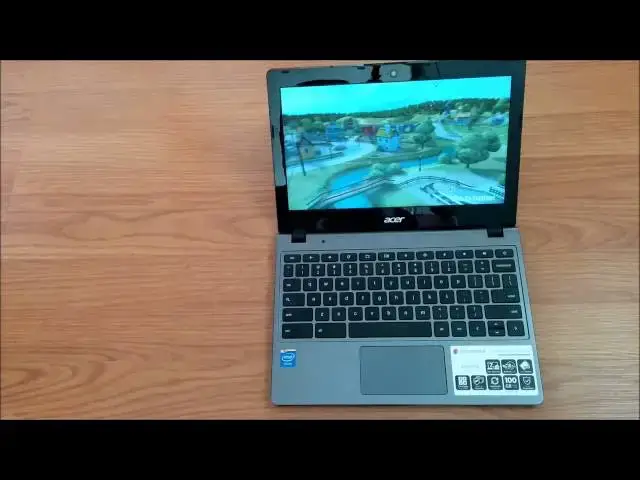
In this video I give a full review of the ACER C720 Chromebook.
Hope you enjoy, subscribe, and check out my other videos!
Show More Show Less View Video Transcript
0:01
hey folks Robbie Pay Here Again with a
0:03
full review of the Acer
0:08
C720 now if you follow me on YouTube and
0:12
or Google+ you've seen the unboxing
0:14
already and we've kind of taken a tour
0:15
of the device uh gotten around just a
0:18
little bit but we'll take a quick tour
0:20
to start things
0:22
off you see the top is kind of
0:24
emblazoned with this matte finish um
0:27
pretty cheap feeling plastic uh it's
0:30
probably impossible for you to see it on
0:33
the video but it does
0:35
do a pretty good job of picking up
0:38
fingerprints even though it's kind of a
0:39
matte finish and then when they get on
0:41
there they're really difficult to get
0:42
off um just a a quick note on the side
0:46
of the device we have USB 3.0 port HDMI
0:50
port power jack and headphone microphone
0:55
slot nothing on the front of the device
0:57
couple LED indicators for charging
1:01
side we have a full sizee SD card slot
1:03
USB 2.0 and then a Kensington lock and
1:07
nothing along the back other than fans
1:10
here uh and this device obviously does
1:14
not support a Sim um any 4G or 3G uh
1:18
there may be some variants out that do
1:20
if not there will be um Acer uh seems to
1:23
do this with the their Chromebook lines
1:25
they'll they'll kind of drop multiple
1:27
variants uh specifically uh just
1:30
yesterday I believe there was announced
1:33
um that there's going to be a
1:36
touchscreen variant of this guy without
1:38
the 4 gigs of RAM um but a full
1:41
touchcreen so it'll be the first
1:42
Chromebook with a touchcreen other than
1:45
the $1,200 Chromebook Pixel so it'll be
1:48
interesting to see how Acer plays that
1:51
and how that screen looks uh if it fair
1:53
is the exact same as this just glossy
1:55
cover on it it'll be an interesting
1:58
thing to see
2:00
this device is packing the Haswell
2:03
class Intel Celeron Processor uh 4 gigs
2:08
of RAM 16 gig internal solid state
2:12
drive 11.6 in display uh 1366 X 768 in
2:18
its resolution it is a matte finish um
2:21
so that's kind of the the specs and the
2:22
rundown I've seen in some other videos
2:24
some some people have asked about
2:26
ethernet ports um the last few
2:29
Chromebook do not have them U so if you
2:31
don't have Wi-Fi I'm unsure at this
2:33
point right now um whether an ethernet
2:36
adapter they make the usb3.0 ethernet
2:39
adapters uh for Windows PCS Mac OS I
2:42
don't know if that would work on Chrome
2:44
I know a lot of other peripherals do uh
2:46
right out of the box so I'm not exactly
2:48
sure if that would work or not but it
2:51
might be worth a try if that's something
2:52
you need uh my recommendation to you
2:55
would be to go buy a $40 router and plug
2:57
it in and let it do its thing um so so
2:59
you can have some wireless internet
3:01
around the house I have turned it off so
3:04
we're going to just see a quick uh quote
3:06
unquote boot up uh even though I'm sorry
3:09
I'm in developer mode so start counting
3:12
from
3:14
now um and we'll see that that
3:18
um 7-second boot up is is more than true
3:22
uh with with Chrome
3:25
OS you can see there's a couple profiles
3:27
on here my I let my wife mess around
3:29
around with it a little bit um she
3:31
currently
3:33
uses
3:36
the Samsung Series 3 Chromebook uh it
3:40
really likes it she gets a little
3:41
aggravated by its performance sometime
3:44
which if any of you own that one or have
3:46
gone with the hp11 um you know what
3:49
she's talking about there there just
3:50
times when the processor doesn't quite
3:53
handle what it needs
3:55
to um but form factor wise this one's a
3:58
lot like the HP as far as the weight and
4:01
the size of it it's a little bit deeper
4:04
this way um than the Chromebook 11 I
4:07
think the almost oop sorry almost the
4:08
exact same uh width left to right so um
4:13
form factor wise it's about the same
4:15
build quality Wise It's nowhere in the
4:17
same ballpark uh this is definitely the
4:21
other than the c710 the c710 was
4:23
incredibly cheap feeling uh this one is
4:25
not that much better uh and by far um uh
4:30
the cheapest build quality of all the
4:33
Chromebooks that I've got my hands on
4:34
thus far um you'll see on the inside uh
4:37
a glossy kind of cheap plastic bezel
4:40
here uh that's just a fingerprint magnet
4:42
I mean that's the one of the areas as
4:44
far as physically manipulating the
4:46
device that's that's one of the things
4:47
you mess with most and it just collects
4:49
the fingerprints uh just the way it is
4:52
um the keyboard uh while the keys are
4:54
plasticky and and again overall
4:57
everything on this thing feels really
4:59
really cheap
5:00
um it actually performs pretty well uh
5:02
didn't bother me there's not a lot of
5:04
flex at all on the keyboard it's nice
5:05
and firm um and responsive I didn't have
5:09
I didn't have much issue at all honestly
5:11
uh with the keyboard typed quite fast on
5:13
it um keys are spaced pretty well for an
5:16
11.6 in machine so I really have no
5:18
complaints with the keyboard they did a
5:20
good job of spacing it kind of right out
5:21
to the edges so that they retain almost
5:23
a full-size keyboard um same goes for
5:26
the trackpad um it's probably impossible
5:28
for you to tell this on the video like
5:30
the corner of my trackpad actually is
5:32
above the casing here so I can run my
5:34
finger there and kind of catch the edge
5:35
of it and pull it up and if I push it
5:38
you'll
5:39
hear it clicks back down into place and
5:42
now it's down in there but the first
5:43
time you click around down here a few
5:45
times it pops itself back up there and
5:47
so again it you just have certain
5:50
expectations when you go into buying a
5:53
200 or $250 laptop it's just the way
5:56
things are they can't use the high
5:59
highest quality everything in in putting
6:02
together a machine like this and so
6:05
there are just certain trade-offs like I
6:07
said it is light um it is it's sturdy
6:09
feeling I didn't feel a lot of creaking
6:11
with the device that's that's not it the
6:14
the cheap feel comes a whole lot just
6:16
from handling it um it it'd be
6:18
incredibly difficult to to explain on
6:21
camera or explain in any kind of written
6:24
review it would be something that you
6:25
just need to go to Best Buy or um
6:28
Walmart or something like that just pick
6:29
one up and just just feel it uh the
6:32
tactile feel of the device is uh is
6:35
pretty cheap feeling other than that uh
6:38
if you were to uh look at my Chromebook
6:41
14 review which you can go down uh below
6:44
the video just click my profile and
6:46
you'll see some other other videos the
6:48
Chromebook 14 uh and this share exact
6:52
similar internals and this is a
6:54
Chromebook and so the software is the
6:56
exact same so we're really just talking
6:58
about Hardware different and really
7:00
they're just external hardware
7:01
differences because internally they're
7:03
the exact same machine and what I found
7:05
is uh this Chromebook is just as quick
7:08
at doing well pretty much anything U
7:11
that the um the Chromebook 14 can do U
7:15
the display is decently usably bright
7:19
it's probably difficult for you to see
7:20
on the camera we'll knock it down a
7:22
little bit just so you can kind of see
7:25
um and the battery life is exceptional
7:28
thanks to the Haswell processor um the
7:31
trackpad though it feels cheap is nice
7:34
and responsive uh it tracks the the
7:37
cursor very smoothly two finger
7:39
scrolling um works just fine no issues
7:44
there I've had some questions in
7:46
previous videos about Java not
7:47
JavaScript but Java um running applets
7:51
and stuff like that uh you're not going
7:53
to get that on a Chromebook um it will
7:55
not run Java uh runs JavaScript
7:57
obviously but um no Java and here's go+
8:01
which is Infamous for being terrible on
8:03
Chromebooks and we can see that with
8:05
Haswell now um that's just not the case
8:08
anymore so um that's pretty cool to see
8:11
uh it moving nice and smooth through
8:13
through difficult things and you'll
8:15
notice uh I don't know if I can catch
8:17
this uh you kind of see the glare on the
8:20
bezel there a lot of glare coming from a
8:23
window um but you don't see any glare
8:25
whatsoever on the screen I did kind of
8:27
like that um even though the screen is
8:30
the most washed out uh of any until I
8:32
got it back next to my Chromebook
8:34
14 I really didn't think it was that
8:37
terrible but it makes the Chromebook
8:39
14's display um look much better um and
8:44
and I'll have a Hands-On or a side by
8:46
side comparison between this and the 14
8:48
coming up soon but it
8:51
uh it really looks washed out uh next to
8:54
the Chromebook 14 and the Chromebook 14
8:56
looks really washed out next to a good
8:58
IPS display such as the hp11 so uh this
9:02
is way down on the totem pole as far as
9:03
displays go but I will say having worked
9:06
with it for a few days being in front of
9:08
it for hours at a time it honestly just
9:11
didn't bother me that bad um again it's
9:15
just like with TVs and things like this
9:17
until you see it next to something
9:19
Superior sometimes it doesn't seem that
9:21
bad so take that with a grain of salt uh
9:23
when you see it on a showroom you see it
9:24
in Best Buy or something like that
9:26
you're going to see the display kind of
9:27
up next to uh something like an hp11 and
9:31
it's going to look like garbage next to
9:34
that it really is um I can't stress that
9:37
enough
9:38
however um it's it's difficult in those
9:41
situations to see it without any
9:43
competition and without competition it's
9:45
it's not that bad it's it's usable it
9:48
really is um and so I'm not going to go
9:51
through showing uh a ton of games and
9:54
all that kind of stuff on here we'll
9:55
load up one thing real quick um murder
9:59
files I've used this in a couple other a
10:02
couple other reviews it's a fun little
10:04
game it's really interesting take on who
10:06
done it kind of thing and um it's a it's
10:11
just a fun game and it it does render a
10:13
lot of 3D stuff so it's nice to see it's
10:17
nice to watch these Chromebooks kind of
10:18
deal with with 3D Graphics kind of let
10:21
you hear the speakers as
10:23
well
10:26
um again not great not not super
10:30
loud um you know they're passable I
10:34
really don't know who sits around and
10:35
listens to stuff at length um just on
10:38
their on their uh
10:40
laptop um without some sort of external
10:43
speaker but a lot of people uh really
10:46
like good speakers and laptops and this
10:48
is probably not going to be the best
10:49
thing in the world but you can see it
10:52
everything rendering real nice um this
10:54
is all 3D all realtime rendering um and
10:58
Chromebook hand it no problem so pretty
11:03
cool but if you haven't played this game
11:05
and you have a Haswell Chromebook uh try
11:08
that guy out it's pretty
11:10
fun other than that guys there's not too
11:13
much else to talk about um and I'm sure
11:17
I'll get a myriad of questions um after
11:20
this video is posted but um you know
11:24
it's a Chromebook so software wise if
11:27
you want to kind of get a better rundown
11:28
of what Chromebooks in general can do I
11:30
go way more into depth on the hp14 and
11:34
hp1 reviews uh and don't feel the need
11:37
to do that here again uh it's a
11:39
Chromebook and this thing can run
11:41
anything that Chrome OS can throw at it
11:42
so really what you're talking about when
11:44
you consider a device such as the Acer
11:47
C720 is form factor weight um screen
11:52
size price is one of the big ones and so
11:56
even though um you know I tend to like a
11:59
lot of the features in the build quality
12:01
say on the hp11 or the hp14 they're both
12:04
more expensive uh the hp14 uh especially
12:08
the one I have is is actually a full
12:10
$100 more expensive than this guy
12:12
because it comes with
12:14
LTE 14in screen but performance- wise
12:18
there really isn't any difference uh you
12:21
know I mean the the the small subtleties
12:24
you know uh clicks on the trackpad kind
12:27
of sound hollow they're not loud not
12:29
obnoxious I used the Transformer book
12:31
T100 for about 2 days and that trackpad
12:34
was obnoxious it was small sounding and
12:37
just clicked so loud U it was it was
12:40
almost borderline ridiculous um you know
12:43
this one has a real Hollow click but at
12:45
least it's quiet um the keys are kind
12:48
of kind of clacky feeling um the the
12:53
overall overwhelming feel of the thing
12:55
if somebody else sees it if they touch
12:57
it if you use it um I can't come up with
13:00
any other word other than it just feels
13:01
cheap um and it is cheap so that's fair
13:05
right um it's a $250 and if you get the
13:08
two gigs of RAM a
13:10
$200 uh laptop so it is cheap um so as I
13:15
said and I've said before Chromebooks
13:17
are at this point in the game
13:19
Chromebooks are give and take uh there
13:21
are you get good things with certain
13:23
ones you you take away things with other
13:25
ones and hopefully uh my hope is that at
13:28
some point in in the next year we're
13:30
going to see some mid-range Chromebooks
13:32
so instead of just the race to the
13:34
bottom hopefully we'll start seeing some
13:36
four and $500 Chromebooks that can
13:38
really pull in some Stellar uh outward
13:41
appearance and design and still maintain
13:44
you know decent internals cuz we're not
13:45
talking about needing i3s i5s i7 aswells
13:49
in these guys this Celeron more than
13:51
takes care of what needs to be done so
13:54
um you know I I don't know if I know the
13:57
the quad core arm processors that are
14:00
out there that are awesome Snapdragon
14:02
800 for instance uh I don't know that
14:04
Chrome can utilize that uh maybe why
14:07
they haven't used it yet cuz all the all
14:10
your
14:11
main uh arm processors are all quad core
14:14
and I don't from what I understand
14:16
Chrome can't utilize quad cord it's can
14:18
only utilize dual core at this point so
14:21
um could be the reason why we're not
14:22
seeing the more powerful arm chips but I
14:24
think either a more powerful arm chip uh
14:27
or stick with this you know this hasell
14:29
seller on it does the job more than
14:31
plenty I mean it just it really takes
14:33
care of business the amount of RAM is is
14:36
fine I've not running with this or the
14:38
hp14 a time where I had too many tabs
14:41
open and I'm talking about opening
14:43
multiple tabs and and I can show you
14:45
that really quick opening multiple tabs
14:47
with with YouTube in it and let me get
14:50
one up and running here and I'll just
14:53
duplicate it over and over again and
14:55
just show you I mean the ram ram is not
14:57
a problem
15:10
um one thing I will say too about this
15:13
one and this would just go with 11.6 in
15:16
devices in general um you know working
15:21
at a desk with it you really kind of
15:22
have to stay leaned forward leaned in
15:25
cuz the the text gets a tad bit small so
15:27
back behind the camera right now um and
15:30
I just had my eyes checked by the way I
15:32
have 2020 Vision so back behind the
15:35
camera um you know some of this text is
15:38
a little bit difficult to make out all
15:40
right folks it's Robbie Pay Here mute me
15:43
there so I'm just going to go and
15:45
duplicate and duplicate and duplicate
15:47
and
15:53
duplicate sorry guys YouTube had a
15:56
little issue there so instead we've
15:57
loaded up uh
15:59
quite a few tabs of The Verge which is
16:01
uh if you're not familiar with it um
16:04
kind of an all-encompassing Tech website
16:06
and they by looking at it here you can
16:09
see it's a very content heavy website
16:13
and so um ends up being a pretty good um
16:17
test for browser speed and so I've got
16:19
it open in multiple tabs and we'll
16:21
scroll to different places and um just
16:24
so you can see it's not having to
16:26
reload uh we'll scroll down a little bit
16:28
with that one and so we see all the
16:30
multiple places we're not getting
16:32
reloads uh and for kicks we'll even
16:36
start this video here as
16:39
well let get going
16:42
and we'll pick one of these and you can
16:45
see it still Scrolls nice and smooth so
16:49
this is a a pretty heavy test uh right
16:52
here going on so you can see the the
16:55
processor in this guy is plenty um it
16:59
it's it's handling everything you needed
17:01
to handle uh does everything you needed
17:03
to do
17:05
and and so to kind of finish my point
17:08
what I was
17:09
saying it would be nice to see a $4 to
17:11
$500 Chromebook where that money is
17:14
spent on aesthetically pleasing
17:16
exteriors uh wellb built uh firm
17:19
construction good keyboards trackpads uh
17:23
fantastic displays and I'm not even
17:24
talking about high res displays I think
17:26
you get up to, 1600 by 19 or by 900
17:29
and it's plenty um it would look great
17:31
on this size or 13 in or something like
17:33
that uh we're not talking about cramming
17:35
more pixels just talking about making
17:37
better use of the pixels that we've got
17:39
already um and then we're going to start
17:41
seeing some some Chromebooks that really
17:42
feel very premium uh hp14 I feel like
17:46
kind of has a lot of those boxes checked
17:48
already uh but this screen still suffers
17:50
a little bit um better than this one um
17:53
but it still suffers a little bit um
17:55
stick around I'm going to have a full uh
17:58
uh side-by-side comparison between this
18:00
and the HP 14 upcoming um scroll down
18:04
subscribe um hopefully we'll see more
18:07
Chromebook stuff in the future uh thanks
18:10
again for watching have a good one
#Consumer Electronics