Up next in 10



Sponsored by NordVPN. Take your online security to the next level with NordVPN. Click here to get started: https://chromeunboxed.com/nord
・・・・・・・
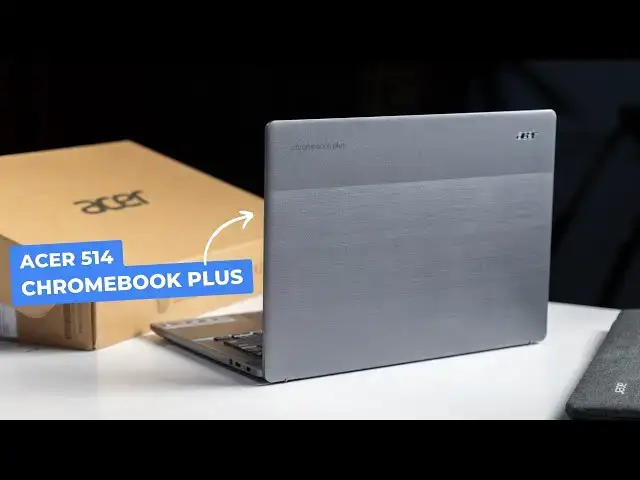
We finally have the final piece of the Chromebook Plus hardware puzzle in the house, folks! When we were in New York for the event, I figured we’d end up with all the new models, so I didn’t spend a ton of time with the devices on display. And for some reason, this particular Chromebook ended up being one I spent extremely little time with and it was the only one we didn’t end up with. Until now.
With the Acer Chromebook Plus 514, we now have a version of all 8 new Chromebook Plus devices in our hands, just in time for the review onslaught to begin. Though we already reviewed one Chromebook Plus device (the ASUS CM34 Flip), we still have 7 others to tackle. With the Acer Chromebook Plus 514 now in-hand, we can get down to business over the coming weeks. For now, though, it’s time for first impressions on a Chromebook I’ve spent very, very little time with.
💲Buy the Acer Chromebook Plus 514 at Costco: https://fave.co/3FzKqFK
👉 READ MORE: https://chromeunboxed.com/acer-chromebook-plus-514-unboxing-we-now-have-every-new-chromebook-plus-model/
📰 Join our newsletter: http://bit.ly/2WjCDm7
・・・・・・・
Join our Patreon community for access to our private Discord, an ad-free website experience, and more ➡️ https://www.patreon.com/chromeunboxed
Fueled by Fresh Roasted Coffee! Buy the special edition Chrome Unboxed bag here: https://chromeunboxed.com/coffee
Show More Show Less View Video Transcript
0:00
Well, guys, here it is. This is the final piece of the Chromebook Plus hardware puzzle for us here in the office
0:06
We've had seven of the eight devices. This is the final one, the Acer Chromebook Plus 514
0:12
I didn't get to spend much time with this one at the event they had in New York
0:17
So I'm super excited to have it here. But more importantly, I'm super excited that we finally have all the Chromebook Plus hardware
0:23
And we can really start into that review process. But first, let's jump in the box and check this guy out
0:30
But before we get into this, this video is brought to you by NordVPN
0:36
And if you're not familiar with what a VPN is, basically it's protecting your online stuff while you're out and about
0:42
So if you're at a coffee shop or you're out at some public Wi-Fi and you want to check your bank account or do something that, you know, you want to make sure to stay secure
0:49
A VPN is the way to go. And Nord is one of the most trusted VPN services out there
0:54
Their speeds are fantastic. It works on your Chromebook. It is an awesome service that is affordable
0:59
they're always running specials. It's something we really think that you should check out
1:02
And if you're interested in it, head over to chrome unbox.com forward slash Nord N-O-R-D to try it out
1:09
So like I said, this is the final piece of the puzzle for us
1:13
And, you know, when it comes to Chromebook Plus hardware, we've been talking about it a lot on the website
1:20
And we're just in a weird spot probably for the next few weeks. So if you're watching this, say, like maybe in December, this probably won't be that big of a deal by
1:28
then. But right now, we're in a spot where we've got, you know, all sorts of kind of overlap. So
1:35
of the eight Chromebooks that were brought into the fold with Chromebook Plus, only three of them
1:41
are actually brand new hardware. This is one of those three. So there's the two from ACER
1:45
the 514, 515 that are brand new hardware, and then the ASUS Chromebook plus CX34. Everything else is
1:52
already out there. So think about HP's offerings. They have a 15.6 inch Chromebook in an X36014C
1:58
Both of those already existed prior to Chromebook Plus. And with Asus, one of theirs, the CM34, already existed prior to Chromebook Plus
2:09
And then Lenovo's, both of theirs existed prior, so the Slim 3I and the Flex 5i
2:16
So, you know, we had some of those devices already in-house, and then we got some of the ones from the event
2:20
And then it's like, we got them all together. It's like, man, we're still missing the Acer 514
2:24
And had I known that, I probably would have spent more time with it at the event, you know, just to kind of check it
2:28
out but as it was like there was just a lot going on and I didn't really get to check this
2:33
Chromebook out much at all and now that we have it we've got all of them which is pretty sweet actually
2:38
before I get into that usually when Acer sends us a sleeve with the device that means the device
2:45
comes with it at retail they're nice sleeves like they're not mind-blowing good but it gives you
2:51
something to put your Chromebook in it looks good it got a pocket up front so if you don want to carry a backpack you want to keep some basic things up front you just take this with you And that would be it So yeah that looks pretty sweet And it would work with any other 14 laptop that you would want to try out with it Let pop this dude open
3:12
From the box, I thought maybe this thing had been used quite a bit before, but it doesn't look like that's the case
3:17
get your general paperwork all that good stuff and yeah that's what we want to see
3:23
so we'll talk about the finish on the outside of this in just a second
3:27
pretty standard standard block here so nothing really out of the ordinary
3:33
let's get all that out of the way and get this guy
3:38
front and center now with their 515 they did this kind of two-tone
3:42
top it's all it's all plastic yeah it's all plastic so was the 515
3:47
15 but the 515 was has been rigid and feels pretty good but it kind of has like a 45 degree
3:54
angle of the two tones so I kind of like this this is this is pretty cool looking okay yeah
3:58
this thing has definitely been used there's some stuff on there somebody else had this for a
4:02
little bit heck this might have been at the event who knows some of that stuff could have been
4:06
crap that I spilled on it um so yeah you got fan porcel on the bottom I want to say this one's a full
4:12
blown core I3 but we'll figure that out here in just a second but like other Chromebook pluses
4:17
like picking it up, it's all plastic, fit and finish just feels great
4:21
Like there's no sharp edges. Everything feels considered and put together well
4:26
So, so far, nice and rigid. Reasonably light, I would call this probably three-ish pounds
4:32
Good port selection. So USB Type C, full-size HDMI, USB A, and then another C over here, Kensington headphone microphone
4:41
Looks like, I don't remember this one at all, to be honest with you
4:46
Yeah, we're getting some upward firing speakers here. So I love to see that too
4:51
Yeah, this thing's going to power right up. Because it's been on before. Oh, that's right
4:55
This one is one of the new models with the new AMD radion in it
4:59
So this is the Horizon 3. So it's that 733. I don't know
5:06
I forget the exact model number on the processor. Same one that's in the ASU's Chromebook, C.M.34
5:13
The screen reader on ChromeOS Chromebox. primarily touch screen so check that out there and you're getting an anti-glary
5:22
screen here too which is kind of nice from the sound of that initial audio I think
5:26
the speakers are going to sound pretty good yeah all plastic feels like their ocean glass on the track pad nice and huge set in there so it's not wobbling great
5:35
click mechanism I love that you know I'm a sucker for a good track pad backlighting
5:40
on the keyboard 16 by 10 screen checking a lot of boxes right now let's see
5:46
Not the firmest Chromebook ever There a little give to the chassis down here It not awful As long as the trackpad not clicking and it doesn feel like it going to like break under the load of the Chromebook
5:59
It doesn't bother me that bad. This one's not terrible. It's not up there. It's not like slink-free eye firmness or anything
6:05
But not bad, though. It still doesn't feel bad. I just wish it was a little bit more rigid there at the beginning
6:12
But no big deal there. So let me get logged in real quick. That'll give me a chance to type for a second and use the track pad
6:18
look at the screen, all that good stuff, and we'll jump back. Okay, so all logged in, all set up, and all that kind of stuff
6:25
And, of course, I have a couple of opinions about this device already. For one, the chassis is pretty good, especially on the desk
6:34
It feels pretty firm. You can kind of tell here, I'm putting a lot of weight right there
6:38
It doesn't really give as you're typing. The keyboard is, Acer's just really starting to do better keyboards in general
6:45
but it's got a really great sound, a really great feel, great feedback. I like this. I like this keyboard quite a bit. And the ocean glass track pad is
6:54
like it is on most of Acer's Chromebooks. It's just, it's good. I know it's not real glass
6:58
but it feels like glass. The click mechanism is nice and quiet, but it's reassuring, it feels
7:04
really good. And the screen is pretty good. So I like the, you know, full HD 16 by 10. I like
7:12
all that kind of stuff. That's great. But it's about, I would say, 250 nits. We did a quick measurement
7:18
it real quick. As fast as I could check, probably about 250 nets. It's definitely not hitting that
7:23
300 net, but it does have anti-glare on it. So that does kind of mitigate some of your
7:28
brightness issues in different environments, obviously until you use it outside of like studio lighting
7:33
It's hard to tell. But I'm not going to give a knock to the screen at this point because
7:36
it still looks pretty good. It's just not super duper bright. But it is touch, which is really nice
7:42
And it is the Ryzen 7320C processor. So again, same thing in the CM34
7:48
which I've been relatively impressed with from a performance standpoint. And then I want to let you listen to the speakers real quick on this thing
7:55
So I've got a video vars queued up. They are upward firing and they're loud
8:00
So I'm not going to try to talk over once they start too much. But they don't have a lot of like base or depth to them
8:13
So yeah, it sounds kind of like I'm talking like this, which is unfortunate because
8:18
you've got a lot of space here for speakers. It'd be nice if they took advantage. We're seeing other companies like HP really kind of step into better speakers on their Chromebooks
8:26
The X360 14C really delivers a nice speaker package in their device
8:33
Nothing's going to come close to the Dragonfly Pro. I get that. But there's room for speakers to be a little bit better
8:40
And then the camera as well Acer was one of the first ones that provided the temporal noise reduction stuff that is now required to be Chromebook Plus ACCUS And you know this camera does a great job Like I looking behind me I like this all looks really great I going to point at Joe over there and let it adjust
8:56
And you kind of see, it looks really nice. And a bonus, you know, as a Chromebook Plus, all your camera stuff comes up here
9:03
So if you want to, just in your camera app, you can actually turn on your lighting adjustments
9:08
You can turn on your improved lighting there. You can turn on your background blur and all that kind of stuff
9:15
So you can do that just in the camera if you just want to take a selfie. So it's kind of a nice add-on
9:19
And that's just kind of the thing with Chromebook Plus in general. We've got all these devices in now, which we're very excited about
9:27
It's awesome for us to have all those. And while we're talking about that, make sure to get subscribed if you are not so that you can see all these reviews we've got coming up all this new hardware
9:35
We've got a bunch of Chromebooks in the office. We've got a lot of work to do from a video content standpoint
9:41
So a lot of stuff coming. But that is the point with Chromebook Plus
9:45
is that you're getting a device that is good. This one is $449
9:48
It's only at Costco right now, and we haven't seen any deals on it yet
9:52
We've seen deals on the five that are over at Best Buy. And so hopefully this one ends up at Best Buy eventually
9:59
or like Walmart and stuff like that, but right now it's just at Costco. But for 450 bucks, I mean
10:03
you're getting 256 gigs of storage in this thing. A really good processor, eight gigs of RAM
10:09
a really good looking camera. Loud speakers, they're not great sounding. You know, a solid keyboard, a solid track pad
10:15
a good screen with some extra real estate. I mean, there's a lot to like here in this package
10:20
And we talked about it kind of at the break. You know, the outer part of this
10:24
this whole brushed-looking stuff, it looks a little bit dated. But, you know, at the same time
10:29
Acer and HP and Lenovo and all of them, they want to do stuff that sets them apart from others
10:35
So they've got to try different stuff, especially if you're using plastic. You don't want an all-plastic lid that's just plain this stuff
10:40
So, you know, kudos for them for trying out something. and this is going to be a love it or hate it kind of situation
10:46
But it is a little grippy and it doesn't collect any fingerprints. So, I mean, there is that part of it
10:51
And I just, honestly, I don't think that looks bad. I don't mind it that much
10:56
And it feels good in the hand. It's not overly heavy. You know, you're getting that nice screen real estate
11:01
There's just a lot to like here. And in general, that's just Chromebook Plus
11:07
Every one of these devices I've picked up, I'm like, I like them a lot
11:11
Now there's little nitpicks I've got with each one, and you'll see those all in the reviews that are coming
11:18
And so on that note, we're going to wrap this one up. And if you're not already, as I said before, go down there and get subscribed
11:25
Make sure to hit that subscribe button and give us a thumbs up too while you're down there
11:29
And bring that notification icon if you'd like to be alerted when we do make future videos just like this one
11:34
Until next time, we'll see you
#Laptops & Notebooks
#Consumer Electronics