0:00
It's been a little while since we've talked about NVIDIA GeForce Now or any other cloud streaming service on a Chromebook
0:06
but we now have gaming Chromebooks, or more specifically, cloud gaming Chromebooks
0:11
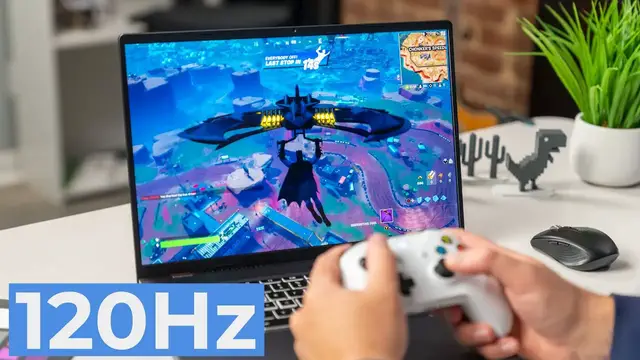
like this one right here in front of me, the Acer Chromebook 516GE. So we wanted to take just a second to show you what this kind of new generation of cloud gaming looks like on these purpose-built Chromebooks
0:22
before we jump into some samples of gameplay i did want to mention a couple of the other services
0:33
so we have xbox's cloud gaming beta and then amazon's luna that are also kind of launching
0:40
alongside this whole cloud gaming initiative from google with chromebooks and honestly xbox
0:46
and Luna have both been a little hit or miss for me when I'm playing on them. And GeForce Now is so
0:54
much better than the other two that that's the one I kind of want to highlight here and show you all
0:58
what a 120 hertz screen with a big bright display and great connectivity looks like when you're
1:04
cloud gaming with all the right stuff in place. So let's dive into it. All right, so before we get
1:09
jumped into a game, I'll use Fortnite kind of because a lot of people know that game pretty well
1:14
in GeForce Now, I do want to at least show you that with this new gaming focus, we have
1:22
Xbox's cloud streaming gaming. They changed cloud gaming beta is what it's being called right now
1:28
You have a PWA for that, which is really awesome. If you go to their website and click the install
1:35
button, you get the PWA. And so it does work. It's just the frame rates have been a little off
1:41
and some of the latency isn't great. Same thing for Luna. So there's a PWA for that as well
1:47
And all of the PWAs work nicely, which is really cool. You don't have to install any Android apps or anything like that
1:53
And with this whole movement, Google is working closer with Luna, with Xbox
2:00
and with GeForce Now to really make sure that devices like this one are set up
2:05
and working in the best way possible to make cloud gaming awesome. And Luna has been working pretty well
2:10
It only supports 1080p. It's just that the games in Luna aren't the best
2:14
There aren't a lot of things I really want to play in here. But along with Chromebooks like this Acer, you get three months free GeForce Now and three months free with Luna
2:23
So I've cashed those things in just to kind of get to mess with those a little bit
2:28
But the real awesome stuff comes in with GeForce Now. And with a device like this, again, all Chromebooks are going to be able to use cloud gaming
2:36
It's not like you can only do it with this. but this device is built with this whole use case in mind
2:41
So you get these really nice upward firing speakers that sound fantastic
2:45
You're not going to use a trackpad a whole lot, but it's got a great trackpad and keyboard on it. So if you're doing mouse and keyboard stuff, the keyboard feels responsive
2:52
You got your movement keys kind of highlighted here. And under all this light, it's kind of hard to see
2:56
but you've got RGB lighting on the keyboard to give you just a little bit of a gamer feel
3:01
But all that stuff kind of comes together with the 120 hertz 16 by 10 quad HD screen here that just makes games pop and GeForce now fully takes advantage of that So with a device like this you can go into your settings as long as you using the upper tier
3:16
of GeForce Now, which I think is 20 bucks a month, you can go down here and change to custom
3:22
Oh, this isn't touch. We'll zoom in like that, just so that's a little bit bigger
3:27
You can go to this custom streaming quality and I could set 2500 by 1600, 120 FPS, which is
3:35
really, really awesome. So I'm going to get that back down to a hundred percent. Um, and so by
3:40
doing this now I'm getting to take advantage of this screen. And, and again, Google is saying
3:45
Hey, look, we've put these types of screens on these Chromebooks for this purpose. Now it's
3:49
great for Chrome OS in general as well. But when you jump into games like this, uh, as you're going
3:54
to see here in just a second with Fortnite, you're going to get really, really high end graphics. So
3:58
RTX ray tracing, all that kind of stuff that's happening on their servers, but you're going to
4:02
get to see it all in this Quad HD resolution at 120 frames. What you'll see here in just a second
4:08
is how quickly this loads up. I mean, it's going to take, I don't know, probably 10 seconds or
4:13
something like that. Boom, we're ready to go. And again, this is the higher tier of GeForce Now. So
4:17
you kind of get pushed up into the queue. If you're using the free version, it's going to take you a little bit of time to jump into these queues, but you're also not going to get 120 hertz and all
4:26
that stuff. So if you buy one of these and you're looking to use cloud gaming, I would say upgrade
4:29
to the high-end GeForce Now specifically for all of these features. So I'm going to just jump into a standard Battle Royale
4:37
just so I can run around and show you just the frame rate, the connectivity, and the smoothness of gameplay
4:43
the responsive nature of the key presses and all that kind of stuff
4:47
It's all been extremely impressive. And it's honestly caused me to play this game specifically on this device
4:54
more than I've ever played it. My kids both play Fortnite and they enjoy playing it
5:01
And I just don't like playing with a controller too much. And so I've never gotten into playing it on a Switch with them
5:07
And so having a system where I can play it with a keyboard and mouse and not have to lug something extra home with me
5:13
So I'm in the process of reviewing this Chromebook anyway. So I'm taking this thing home with me all the time
5:17
And it's nice to be able to just plop this thing open on the kitchen table and grab a mouse out and start playing and jumping a match with them
5:25
and not feel like I'm playing something that is less competitive or playing something that's a novelty
5:32
which is what I've kind of done with GeForce Now and stuff on Chromebooks before. It's felt like a novelty
5:38
It's felt like something I'm launching to do it to say that I did it
5:42
Like, oh, look, I'm playing Fortnite on a Chromebook, but it's so laggy and so jittery that I'm not actually being competitive
5:48
I'm not getting better at the game. And that's just not the case anymore. I feel like I'm actually finally getting good or, well, decent
5:54
at Fortnite on this Chromebook because I can actually play it. Things work quick enough
6:02
Everything responds fast enough that I'm not a liability anymore when I play on my kids' team
6:09
And you can see as soon as I click there no lag whatsoever Everything moves exactly the way that you would expect it And it feels like I playing this game right here on this Chromebook which obviously there no way that you would run 120 hertz with all the
6:28
motion blur, which looks really sweet, quad HD with all the graphics cranked up on a Chromebook
6:35
You're just not going to do that. Even one that's got the Core i5 12th gem with Iris XE graphics
6:40
it could probably run Fortnite at medium settings just fine, but it's not going to run it at 120
6:45
hertz quad HD and look and feel this smooth. And that's the thing that's just been different
6:50
this time around with GeForce Now is that it doesn't feel like a gimmick. It doesn't feel
6:56
like a novelty or something that I get to mess around with and think, oh, this will be cool one
7:00
day when it's super good. It's already good. It works exactly like you'd expect. And it allows me
7:07
to play some of these games that I just wouldn't play otherwise on a device that I don't have to
7:13
pack along with me like this. This is the device I take home anyway. And so this is going to be true
7:19
relatively speaking, of other Chromebooks too. You're not going to get the 120 hertz refresh
7:22
and you're not going to have, generally speaking, a quad HD 16-inch screen. You're probably not
7:28
going to have speakers that sound as good as these do on most Chromebooks. But if you're
7:33
buying a Chromebook and you want to take advantage of cloud gaming like this, then yeah, get one like
7:37
this. But if you're wanting to try out GeForce Now and just kind of see where it's at these days
7:42
I would definitely say go and try it out because it's pretty awesome. Now, this is the other cool
7:48
thing. As soon as it notices I have a controller plugged in, which my controller turned off
7:52
let's see if it connects back, and once it does, boom, connected, and GeForce Now just picks up on
8:00
it, and I'm rocking a controller now. I'm not very good with a controller. I'm trying to get a little
8:05
bit better, but I can't decide if I want to spend what little time I've got to play this game
8:09
getting good with a controller or just getting back to my roots and being good at playing
8:14
with a keyboard and mouse. But I love the fact that GeForce Now doesn't have to have any specific
8:19
settings. You don't have to do anything special in order to get the joystick working. It just
8:26
picks up on it and switches over to it. And as soon as I want to go, you know what, I don't want
8:30
this anymore. I'm just going to go here. It knows like even the letters and everything changed right
8:35
back. Boom. Since I picked this up, you see the control scheme just immediately changed. And so
8:40
little stuff like that for a casual gamer like myself is really awesome because again, I don't
8:45
know if I want to get better using a controller or if I want to get better using a keyboard and
8:50
mouse, but I don't really have to decide that before I get into the game. I don't have to
8:54
figure all that kind of stuff out. I can just jump in here and enjoy the game in a more casual setting
8:58
because I'm not going to go buy a big gaming rig. I'm not going to spend a lot of money on a gaming
9:02
PC and carry it around with me and do all that kind of stuff. But I'm going to always have a
9:06
Chromebook with me. And I've been really liking this particular Chromebook. And so, you know
9:11
I can, I can carry it around with me and jump into some of these games. I was going to show
9:15
you all Apex Legends, but they are actually, as we're beginning filming this, they're patching
9:20
that game right now on GeForce Now. But other than those times where it's down for patching
9:25
you don ever have to worry about updates or anything like that I don have to log in and and sit there and load stuff and download and install and all that kind of thing This is just you getting this high gaming experience right here on a Chromebook and it looks awesome
9:38
I wish you could see the 120 hertz because it looks fantastic. As I turn and move here in real time, it's so smooth looking, and all the effects look awesome
9:49
There's no way a Chromebook would get to run this stuff apart from something like GeForce Now
9:53
I really love that it's available. I love that it's working this well. I love that there's so many games to play and there's Steam support and Ubisoft support
10:01
And even with Stadia kind of falling by the wayside, I think GeForce Now is probably the better way forward for cross-play
10:09
There's tons of people in here playing these games and there's all kinds of titles that people want to play
10:14
I just love this experience. It's been awesome to you so far
10:17
I'm going to continue playing it a lot more. And we just wanted to make a video showcasing that because this is really fantastic
10:25
I mean, from where it was when it first started, it was like, whoa, a game is actually playing
10:29
and the lag's not that bad, to being able to sit here and look at this at 120 hertz
10:34
over a kind of crummy Wi-Fi connection right now, because there's an Ethernet port on this
10:38
thing we could plug into, and it's over a crummy Wi-Fi connection right now, and it's
10:43
still completely playable. Is it perfect? No. There's going to be a jitter here and there, but if you were playing on a medium or lower
10:49
end PC or on a Switch or something like that, you're going to have spots where there's lag
10:53
and spots where there's difficulty in rendering things on screen. But 99% of the time when I'm
10:59
playing this, especially if I'm at least sitting relatively close to the router and things are
11:03
more optimal, this is just an awesome experience. And I can't tell you enough, if you're interested
11:10
in this, go check out GeForce Now. And if you're really interested in it, go check out, these
11:15
Chromebooks are already available. Our review's not out of this one or any of the other two
11:19
the ones by Asus and Lenovo. Those reviews aren't out yet, but I can tell you from this one
11:24
my time that I've used this one, this is an excellent Chromebook and it's awesome to do
11:28
this kind of gaming on, especially with the screen and with this refresh rate. And I was hoping to
11:32
run into somebody by the time I got done talking about all this stuff, but so far not so good. But
11:38
you know, there's not much else to say here. Again, oh, there's somebody. Let me at least
11:44
try my skills. Let me try my skills here. Oh, where'd you go? Where'd you go? I lost him
11:51
Oh, well, no big deal. Oh, they might be coming through the wall. Oh, there they are. I'm going to get, I'm going to get owned. Oh, so close. I thought I was actually going to get that guy
12:00
He's like got a hand for a head or something. Anyway, that's me on a controller. Not so good
12:05
but this is an awesome service. This is an awesome Chromebook too. And again, if you're even remotely
12:10
interested, go check it out. GeForce now, uh, sign up for the higher tier, get some of the
12:15
cooler perks that go along with it. But that's it for this one. If you enjoyed this video
12:20
give us a thumbs up, head down there, hit that subscribe button and be sure to ring the
12:24
notification icon as well. If you'd like to be alerted when we make future videos, just like this one until next time. We'll see