Up next in 10



Sponsored by NordVPN. Try it out and get 75% off a three-year plan during Cyber Month! Click here: https://chromeunboxed.com/nordvpn
Shop Samsung Chromebook Plus Core m3: https://amzn.to/2qXoaPJ
Shop LG 34-Inch Curved Monitor: https://amzn.to/2Bqzr0V
・・・・・・・
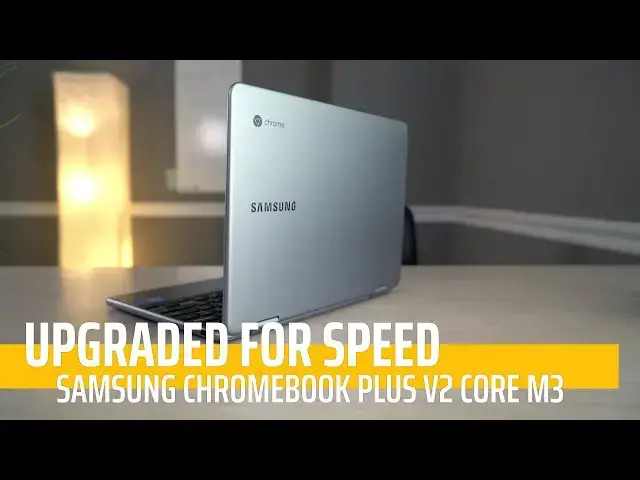
When the Samsung Chromebook Plus V2 came out, we were a bit underwhelmed with its overall performance. Great hardware couldn't' undo slow speeds from the processor. With the introduction of a model with the Core m3, that has all changed.
・・・・・・・
Subscribe to the channel: http://bit.ly/2xFuj6L
Shop Chromebooks: https://amzn.to/2NE2wKq
Read more: https://chromeunboxed.com/
Follow us: https://www.instagram.com/chromeunboxed
https://twitter.com/chromeunboxed
https://www.facebook.com/Chromeunboxed
Show More Show Less View Video Transcript
0:00
[Music]
0:08
so the Samsung Chromebook plus V2 showed
0:11
up on the scene a little unexpected and
0:13
just kind of announced out of nowhere
0:15
and we got our hands on it and we did
0:16
the review you can watch that right up
0:18
here if you want to check it out because
0:20
in that review we we talked about
0:21
everything right we talked about the
0:22
screen the keyboard the trackpad the the
0:24
whole the whole shebang uh we did the
0:26
whole normal review treatment on that
0:28
device we don't want to do that here
0:30
this is literally the exact same device
0:32
with a core M3 processor and I want to
0:34
kind of go through a few things to tell
0:35
you why this device might be worth your
0:38
money uh especially when I told you with
0:40
the original version maybe it wasn't in
0:42
the event that you've already watched
0:44
that review or you need to take a second
0:45
go watch that review you'll remember
0:48
that there are a lot of good things
0:49
about the version two of this Chromebook
0:52
and there are some things that they kind
0:53
of backpedal on a little bit one of
0:54
those was the display it is lower
0:56
resolution and not quite as bright but
0:59
that doesn't mean it wasn't good it the
1:00
device actually has a really good
1:02
display on it I would love it to be a
1:04
little bit brighter but the viewing
1:06
angles are great the colors are really
1:07
good and the 16 by10 ratio actually uh
1:10
appeals to a lot of people so it doesn't
1:12
feel super clunky in tablet mode and uh
1:15
it it makes it feel a little more
1:17
widescreen so you get a little a little
1:18
bit less letter boxing whenever you're
1:20
watching a video so I I think they did a
1:22
lot of stuff right with this the
1:24
keyboard was good trackpad was good
1:25
stowable stylus all good stuff a lot of
1:27
aluminum build quality here again I I
1:29
refer you back to that review if you
1:31
really want in-depth stuff on the
1:32
Samsung Chromebook plus V2 what I want
1:35
to talk about today is the difference in
1:37
processor and so they've launched a
1:39
couple different ones so they've got one
1:40
with uh with LTE support and then
1:42
they've put out this version here
1:44
nothing changes in it except for the
1:46
processor and now it has an e gen core
1:48
M3 processor and it makes a really
1:51
really big difference uh my my main nag
1:54
with the original version of this device
1:56
was that it just wasn't quite fast
1:57
enough it it chucked a lot of boxes was
2:00
a pretty good device but at 500 bucks I
2:02
kind of ended up feeling like I like the
2:04
original version of this device a little
2:06
bit better just for all the different
2:07
things that brought to the table that
2:09
all changes with the core M3 processor
2:11
this thing gets around 24 to 255,000 on
2:14
Octane and really I I've used it at work
2:17
for the last few days and it works
2:19
really really well um the the problem
2:22
really comes down to MSRP at this point
2:25
this device moves along fast enough for
2:28
most people to get all of their job done
2:29
all work done multiple tabs all kinds of
2:31
stuff all the normal stuff that I would
2:33
throw at a Chromebook this thing handled
2:35
with no issues whatsoever and it was
2:37
also pushing this monster display over
2:39
here which is a Quad HD extended so you
2:41
got 4K resolution across the lateral
2:43
measurement uh while you at, 1440 pixels
2:47
uh top to bottom and so it's a lot of
2:48
pixels to push and this thing had no
2:50
issue pushing all of those pixels and
2:52
its own display and so performance was
2:55
no issue whatsoever the only problem we
2:57
run into with this one now is MSRP $599
3:01
is what Samsung is wanting for this one
3:02
and I'm still not sure to tell you hey
3:04
go buy this thing at $600 because there
3:07
are a ton of contenders at 600 bucks and
3:09
Below you've got Dell's new Chromebook
3:11
hp's new X360 the X2 from HP the pixel
3:16
book right now is coming down at $700 so
3:18
just $100 more than that you've got the
3:20
Lenovo 15in all of these are eighth gen
3:23
processors they're all faster than this
3:24
one but I really like the overall
3:26
package here and so I don't know that I
3:28
can tell you at $5.99 to go buy but
3:30
here's the thing right now you can
3:32
actually get a hold of this device for
3:33
450 bucks and at that price and I expect
3:36
that price to come back probably not
3:38
just for Black Friday and not just for
3:40
December but in the coming months you're
3:42
going to see this thing marked down for
3:44
450 to 500 bucks this thing is a steal
3:47
overall it's just a great Chromebook and
3:49
now that the processor's out of the way
3:50
and the speed's out of the way it's fast
3:52
it feels really good the pen works
3:54
really good the keyboard feels great the
3:55
trackpads great the screen is great and
3:57
at $450 it is just easy to tell you to
4:00
go pick one of these things up but one
4:02
last thing I want to point out with this
4:04
and every other Chromebook sure you're
4:06
protected against malware and all that
4:07
kind of stuff because Chrome OS is a
4:09
signed Boot and it's not going to boot
4:11
up and run the OS if there's an issue if
4:14
there's malware present and so you're
4:16
protected from all that stuff and that's
4:17
great but just because you're protected
4:19
from that kind of stuff does not mean
4:20
that you are browsing completely
4:22
privately and so your personal
4:23
information isn't always as safe as you
4:25
might think it is and Chrome OS can't
4:27
fix that either but who can is nordvpn
4:31
and so we're glad to have them sponsor
4:33
this video particularly because nordvpn
4:36
is available not in just chromeos but on
4:38
the Android side of Chrome OS as well so
4:40
you can actually install it with one
4:41
account you can run the VPN through your
4:43
Android apps it'll cover all of your
4:45
chromos usage as well and you can be
4:47
sure and know that you are browsing the
4:50
internet and using your apps in complete
4:52
privacy all you got to do is go to
4:53
Chrome inbox.com
4:55
nordvpn that's n o r
4:58
dvpn today in order to get started so
5:01
let's wrap all of this up Samsung's
5:03
Chromebook plus V2 the way it came out
5:06
before with the seller on processor is
5:08
an okay Chromebook questionable whether
5:10
you spend 500 bucks for it but add $100
5:14
add the core M3 processor add that speed
5:16
and the ability to kind of do whatever
5:18
it is you want to do and not have to
5:19
worry about how fast your Chromebook is
5:21
and then subtract 150 bucks to get you
5:24
to
5:24
$450 this thing is easy for me to tell
5:27
you if you see it on sale for this price
5:29
go get it there will be a link down
5:31
below where you can go find it there's
5:33
all kinds of places you can get a hold
5:34
of this thing I give it an absolute
5:36
thumbs up at this price and guys if you
5:38
like this give us a thumbs up down below
5:40
subscribe and until next time we'll see
5:42
you
5:45
[Music]
#Consumer Electronics
#Product Reviews & Price Comparisons