Up next in 10



Sponsored by NordVPN. For a limited time, grab the 3-year plan with 70% off! Click here: Click here: https://chromeunboxed.com/nordvpn
Shop Lenovo Chromebook 3 (11) at Walmart: https://fave.co/2A4ZrRs
・・・・・・・
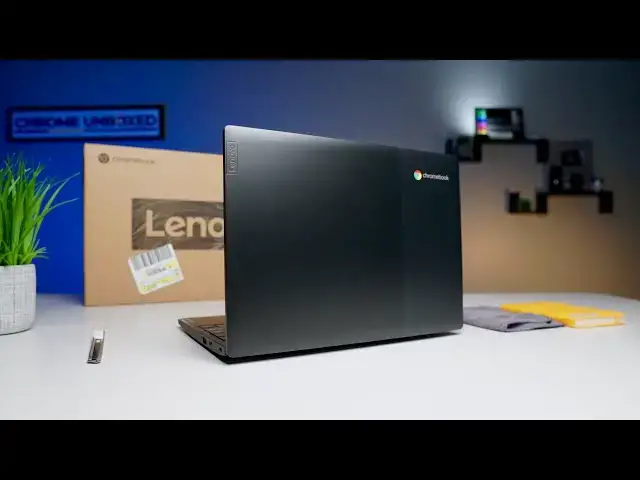
We got our hands on Lenovo's latest Chromebook and we're anxious to see if a $169 dollar device is worth spending your hard-earned money. Let's take a look at what's inside this unassuming box.
Read more: https://chromeunboxed.com/
Join our newsletter: http://bit.ly/2WjCDm7
・・・・・・・
Shop Chromebooks on CHROME SHOP: https://chrmshop.com/
Subscribe to the channel: http://bit.ly/2xFuj6L
The Music We Use - PERFECT for YouTube: http://bit.ly/31W6PYP
Become a member of Chrome Unboxed to help us make our channel even better, and for access to exclusive perks: http://bit.ly/CU-join
Show More Show Less View Video Transcript
0:00
hey guys today we have a special
0:01
unboxing for you this could very well be
0:05
one of the most important devices of
0:07
2020 no it's not a flagship device it
0:10
doesn't have a core AI processor or a
0:12
terabyte of RAM it doesn't really have a
0:15
whole lot to offer as far as spec sheets
0:17
go but what it does have is a $169 price
0:20
tag and when we're looking at that price
0:22
range there's really not a lot to choose
0:24
from and there's definitely not much
0:25
that we would recommend so let's get
0:28
into it and unbox this before we get
0:35
into this box this video is brought to
0:37
you by Nord VPN it's the VPN choice for
0:40
millions it works across all devices
0:42
wherever you go at home on the go at the
0:45
office it's a great VPN we love it we
0:48
use it if you'd like to learn more about
0:49
it check out the link in the description
0:51
or go to chroma and box comm forward
0:53
slash Nord VPN alright guys as I said
0:56
this could be a very important device
0:58
for 2020 and it has nothing to do with
1:01
the specs that that come inside this box
1:03
what we have here is the Lenovo
1:06
Chromebook 3 this device debuted just
1:09
this week on Lenovo's website and while
1:12
we were poking around we we realized
1:14
that it was available at our local
1:16
Walmart in a 32 gig model and it's only
1:19
a hundred and sixty-nine dollars now
1:21
again that may not interest you and a
1:23
lot of people may check out right now
1:25
but it's important because there aren't
1:28
a lot of devices actually I can't think
1:29
of any devices under $200 that are worth
1:32
their weight in salt but this one has
1:34
some internals that we know work really
1:36
well and if it has a decent screen and
1:38
it's built halfway decently this device
1:42
could be one of the most popular devices
1:43
of 2020s so without any further ado
1:46
let's crack this thing open
1:55
you can see it's just a regular old
1:57
brown Lenovo box nothing fancy this two
2:04
and a half pounds which is about average
2:07
for an eleven point six inch device so
2:09
it doesn't feel like crazy clunky when
2:11
I'm taking it out here but anything
2:15
important no regular old Lenovo clock
2:17
charger some paperwork nobody needs to
2:20
see that spring neat little cheesecloth
2:24
sleeve they got on here
2:25
yeah pulling it out I mean it feels it
2:29
feels a little dense it's not crazy
2:31
thick it's thinner than an Acer r11 but
2:34
this is one thing they note on the
2:36
website two-tone black onyx lid I
2:39
thought this was textured but it's not
2:41
it's actually just two different tones
2:44
kind of gives it a really unique light
2:46
look I've seen some that have this
2:48
across the lid like some of the Acer's
2:49
but just on one side it looks kind of
2:51
cool it definitely looks different so it
2:54
feels solid though it doesn't feel cheap
2:56
like it's not flexing a whole lot but
3:01
yeah so far so good let's take it open
3:04
and see some more some more little
3:09
cheesecloth there for you yeah this is a
3:13
in 40:20 Gemini Lake our processor which
3:18
is just a refresh of last year's Gemini
3:20
like but we've seen that this processor
3:22
will put out over sixteen thousand and
3:24
octane scores which if you know anything
3:26
about octane scores we talked about them
3:28
have four years that's a pretty high
3:30
output this device is gonna get around
3:32
just fine
3:33
it has four gigs of RAM and for most
3:35
users doing schoolwork homework stuff
3:38
for the office or just regular browsing
3:40
around home this is gonna be great it's
3:42
gonna play hand Royd apps just fine it's
3:44
gonna handle a lot of Linux apps with no
3:47
problem it's gonna play stadia great
3:49
because as we've seen stadia runs great
3:51
on just about any Chromebooks so let's
3:53
take a quick break I'm gonna power this
3:55
on and get logged in and we'll take a
3:56
look at the screen and see what else
3:58
this thing has to offer
3:59
alright guys we're all powered up and
4:01
logged in and
4:02
first thing I see which this was my
4:05
biggest concern about this device is the
4:07
display a lot of Lenovo's displays have
4:10
that really bad TN panel with to 20
4:12
minutes and they're really washed out
4:14
and the viewing angles are horrible this
4:16
one's not great I'll go ahead and be
4:17
honest with you the the colors are a
4:19
little flat and it's a little bit washed
4:22
out but it's a lot brighter at 250 nits
4:26
and the viewing angles are a lot better
4:28
so I can already tell you this thing is
4:30
way better than what they put in s 330
4:32
and the 340 and devices like that we've
4:36
logged in and as I as I mentioned moving
4:39
around is easy it's snappy everything
4:41
runs great on it and you can see the
4:45
screen here looks pretty good I mean and
4:48
again we're talking about a hundred and
4:49
seventy dollar Chromebook this is
4:51
something that if somebody says hey I
4:52
just needed a cheap device but I don't
4:54
want to buy something that's garbage the
4:56
screens not bad
4:58
as with most Lenovo devices the keyboard
5:01
is really good I mean it's no pixel book
5:03
go but it's really good I would be
5:05
comfortable typing on this long-term the
5:08
trackpad is obviously not glass it's a
5:11
little grabby because of the texture but
5:13
the clicks really good it's really
5:14
shallow nice sharp click it does have
5:17
some flex now at the bottom but that's
5:19
to be expected with these all plastic
5:20
devices they could have trimmed the
5:22
bezels a little bit but it's not bad
5:24
okay it's it's kind of what we expect
5:27
when we look at an 11.6 inch device
5:29
again this isn't touchscreen it's not a
5:31
convertible it has about a 170 degree
5:34
Bend I don't know why you would want to
5:35
put your device like that but you can if
5:37
you want to around the outside it's got
5:40
great amount of ports you have to each
5:42
of a USBC and to each USB a on each side
5:48
has a micro SD card slot of course the
5:51
Kensington lock audio audio input and
5:54
other than that this device looks really
5:56
good for a hundred and seventy dollars I
5:58
am gonna drive it for about a week give
6:00
you guys a full review but I still think
6:03
that this device could be a big deal for
6:05
a lot of people another neat little
6:07
thing and that I've noticed lenovo is
6:09
doing this a lot lately they're putting
6:10
this little barcode on here
6:12
you can scan it just says 'support on
6:14
there so I'm assuming you can scan that
6:16
we'll check it out in the review I'm
6:17
sure you can scan it and it will take
6:19
you to a product page or something with
6:21
some PDF so that you can check out but
6:23
that's been it for this one guys like I
6:25
said I'm gonna drive this for about a
6:26
week to bring you a full review if you
6:28
like this give us a thumbs up and don't
6:31
forget to subscribe if you want to see
6:32
more videos like this until next time
6:35
we'll see you
6:37
[Music]
6:39
you
#Laptops & Notebooks
#Consumer Electronics
#Shopping