Up next in 10



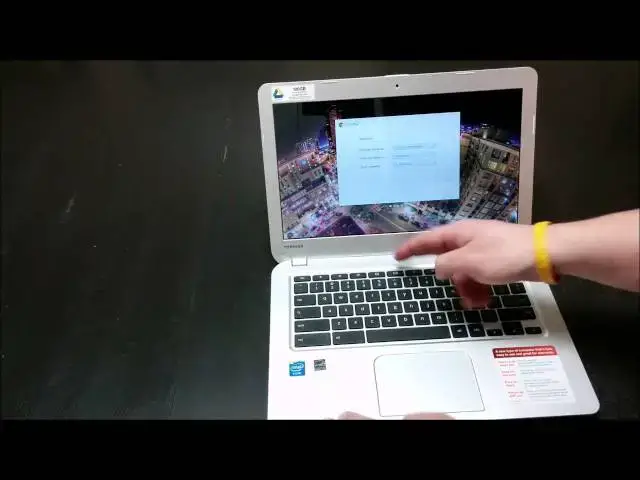
In this latest video, I get my hands on the newest Chromebook to join the lineup: the Toshiba Chromebook. Enjoy!
And don't forget to check out: http://chromeunboxed.com
Show More Show Less View Video Transcript
0:00
hey folks Robbie Payne here again with
0:03
chrome unbox coming at you today with an
0:05
unboxing of the new Toshiba Chromebook
0:09
now for those of you who know this is a
0:11
13.3 inch device made by Toshiba
0:14
um due out in the next couple weeks uh
0:17
from what it was said online Amazon
0:20
shipped me mine a little bit early so
0:22
not going to complain at all there I'm
0:24
gonna go and get it unboxed today for
0:26
you get a quick Hands-On quick initial
0:28
Impressions and then obviously spend a
0:30
little bit of time with the device and
0:32
give you my overall Impressions within a
0:34
week or so of using it as my primary
0:36
work device so without any further Ado
0:38
let's go ahead and get into this bad boy
0:41
thank you
0:53
all right decently attractive packaging
0:58
Chromebooks some of them have had iffy
1:01
packaging probably the best packaging
1:03
most uh unique packaging has been the HP
1:05
11. and a lot of it's kind of boring so
1:09
this one
1:11
pretty decent pretty decent box layout
1:13
and really looks on the on the box a lot
1:16
like the Samsung Series 3 in some ways
1:19
the hinge obviously is different and the
1:21
overall design of this guy is going to
1:22
be quite different anyway
1:24
look for in the next couple weeks
1:27
um a we'll have a side-by-side
1:29
comparison with this and my HP 14 that
1:32
so far every time I've put another
1:33
Chromebook up against it's always come
1:35
out the uh the Victor at least in my
1:38
opinion I really enjoy that machine as a
1:41
lot of you who've watched my videos have
1:43
probably noticed
1:45
um and figures
1:49
you think by this time I would be really
1:52
good at doing this but I try not to tear
1:54
the boxes up because normally they're
1:55
going to go back
2:01
all right and we've got some normal
2:05
Chrome quick start guides I always think
2:07
these are funny
2:09
um shouldn't it just be like one picture
2:10
open it turn it on it's a Chromebook
2:12
it's done
2:14
uh we've got the ball jock here and I
2:17
might have to plug this in most of the
2:19
ones yeah it's a plug-in power up get
2:21
ready to enjoy your Chromebook
2:23
um uh somebody I cannot remember it so
2:25
forgive me if you're watching this video
2:26
and you made the comment I cannot think
2:28
off the top of my head but somebody in
2:30
one of the other videos commented uh
2:32
about the uh the fact that they're
2:34
shipped this way and they need to be
2:36
plugged in I don't even remember the
2:38
reasoning but it seemed pretty legit
2:40
when he said it so um
2:42
if anybody else wants to chime in in the
2:44
comments and let me know why it is they
2:46
do this I don't know for sure so I don't
2:47
want to say something that's not correct
2:49
but I know every Chromebook I've had
2:51
shipped to me as soon as I open up I
2:54
always have to plug it in to get it to
2:55
boot up and that's not because it's dead
2:57
it actually has plenty of battery
3:00
all right get these guys off here
3:07
this plastic sheath there
3:11
kind of the thin cloth that's
3:12
interesting I just wrapped it around the
3:14
screen
3:16
so I'll pull that off there
3:18
and here we are
3:22
gonna get this box and all this stuff
3:24
out of the way
3:25
foreign
3:31
we'll go over the quick specs
3:34
much like most of the Chromebooks
3:37
that are at right now this guy's
3:39
sporting the Haswell 29.95
3:42
um
3:43
CPU and so we're expecting awesome
3:45
battery life just like every other
3:48
Haswell toting Chromebook also expecting
3:50
very good performance this device does
3:52
have two gigs of RAM and I did a video
3:55
before you can subscribe to the channel
3:57
and check it out I did a video
3:58
comparison comparing uh video comparison
4:01
comparing multiple Chromebooks with two
4:04
and four gigs of RAM respectively and
4:06
kind of seeing how they fared against
4:07
each other
4:09
um and to be honest I didn't see a huge
4:12
difference in performance overall as the
4:15
as the tasks increase obviously you're
4:18
running some issues there but
4:21
um
4:21
there was a conversation that got
4:22
started around that video on Google Plus
4:25
and and the end I'll be all of the
4:27
conversation was
4:29
if you know you have two gigs of RAM you
4:32
know deal with it accordingly know that
4:35
you're not going to be able to have 20
4:36
tabs open and I think that's good advice
4:41
um
4:41
and just knowing the limitations of your
4:44
of your device that you're using and so
4:45
the two gig yes you're not gonna be able
4:47
to do as many things at one time and it
4:49
does get hampered a little bit with uh
4:51
Ubuntu running on the back end I will
4:53
install Ubuntu on this because I need it
4:54
for work so if I'm going to use this as
4:55
my work PC or shoot excuse me is my work
4:59
Chromebook
5:01
um I will have to have Ubuntu running
5:03
just for inkscape specifically so
5:06
I will be able to give you real world
5:08
use on a day-to-day basis of how that
5:12
2gig is or is not affecting me I'm
5:14
tending to think it's not going to
5:16
affect me that bad I don't usually have
5:18
that many tabs open so it shouldn't
5:19
affect me too much quick tour of the
5:21
hardware before I plug this guy in and
5:23
that gets really awkward
5:25
on the top we kind of have this uh
5:28
pattern you can kind of see little bitty
5:30
dots I don't know if you can see that
5:32
see if it'll focus
5:35
kind of sort of you can see that see
5:38
that pattern there that is not just a
5:40
pattern in the material it's actually a
5:42
it's got some some dimples to it
5:45
same thing on the bottom uh we've got
5:47
the four to four soft touch foot feet I
5:50
can't speak tonight uh we've got the
5:52
stereo speakers down here and screws
5:54
obviously to take the bottom panel off
5:56
I'm sure there will be quite a few
5:57
people uh getting into this guy and
5:59
seeing what is and is not replaceable I
6:01
will not do this as it is a review unit
6:03
and I don't want to avoid the warranty
6:05
and avoid my ability to return it
6:08
um and who knows it may win me over them
6:10
it may become my new Chromebook we'll
6:11
see we've got some fan slots back here
6:13
on the back over on the side full size
6:15
SD card slot you have charging port
6:17
Kensington lock
6:19
on the other side two USB 3.0 and they
6:22
are blue so you know for sure that they
6:24
are 3.0 uh we've got the earphone
6:26
microphone combination Jack we've got
6:29
the HDMI out and that's it
6:32
nothing that's uh standing out or crazy
6:36
looking about it it's Sleek looking
6:38
feels nice and firm no no creakiness
6:43
it's not as heavy as my HP for sure but
6:46
it's not light not super duper light I
6:48
want to say it comes in around three
6:48
pounds so pretty normal for something
6:50
the size and and honestly the pictures
6:52
and stuff I don't want to make it feel
6:54
like it's going to be a little thicker
6:55
it does it casts a nice Sleek profile I
6:58
don't know if that's really catching it
6:59
but it feels nice and Sleek uh the one
7:02
thing I saw somebody do with it which
7:04
I'm a complete sucker for is lift the
7:06
lid with one finger and we'll see if
7:08
nope not going to do that maybe once it
7:09
gets worked in it will do just that it
7:13
doesn't look like it maybe that wasn't a
7:15
final build I'm a complete sucker for
7:17
devices where you can lift it up with
7:20
one finger and not have to touch the
7:21
bottom of the of the device in order to
7:23
do that look at this I made all that
7:25
commotion about needing to plug it in
7:27
even got my my plug ready to plug in and
7:30
it didn't need it so
7:31
who knows perhaps it's uh it's a
7:35
completely random thing
7:37
so let me get on the Wi-Fi here I will
7:41
say the trackpad has a
7:43
um
7:45
I'm trying to think what to compare this
7:47
to
7:48
um
7:49
kind of the feeling when you uh you have
7:53
safety bars like in a restroom or
7:56
something and they kind of have that
7:58
slightly grippy stainless steel
8:00
I don't know what this feels like and
8:02
the rest of it has this matte finish not
8:03
going to collect a single fingerprint
8:05
which is really really awesome and it
8:08
almost it it comes off
8:10
somewhat like aluminum definitely not
8:12
aluminum
8:13
definitely doesn't have that cold
8:15
aluminum feel I'll tell you
8:17
it's it's nice and firm there's not a
8:19
lot of give a little bit there
8:22
a little bit on the back side there
8:23
other than that when you're ever going
8:26
to be pushing up there probably never
8:27
other than that it's got a real good
8:29
solid feel to it
8:32
not a lot of creaking so that's good
8:34
we'll deal with some typing stuff here
8:36
in a minute and
8:38
let me get logged in here and now we'll
8:40
talk about some other things a nice
8:42
quiet track pad I appreciate that if
8:44
you've watched my other videos you've
8:45
heard me harp about that
8:53
let's go somehow changed
9:05
hmm
9:07
I may have to cut away and come back
9:08
because I don't know what the heck I
9:09
just did somehow change the language and
9:11
I
9:14
language I'm close to understanding
9:25
God for just a little bit of English in
9:27
parentheses here we go
9:35
okay it's checking for system update so
9:37
it may uh perhaps update to the latest
9:40
version of Chrome I've had some that do
9:42
this and some that don't so we'll see
9:44
what exactly happens here if it does
9:46
we'll cut away and come back
9:47
yeah but I must say right out of the
9:49
gate the likeness to a MacBook Air
9:53
um pretty heavy I'm gonna have somebody
9:55
walking by it's probably going to think
9:56
you're using a MacBook Air the screen I
10:00
don't know if I can adjust yeah it's
10:01
gonna let me do that so uh pretty
10:04
decently bright I'm gonna um right
10:06
underneath the fluorescent light which
10:08
is not the greatest light in the world
10:10
to be looking at stuff in but it does
10:12
give you a good idea of how to glare and
10:14
all that kind of stuff it's going to be
10:15
and it's not terrible
10:17
um
10:18
do get the polarization
10:21
forward
10:24
way back if you'll get a little bit
10:26
there
10:27
um left or right viewing angles are
10:30
pretty good though see if we can catch
10:31
that on here
10:34
see a little bit of that polarization
10:35
trying to keep it on angle here
10:38
just a little bit and honestly it looks
10:40
like it's polarizing a little bit more
10:42
on camera
10:44
yes I mean you get 45 degrees before you
10:46
notice anything and then you do get some
10:48
polarization so
10:50
um yeah TN panels what are you gonna do
10:53
hopefully what we're hearing from the
10:55
rumors on the Samsung Chromebook the
10:58
series 3 refresh looks like they're
11:00
really going to focus on the screen and
11:02
uh the Lenovo
11:05
adds just an education sector for right
11:07
now but the Lenovo Yoga is going to
11:10
actually have an IPS panel on it so I'm
11:12
really looking forward to something with
11:13
Haswell and IPS and four gigs of RAM
11:16
those three things together I think
11:17
would that would sell me completely but
11:20
this display looks nice
11:22
it's it's really difficult for me to
11:24
tell until I have it literally side by
11:26
side with the HP instead of trying to
11:28
think from memory but it looks it looks
11:30
really good the contrast looks good on
11:31
it
11:32
um but it seems to be the case when I
11:34
open up a Chromebook and I don't have
11:36
anything to compare it to much like if
11:37
you have a television and you don't have
11:38
anything to compare it to right side by
11:40
side it's it's honestly hard to make
11:42
that call
11:43
um there's really nothing else that sets
11:46
this guy apart other than the fact that
11:47
you have a 13.3 inch screen here and in
11:51
the review I'll deal with the the webcam
11:53
I'm not off the top of my head exactly
11:55
sure I think it's a 720p front-facing
11:58
camera I'll talk about that at more at
12:00
length in the review but I have to say
12:02
the the travel and the keys very good
12:04
trackpad feels great it really does I
12:07
mean the the tactile finish on there is
12:09
not off-putting at all and uh
12:12
hopefully we're resetting with the
12:14
newest version of Chrome some of the
12:16
some of the updates in the later
12:17
versions of chrome also help the
12:19
trackpad be even better than it's been
12:21
in the past versions other than that if
12:25
you're watching this you 've probably
12:27
been introduced to Chromebooks at some
12:28
point in time
12:29
you know there's not much different in
12:31
this in any other Chromebook so there's
12:33
not a lot more to say other than the
12:35
fact that the device looks really
12:37
attractive and it feels good
12:40
um all the all the pieces feel nice it
12:42
feels well put together
12:44
it doesn't feel like an afterthought
12:45
device
12:47
trackpad feels great it's nice and roomy
12:49
I won't know specifically how good the
12:52
trackpad is until I've used it for an
12:54
extended period of time it's sometimes
12:56
hard to tell but some of those three
12:58
finger swipes I use a lot of that stuff
12:59
now so it'll be nice to see those things
13:02
in action let me type in my
13:04
username and password Here
13:07
yeah I like the keyboard a lot
13:09
really quiet too
13:18
and yeah here we go up and running so
13:20
there's a good starting guide
13:22
uh
13:26
so yeah that's about it for right now as
13:27
it's kind of moving all my settings in
13:29
it'll be choking up on some stuff here
13:31
for a few minutes but overall like I
13:33
said it feels great keyboard feels good
13:35
trackpad feels really good screen looks
13:37
nice not the brightest thing in the
13:39
world oh there we go yeah there's some
13:40
extra brightness you know it's it's
13:43
fighting off clear pretty well in here
13:44
for a dark background
13:47
we'll see we'll see we'll look into more
13:49
things like battery life front-facing
13:50
camera the two Giga Ram performance I
13:52
know a lot of people are saying hey if
13:53
you got two gigs just use less resources
13:55
but
13:56
um it would be a different story for me
13:58
if if Toshiba said hey here's a two gig
14:00
and if you want four gig you can't get
14:01
it in stores but you can order it we can
14:02
get you four gigs in there or here's a
14:04
slot where you can add some Ram uh some
14:06
of those things would be cool and
14:07
hopefully we'll see some of those things
14:08
as well in future Chromebooks
14:10
um you know nobody really wants to tear
14:12
it apart and go crazy with it but it'd
14:14
be nice to be able to add solid state
14:15
storage and RAM those two things would
14:18
be nice and you could kind of upgrade as
14:19
you want to and then they could really
14:21
focus on putting some money into a
14:24
better display because it really feels
14:25
like the last few uh Chromebooks that
14:27
have come out keyboards really across
14:29
the board it's just been a really good
14:30
I've really enjoyed them uh and track
14:33
pads are pretty good the Acer one is a
14:35
little hit and miss and so I don't want
14:36
to I don't want to say that this
14:37
trackpad's great just because it feels
14:39
good off the off the Jump but
14:42
looking forward to really getting my
14:44
hands on this guy for a little while is
14:46
that it's an attractive Chromebook look
14:47
it's lighter than the HP it's a little
14:49
bit smaller but that looks like a nice
14:51
big fat bit of screen real estate to
14:53
work from on a daily basis so who knows
14:55
this guy could become my new daily
14:57
driver we'll see there'll be much more
14:59
coming in the next week to 10 days
15:01
before I got to send this guy back I'll
15:04
have a full review up we'll have it
15:06
against the HP 14 again which for my for
15:09
my money is the best Chromebook on the
15:10
market right now and lots more coverage
15:14
coming thanks for uh thanks for watching
15:16
the video feel free to subscribe down
15:18
below more subscribers means more videos
15:20
means more Chromebooks means more
15:21
coverage so thank you guys all for
15:23
watching the videos I hope you've
15:25
enjoyed this like I said tune back in in
15:27
just uh a few days and we'll see a full
15:30
review up of this guy after some time
15:31
spent with it thanks again we'll see you
15:33
next time
#Computer Hardware
#Laptops & Notebooks
#Consumer Electronics