Up next in 10



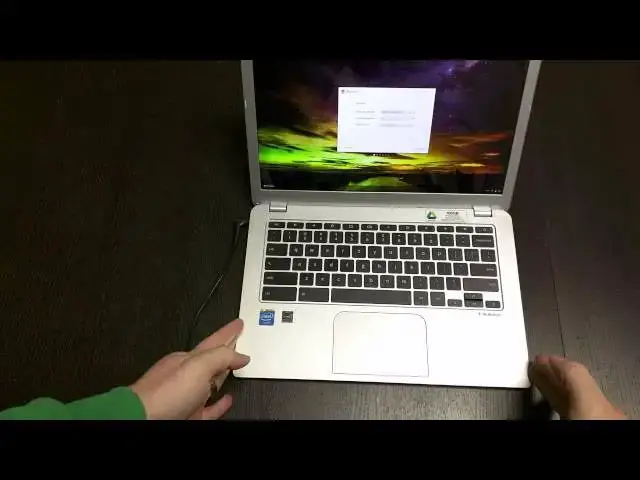
In this video I unbox and quickly tour the new Toshiba Chromebook 2. A much-anticipated bump in screen quality has made this one quite possibly THE go-to Chromebook for the holidays.
Show More Show Less View Video Transcript
0:01
[Music]
0:13
hey folks Robbie pay with chrome unboxed
0:15
here coming at you today with an
0:16
unboxing of the Toshiba Chromebook 2
0:19
this device is rocking a
0:21
1080p IPS display which is a a big
0:25
feature that a lot of people have asked
0:27
for a lot in in the lower to mid-range
0:30
Chromebooks that we have not seen very
0:33
often aside from the hp11 and the
0:35
expensive Chromebook Pixel this one is
0:39
also uh rocking the the latest betrail
0:42
processor 4 gigs of RAM and um skull CI
0:46
audio so we'll see how kind of some of
0:48
those things all pan out for those of
0:50
you who are not familiar there is a
0:51
lower-end Toshiba Chromebook uh it's a
0:53
little less expensive has the kind of
0:56
Chromebook standard 1366 768 TN panel
1:00
display which a lot of people are
1:02
getting pretty tired of um and for the
1:04
most part seems to be online a lot of
1:06
people are really clamoring over the
1:09
outer parts of this device and and kind
1:12
of coming back to saying you know the
1:13
processor is a little slow the ba Trail
1:15
processors are a tad slow um and
1:19
probably until we start seeing Broadwell
1:21
uh whichever whichever version or part
1:23
of the Broadwell line of processors uh
1:26
at the beginning of the year um start
1:28
getting Chromebooks this is kind of what
1:29
what we're going to see in Chromebook
1:30
performance for now U from what I've
1:33
seen online
1:35
um most of these are hit somewhere in
1:38
the 8,000 on octane if benchmarks mean
1:41
much to you and so that puts it squarely
1:43
in between say the um Samsung arm
1:48
Chromebooks or uh what's the other arm
1:51
Chromebook I'm thinking of uh the Acer
1:53
uh Chromebook 13 those arm Chromebooks
1:56
get somewhere in the 6,000 range and
1:59
then your Haswell uh your hp14 Acer C720
2:03
the old toiba Chromebook um uh designs
2:06
that hat fans um those usually get
2:09
between 10 and 11,000 on octane so this
2:11
puts it squarely in between those two so
2:14
um the 4 gigs of RAM will help with
2:17
multitasking uh but it's not going to be
2:19
the blistering fast Chromebook
2:21
experience that some people are looking
2:22
for myself included but I do believe the
2:25
hardware uh from what I've seen online
2:26
so far really wins out with a lot of
2:29
people uh standard fair in here slim
2:33
pretty standard looking charger block
2:35
and cable we may have to plug that guy
2:37
in to get him to wake
2:39
up I have not seen too many reviews yet
2:41
of this guy it's been a hit and miss as
2:44
far as getting it from major retail
2:45
outlets but it seems like it's starting
2:47
to hit those channels
2:48
now let's get this box out of
2:54
here pull the cloth off and there's a
2:57
lot of striking resemblance to uh not
3:00
surprisingly to the original Toshiba
3:02
Chromebook first off you kind of have
3:04
that dimpled pattern get it up close
3:07
here and see if it can focus on that or
3:10
not there it goes uh so highly textured
3:14
uh but very fingerprint resistant which
3:16
is kind of nice it's not really picking
3:18
up anything I'm doing here on the back
3:20
side it's a less uh glossy less silvery
3:23
version of that same thing lots of
3:24
screws uh so you probably jump in there
3:26
pretty easily but being fanless and slim
3:30
it's probably going to be hard to work
3:31
on I would say on the side we have HDMI
3:34
Kensington lock USB 3.0 combo headphone
3:37
microphone nothing across the back save
3:39
for the
3:41
hinges other side USB 2.0 it looks like
3:44
yep full sizee SD card slot um and then
3:48
your power jack no speaker ports across
3:52
the bottom sides front anything that is
3:54
because this has got um Skool candy
3:58
audio um uh some people may be fans of
4:00
Skull Candy I'm I'm not a huge fan of
4:02
them but um the audio apparently comes
4:05
straight from the keyboard which is kind
4:07
of cool I like that effect and other uh
4:09
Chromebooks that have done that the hp11
4:11
and most notably the the Chromebook
4:13
Pixel um both of them had Stellar audio
4:16
coming from the keyboard uh the device
4:18
is relatively light um pretty thin as
4:21
well and it's a slight bit thinner than
4:24
the original Toshiba Chromebook and it
4:26
does kind of have these beveled edges um
4:28
on it you can see that there's that hard
4:30
bevel there rather than kind of a curved
4:32
meeting there so uh very cool
4:37
indeed so let's open it up and see if oh
4:41
so close almost got the one finger open
4:44
which is pretty awesome let SC this down
4:47
here and see if it's going to power up
4:48
for me if not we'll cut away real quick
4:50
I'll grab the charger and get this thing
4:52
plugged in doesn't look like it's going
4:53
to play along I'll be right
4:55
back all right and in true Chromebook
4:58
fashion I plugged it in and hit record
5:01
and before I could even get back to the
5:04
camera to hit record it had already
5:05
booted up so that's pretty awesome nice
5:08
quick boot time as we know love and
5:10
expect from Chromebooks and I can tell
5:12
you guys just from right now looking at
5:15
the screen apart from the Chromebook
5:17
Pixel hands down best uh best screen
5:20
I've seen yet on a Chromebook that is
5:23
that is nice really really
5:25
gorgeous um first touch on the trackpad
5:28
here a little rainy feeling uh it's
5:31
textured um the original Chromebook or
5:34
Toshiba Chromebook had this as well the
5:36
interior body looks like that brushed
5:38
aluminum actually kind of feels
5:39
texture-wise to the touch like it
5:42
obviously uh hitting on a little bit it
5:44
is not that but overall it's an
5:47
attractive
5:48
design it feels good uh not creaky very
5:51
solid and again no fans no speaker ports
5:54
so it's uh it's very very uh very solid
5:59
in the hand which is pretty cool let's
6:01
get signed on to some Wi-Fi
6:09
here and guys to be honest with you I
6:11
don't know if I'm um real lenient on
6:13
keyboards for the most part they don't
6:15
get me B out of shape and the travel is
6:16
not that great and I'm not typing
6:19
lengthy articles uh every day uh usually
6:22
I'm typing a few lines of code few lines
6:24
of code stop few lines of code so um I
6:27
may not be the best judge of keyboard he
6:29
keboard feels good travel feels okay on
6:31
it keys are nicely spaced um so nothing
6:34
surprising there trackpads nice and wide
6:36
full width of my hand again um the
6:38
texture I'm not crazy for cuz I feel
6:40
like that's going to um take away from
6:43
some of the uh um responsiveness of it
6:47
because it's not going to be easy for
6:48
your finger to slide across I'm not sure
6:50
why companies ever go with a a textured
6:53
trackpad but some of you may like that
6:55
um maybe maybe your thing um not sure I
6:58
can tell you it isn't going to collect
7:00
uh oil and grease nearly as much as a
7:02
slick trackpad would um it doesn't seem
7:05
like the inside is going to do that
7:07
either um kind of pushing all over here
7:10
and not seeing anything actually
7:11
attracted on there which is kind of neat
7:14
I'm hoping to be able to cash in on that
7:16
one terabyte of uh uh storage if if you
7:20
don't know anything about that for a
7:21
limited time you get a Chromebook
7:23
they're giving you a terabyte of storage
7:25
for two years versus the 100 gigs you
7:27
normally get with a Chromebook which is
7:28
pretty nice
7:30
not sure what's going on here hopefully
7:32
this won't take too
7:34
long uh a couple things I can tell you
7:36
from just looking at it right now uh
7:38
viewing angles are great as expected
7:41
from an IPS display there's quite a bit
7:44
of glare on it and I've got the
7:45
brightness cranked uh Max here it's a
7:48
decently bright room see if I can catch
7:50
some of the
7:51
glare yeah you can see
7:53
the and though it is picking up glare uh
7:56
it is doing that um the color
8:00
just look great the blacks are deep um
8:03
like I said off angle viewing looks
8:05
great um it's just a a real pleasure to
8:08
look at a screen that looks like this on
8:10
a Chromebook finally uh while it's doing
8:13
whatever it is it's doing here probably
8:15
pull this out
8:17
now kind of give you a look around with
8:19
it opened um very nice very Sleek um
8:24
very attractive Chromebook in general um
8:28
and again we're not getting
8:29
creaking um not really able to to twist
8:33
or bend
8:34
anything it is an attractive
8:38
attractive Chromebook to say the least
8:41
um I don't know I've ever been stuck
8:44
this long on this particular spot
8:46
determining device configuration let's
8:48
shut down try to restart here and see
8:50
what
8:53
happens I like to at least do something
8:56
so you can kind of see some performance
8:57
but we'll get to that in the review
9:00
um not a huge deal here just to say uh
9:04
on first blush device feels good um um
9:08
very sturdy very attractive U the screen
9:11
is gorgeous it looks like we're going to
9:13
be able to move through good pull this
9:15
off screen real quick get my credentials
9:18
in here
9:31
I'm telling you up close I haven't
9:33
really gotten to get my face down close
9:35
enough to it to interact with it screen
9:38
is just so
9:47
gorgeous all right all logged in
9:50
there and here we go it's going to be uh
9:54
downloading apps and stuff like that so
9:57
take all of this what I'm about to do
9:59
here with a grain of salt let's put it
10:01
through the
10:11
Google+ because as we all know Google+
10:14
seems to be the
10:16
worst are one of the worst websites for
10:19
Chromebooks and they usually struggle
10:20
pretty badly through it so we give it a
10:22
second I want to let it load because I
10:24
know it's downloading a bunch of stuff
10:25
in the
10:26
back um just part of it
10:33
and you know not too bad let's go full
10:43
screen you know a bit of lag but uh I'm
10:47
going to
10:50
say not the worst thing I've ever seen
10:53
usually those arm Chromebooks I pull up
10:54
go+ the first time and it's just a
10:57
nightmare um
11:00
not real bad at all I'm not going to lie
11:03
this is uh this is impressive now an
11:05
update did go out last week uh one of
11:07
the new Chrome OS updates and it only
11:10
hit uh
11:12
um seemed like the most of the Bay Trail
11:15
most of the uh Haswell processor
11:19
processor powered Chromebooks were left
11:20
out of that but um so it seems like it's
11:23
doing okay especially with the
11:24
installing stuff behind so my hopes are
11:26
a little higher um my hopes are pretty
11:28
low to be honest with you as far as
11:30
performance goes the last betay tril
11:32
Chromebook I had was the Asus C300 and I
11:36
wasn't real happy with that so I'm
11:38
trying uh I'm getting ready to move into
11:40
maybe a different approach um so you may
11:43
get a longer uh look review at this
11:45
device with me because um I'm thinking
11:48
about for work going to a chrome box um
11:51
I've ordered it we're going to see how
11:52
it works out the as the Asus Chrome box
11:56
is the one you you can open up and
11:58
manipulate pretty easily I'm going to
11:59
you know I I ordered the I3 version
12:01
going to fill it up with some extra RAM
12:04
and maybe do a review once I've once
12:06
I've tweaked it up a little bit and use
12:08
it for work and kind of leave it at the
12:10
desk and they're small you can grab it
12:11
take it with you if you need but um and
12:14
then have maybe this device as my carry
12:17
around Chromebook and so you know still
12:19
be looking at staying under that $600
12:21
$700 total package for uh work rated
12:24
materials so to me that's a that's a
12:26
very a normal and standard price point
12:28
so uh ideally what I'd like to have is
12:30
something like this with a Broadwell
12:32
processor in it something that can
12:33
really be a beast um and an all in one
12:36
thing but we're not there yet uh
12:38
hopefully beginning to Quarter Two of
12:41
next year we'll start seeing some
12:42
high-powered uh fanless IPS display
12:46
wielding awesome Chromebooks um we're
12:48
getting there and the the selection just
12:51
keeps growing so that's pretty awesome
12:53
uh until a few weeks maybe a week and a
12:55
half or so I'm going to use this thing
12:57
try to use it at home a lot um and and
13:00
really get a good feel for uh how good
13:02
this device is I can tell you it looks
13:04
really great just sitting on the desk
13:06
one thing I saw a complain about before
13:08
and and who knows maybe with an IPS
13:11
display it doesn't matter that's as wide
13:12
as this thing opens so there's no
13:14
opening it past that that width and so
13:16
I'll show you that angle and we'll talk
13:17
about this more in a review whether this
13:19
becomes a bothersome thing so um keep
13:22
that in mind if if you're somebody for
13:24
some reason that happens to use them and
13:26
open them up real wide or something this
13:28
one doesn't open any farther than that
13:29
so just the way it's built anyway uh
13:32
guys if you like this video uh please
13:34
give it a thumbs up subscribe to the
13:35
channel uh share it out with other
13:37
people all that kind of stuff um like I
13:40
said more likes more subscriptions more
13:42
videos all that kind of stuff um keep it
13:44
locked here in a week and a half two
13:46
weeks or something like that we'll have
13:48
the review up of this guy hopefully uh
13:51
having used it in lots of different
13:53
scenarios um because I'm thinking about
13:55
keeping it as kind of a like I like I
13:57
was saying a split daily driver kind of
14:00
device so uh we will see um again keep
14:03
it locked here hope to see you again
14:04
soon have a good one
#Consumer Electronics