Up next in 10



Sponsored by NordVPN. Buy a 3-year deal at 70% off, get an extra plan on top! Click here: https://chromeunboxed.com/nordvpn
Shop Logitech K580 and M355 at Chrome Shop: https://chrmshop.com/logitech-k580-m355/
On The Run To 100K Giveaway: http://bit.ly/OnTheRunTo100KGiveaway
・・・・・・・
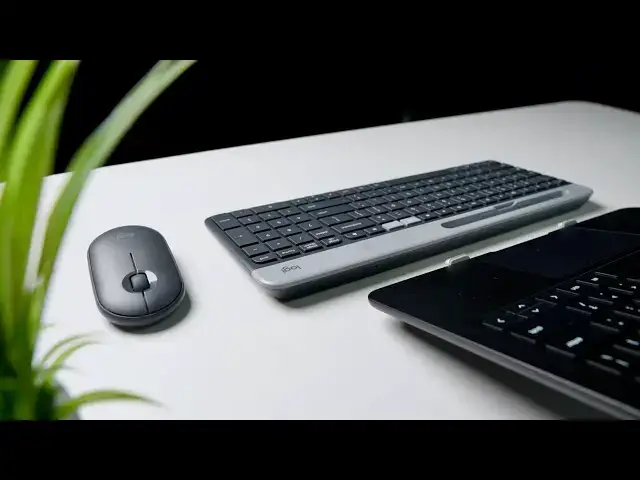
That headline up there is not hyperbole. I'm not having to stretch even a bit to crown this new duo from Logitech as the best set of wireless, Bluetooth accessories I've ever used with a Chromebook. Don't hear me saying this is the best keyboard or mouse you will ever use. They are good, not great, but it is in their connectivity that I find such relief. Let's talk first about what makes them so special.
Read more: https://chromeunboxed.com/logitech-bluetooth-keyboard-mouse-chrome-os-chromebook-best-wireless-k580-m355
Join our newsletter: http://bit.ly/2WjCDm7
・・・・・・・
Subscribe to the channel: http://bit.ly/2xFuj6L
The Music We Use - PERFECT for YouTube: http://bit.ly/31W6PYP
Become a member of Chrome Unboxed to help us make our channel even better, and for access to exclusive perks: http://bit.ly/CU-join
Show More Show Less View Video Transcript
0:00
back in October of last year at Google's
0:01
annual Hardware event we not
0:03
surprisingly spent all of our time
0:05
googling and ogling over the pixel book
0:08
go but why we were looking at it and
0:11
testing it and doing everything we
0:12
needed to do in that space there was a
0:15
pair of accessories kind of hiding out
0:17
over in the corner that were these two
0:19
things are here this new keyboard from
0:21
Logitech and this new mouse from
0:23
Logitech so we want to take a look at
0:25
this k5 eighty keyboard in this M 355
0:29
Mouse that's probably the last time I'm
0:30
going to say those things and let you
0:32
know how well they work actually with
0:34
Chromebooks today's video is brought to
0:43
you by Nord VPN of the VPN a choice for
0:45
millions of consumers including those
0:47
that use Chromebooks because they're
0:48
awesome at what they do
0:49
keeping your browsing secure and safe
0:51
when you're out and about or if you're
0:52
at home - we'd like to learn more about
0:54
them head over to Chrome and voxcom
0:56
forward slash Nord VPN and you can learn
0:58
more and get started today
0:59
I've been using this keyboard and mouse
1:02
combo now for about a week and right at
1:05
the top here I can tell you they're
1:07
probably my favorite pair of accessories
1:10
for a Chromebook I've used to date now
1:12
is it the best keyboard in the world as
1:14
far as like key travel and all that kind
1:15
of stuff no I wouldn't I wouldn't put it
1:17
there I still prefer if I'm gonna type
1:19
on anything the pixel what goes keyboard
1:21
itself if I could just take it out and
1:23
make it this it would be perfect but
1:24
aside from that and like it has a good
1:27
key travel it feels good to use and the
1:30
mechanisms are quiet and all that kind
1:32
of stuff it's a good keyboard so it's
1:33
not the best one I've used but
1:35
everything else about this pair is just
1:37
awesome for people that use Chromebooks
1:39
so let's dive into specifics here and
1:41
we'll start with the little mouse here
1:44
and there it's not another Logitech
1:46
mouse that looks like this so you don't
1:48
have to remember that model name again
1:50
it's the m3 55 it's almost impossible to
1:53
remember Logitech's model numbers I mean
1:55
they stuck with their thing k's or
1:57
keyboards and MS or mice but other than
1:59
that you're just good luck remembering
2:01
what number goes with which keyboard but
2:03
conveniently they always put it right on
2:05
the bottom of the device but you're not
2:07
going to find another mouse that looks
2:08
like this so if you see this one it is
2:10
the one that works well with Chromebooks
2:11
and I'll say this right at the
2:13
for both of these devices and we won't
2:15
rehash this when we talk about the
2:16
keyboard the Bluetooth in these things
2:18
is phenomenally good better than any
2:21
other mouse keyboard accessory I've ever
2:23
used with a Chromebook hands-down it's
2:25
not even a close comparison and that's
2:27
talking about stuff like bridges g-type
2:30
and c-type that were made specifically
2:32
for Chromebooks those things always drop
2:34
parrying and had all kinds of issues and
2:36
I don't I don't know what Logitech has
2:37
done here but clearly when they stamped
2:40
made for Google on the back of these
2:41
things they took care of the Bluetooth
2:43
issue somehow I don't know Chromebooks
2:45
didn't get it fixed and we're not
2:47
expecting a real fix to happen until
2:48
Bluetooth 5 and all this new wave of
2:50
Chromebooks come out but whatever
2:52
Logitech is done here now these these
2:54
work with both the dongle and bluetooth
2:56
but I've I've only used them in
2:58
Bluetooth mode because it's been so
3:00
rock-solid every time I go to wake the
3:03
screen up every time I need to get and
3:05
start using the keyboard and use the
3:07
mouse it works every single time a full
3:10
week of work with this thing and not one
3:12
time has the Bluetooth ever dropped out
3:14
ever lag
3:15
ever acted wonky or silly the way it
3:18
does with most Chromebook accessories
3:20
aside from that that the mouse doesn't
3:21
do anything special really again it goes
3:23
from both modes so you can use it with a
3:25
logitech dongle or in bluetooth again
3:27
bluetooth is so good I would just stick
3:28
with bluetooth honestly it's got a nice
3:30
quiet scroll wheel and one of the cool
3:32
things it does is the the buttons on it
3:34
are really really quiet and we're kind
3:36
of seeing a trend towards that where you
3:39
know if you're in the office and
3:40
everybody's got a clicky Mouse you know
3:41
exactly the sound if you're around a
3:43
bunch of people and just constant
3:45
everybody's clicking and it just it's
3:47
non-stop every day all day well this
3:50
kind of puts a stop to that I'll I'll
3:51
put this up here and you can hear how
3:52
quiet these are I mean they don't make a
3:57
lot of noise at all and yet there's
3:59
still a nice reassuring click to them so
4:01
I do like that function it also is
4:03
magnetic on the top so when you take
4:05
this off to change the battery or to get
4:07
to that dongle there there's nothing
4:09
really else going on
4:09
it's just magnetic and it drops right on
4:11
no no things to pry open or anything
4:13
like that so that's another nice touch
4:15
the scroll wheel is super smooth and
4:17
honestly it's weird to say but it's the
4:19
best like scroll wheel click I've ever
4:22
felt
4:23
again it's quiet too
4:25
but it's very reassuring and I usually
4:27
end up double-clicking the scroll wheel
4:29
when I go to use it and there's a couple
4:30
things you can do in Chrome OS with it
4:32
no issues here with that so overall it's
4:35
a very utilitarian functional Mouse but
4:37
the big win here is it's super
4:39
comfortable to use it's nice and small
4:41
and fits in a bag and it's bluetooth
4:42
connection is absolutely rock-solid in a
4:45
similar fashion the keyboard doesn't
4:47
really stand out in any specific way it
4:50
is thinner than most keyboards and if
4:52
you know if I hold it up here you can
4:53
just see it's like razor thin here and
4:55
it's raised across the back of the
4:57
batteries and all that kind of stuff are
4:59
there it's got a tray here too so you
5:01
could you know drop a phone or a very
5:03
small tablet in that if that's what
5:04
you're into but I've just used it to
5:06
like put pins or whatever in but in
5:08
general it's just kind of a nice spot to
5:09
be able to carry it it fits well in your
5:11
back it's not heavy at all
5:13
and you know the top pops off pretty
5:15
easily for you to replace the batteries
5:16
and that kind of stuff
5:17
other than that it doesn't do anything
5:19
different than other keyboards do it's a
5:21
keyboard with a numeric keypad the key
5:23
travel is good and it's relatively quiet
5:26
not the quietest thing I've heard in the
5:28
world but it is pretty quiet for a
5:30
keyboard you feel the travel pretty well
5:32
the click mechanism is good and so I'm
5:34
not having a lot of errors when I'm
5:35
typing on it it isn't backlit but again
5:38
it does have all the Chrome OS specific
5:40
keys so you never have to guess and poke
5:42
around and wonder which function key to
5:43
use to get that overview mode or to
5:45
change your brightness or volume the
5:47
keys are laid out here well they work
5:49
the way they're supposed to there's a
5:50
lock button on here so when you're
5:52
walking away from your terminal you hit
5:53
that button and it locks your screen
5:54
it's just a nice overall presentation
5:56
and it's nice to have something that
5:58
works this well on Bluetooth works so
6:00
well with the operating system the way
6:03
it's meant to finally it's worth noting
6:05
that this device also has a dedicated
6:07
assistant key on it so a lot of
6:08
Chromebooks still are coming out and
6:10
they don't have that key on there for
6:11
whatever reason and you can hit search a
6:14
on most Chromebooks and pull the
6:16
assistant up with a shortcut but it is
6:17
nice to have that assistant key there is
6:19
I've gotten more and more used to the
6:21
idea of using the assistant on my
6:22
Chromebook it's nice to have an external
6:24
keyboard that has that button I can hit
6:26
one click and have that assistant up
6:28
there and get those things I need from
6:30
it as for the price the keyboard goes
6:32
for $49.99 and the mouse is $29.99
6:35
so super reasonable four great
6:38
accessories for your Chromebook I
6:39
personally went out and purchased this
6:41
set of them and I'm gonna be keeping
6:43
them Logitech was nice enough to send
6:45
these over but prior to them showing up
6:47
we weren't sure when they would get here
6:48
I was curious and felt like these were
6:50
gonna be a good fit for me and I'm glad
6:52
I went and bought them because I'm gonna
6:53
be keeping them and I think if you go
6:55
out and buy them as well if you need an
6:57
external keyboard and mouse for your
6:59
Chromebook or Chrome box or whatever
7:01
you're gonna be very very satisfied with
7:04
your purchase before we get out of here
7:05
I don't want to fail to mention our on
7:08
the run to 100k giveaway we are
7:11
approaching ninety five thousand
7:13
subscribers and eventually we'll be
7:15
hitting a hundred thousand and at both
7:16
of those landmarks we are going to be
7:19
giving away some pretty cool stuff so
7:20
the first one at ninety five thousand
7:22
pixel for and all kinds of accessories
7:24
and at a hundred thousand and Asus
7:26
Chromebook flip C 434 so if you haven't
7:29
already make sure and go hit the link in
7:31
the description to get yourself entered
7:32
share it with everybody you know so that
7:34
they can get entered the more
7:35
subscribers we'll get the closer we get
7:37
to that number we'll finally get to the
7:39
point where we can give these things
7:40
away we cannot wait to be able to
7:42
announce those winners that's it for
7:44
this one guys if you liked it give it a
7:45
thumbs up go down there and hit that
7:46
subscribe button and make sure and hit
7:48
the notification bell right next to that
7:49
if you'd like to be alerted when we make
7:50
future videos just like this one and
7:52
also don't forget to hit that join
7:54
button as well to see all the perks like
7:56
custom emojis and behind-the-scenes
7:57
footage all of our members get until
8:00
next time we'll see you
8:02
[Music]
#Consumer Electronics