Up next in 10

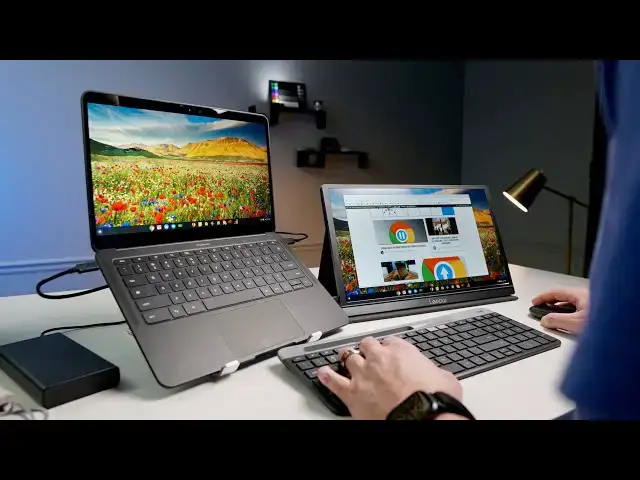
The Work From Home Desktop Setup That Fits In Your Bag
Mar 21, 2020


Right in the middle of the current crisis our world is currently facing right now, new modes of doing standard things are needed. Maybe one of the most pressing needs most people have is figuring out how to transition their work practices from office spaces to spaces in the home. Doing this drastically decreases the spread of the novel coronavirus and will be crucial to our country overcoming the spread of COVID-19. Here's what I've done that has worked well, and I hope there are some ideas in here that help you out, too.
Earlier Desktop in a bag video: https://youtu.be/I_uN5wxv4DY
Logitech's new mouse & keyboard video: https://youtu.be/rasmaG4bx5I
Read more: https://chromeunboxed.com/
RAVPower 45W Portable Battery: https://fave.co/2YDzIe3
Lepow USB-C Portable Monitor: https://fave.co/2MN7qGO
Thule Crossover Backpack: https://fave.co/2YCRdeA
Logitech Mouse & Keyboard: https://chrmshop.com/logitech-k580-m355/
Folding Laptop Stand: https://fave.co/2U7xFLq
Join our newsletter: http://bit.ly/2WjCDm7
・・・・・・・
Shop Chromebooks on Amazon: https://fave.co/2OuedYL
Show More Show Less View Video Transcript
0:00
[Music]
0:06
as you are no doubt aware a lot of
0:09
people are taking their work home and
0:11
not in the working after hours sort of
0:14
way we're all working at home a lot of
0:16
us and you know why I can't say it
0:20
YouTube does a lot of weird things when
0:23
we talk about the thing that we all know
0:24
is the thing that everyone's talking
0:25
about right now and so I want you to be
0:27
able to see this video because I think
0:28
it'll be helpful to you so we'll just
0:31
shelf that part and you know what I'm
0:32
talking about and I know what I'm
0:33
talking about you're probably working at
0:35
home you're probably watching this video
0:36
at home and so we've had to do the same
0:38
thing and I've had to work in a house
0:41
that doesn't have a space for an office
0:42
that doesn't have a specialized desk
0:45
area for me to sit at I never have we
0:48
just you know we have two kids and our
0:50
house just isn't set up for that and so
0:52
when I do work at home generally on the
0:54
weekends or something I'm gonna write an
0:56
article or help get a video put out I
0:58
sit at our kitchen table and I'll just
1:01
open my Chromebook and work from there
1:02
but for long periods but if I'm gonna be
1:05
working for seven eight hours a day I
1:07
really need something better a better
1:09
setup but I also don't want to set up
1:11
that's going to take over our kitchen or
1:12
take over our dining room and I feel
1:14
like there's probably a lot of you in
1:15
that same scenario you don't have an
1:17
office space you don't have a dedicated
1:18
desk that is meant for a workstation so
1:21
you need something that you can pack up
1:23
and put away because for me that has
1:25
been a huge difference maker thus far in
1:27
this whole process the ability to
1:29
basically pull everything out of this
1:31
bag set up a desktop get work done be in
1:34
work mode and then when I put it all
1:36
away I can go back to being at home and
1:38
not letting those lines get too blurred
1:41
so we want to just go through and show
1:43
you this and then you know just being
1:45
absolutely candid here we've done a
1:47
video about a desktop setup basically in
1:50
a bag and it's been updated a little bit
1:52
what I use now is a little different I
1:54
think it's better than what it was in
1:55
that older video but that older video is
1:57
fine too we'll link it in the
1:59
description if you want to go check it
2:00
out and we'll put links to the stuff
2:02
that we can find for products but that's
2:04
just not what we're here to do I really
2:06
feel like this could be a helpful thing
2:07
for a lot of you to just see and go huh
2:09
why did you do this and know that really
2:11
helps save space or that makes the whole
2:13
thing a lot better
2:14
whatever hopefully it can help you in
2:16
some
2:16
shape or form whether it's a specific
2:17
product or just a way that I went about
2:19
setting stuff up that allows you to be
2:22
more productive at home and to remember
2:24
to keep that line between work and home
2:27
so that you just don't go absolutely
2:30
insane so let's uh let's get it out of
2:32
the bag and take a look at what I got
2:33
set up okay so here's my bag and this
2:36
isn't set up or staged I literally pack
2:38
my stuff up after working today and
2:40
we're filming in the evenings right now
2:42
just you know social distancing and
2:45
whatnot I'm gonna get in here get my
2:47
stuff out so one of the main updates and
2:51
you've probably seen our video hopefully
2:53
as the the new Logitech keyboard and
2:56
mouse this has kind of been my go-to now
2:58
at my desk
2:59
normally at work and now that I'm at
3:01
home it goes with me as well they're
3:03
super thin super light so it's nice to
3:05
be able to carry that stuff around you
3:08
know but any mouse works and any
3:10
honestly any wireless keyboard or wired
3:12
keyboard for that matter would work in
3:14
this setup it's not like I'm doing
3:15
anything special it's just nice to have
3:17
a keyboard that has chrome specific keys
3:19
in this bag we have a quick this is like
3:24
been one of my favorite little things to
3:26
have around it's lightweight aluminum
3:28
but it is an expandable laptop stand and
3:32
I will get to why this thing is so
3:34
crucially important in just a second
3:37
when we get it for that but it's ready
3:39
to go obviously at the center of all of
3:41
it and we have a Chromebook again
3:43
doesn't have to be a pixel book go and
3:45
your Chromebook will do and honestly any
3:48
Windows laptop or Mac will do here too
3:50
let's you know let's be honest here this
3:52
isn't just a Chromebook set up so this
3:55
is my external monitor I think this one
3:57
we have a couple of these floating
3:58
around this one is by de pal yep and
4:02
we've talked about and some other videos
4:03
before it's it's been fantastic it just
4:06
looks good out of the box the stand is
4:08
magnetic and so it's simple to set up so
4:10
a lot of this stuff you'll note is all
4:13
about simplicity quickness ease of use I
4:15
don't want to have to pull this stuff
4:17
out and do a bunch of tinkering to get
4:19
everything to work I just want to open
4:20
it up and get to work
4:21
and then the last thing I've been using
4:23
at home
4:24
just kiss our dining room table isn't
4:26
set up in a place where I've got I've
4:28
got a wall outlet but it's kind of
4:29
behind me
4:30
and so then you'd have a cable kind of
4:32
strung up and it'd be really awkward so
4:34
what I've been doing is charging my
4:36
battery this is the RAM power it's got
4:38
like twenty five hundred thousand no 220
4:42
thousand one hundred milliamp hour
4:44
anyway a USB type-c charging brick this
4:48
one has been less cantankerous with
4:50
Chromebooks and some of the ones we've
4:51
messed with and plug it in it just works
4:53
it's super simple but I make sure and
4:55
charge it up at night and then I use it
4:57
throughout the day so I'll honestly
4:59
pushing the the screen and the laptop
5:02
and the Bluetooth connections and
5:04
everything the pixel book go we'll make
5:06
it through to about three o'clock in the
5:08
afternoon normally all by itself because
5:09
it's a battery champ already but when
5:11
you start pushing a secondary monitor
5:13
it's pushing power to this one it's
5:15
that's a lot more stress on the device
5:17
so it's nice to be able to just have
5:18
this kind of sitting up underneath here
5:19
when I see it start to drain up I'll
5:21
just connect it on the side and just
5:22
have an extra a little bit of a little
5:24
bit of juice there but that's oh god
5:28
yeah
5:28
that's it now I will say I do keep a we
5:33
call those things just like a little pad
5:34
down here under the keyboard into the
5:36
mouse because you know sitting for long
5:38
periods a day of the day with your hands
5:40
here it's kind of aggravating in a pinch
5:43
you don't have to have them if you can
5:44
kind of scoot everything out and let
5:45
your forearms rest on the desk you can
5:47
undo a lot of that stuff but it is
5:49
better for your back to kind of sit back
5:50
and up not hunched over so it is
5:53
recommended to have that kind of stuff
5:55
here and let your wrist sit right at the
5:56
edge of the desk but I didn't put that
5:58
in here because I don't feel like that's
6:00
not necessary and I'm not really ever
6:02
gonna carry that stuff around my bag to
6:03
be honest with you I just I put that
6:04
stuff away at home again I can't stress
6:06
enough how important this is mainly for
6:09
the separation of home and work so you
6:12
see I kind of get all this stuff out and
6:14
as I set it up you know this is all
6:17
stuff that can go right back in my book
6:18
back at the end of the day and main
6:21
benefit there again is that when I put
6:23
it away my brain can can clock out and I
6:26
can get out of work mode and not get
6:28
stuck thinking about work and all that
6:30
stuff when there are huge issues going
6:32
on in the world right now
6:34
that probably deserves some of your
6:36
attention so you want to make sure and
6:37
have that one reason that I put the
6:40
laptop up here is not so that I can have
6:42
some weird setup here I could obviously
6:44
put this down and you could skip some of
6:46
this like I can get rid of these two
6:47
pieces and just kind of have this set up
6:49
here hooking the monitor over to the
6:51
Chromebook if especially if you have a
6:53
Chromebook or a laptop that has a great
6:55
keyboard and trackpad over time longer
6:58
periods of work I prefer to have a mouse
7:00
for you know text and stuff like that so
7:03
I'm already gonna be putting a mouse on
7:05
there I like having a keyboard away too
7:06
so that I can kind of get the screens
7:07
out of my face a little bit and it's
7:09
weird to me to have a laptop set up and
7:11
then have a second screen like over here
7:13
I feel like I'm turning versus having
7:15
these back a little bit and just kind of
7:16
in front of my face but as you can see
7:19
with Chromebooks and I'm not gonna make
7:21
this look pretty I do spend a couple
7:23
more minutes normally doing this but I'm
7:25
gonna hook that there this into the hair
7:31
and we're already set up and like I said
7:34
this is monitor out of the box the
7:35
benefit here is that it's got a bright
7:37
it's got a menu toggle here but it's
7:39
also got just a brightness slider I can
7:41
just bring it up to you know 70 80 % and
7:44
we're pretty much on par colors look
7:46
really good on it's a little lighter
7:47
it's a bluer shifted and you could
7:49
adjust that if you want but for working
7:51
for me it's been fine it doesn't look so
7:53
far off of my normal display that it's
7:56
gonna you know hamper my ability to do
7:57
work but having the laptop up on the
8:00
stand gives it a more vertical layout so
8:03
I can actually bring it closer so it's a
8:05
13.3 inch device if I had it down on the
8:07
desk at this at this closeness it's
8:10
gonna push into here my keyboards gonna
8:12
be here and this is no no sinto good so
8:14
to be able to kind of get stuff back but
8:16
not have to move the monitor back
8:17
especially on a 13.3 inch device I
8:20
worked one day with a 15-inch Acer
8:22
Chromebook and it didn't bother me to
8:24
kind of have it away a little bit but
8:25
this whole setup allows me to kind of
8:27
pull that one back bring this one up
8:29
forward I kind of have my self centered
8:31
between the two screens and I'm set up
8:34
already for a multi-monitor setup
8:35
multi-monitor desktop and again like the
8:38
logitech i'm just going to turn these on
8:40
this is bluetooth where my cursor at
8:42
we're yet don't figure cursor is already
8:46
working you know
8:47
keywords already paired up there's no
8:50
issue with it whatsoever and if you go
8:52
back and look at our review that was the
8:54
main selling point of these two like I
8:55
don't know what Logitech did but they
8:57
made the Bluetooth just incredibly
8:58
incredibly stable on this and so now
9:00
I've got a multi monitor desktop setup
9:03
that I pulled out and chat it through
9:06
while I'm doing it and had it set up and
9:08
what just a few minutes and at the end
9:09
of it I can unplug it all I can put it
9:12
all back in my bag and I can get it out
9:14
of the way and I can't stress again how
9:16
important that part of it is especially
9:18
in this time where we're going to be
9:19
working in places we're not used to
9:21
working the day comes when all this is
9:23
done and you're back to working in your
9:26
office you can keep all this setup you
9:28
can keep all this stuff here right in
9:29
front of you and use it to allow
9:32
yourself to work in different places
9:34
because sometimes being a slave to your
9:35
desk isn't great either especially if
9:37
you have a job where you're allowed to
9:38
go work other places this kind of setup
9:40
could be used at your desk every day if
9:42
you want it you could take your entire
9:43
desktop with you if you want and so
9:45
that's kind of the benefit of this but
9:47
especially in the time we're in right
9:48
now I think this is highly beneficial if
9:51
you don't buy any of the stuff that I'm
9:52
using here I don't care I just hopefully
9:55
I'm giving you a thought process that
9:58
you can work through and go oh I didn't
10:00
think about that and moving the keyboard
10:01
back and oh yeah you want to have it
10:03
back and maybe put your you know
10:05
forearms down or yeah having two screens
10:07
is beneficial and it is better to have a
10:08
USB type-c one that doesn't need extra
10:10
power and oh yeah I didn't think about a
10:12
power brick instead of having to string
10:13
a cable across my living room or
10:15
whatever hopefully something in this
10:17
helped you and if it did please go down
10:19
there give us a thumbs up consider
10:20
subscribing and if you do subscribe hit
10:23
the notification bell so you can be
10:24
alerted when we make future videos just
10:25
like this one be safe out there
10:27
thanks for watching we'll see you in the
10:29
next one
10:30
[Music]
#Computer Peripherals