Up next in 10



Sponsored by NordVPN. Try it out and get 75% off a three-year plan for a limited time! Click here: https://chromeunboxed.com/nordvpn
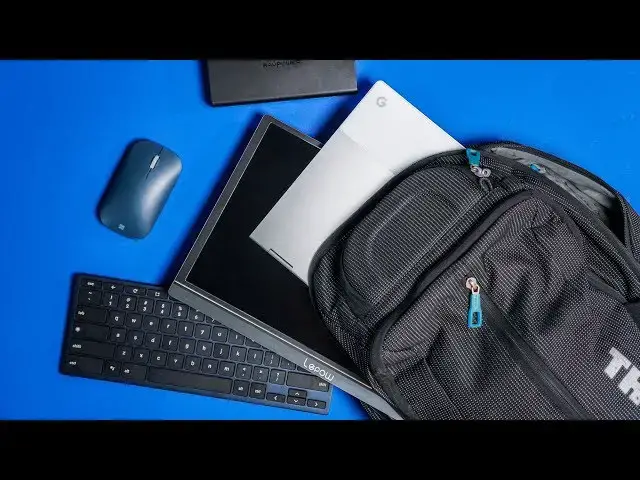
~~~ BUY THIS SETUP! ~~~
RAVPower 45W Portable Battery: https://fave.co/2YDzIe3
Lepow USB-C Portable Monitor: https://fave.co/2MN7qGO
Brydge C-Type Keyboard: https://fave.co/2YSpxlj
Microsoft Surface Mobile Mouse: https://fave.co/2MRzedc
Thule Crossover Backpack: https://fave.co/2YCRdeA
・・・・・・・
There's something soothing about a clean, minimal desk when it comes to getting work done. The less distracting the desk, the easier it is to think clearly when you sit in that space to get productive. As we've talked about in a prior post and video, we like our desktop setups to stay clean, minimal and functional. It becomes very easy, however, to let that clean and uncluttered space begin picking up more and more stuff as time goes on, and the same is true for us here at Chrome Unboxed.
Read more: https://chromeunboxed.com/this-mobile-multi-monitor-chromebook-desktop-setup-fits-in-a-backpack/
Join our newsletter: http://bit.ly/2WjCDm7
・・・・・・・
Show More Show Less View Video Transcript
0:00
[Music]
0:07
there's something so rewarding about a
0:09
clean uncluttered desktop but for many
0:12
of us as we go day-to-day to our jobs
0:15
and we return to the same desk it's easy
0:17
to start collecting all kinds of things
0:19
on that desk and it's very easy for all
0:22
of those things to become kind of
0:24
necessary to get your job done whether
0:26
it be a monitor or a certain keyboard
0:27
setup or specific things you keep in
0:29
your drawers whatever it is it's very
0:32
easy to fall into the trap of having to
0:34
go to that desk to get your job done
0:36
every single day I know that for me as a
0:38
person who technically has been able to
0:41
do my job for years remotely I've kind
0:44
of been chained to a desk because I kept
0:45
working on my perfect desktop setup and
0:48
I got it just the way I wanted it and
0:49
then I found that I kind of became a
0:51
slave to that because if I'd have once
0:53
an at that desk every single day I felt
0:56
like I couldn't be quite as productive
0:57
as I wanted to be and so I've been
0:59
experimenting with some stuff lately to
1:00
get me back into a mode of work where I
1:03
could pick my stuff up and work from
1:05
just about anywhere and be just as
1:07
productive as I am at the desk at the
1:09
office and I want to show it to you
1:11
[Music]
1:17
before we get into that whole new
1:19
desktop in a bag setup this video is
1:22
brought to you by Nord VPN and they are
1:24
the VPN used by millions and millions of
1:26
people because they are fantastic what
1:28
they do and what they do is keep your
1:30
browsing secure and safe when you're out
1:33
and about or even at home if you'd like
1:34
to learn more about them and about how
1:36
to get started today just go to Chrome
1:38
on voxcom
1:39
forward slash Nord VPN from a purely
1:42
technological standpoint if I'm being
1:44
fair back six eight years ago when I
1:47
started web development and started
1:48
working at a job where I could decide
1:50
where I wanted to work a lot of the
1:52
stuff I'm going to show you didn't exist
1:54
back then or if it did it existed in a
1:56
form that I didn't want to use it a lot
1:58
of things have changed over the course
1:59
of those years and because of those
2:01
things and my desire to be more mobile
2:03
at this point I picked up some gear that
2:05
I want to show you piece by piece kind
2:07
of how I've built this mobile working
2:09
moveable desktop so first up we have the
2:11
power right at the core of all of this
2:13
set up and it is for me the ravpower
2:16
super c series battery it doesn't matter
2:19
if you buy this one specifically will
2:20
link it obviously below but there's
2:22
quite a few on Amazon and at Walmart
2:24
BestBuy what you really need to know is
2:27
that this power pack and others like it
2:29
can actually deliver the same wattage
2:31
that you would get from being able to
2:33
plug your power adapter into a wall so
2:36
45 watts which is like big wall adapter
2:39
kind of charging power in your pocket
2:41
and this thing is twenty thousand one
2:43
hundred milliamp hours so it's gonna be
2:45
able to charge a Chromebook a couple of
2:47
times maybe three times over depending
2:48
on the size of the battery and so you've
2:50
basically replaced a wall outlet with
2:52
something you can slide in your bag it's
2:53
not crazy heavy and it's gonna charge
2:56
your Chromebook and anything you've got
2:57
attached to your Chromebook just like
2:59
your plugged into a wall outlet so again
3:01
being able to move and keep this in your
3:03
bag power cables all that junk solved so
3:06
the second key element for me at least
3:08
in this whole set up is a good USB C
3:11
secondary monitor because in general
3:12
there are a lot of tasks I like to do
3:15
with a second screen and that's one of
3:16
the things that kept me chained to my
3:17
desk all the time I had that nice big
3:20
monitor and I hooked my Chromebook into
3:22
it so multi monitor display setups are
3:25
kind of crucial for a lot of people
3:27
anybody student data entry you got kind
3:28
of stuff
3:29
it's
3:29
to be able to glance back and forth and
3:31
it really hurts your productivity if
3:34
you're used to that and then you're like
3:35
well I'm gonna go down to the coffee
3:36
shop and work and you've got one little
3:38
screen you're working on so this is a
3:40
very very key part in this whole thing
3:42
and honestly part of what kicked all of
3:44
this off for me in my brain was lip pal
3:47
sent us USBC monitor and it's a 15.6
3:50
inch all aluminum relatively light just
3:53
over a pound with a magnetic enclosure
3:55
here that acts as a stand and it's works
3:58
it stood solid it feels great the screen
4:01
looks really good nice punchy colors IPS
4:04
display all that kind of stuff but the
4:05
most important thing is it's USB type-c
4:07
it's powered from USB type-c one cable
4:10
hooks from it to the Chromebook and I
4:12
can see my secondary display I don't
4:14
have to plug power cables in or all that
4:16
kind of stuff you can if you want to but
4:18
in general I can pass this power right
4:21
through this monitor right to my
4:22
Chromebook and it's just one link one
4:24
cable from here to there one cable from
4:26
here to there and everything is powered
4:28
and matter of fact this thing puts out
4:29
so much power it'll charge my Chromebook
4:32
while it's outputting both displays at
4:35
the same time and so it's this nice
4:36
productive kind of enclosed setup and
4:39
the last piece to the puzzle for me at
4:41
least is having a good keyboard and
4:43
trackpad or mouse that is secondary so
4:45
this only comes into play honestly if
4:47
you are using a convertible or a tablet
4:49
or something like that for me I like
4:51
being able to fold the keyboard and
4:53
trackpad portion of the pixel book back
4:55
away from me so that I can bring both
4:57
screens nice up and close because you
4:59
know we're talking about a 15.6 inch
5:00
screen and a twelve point three inch
5:02
screen so these aren't massive screens
5:04
that I want far away and kind of be
5:05
sitting back I mean I want more of a
5:07
lean for experience here because I'm not
5:09
dealing with such a massive monitor so
5:11
that allows me to kind of bring it up
5:12
closer well when I do that then I need a
5:15
secondary keyboard and mouse or trackpad
5:17
now Bridge is supposed to be coming out
5:19
with a trackpad pretty soon I will
5:21
absolutely replace anything I'm using
5:22
with that once that thing rolls out but
5:25
for now I'm using the Microsoft mobile
5:27
surface Mouse which is pretty decent and
5:29
it's a bluetooth only so no dongles
5:31
needed just hold the button down go in
5:33
your Bluetooth settings pair it up it
5:35
works like you'd expect it to and then
5:36
bridges very awesome
5:38
ctype wireless keyboard it again is
5:41
bluetooth as well pairs up very easily
5:43
and
5:43
it is a true Chrome OS layout so all of
5:46
your shortcut keys are here where you
5:48
need them to be so in general I just
5:50
kind of have this setting here my two
5:51
displays up battery stuck back there
5:54
behind it a few cables and my entire
5:56
thing is set up my desktops ready to go
5:59
I'm ready to sit down be productive and
6:01
when I'm done
6:01
fold it all up slides right in the
6:03
backpack goes with me and so wherever it
6:05
is I sit down and choose to work I can
6:08
do so and I can do so on the same level
6:10
of productivity that I can whether I'm
6:13
in the office or not and for me as
6:15
someone who's able to go and work mobile
6:18
II and get out and choose different
6:19
places to work that's an important thing
6:22
and I need to take advantage of that and
6:23
I would assume that if you're watching
6:25
this and you've watched it this far
6:26
you're at least intrigued by the idea of
6:28
doing this and I would encourage you do
6:30
the same thing go out take advantage of
6:32
the fact that you have a job where you
6:33
can go out and move and be mobile and
6:35
experience working in different
6:36
environments and all that kind of stuff
6:38
because it's a great advantage and it's
6:40
a great thing to be able to do as long
6:42
as you take advantage of it and as long
6:43
as you have the tech that allows you to
6:45
take advantage of it but guys that's it
6:47
for this one if you liked it give it a
6:48
thumbs up hit the subscribe button down
6:50
below and make sure to hit the
6:51
notification bell if you'd like to be
6:53
alerted when we put out new videos just
6:54
like this one until next time we'll see
6:56
you
6:58
[Music]