Up next in 10



Sponsored by NordVPN. Buy a 3-year deal at 70% off, get an extra plan on top! Click here: https://chromeunboxed.com/nordvpn
Shop Galaxy Chromebook on Chrome Shop: https://chrmshop.com/samsung-galaxy-chromebook/
・・・・・・・
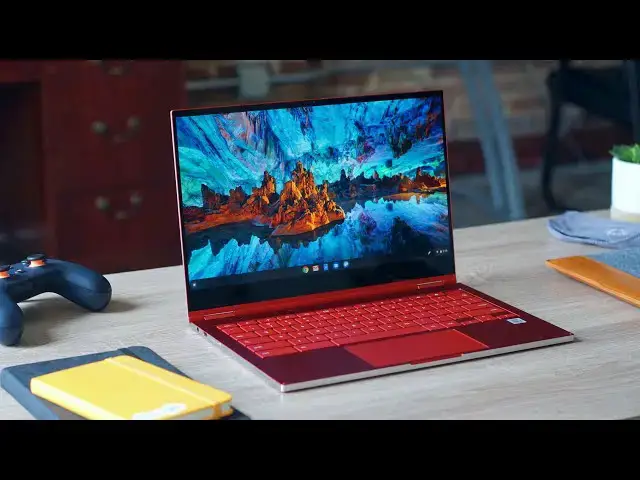
The Samsung Galaxy Chromebook is what you get when a company takes a swing at doing everything right, landing all the punches, and delivering on all fronts. When we talk about Chromebooks and what makes them great, the pillars are pretty simple: build quality, screen, keyboard, trackpad, internals/speed, and battery. Most of the other stuff can be forgiven. We can live with sub-par speakers or a different port selection than we’d like, but if the pillars listed above don’t deliver, there’s simply a feeling of incompletion.
With Chromebooks, this is unfortunately the norm. Devices large and small tend to get some or most of the main pillars right, but fail in a few areas. We’re left saying things like, “If the screen was just a bit better – passable, even – then this would feel like the perfect Chromebook.” To be fair, this is true of phones, tablets, Macbooks, iPads and Windows laptops alike, but the feeling is always the same. A few tweaks here and there feel like they could have been made along the way and some of these good devices would go from OK to extraordinary.
Largely, however, this reality just isn’t the case with the Samsung Galaxy Chromebook. Instead, I’m left with a very short list of things I could ask for to be changed (preferences, really) and a single flaw that may make this otherwise-brilliant Chromebook a non-starter for some of you. Other than that one flaw, however, Samsung has delivered a package that undoes what I routinely expect when reviewing a Chromebook.
Read more: https://chromeunboxed.com/samsung-galaxy-chromebook-review/
Join our newsletter: http://bit.ly/2WjCDm7
・・・・・・・
Shop Chromebooks on CHROME SHOP: https://chrmshop.com/
Show More Show Less View Video Transcript
0:00
the statement that there is no perfect
0:02
device or Chromebook or phone for
0:04
everyone probably doesn't come as a
0:06
shock or surprise to you we all have
0:07
preferences and thoughts about what
0:09
makes a great device or whatever so put
0:12
all that stuff aside put your
0:13
preferences aside and let me tell you
0:15
that this particular Chromebook comes
0:17
closer than any Chromebook I've ever
0:19
used at becoming that kind of Munich or
0:21
device the one that's good at everything
0:24
and it's almost impossible to nitpick
0:26
aside from one Achilles heel one [ __ ]
0:29
in the armor one relatively large flaw
0:32
this thing absolutely nails everything
0:35
else and there's no other Chromebook
0:37
I've ever reviewed that gets so close to
0:40
just getting all of it right it's
0:43
painful that it has this problem and
0:45
we're going to talk about that but I
0:46
also want to spend the rest of this
0:47
review talking about all the things
0:49
Samsung has done right with this
0:51
Chromebook because it is really a fun
0:54
enjoyable Chromebook to use and I think
0:56
for a lot of you all it's going to be
0:58
the right one so let's get into it
1:00
[Music]
1:03
today's video is brought to you by Nord
1:06
VPN there the VPN of choice for millions
1:08
of users because they're awesome at what
1:10
they do
1:10
that's keeping your browsing secure and
1:12
safe whether you're at home or out and
1:13
about if you'd like to learn more about
1:15
them and their services head over to
1:16
chroma and voxcom forward slash Nord VPN
1:19
to learn more and get started today
1:20
starting with the build quality this is
1:23
like most of the categories we're going
1:25
to talk through here an absolute home
1:27
run I mean Samsung has built a
1:29
Chromebook in the galaxy Chromebook that
1:32
looks like no other Chromebook matter of
1:34
fact it looks like very few laptops out
1:36
there I mean this looks like something
1:37
that would be designed as a peek
1:39
kind of Windows device or a MacBook or
1:42
something I mean if you've ever picked
1:43
up the pixel book the original pixel
1:45
book you kind of get some sort of idea
1:47
of how this thing feels with this kind
1:48
of boxy edges super thin design but
1:51
everything feeling firm and rigid and
1:53
substantial he even has a one finger
1:55
lift with the convertible design the
1:57
hinges are you know exactly the way that
2:00
you would expect them to be and so the
2:01
the lid lifts with one finger but then
2:03
it also converts very easily so it's not
2:06
too firm but it's firm enough
2:08
it's just put together so well and it
2:11
looks so great on a desk
2:13
the colors sure the gray is fine but
2:15
this red color is eye-catching and
2:18
appealing I mean overall this thing is
2:20
put together so pristinely and so well
2:24
that I can't I can't fault it in any way
2:26
I love the way it looks on a desk I love
2:28
the way it feels when I'm holding it
2:30
it feels great in tablet mode the hinges
2:32
work perfectly build quality a plus
2:35
there's nothing to worry about when it
2:37
comes to the way Samsung put this
2:38
Chromebook together next up let's talk
2:40
about the screen and this is one of the
2:42
highlights of this device Samsung is
2:44
selling it making a big deal about it
2:46
and they should it's an absolute home
2:47
run so spec wise sixteen by nine
2:50
thirteen point three inch screen 4k
2:53
resolution and it's AMOLED so that means
2:55
it has crazy contrast super punchy
2:58
colors and it's very color accurate it's
3:00
a hundred percent
3:01
dobe RGB and 100% DCI p3 and if you
3:05
don't know what those things mean it's
3:06
okay all it means is the screen is crazy
3:08
color accurate for things like video
3:10
editing which we're still kind of
3:12
waiting for a proper video editor but
3:14
that's a subject for another time but
3:15
the bezels are tiny on this thing the
3:17
screen looks amazing it's insanely sharp
3:20
it's crazy bright and everything moves
3:23
around way more fluid on this screen
3:25
than any other chromebook screen I've
3:27
used hands-down no contest this is by
3:30
far the best screen I've ever seen on a
3:32
Chromebook it's probably one of the best
3:34
screens I've ever seen on any laptop not
3:37
just Chromebooks so again Samsung has
3:39
delivered something here that is not
3:41
just good and not just great but 100% a
3:44
homerun they've knocked it out of the
3:45
park we've got great build quality now
3:47
at like insanely good build quality and
3:49
then we've got this insanely good screen
3:51
this trend continues when we move down
3:53
to the keyboard and trackpad and this is
3:55
a place where you know when a company
3:57
focuses on this really great build
3:59
quality and aesthetic look and a great
4:02
screen you would think well maybe they
4:03
cheaped out on the keyboard nope not at
4:06
all
4:06
matter of fact I might like it better
4:09
than my pixel look go and I've said that
4:12
that's the best keyboard ever but a
4:14
similar thing here we got minimal travel
4:16
good click eNOS very silent keys so when
4:19
you put all those things together you
4:20
can kind of listen you have a great
4:24
keyboard it's backlit as well no issues
4:26
with
4:26
I can't see my symbols on the keys the
4:29
backlighting doesn't really bleed out
4:30
anywhere and additionally there is a
4:32
fingerprint scanner up top that behaves
4:35
just like you would expect it to
4:36
allowing you to log into this Chromebook
4:38
very quickly it's a nice addition to the
4:40
top row of the keyboard and I'm glad
4:42
Samsung brought it along for the ride so
4:44
keyboard again a plus they absolutely
4:48
killed it with the keyboard likewise
4:49
with the trackpad I've heard a few
4:50
people complain about the trackpad
4:52
saying it's a little bit too shallow I
4:54
didn't have any issues whatsoever with
4:56
it it sits nice and wide it's glass the
4:59
click is very good the whole thing feels
5:02
smooth and solid and well put together
5:05
yeah which probably reflects from the
5:07
build quality of the thing but I have
5:09
zero complaints whatsoever with the
5:11
trackpad zero complaints whatsoever with
5:13
the keyboard input methods here again
5:16
just a knock out along with those input
5:18
methods we also have to talk about the
5:20
fact that this is equipped with a stylus
5:21
and it fits inside the device this super
5:24
thin super light device it fits right in
5:27
the side so it's nice to have when I
5:29
need it I'm not somebody who draws a ton
5:31
but I like to take notes and maybe you
5:34
know jot something down on a photo or
5:35
something like that
5:36
it's great because I can just have it
5:38
there when it's needed or let the kids
5:40
draw or something like that and I don't
5:41
have to worry about digging it out of
5:43
the bag I don't have to worry about
5:44
whether or not the magnet was strong
5:46
enough to hold it onto the side of the
5:47
Chromebook it's just kind of stowed away
5:48
there for when it's necessary and when
5:51
it's not I don't even give it a second
5:52
thought when I did go to use it in
5:55
Google keep and chrome canvas I was kind
5:57
of shocked by how good the latency has
5:59
gotten and I don't know if that's just
6:01
EMR pins and Chrome OS but that's
6:03
something that Samsung worked out with
6:04
Google specifically what I can tell you
6:06
it's the latency on this pin on this
6:08
screen with this Chromebook setup is
6:10
fantastic I really actually enjoyed
6:13
taking notes in Google key probably for
6:15
the first time it just felt very natural
6:17
and and very quick to respond so again a
6:20
plus well done on the stylus around the
6:23
outside of the device we don't have a
6:24
selection of ports that's mind-boggling
6:26
or anything you have a USB type-c on
6:28
either side volume rocker power button
6:30
you do have expandable storage we're
6:32
going to get back to that in just a
6:33
second and then you've got side firing
6:35
speakers the speakers are okay
6:38
they're not great they're not the worst
6:40
speakers behind he means they're right
6:42
in the middle so we come to the first
6:43
thing that I could say this isn't the
6:45
absolute best I did miss my pixel book
6:47
ghost speakers when we got to this part
6:49
and watching some videos because
6:51
obviously you want to watch content on
6:53
this the screen looks absolutely amazing
6:55
so when I did do that I wasn't blown
6:58
away by the speakers I wasn't put off by
7:00
the speakers they're just kind of
7:02
mediocre we also have a headphone
7:03
microphone jack and with a thin light
7:06
device like this sinks 2.2 pounds so
7:09
it's it's very light in its overall feel
7:12
it's nice to see them not get rid of the
7:14
headphone jack but you also have a micro
7:16
SD card slot that is unique and it will
7:19
take microSD cards obviously but it'll
7:21
also take Samsung's ufs storage which is
7:23
universal flash storage and if you go
7:25
and look for one of these cards they
7:27
look just like micro SD cards except the
7:29
fins a little bit different the big
7:31
difference here is that they're
7:32
read/write speeds are insanely fast so
7:35
the cards that I looked up and saw that
7:37
you could buy and use with this
7:38
Chromebook right now if you want it have
7:40
a read speed of 500 megabytes per second
7:42
and a write speed of 200 so I mean I
7:44
want to say a regular micro sd card as
7:47
fast as you can get them right now is
7:48
about 90 megabytes per second so you're
7:50
talking about read speeds five six times
7:52
faster than what you would get with
7:54
micro sd so as we start to see more and
7:56
more stuff Linux apps android apps take
7:58
advantage of expandable storage this
8:01
type of storage speed is going to help
8:03
you be able to do stuff on Chromebooks
8:05
way faster and it'll feel just as fast
8:07
as the internal drives that are on most
8:10
Chromebooks now when I said that it
8:12
works as fast as the internal drives on
8:15
most Chromebooks I wasn't referring to
8:17
this chrome book because this Chromebook
8:19
and other Chromebooks that are coming
8:20
out in 2020 are equipped with much
8:22
faster nvme storage and so that's
8:25
another perk that this thing comes with
8:27
it only comes in one configuration
8:29
that's eight gigs of RAM a core i5 10th
8:32
gen Core i5 processor and 256 gigs of
8:36
nvme storage and that's important
8:38
because nvme has a much faster
8:39
read/write speed than emmc which is in
8:42
most Chromebooks so that ufs storage I
8:45
was talking about is fast it's not going
8:47
to be quite as fast as nvme storage and
8:49
so that just add
8:50
- the overall zip enos of this
8:52
Chromebook so when you pair that kind of
8:54
speed in its storage along with eight
8:57
gigs of ram and this core i5 10th gen
9:00
caught 5 processor it shouldn't come as
9:02
any surprise that this thing hiccups
9:04
never basically I mean I couldn't do
9:07
anything that ever made it even think
9:09
about slowing down at all it's super
9:12
fast just like you would expect from
9:14
these types of specs so if you're
9:16
thinking well maybe I really need an i7
9:18
and maybe I need 16 gigs of ram maybe
9:21
you do but I would say general users 98
9:25
99% of most users would not be able to
9:28
slow this thing down whatsoever and
9:29
that's impressive because we've seen 4k
9:32
Chromebooks get crippled a little bit in
9:34
the performance category because of all
9:36
the pixels on the screen and this thing
9:38
I've had hooked up to my big monitor
9:40
which is almost a 4k monitor by itself
9:42
so it's pushing to 4k displays at once I
9:45
got multiple desktops I've got 15 tabs
9:48
open I've got other apps going never
9:50
never has it had any issue performing
9:53
whatsoever all that performance is great
9:55
and all that speed is great and the
9:57
screen is great and everything has just
9:59
been roses up to this point right but
10:02
here's where the whole thing starts to
10:03
break down a little bit when we have a
10:05
screen that can get this bright and is
10:06
this vibrant and it looks so good and it
10:08
just keeps looking better as you crank
10:09
up that brightness so most people were
10:12
gonna tend to crank it up and you have a
10:14
device that moves this fast and has a
10:16
processor that it's this powerful this
10:17
isn't a Y series this is a u series
10:19
processor so full blast Core i5 going on
10:22
here and you have memory that moves this
10:24
fast and you have a chassis that's only
10:26
2.2 pounds and nine point nine
10:28
millimeters thin something's got to give
10:30
and where it gave is in the battery life
10:34
Department and I'll just say it battery
10:36
life is not great in here and for some
10:40
of you that have to live off a charger
10:42
for some of you that have used
10:43
Chromebooks for years and just kind of
10:46
gotten used to eight to ten hours of
10:47
battery across the board like we don't
10:49
have to think about it usually anymore
10:51
this is going to come as a bit of a
10:53
shock and so if you go to buy a thousand
10:55
dollar Chromebook like this and
10:56
everything else seems almost perfect
10:59
like absolutely nailed it kind of comes
11:01
as a surprise to a lot of people that
11:03
if you're not careful and you just ramp
11:06
up everything and you crank brightness
11:08
up and your going at it and no charger
11:10
whatsoever I'm not kidding
11:12
you're looking at two and a half or
11:14
three hours of battery here having said
11:15
that if you look at what you have in
11:18
this package and you consider all the
11:20
power that's here not just in internals
11:24
but power in the display like you have a
11:27
display that looks fantastic at 60
11:29
percent brightness compared to other
11:31
Chromebooks that need 100% to look great
11:33
when you consider all those things you
11:35
have to take all those things with great
11:37
responsibility and decide is it worth it
11:40
to crank everything to the max and just
11:43
enjoy myself as much as possible or do I
11:45
need to restrain myself and again we
11:47
haven't had to think about that as much
11:48
with Chromebooks in the past but we also
11:51
haven't had Chromebooks that have 4k
11:53
AMOLED displays in them and we haven't
11:55
had Chromebooks with fameless' core i5s
11:58
inside and we haven't had Chromebooks
12:00
with tons of NPM II storage and all this
12:02
stuff that you get with this Chromebook
12:04
that's all great stuff comes with the
12:07
cost of that battery and so if you're
12:09
considering this Chromebook that's the
12:10
one thing you've got to know going in
12:12
the battery life is bad if you just
12:14
abuse everything that this thing can do
12:17
and because we've had so many
12:19
Chromebooks in the past where you can
12:20
just crank everything to 11 and go at it
12:22
and get seven eight hours nine hours of
12:24
battery that is just not the case with
12:27
this Chromebook and if you know that it
12:29
goes from being an Achilles heel is
12:30
something you can manage and if you keep
12:32
your brightness down on your screen and
12:34
don't just go absolutely nuts with
12:36
running everything in the background I
12:38
was able to achieve six or seven
12:39
sometimes eight hours of battery but I
12:42
had to be conscious about what I was
12:44
doing and conscious about how I was
12:45
using my Chromebook and that's just not
12:47
been the case for years so you need to
12:49
know that going in finally along with
12:51
that kind of battery whoa that we have
12:53
this device there's been some complaints
12:56
of overheating I will say it's not
12:58
overheating because we don't get to the
12:59
point where it shuts down because it's
13:01
too hot or anything like that but it is
13:02
a passively cool device with a core i5 u
13:05
series processor that generally gets a
13:07
fan I mean a Seuss's version has some
13:09
small fans in it so that means it's
13:11
going to get warm from time to time it
13:12
was way worse when I first got the
13:14
device
13:14
than it is now it has since updated to
13:17
Chrome OS 81 and from what we understand
13:20
they're going to continue working
13:21
towards kind of reining this processor
13:24
in a little bit when it doesn't need to
13:25
be just like full blast but it's a big
13:28
chip in a small chassis with no fan so
13:31
again just like with the battery you
13:33
need to understand that going in
13:35
[Music]
13:45
so when we take all of this into
13:48
consideration and we look at the screen
13:51
and the build quality and the keyboard
13:53
the trackpad is stylus all those things
13:55
if we if we look at those things
13:56
performance this is easily the best
14:00
Chromebook ever made period if it's
14:03
plugged in when it's got power and juice
14:05
this is by far the best Chromebook you
14:08
can buy so I think the nine hundred
14:10
ninety nine dollar price tag is
14:11
justified if you're looking for a
14:13
premium device now some of you are
14:16
looking at that going yeah
14:18
but I'm not going to be able to get
14:19
all-day battery out of it and then some
14:21
of you are looking at it going I don't
14:23
care that much about the battery and to
14:25
be frank for me when I'm not reviewing a
14:27
device I'm in that latter camp I'm the
14:30
type of person that will unplug it for a
14:32
few hours here and there but I'm doc
14:33
must of the day so well I like having
14:36
that battery there I don't actually
14:37
leverage that very often I need it off
14:40
battery for a few hours of use each day
14:42
but some of you aren't in that camp some
14:45
of you are in the position where you've
14:46
got to have a device that lasts you all
14:48
day and that's part of if not the most
14:51
important thing that you think about
14:53
whenever you go to buy device whether it
14:55
be a Chromebook or any other laptop so
14:57
if you're in that camp I would say you
14:59
need to think very carefully about
15:00
spending your money on this device and
15:02
that pains me to say that because
15:04
otherwise it is so good I mean it does
15:07
everything else right to almost to the
15:09
point it's ridiculous but I'd almost say
15:11
go buy a battery pack to take with you
15:14
if battery set important and just plug
15:16
the battery pack in it'll be fine but a
15:18
lot of you looking at that are going I'm
15:20
not gonna spend $1000 on a device I
15:22
can't use all day on a battery but for
15:24
those of you that aren't that concerned
15:26
about a battery there's no question this
15:28
thing is awesome and if you've got a
15:30
thousand dollars to spend on a
15:31
Chromebook you'll find little else that
15:33
will be as good as the Samsung Galaxy
15:35
Chromebook but guys that's it for this
15:37
one if you liked it give it a thumbs up
15:39
go down there and hit the subscribe
15:40
button and make sure to hit that
15:42
notification bell if you'd like to be
15:43
alerted when we make future videos just
15:45
like this one also hit that join button
15:47
if you'd like to see all the cool stuff
15:48
our members get like custom emojis and
15:50
all kinds of behind-the-scenes footage
15:51
till next time
15:54
[Music]
#Consumer Electronics