Up next in 10



Sponsored by NordVPN. For a limited time, grab the 3-year plan with 70% off! Click here: https://chromeunboxed.com/nordvpn
・・・・・・・
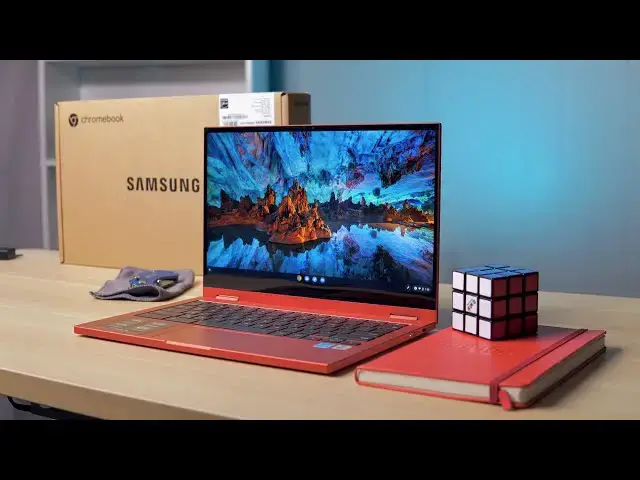
Since CES 2021 earlier this year, we've been anticipating Samsung's latest flagship, consumer Chromebook in the Galaxy Chromebook 2. With the same Fiesta Red color, pared-back stats and a scaled down pricing structure, Samsung definitely went in a bit of a different direction with this latest Galaxy Chromebook, and we'll obviously need time to decide whether those cost saving measures ruin the experience or combine with the other notable benefits of this new Chromebook to create a great overall experience.
For right now, just out of the box, this thing is impressive and fun to look at. Time will tell on whether or not the $699 price tag is justified, but we'll need time to review it in order to make that distinction.
Read more: https://chromeunboxed.com/samsung-galaxy-chromebook-2-unboxing-and-first-impressions-video/
Join our newsletter: http://bit.ly/2WjCDm7
・・・・・・・
Join our Patreon community for exclusive extras, an ad-free website experience, access to our private Discord server, and more: https://www.patreon.com/chromeunboxed
Shop Chromebooks on CHROME SHOP: https://chrmshop.com/
Subscribe to the channel: http://bit.ly/2xFuj6L
The Music We Use - PERFECT for YouTube: http://bit.ly/31W6PYP
Show More Show Less View Video Transcript
0:00
well the day is here the samsung galaxy
0:02
chromebook 2
0:03
is here in the office and as we always
0:06
do
0:06
we're going to hop in the box see what
0:08
the thing feels like see what it
0:10
actually looks like
0:11
in our hands in person and get some just
0:13
initial impressions out of the way
0:15
before we start that review process
0:17
[Music]
0:20
today's video is brought to you by
0:22
nordvpn they're the vpn of choice for
0:24
millions of consumers because they're
0:25
frankly awesome at what they do and
0:27
that's keeping your browsing safe and
0:28
secure
0:29
whether you're at home or out and about
0:30
if you'd like to learn more about them
0:32
and their services head over to
0:34
chromeunboxed.com forward slash nordvpn
0:36
where you can learn more and get started
0:38
today
0:38
all right so let's do what we do hop
0:40
right into the box here
0:42
and i will say for this particular
0:43
unboxing uh
0:45
sometimes we we tend to get into too
0:47
much stuff
0:48
uh i want to spend the proper amount of
0:51
time reviewing
0:51
this particular device because i think
0:53
it's going to be an important one in a
0:54
handful of ways
0:55
but there are a few things about the
0:57
samsung galaxy chromebook
0:59
that we honestly need to see like right
1:02
now we need to see what's going on with
1:03
it because
1:04
we've talked about this thing quite a
1:06
bit and this device
1:08
is in a lot of ways a side step from the
1:11
original
1:12
galaxy chromebook and so uh because it
1:14
has two at the end most people think
1:16
that this is going to be like the next
1:17
iteration
1:18
but really it's more of a different
1:19
iteration it's a different take on the
1:21
galaxy chromebook so
1:22
we've got the awesome red color going on
1:24
we've still got a great looking screen
1:26
we've got a powerful processor inside
1:28
but a lot of those specs actually take a
1:30
step back from what the original did
1:32
and so really when it comes down to it
1:34
we need to see what's this thing feel
1:35
like does it feel quality
1:37
what do these speakers sound like is the
1:38
keyboard nice still does the screen look
1:40
really good because if those things are
1:42
a yes then the price points at
1:44
549 dollars and 699 dollars for this one
1:47
the i3 with eight gigs of ram
1:50
start to make a little bit more sense if
1:51
the build quality is there and some of
1:53
the nicer parts
1:54
are along for the ride but if they're
1:56
not then we start to run into some
1:58
trouble and
1:58
it's going to be really interesting
1:59
trying to review this device so that's
2:01
really what we're going to tackle here
2:03
as we jump into the box okay so
2:06
let's just hop in the box and get
2:08
started here one thing you will note is
2:10
if you remember the unboxing of the
2:12
original galaxy chromebook it was this
2:13
nice white box this kind of unique
2:15
looking thing
2:16
and people poke fun at me for getting
2:17
excited about a box but i mean this is
2:19
what we generally see with chromebook
2:21
boxes so
2:22
we're kind of back to that standard you
2:24
know brown box and that's fine honestly
2:26
if it recycles and it helps the
2:28
environment a little bit i'm all for
2:30
that
2:31
rather than having a box that looks nice
2:33
and can't be recycled
2:35
basically quick start guide warranty
2:37
information nothing out of the
2:38
out of the ordinary there some really
2:42
basic
2:43
uh styrofoam going on
2:46
around this thing uh we'll get that out
2:48
in just a second
2:49
and then over here we've got a usb
2:52
type-c
2:52
charging cable and then a
2:56
power brick so again nothing that wasn't
2:59
expected here
3:00
with this particular chromebook and just
3:02
about every other chromebook
3:04
as well so here we go yeah there's that
3:07
fiery red color
3:09
and just like the predecessor it's got a
3:12
propensity to pick up fingerprints just
3:14
like
3:15
most chromebooks that come with a cool
3:16
color and a cool
3:18
kind of soft touch aluminum feel but
3:20
yeah it's cool to the touch on the
3:22
outside so we're talking aluminum
3:23
and right off the bat i can tell you
3:26
very firm
3:27
uh and substantial and so for me in my
3:29
head i'm comparing this thing to
3:32
the pixelbook go so the pixel will go is
3:34
kind of thin
3:35
it kind of does a lot of the same stuff
3:36
it cut back in a lot of ways from the
3:38
original pixel book
3:39
but tried to maintain uh some some nicer
3:42
build quality parts and so i feel like
3:44
that's what samsung's going for here
3:46
and so that's kind of the measuring
3:47
stick that will put
3:49
this particular chromebook up against
3:51
all right
3:52
so again you've got this nice boxy
3:54
design
3:55
the crazy looking red color and already
3:57
what feels like some pretty premium
3:59
build going on here
4:00
so so far so good let's get rid of all
4:01
this junk
4:03
you know you really want to focus in
4:04
here on the red
4:06
let's just look at around the bottom
4:08
here we do have a grill
4:10
there's a fan this time around so you
4:12
know the overheating issues that were a
4:14
problem on the original galaxy
4:15
should be taken care of again i can't
4:17
speak to that until we have it for a
4:18
little while
4:19
uh let's see if there's any fans yep
4:21
some fans across the back some fan ports
4:23
here so
4:24
we definitely have cooling under control
4:26
this time around and again with a 1080p
4:28
screen
4:29
and a core i3 inside it's a 10th gen
4:31
core i3
4:32
and this one there's also a celeron
4:33
version for 549
4:36
we shouldn't really run into battery
4:38
issues either samsung is claiming
4:39
something around 13 hours of battery so
4:41
if those two things happen we've already
4:43
cleaned up a couple of the real
4:44
big issues with the original galaxy
4:46
chromebook
4:48
around the sides we've got a usb type-c
4:51
a volume rocker and then a micro sd card
4:55
slot
4:56
and then on the other side we've also
4:58
got another usb type c
4:59
and then just your power button and
5:01
nothing really else this is a very
5:03
simplified chromebook
5:05
there's nothing really extra going on
5:06
here but let's uh let's crack this thing
5:08
open and see what it looks like on the
5:09
inside
5:10
all right so let's try it it's a
5:11
convertible so i'm not expecting
5:13
[Music]
5:15
oh it's got stuff on the feet too so
5:16
it's sliding that feels really good
5:18
that might be close to a one finger lift
5:20
once we there's plastic pieces on the
5:22
bottom of the feet that i'm not going to
5:23
waste time
5:24
scraping off there right now but that
5:27
could get close to a one finger lift
5:28
which is really impressive for any
5:30
convertible any time a convertible has a
5:31
single finger lift that means they've
5:33
really engineered the hinge as well
5:35
and that's kind of a cool thing speaking
5:37
of which yeah screen's a tad bit wobbly
5:39
let's move it back to its stronger point
5:41
here yeah it gets better once you have
5:43
it here but straight up
5:44
a lot of convertibles get pretty wobbly
5:46
when they're at 90 degrees so
5:48
at a normal viewing angle that's not
5:50
terrible but yeah the hinge mechanism
5:52
does feel good
5:53
it doesn't feel like super weak or
5:55
wobbly and then
5:56
inside once you get inside this thing
5:59
you know it really feels
6:00
uh a lot like its predecessor i mean the
6:03
size of the track pad
6:05
the red i do i prefer these black keys
6:08
on the red because
6:09
there's no issue with seeing them when
6:11
it's like this instead of it being
6:13
you know silver keys with white
6:15
backgrounds that
6:16
sometimes work in certain light i don't
6:18
know if the backlight's even on at this
6:20
point right now but these keys are
6:21
perfectly visible
6:22
there we go turn the back light on they
6:24
just kind of glow again very pixel book
6:26
go-esque
6:27
uh in that sense let's see
6:30
yeah there's there's a tad bit of creek
6:33
and not creek i shouldn't say
6:34
a tad bit of give here in the frame but
6:37
overall
6:38
relatively sturdy here so those are
6:40
things i'm looking for
6:42
like if this thing's going to cost 700
6:44
bucks it doesn't need to feel creaky it
6:46
doesn't need to feel
6:47
cheap it needs to feel good the speakers
6:49
need to be good and i can already tell
6:50
you
6:51
looking at the screen on this thing so
6:54
i'm going to crank it up and it's going
6:55
to blow the shot out most likely
6:57
very bright very vivid very colorful
7:01
and again 1080p on this size of a
7:04
display so it's 13.3 inch 16x9
7:07
1080p on this is absolutely more than
7:10
enough
7:11
yeah digging in there i can't really
7:13
pick out any pixels
7:15
it looks great i'm not surprised
7:17
samsung's done q led screens for a while
7:19
so the screen looks great so that checks
7:21
out
7:22
i'm already not missing really the
7:24
amoled stuff going on here
7:25
as long as this stands up under bright
7:27
sunlight it's sharp it's crisp it's
7:29
very colorful it's very vivid it looks
7:31
great so
7:32
build quality feels pretty good screen
7:34
looks pretty good too
7:36
okay so got logged in got all that
7:38
normal setup stuff out of the way so
7:39
that we can just
7:40
talk briefly about a couple things that
7:43
i've already noticed
7:44
just unboxing this device one is that it
7:46
does have
7:48
galaxy chromebook feel to it so when i'm
7:50
just using it when i'm messing with the
7:52
trackpad
7:53
the trackpad click feels great the
7:54
surface is super smooth
7:56
it's kind of small like the original
7:57
galaxy chromebook was but
7:59
it's very good it feels good to use the
8:01
keyboard has nice short throw keys if
8:03
you like that kind of keyboard like
8:05
pixelbook go or something like that
8:07
or the original galaxy chromebook you're
8:08
gonna like this keyboard it feels good
8:10
and by the way it's nice and quiet
8:13
so it's always nice to have a quiet
8:15
clicky
8:16
short throw keyboard again if you like
8:18
that type of keyboard so i think a lot
8:19
of people are going to like the keyboard
8:21
the screen just looks really gorgeous
8:25
and i thought that this would probably
8:26
be the case with this chromebook i kind
8:28
of figured
8:29
honestly it would be sharp enough at
8:30
1080p that's not a question because
8:32
again we have lots of 1080p
8:34
13.3 inch chromebooks so sharpness
8:37
wasn't the question but
8:38
you know that just the vividness of the
8:40
colors the poppiness on the screen
8:42
looks really really excellent so i think
8:45
the screen checks out i think build
8:46
quality feels pretty good
8:48
you do need to note that it is aluminum
8:50
on the top it is aluminum on the bottom
8:53
but it is plastic here on the keyboard
8:55
deck
8:56
but what samsung feels like they have
8:58
done here other than the fact that i can
8:59
feel the lid is cool and the
9:01
the keyboard deck is not uh they
9:04
feel very similar to the touch like as
9:06
far as the texture of them
9:08
and the color is matched up almost
9:10
perfectly so
9:11
unless you really know that that's the
9:13
case you kind of miss the fact that this
9:15
isn't aluminum on the inside
9:17
i wish it was at 6.99 i kind of feel
9:19
like they should have went with all
9:20
aluminum here
9:22
but they didn't so it's going to be
9:24
little trade-offs like this with this
9:25
particular device because
9:27
ultimately samsung wanted to bring the
9:28
price back and make a more affordable
9:30
galaxy chromebook
9:31
and again it's all going to come down to
9:33
whether the overall experience of this
9:35
thing
9:36
adds up to be something that's worth
9:37
that price or if they just missed the
9:39
mark
9:39
but one thing that samsung is touting
9:41
right here this huge sticker that's on
9:43
the
9:43
the palm rest of this device is the
9:46
speakers and so
9:47
i pulled up one of our videos just has a
9:49
cool little intro track on it i'm going
9:50
to crank these speakers up
9:52
i'll start it at middle let's just see
9:54
what they sound like because they're
9:56
touting them
9:56
quite a bit
10:07
all right so let's get so yeah pretty
10:09
good you can pick up quite a few of the
10:11
base tones in there lots of mids crispy
10:13
highs
10:14
good stereo kind of separation going on
10:16
they are downward firing so they're
10:17
coming from the bottom of the of the
10:19
device
10:20
but ultimately they sound really good i
10:22
don't have the pixelbook go here to
10:23
compare we'll obviously do that probably
10:24
for the review
10:26
my guess is just like every other
10:27
speaker i ever listened to the pixelbook
10:29
goes probably going to beat it
10:30
but in the end they do sound i can
10:33
already tell you a lot better than most
10:34
other chromebooks so
10:36
you start kind of seeing this whole
10:37
thing come together here we've got
10:39
a really good display good keyboard
10:41
trackpad good speakers
10:43
the core i3 in here is going to be fine
10:44
it's going to get along just fine
10:46
as long as the battery holds up and the
10:48
overall performance feels good
10:50
i think the core i3 this one has 8 gigs
10:52
of ram and 128 gigs of storage
10:55
i think this thing's going to be a
10:56
really good performer and
10:58
ultimately again it depends on what you
11:00
care about with price and chromebooks if
11:03
what's most important is just the
11:04
experience and the feel and
11:06
what it looks like on the desk and those
11:08
types of things
11:09
this thing's going to deliver i can
11:10
already tell you that but if it comes
11:12
down to
11:13
just raw horsepower and if it comes down
11:15
to just raw specs and you want that 11th
11:17
gen intel
11:18
processor or something like that then
11:20
you know i don't know i don't know if
11:21
this is going to be the right chromebook
11:22
for you i do want to throw in two
11:24
usi compatibility is here uh we haven't
11:27
tested it just yet but again
11:28
all of this stuff will cover in the main
11:30
review so if you aren't already
11:32
subscribed
11:32
be sure and get subscribed so that you
11:34
don't miss it when we do
11:36
make that video probably in the next few
11:38
weeks as i've spent
11:39
kind of every day with this device but
11:41
guys that's it for this one if you like
11:43
this video
11:43
head down there and hit that thumbs up
11:45
button and like i said go down and hit
11:46
the subscribe button too
11:48
and make sure to ring that notification
11:49
icon next to it if you'd like to be
11:50
alerted when we make the future videos
11:52
just like this one until next time we'll
11:54
see
12:01
[Music]
#Consumer Electronics