Up next in 10



Sponsored by NordVPN. Try it out and get 75% off a three-year plan for a limited time! Click here: https://chromeunboxed.com/nordvpn
Shop these devices and read more: https://chromeunboxed.com/samsung-chromebook-pro-vs-asus-chromebook-flip-c302/
・・・・・・・
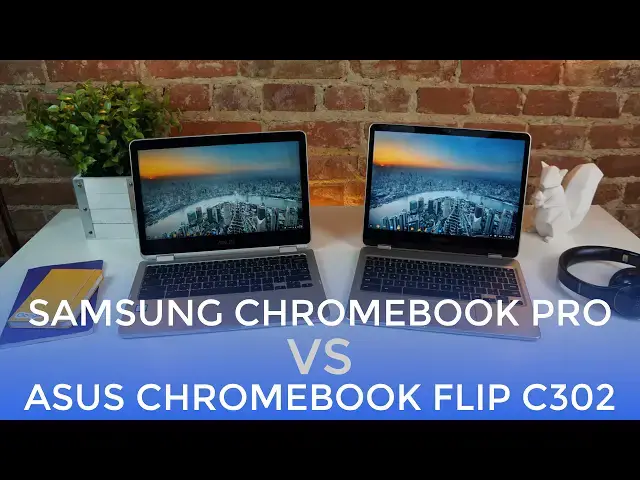
As an answer to many, many questions about which of these Chromebooks is better, we've produced a side-by-side video to hopefully help anyone on the fence. Both of these Chromebooks are great, but each one has its strengths.
Which will you choose?
Read more: https://chromeunboxed.com/
Join our newsletter: http://bit.ly/2WjCDm7
・・・・・・・
Shop Chromebooks on Amazon: https://fave.co/2OuedYL
Subscribe to the channel: http://bit.ly/2xFuj6L
Show More Show Less View Video Transcript
0:01
[Music]
0:07
hey folks Robbie Payne with Chrome Unbox
0:09
coming at you today with a sideby-side
0:11
look at the Asus Chromebook Flip C302
0:14
and the Samsung Chromebook Pro i'll be
0:17
honest this is one of the most difficult
0:18
comparison videos I've ever had to make
0:20
because both of these devices are great
0:22
and spoiler alert whichever one you
0:24
choose you're probably going to be happy
0:26
with so what we want to do today is as
0:28
we set them side by side give you an
0:31
idea of which one excels at different
0:32
parts of being a good Chromebook so you
0:35
can make a better purchasing decision
0:37
for yourself what becomes abundantly
0:39
clear when you look at both of these
0:40
devices is the fact that Chromebooks are
0:42
not relegated to bargain bin devices any
0:45
longer aluminum and glass dominate both
0:47
devices yielding thin light and sturdy
0:49
bodies aesthetically they do veer to
0:52
different sides asus employing a very
0:54
squared and boxy look its lines looking
0:56
classic and elegant and the aluminum has
0:58
a matte finish that exudes quality with
1:00
no creeks or wobbliness everything feels
1:03
in place and substantial it's the
1:04
closest thing to a MacBook Pro I've used
1:06
that isn't well a MacBook Pro samsung on
1:09
the other hand goes more the route of a
1:11
tablet or mobile phone aesthetic
1:13
everything's very rounded and it gives
1:15
the Samsung the perception of being
1:17
thinner than the Asus it's actually a
1:18
fraction of an inch thicker but it
1:20
doesn't feel like it and what it feels
1:22
like in your hand what it feels like on
1:24
the table that's important because
1:26
perception is actually what dictates
1:28
what we like again everything here is
1:29
firm thin and clad in aluminum the
1:32
finish on the Samsung is better at
1:33
repelling fingerprints for what it's
1:34
worth both devices have a 360° hinge and
1:37
both operate very well i give the
1:39
Samsung a bit of a win here though as
1:41
its 3x2 aspect ratio just feels more
1:43
natural in tablet mode if you don't use
1:45
that mode too often this is likely a
1:47
moot point i'm a fan of the taller
1:48
display and have been since the Pixel
1:50
but that isn't a universal win some
1:52
people prefer 16 by9 screens and the
1:54
Asus falls more comfortably into that
1:56
slot overall the Asus feels more like a
1:59
laptop and the Samsung feels more like a
2:01
hybrid tablet mobile device again it's
2:04
all in what you're looking for both are
2:06
built very well and you can feel good
2:07
about taking either down to your local
2:09
coffee shop and feeling like your
2:10
purchase was for something of quality
2:12
moving on to port selection this is an
2:14
area where these two devices are still
2:16
quite similar both have two USBC ports
2:18
micro SD card slots headphone microphone
2:20
jacks and speaker ports both have decent
2:22
sounding speakers as well with Samsung's
2:24
being bottom firing and ASUS's being
2:26
sidefiring i'd give Asus a slight edge
2:28
here as sidefiring speakers are less
2:30
prone to be blocked when sitting in your
2:32
lap and give you a wider stereo
2:34
separation when you're watching a movie
2:35
or a video samsung speakers oddly enough
2:38
perform well even when the ports are a
2:40
bit covered up i'm inclined to think
2:41
that sound is routed up through the
2:43
keyboard somehow as well either way the
2:45
speakers on the ASUS have a bit better
2:46
sound all around and so I'd have to give
2:48
the win to ASUS here when we move to the
2:50
screen we get into some pretty
2:52
substantial differences in a nutshell
2:54
the ASUS has a 12.5 in IPS 16x920x
3:00
1080 resolution 300nit screen that was a
3:04
lot of stats but let's move on to the
3:05
Samsung it comes in with a 12.3 in IPS
3:09
3x2 2400 by600 resolution 400nit screen
3:14
so if we're looking at stat sheets alone
3:16
those are two very different screens and
3:18
this is the first place where there's a
3:20
clear winner and that winner is Samsung
3:22
first off though the diagonal measure of
3:24
the ASUS is larger at 12.5 in the actual
3:27
square inch area of the screen the space
3:30
you have to work with is actually larger
3:32
on the Samsung next the 3x2 ratio is a
3:34
big win especially with a device that
3:36
will be used a lot as a tablet with web
3:39
content and documents as well the taller
3:41
screen just feels more spacious and
3:42
better suited to web related tasks
3:44
another win for Samsung is in the
3:45
resolution department clearly there are
3:47
way more pixels on Samsung's display and
3:50
it shows it's not to say that ASUS is a
3:52
slouch here with the new scaling for
3:53
1080p screens things do look pretty good
3:56
and crisp and the right size on the
3:58
ASUS's 1080p screen but things look
4:01
superb on the Samsung like as good as
4:03
I've ever seen good i'm sure there's
4:06
some contrast ratio RGB or other display
4:09
specs that this display isn't the best
4:10
at i'm not saying it's the best display
4:12
ever created but in the Chromebook world
4:14
it really only has one rival and that
4:16
would be the Pixel and that is stellar
4:19
company to entertain i can't overstate
4:21
how great and how important this display
4:24
is everything is crisp and pops and is
4:27
simply gorgeous between it and the ASUS
4:29
there's really no comparison whatsoever
4:32
brightness is again a win for Samsung at
4:34
400 nits there is no environment where
4:37
this thing has any issue asus's display
4:39
comes in at 300 nits and that's really
4:41
good but when up against an absolutely
4:43
stellar incredibly bright display it
4:45
quite literally pales in comparison when
4:47
we start talking about input devices
4:49
like keyboard and trackpad this is
4:51
another place where these two devices
4:52
are quite different and ASUS takes the
4:54
edge here in this category with the Asus
4:56
we get a backlit full-size keyboard that
4:59
has fantastic feel and great travel it's
5:01
probably my favorite keyboard on a
5:03
Chromebook to date with Samsung we get a
5:06
good keyboard with slightly cuped and
5:07
rounded keys that feel good under your
5:09
fingers and they have pretty good travel
5:11
however there's no backlighting and
5:13
because of the more square shape of the
5:15
overall device keys on the left and
5:17
right that you're used to being a
5:19
certain size are truncated to fit in the
5:22
space provided and after a couple weeks
5:24
I still miss the backspace and I still
5:25
miss the tab keys from time to time and
5:27
it's not a dealbreaker but the Asus
5:29
keyboard is clearly better trackpads go
5:32
the other way however with the Samsung
5:33
actually using a glass trackpad with
5:35
perfect click travel and great smooth
5:38
oilresistant surface it's as good if not
5:40
better than any trackpad I've ever used
5:42
the ASUS trackpad is good but again none
5:45
of these differences are dealreakers the
5:46
ASUS tends to pick up more oil and lose
5:48
its smoothness over time much quicker
5:51
than Samsung overall the surface of the
5:52
Samsung trackpad is just better as we
5:55
get into the internals of these two
5:56
devices we come right back to the
5:58
similarities both devices are running
6:00
the same Core M3 processor with 4 gigs
6:02
of RAM one big difference is Asus's 64
6:05
gigs of storage in their base unit it's
6:07
double what you get in Samsung's
6:08
Chromebook and it's yet to be seen
6:09
exactly how much local storage will
6:11
really be best for Chromebooks running
6:13
Android apps for what it's worth I
6:15
didn't have storage issues on either
6:17
device also the ASUS looks to come in
6:19
multiple configurations down the road
6:21
with up to a CoreM7 and 8 gigs of RAM
6:23
and Samsung looks instead to be staying
6:26
with single models for now between the
6:28
ARM and the CoreM3 versions with no
6:30
intentions of expanding that down the
6:31
road finally the ASUS will have a
6:33
perceived edge in performance due to the
6:35
display resolution if we count pixels
6:38
the Samsung has 3.84 million pixels to
6:40
push around on the screen and the ASUS
6:42
is only dealing with 2.07 million that
6:45
means the Chromebook Pro is constantly
6:47
having to deal with two times more
6:49
pixels while this won't show up in
6:50
Octane benchmarks it is apparent in real
6:53
world use the ASUS simply feels faster
6:55
but it usually only shows up when there
6:57
are many tasks going at once again not a
7:00
dealbreaker but it is a spot where ASUS
7:02
wins out we have to mention at this
7:04
point that there's a clear and defined
7:06
differentiation in Samsung's pen for
7:09
some this is a non-issue but for others
7:11
of you this is what sets Samsung's
7:13
latest Chromebooks apart from the rest i
7:16
enjoy using it from time to time but it
7:18
isn't what seals the deal for me my hope
7:20
is Google Keep continues to get more and
7:22
more capable with the pen and becomes
7:24
more indispensable as time goes on for
7:26
me right now it's simply a cool add-on
7:28
and not really a gamecher for some of
7:30
you though the addition of the pen is
7:32
enough to crown Samsung the winner in
7:34
this little competition when we talk
7:36
about pricing and availability things do
7:38
get a little bit tricky as of the time
7:40
of this review the Asus Chromebook Flip
7:42
C302 is available for purchase running
7:44
$499 for the Core M3 with 64 gigs of
7:47
internal storage and 4 gigs of RAM the
7:50
Samsung Chromebook Plus with the ARM
7:52
chip is available for $449
7:55
4 gigs of RAM 32 gigs of internal
7:57
storage the Pro that we are talking
7:59
about in this video will not be
8:00
available until April at $549
8:04
so depending on your particular budget
8:05
your particular needs and your
8:07
particular time constraints that could
8:08
paint your decision considerably so in
8:11
the end how do you choose between two
8:13
devices like these when they're both
8:14
quality and they both have a lot of
8:16
potential going for them how do you
8:18
actually make a purchasing decision for
8:21
me it comes down to which device I enjoy
8:23
using more than the other and frankly
8:26
for me that's the Samsung and I get
8:28
there are a few trade-offs the keyboard
8:30
not being back lit and having some
8:32
shaved off keys on the ends maybe that's
8:35
a turnoff for some for me that's not
8:36
that big of a deal but if it is a
8:38
turnoff for you then maybe the Asus is a
8:40
better device for you i can't tell you
8:42
which one is definitively better all I
8:44
can tell you is which one I choose to
8:46
pick up and if they're both in the room
8:48
which one I'm going to use and that's
8:49
the Samsung for you those things could
8:51
be different and I hope that as we've
8:53
taken some time to set these devices
8:55
side by side the decision for you can be
8:57
a little bit easier guys if you like
8:59
this video hit the subscribe button
9:01
below click that like button and until
9:02
next time we'll see you
9:05
[Music]
#Consumer Electronics