Up next in 10



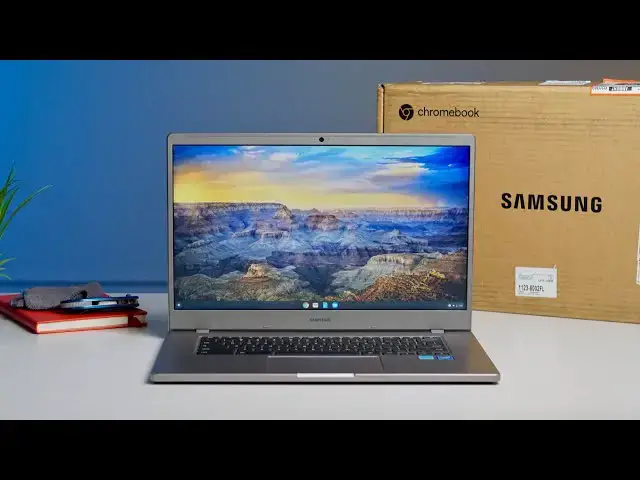
With Chromebook sales through the roof and inventory being a bit scarce as we find ourselves firmly in back-to-school mayhem, we’ve begun looking at every possible option when recommending affordable Chromebooks for students. While we’ve long panned the Samsung Chromebook 4 and 4+, they are among the few affordable Chromebooks still available and still reasonably-priced, so we're going hands-on.
Shop Samsung Chromebook 4 and 4+ on Chrome Shop: https://chrmshop.com/samsung-chromebook-4-4/
Read more: https://chromeunboxed.com/back-to-school-samsung-chromebook-4-unboxing-intial-impressions/
Join our newsletter: http://bit.ly/2WjCDm7
・・・・・・・
Shop Chromebooks on CHROME SHOP: https://chrmshop.com/
Subscribe to the channel: http://bit.ly/2xFuj6L
The Music We Use - PERFECT for YouTube: http://bit.ly/31W6PYP
Become a member of Chrome Unboxed to help us make our channel even better, and for access to exclusive perks: http://bit.ly/CU-join
Follow us: https://www.instagram.com/chromeunboxed
https://twitter.com/chromeunboxed
Show More Show Less View Video Transcript
0:00
here we are smack dab in the middle of
0:01
back to school season and low price
0:03
chromebooks are getting harder than ever
0:05
to find
0:06
but one chromebook that's been available
0:08
across multiple channels is this one the
0:10
samsung chromebook 4
0:11
and 4 plus which is the one we have our
0:13
hands on right here so
0:14
we want to do a quick unboxing get some
0:16
initial impressions because we've not
0:18
spent any time with this chromebook yet
0:20
so that you might be able to find one of
0:22
these before school gets started again
0:25
[Music]
0:28
it needs to be said that we did not jump
0:31
on reviewing this device
0:33
right out of the gate uh for a handful
0:35
of reasons it's just one of those
0:36
chromebooks that doesn't bring a ton of
0:38
like
0:38
really interesting stuff to the table
0:40
and it's always been priced a little bit
0:41
too high i think so
0:43
this device has the n4000 processor the
0:46
gemini light processor that
0:47
tons of other chromebooks have and
0:49
honestly it's just not been that
0:51
exciting of a chromebook to think about
0:52
because the price has been a little bit
0:54
too high compared to other devices that
0:55
are similarly spec so
0:57
we just kind of kept pushing off this
0:59
review we couldn't get a review unit
1:00
from samsung and
1:02
just weren't really sure that this was
1:03
one that we would really want to
1:05
encourage our readers and our viewers to
1:07
go check out
1:08
but we're now in the middle of the back
1:10
to school rush and chromebooks are
1:11
getting insanely hard to find
1:13
but the four plus is available at quite
1:15
a few places at least
1:17
as of the time of filming this so we
1:19
wanted to unbox it and give you some
1:21
initial impressions because ultimately
1:22
i have no impressions of this device i
1:24
saw it at a store once and kind of
1:26
looked at it
1:27
real quick but didn't really spend much
1:29
time getting my hands on it so
1:31
uh i thought this was a cd i swear to
1:34
god i thought this was like
1:35
they're gonna put like a cd in here like
1:37
what am i supposed to do with this
1:38
it is not a cd
1:41
okay that's whatever
1:45
uh interesting
1:49
it's a nicer charger than you get in
1:50
most uh low end
1:52
chromebooks honestly you usually get the
1:54
big you know normal
1:55
three-prong thing and the block and then
1:57
another cable so
1:58
you get a nice chunky block here
2:02
it says samsung fast charging so it's
2:04
probably at least a 30 watt if not 45
2:06
and a pretty nice cable i mean again you
2:09
get excited about little things in low
2:10
end chromebooks that's
2:11
that's a nicer than normal charging
2:13
setup uh for a
2:15
an affordable chromebook and i believe
2:17
we got our hands on this one
2:19
for uh just over 300 so
2:22
somewhere in that realm obviously
2:23
chromebook prices are fluctuating wildly
2:26
right now
2:26
but it seems like across the board the
2:29
prices on
2:30
this particular chromebook aren't going
2:32
crazy which is nice to see
2:34
because this is going to be a decently
2:36
good
2:37
chromebook for students uh for basic
2:40
education tasks that kind of stuff we
2:43
just need to see if it's
2:44
you know worth the money basically and
2:46
as other chromebooks like i said are
2:48
getting harder to find
2:50
it's harder to find decent deals on
2:51
stuff and you know
2:53
it actually it feels really solid
2:57
that might be an aluminum top actually
3:00
definitely a plastic on the bottom but
3:02
really good looking so around the sides
3:04
you know you get this nice just squared
3:06
off look
3:06
and again we've seen this in photos but
3:08
it's hard to tell whether this will
3:10
translate on the video but
3:11
i don't know that squared off gives kind
3:13
of this uh
3:14
pixel bookish almost chromebook pixel
3:18
vibe um and it's not like unwieldy again
3:22
really kind of sturdy for what i would
3:24
call an entry level
3:26
you know basic chromebook
3:29
uh inside is definitely plastic and then
3:33
as we move
3:34
you know this is again like i said this
3:35
is a very simple take no backlit
3:38
keyboard here no upward firing speakers
3:40
a plastic trackpad it's nice and large
3:44
click mechanism feels pretty good
3:45
there's a little bit of give here in the
3:47
in the top part here and typing
3:50
experience is probably going to be okay
3:51
as well
3:52
again this is a 300 to 400 chromebook so
3:55
you can't expect
3:56
too much out of it um yeah bottoms
4:00
the bottom's relatively flimsy um down
4:02
here
4:03
so again you kind of get what you pay
4:06
for in these scenarios
4:07
but i want to boot this thing up and
4:10
actually type a few things on it see
4:11
what the screen looks like that's
4:12
probably
4:13
the most important thing what's the
4:14
trackpad screen and keyboard feel like
4:16
at least on first blush so you can maybe
4:19
take this unboxing video and
4:20
make a decision whether or not you want
4:22
to pull the trigger on this thing
4:23
because like i said
4:23
stock for chromebooks is just kind of
4:25
plummeting so we're gonna take a break
4:26
real quick
4:27
power this thing on and check it out
4:30
okay
4:30
so cheated a little bit and while we
4:32
were powering it on i went ahead and
4:33
just
4:34
ran a couple little tests on it
4:36
basically feeling what the thing feels
4:37
like is you're actually gonna be
4:38
handling it
4:39
listening to the speakers just a little
4:41
bit and then obviously going through the
4:43
login screens and getting everything set
4:44
up forming a couple of opinions about
4:47
the screen
4:47
so i want to talk to you about those
4:49
specific things really quickly again
4:51
i'm not spending any time with this
4:52
other than the few minutes i've been on
4:53
camera here
4:55
but time is of the essence right now and
4:57
so if you need to make a chromebook
4:59
purchase
4:59
you probably don't have time for us to
5:01
wait to do two or three weeks in a
5:02
review on this thing you need to decide
5:04
now whether it's worth the money so
5:05
i did go and check 299 is what we paid
5:08
for this one at walmart
5:09
it's going to be similarly priced at
5:10
samsung.com it's available at best buy
5:12
as well i think b h photo sells it
5:14
we'll compile the links we'll make sure
5:16
all those links are available on chrome
5:18
shop and the link will be in the
5:19
description in the video
5:20
all that to say you need to know at 300
5:23
bucks you're getting a couple good
5:24
things here
5:25
and you're getting a couple of flimsy
5:27
crappy things here as well so
5:30
the keyboard feels great so again if
5:32
we're thinking about students they're
5:33
going to be typing a lot the keyboard
5:35
feels excellent it's not backlit but
5:36
it's really clicky it's very nice it
5:38
feels great to type on
5:40
so far the the look and aesthetic of the
5:42
device is actually really attractive on
5:44
the table
5:45
until you open it up and you see the
5:47
screen you can probably tell i'm going
5:49
to kind of tilt it
5:50
i would assume you'll be able to pick up
5:52
on that kind of stuff it is a tn panel
5:54
so there's no surprises here it doesn't
5:56
have very good off angle viewing i will
5:58
say left to right
5:59
off angle you can probably tell this
6:01
here you don't lose too much whenever
6:02
you go left and right
6:04
but you go forward and back and you're
6:05
going to lose all kinds of brightness
6:07
the colors are going to blow out yeah
6:09
it's just it's kind of a mess so you
6:11
really have to angle the thing back
6:12
quite a bit it's not a full flat but it
6:14
does open up pretty well here you can
6:16
see
6:17
it opens up at a decent angle and that's
6:18
a good thing because if you're a taller
6:20
person or you're sitting up high on the
6:22
desk or whatever
6:23
you're going to angle that thing back
6:24
pretty good to kind of get all the
6:26
colors that should be on the screen and
6:28
because it's a 15.6 inch screen you're
6:29
not going to get all those colors anyway
6:31
because there's probably no one angle
6:32
where you're going to be able to see the
6:34
entire screen perfectly it's a tn panel
6:36
they're cheap
6:37
and they you know show you what's on the
6:39
screen and don't do much else but
6:41
it's usable it's serviceable it works
6:44
and the keyboard is really good the
6:45
trackpad is plastic
6:47
and isn't the smoothest thing i've ever
6:48
felt but the click mechanism feels good
6:50
it's very spacious
6:51
uh and so i don't think it'll be a
6:53
problem either
6:54
the issue is a good keyboard and
6:56
trackpad are like 90 of the answer
6:58
the other problem usually comes in with
7:01
flex on the keyboard deck
7:03
and this one has got it you know a
7:05
decent amount of it
7:06
uh when the when the things open a
7:08
little more i'll slide it forward just a
7:10
little bit
7:10
you can see it kind of loses all sorts
7:12
of firmness there so like
7:14
for some reason when it's up here it's a
7:16
lot more stable
7:17
the minute this thing goes back i think
7:18
what happens is the hinge
7:20
on the bottom actually lifts the
7:21
chromebook up a little bit uh you can
7:23
probably see that here in the side view
7:25
you can see it picks it up and when it
7:26
does so you really feel the flimsiness
7:28
here
7:29
but it's when it's all set when the
7:30
whole base is on the ground
7:32
it's it's pretty firm so again a little
7:35
bit of an oddball design decision there
7:37
we're pretty sure the top here is
7:39
aluminum which is awesome
7:41
uh in the 300 chromebook but the bottom
7:43
is going to feel a little bit flimsy so
7:45
you've got a kind of mediocre screen but
7:47
it is 1080p uh
7:49
full hd uh you've got a good keyboard
7:52
and a decent trackpad
7:53
we also tested the speakers uh i will
7:55
actually timetable they're not the
8:05
[Music]
8:08
again not the loudest thing ever but
8:11
like the sound
8:12
is actually pretty full and better than
8:14
a lot of
8:15
you know better specked more expensive
8:17
chromebooks that we've tried so
8:19
that's kind of a nice surprise and so
8:21
ultimately the n4000 is gonna perform
8:23
pretty well
8:24
you're gonna be able to do multitasking
8:25
better than older generation
8:27
education focused chromebooks this one
8:29
comes with 64 gigs of storage there's a
8:31
version available with 128 gigs of
8:33
storage
8:33
it's paired up with four gigs of ram and
8:36
so let's talk real quick too about the
8:38
outside portion you have a usb type a
8:40
which is very nice
8:41
uh so if you have any dongles or
8:43
anything you need to plug in there
8:44
that's awesome
8:44
and then you got a usb type c on both
8:46
sides it's going to do all the stuff usb
8:48
type c does
8:49
and micro sd card slot in case you have
8:51
files that need to be saved and
8:52
transferred
8:53
headphone microphone jack so utilitarian
8:55
that's what this thing is
8:56
it's just enough to get the job done
8:58
it's like a pixel 4a approach to a
9:01
chromebook
9:02
there's nothing striking about it
9:03
there's nothing nothing amazing about it
9:06
but i think it's gonna do the job i
9:08
think it's gonna be a device that for a
9:09
lot of students
9:11
just does enough to get by to get you
9:13
through school work
9:14
to take care of those assignments to get
9:16
some stuff done but guys that's it for
9:18
this one if you like this video
9:20
give us a thumbs up head down there and
9:21
hit that subscribe button
9:23
and make sure to hit the notification
9:24
bell as well if you'd like to be alerted
9:25
when we make future videos
9:27
just like this one till next time we'll
9:29
see you
#Consumer Electronics