Up next in 10



Sponsored by Hostinger. Go to https://hostinger.com/chromeunboxed and use code 'CHROMEUNBOXED' to get up to 91% OFF yearly web hosting plans. Succeed faster!
Shop HP x360 Chromebooks and read more: https://chromeunboxed.com/hp-chromebook-x360-models-price-comparison/
・・・・・・・
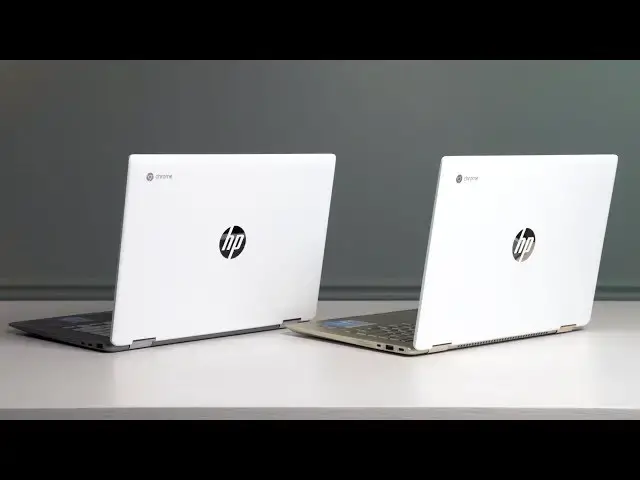
As we approach the holidays, HP has followed the lead of other Chromebook manufacturers in making multiple models of essentially the same Chromebook to offer different pricing structures for consumers. With different internal hardware, swapped out build materials, multiple screen variations, and overall distinctly different user experiences, the HP Chromebook x360 is not the simply recommendation it once was.
Instead, we now have all sorts of variations that look enough alike that you may find yourself a bit dizzied by the options on what looks to be just a single Chromebook. Don't be fooled, however, as the end result of all these variations may be more choice that only causes consumer confusion. We want to help a bit, especially because the HP Chromebook x360 is a great device that we easily recommend. You just need to be sure you fully understand what it is you are getting when you spot that next great deal.
Join our newsletter: http://bit.ly/2WjCDm7
・・・・・・・
Shop Chromebooks on Amazon: https://fave.co/2OuedYL
Subscribe to the channel: http://bit.ly/2xFuj6L
The Music We Use - PERFECT for YouTube: http://bit.ly/31W6PYP
Become a member of Chrome Unboxed to help us make our channel even better, and for access to exclusive perks: http://bit.ly/CU-join
Show More Show Less View Video Transcript
0:00
as we roll into the holiday season HP
0:02
has followed the lead of other
0:03
Chromebook manufacturers in releasing
0:06
the same device but just changing it up
0:08
a little bit in order to give themselves
0:10
a lot more of a broad price range and in
0:13
doing so they've created a little bit of
0:15
consumer confusion we think and so we
0:18
want to clear up exactly what's going on
0:20
with hp's Chromebook X360 line
0:25
[Music]
0:29
but before we get into all that today's
0:31
video is brought to you by hostinger and
0:33
they provide web hosting that's not only
0:35
easy to set up but easy to maintain and
0:37
manage as well even better their prices
0:39
are nearly impossible to be but hosting
0:41
plans starting as low as 80 cents per
0:43
month we use their simple and intuitive
0:45
hpanel to get a new site up and running
0:47
with their six step WordPress install
0:48
and love the access to 24 7 365 support
0:52
for the few questions and issues we had
0:53
along the way even more exciting is
0:55
hostinger's upcoming move to Google
0:56
cloud with this shift users will get all
0:59
the benefits of Hosting or simple and
1:01
intuitive hpanel combined with the power
1:02
scale and flexibility of Google's cloud
1:04
and back end no need for professional
1:06
setup no need to hire a developer it all
1:09
just works if you'd like to learn more
1:10
about how to supercharge your hosting
1:12
experience and in all likelihood save
1:14
yourself some money go to hostinger.com
1:15
forward slash Chrome inbox to get
1:17
started and use the code Chrome unbox to
1:20
receive 91 off yearly web hosting plans
1:23
in front of me I have two devices both
1:26
called if you go to look them up online
1:27
the HP Chromebook X360 and both of these
1:30
are very very different devices with
1:33
different users in mind with varying
1:35
price points and these aren't the only
1:37
ones that HP has out branded as HP
1:39
Chromebook x360s this first one is a new
1:43
version of the X360 from last year that
1:45
HP has released and we're only finding
1:48
it at Best Buy right now but it's a
1:50
carbon copy of the original version We
1:52
Loved from last year we're going to link
1:53
the original review of this device
1:55
because our attitude towards it hasn't
1:57
really changed since last year but this
1:59
is nothing different except for the
2:01
color so the keyboard deck has got this
2:03
nice kind of like champagne gold color
2:05
love the way it looks but it's not
2:07
really a new device it's just kind of
2:09
the same device with the paint job over
2:11
here we have the X360 that is a
2:15
completely different device but you
2:17
really wouldn't know it from looking at
2:18
it this particular device can be had at
2:20
Best Buy it can be had on hp's website
2:23
we've seen versions of it at Costco and
2:26
at Target so far I'm sure Walmart will
2:28
probably carry it and who knows whoever
2:30
else and so what could happen is as you
2:33
go to look for a device you find an HP
2:35
Chromebook X360 that's like 300 or 320
2:38
dollars and you think I'm buying this
2:40
exact same device that I've seen
2:42
reviewed by other reviewers like us here
2:44
at Chrome unboxed and the truth is it's
2:46
not quite that simple the first Telltale
2:48
giveaway is that on the inside of the
2:50
cheaper Celeron and or Pentium based
2:52
models you have a white keyboard and
2:55
kind of the silver colored keyboard deck
2:57
so the color can kind of give it away
2:59
the champagne gold and the dark blue
3:01
ones those are the core I3 high-end 600
3:04
MSRP HP Chromebook X360 now these other
3:08
variations are powered by either a
3:10
Celeron n4000 so like the Gemini Lake
3:13
processor or a Pentium n5000 still in
3:16
that Gemini Lake line but just kind of a
3:18
bump in performance and they range
3:19
anywhere from what we're seeing right
3:21
now from about 300 all the way up to
3:23
like 500 150 dollars we're going to talk
3:25
about some of the price issues there
3:26
here in just a second but inside you're
3:28
getting a processor that does pretty
3:30
well and for a 300 machine I think most
3:33
people are going to be extremely happy
3:34
and I'm happy that Gemini like
3:36
processors as opposed to the Apollo like
3:38
ones from last year are pretty quick and
3:41
pretty speedy and they get around just
3:43
fine but you need to know it's not the
3:45
core I3 that is kind of a beast in the
3:47
X360 that was around last year with all
3:49
those other devices like the Dell
3:51
Inspiron and stuff like that it is not
3:53
that processor this one doesn't require
3:55
fans but it also is quite a bit less
3:57
power additionally the X360 from last
3:59
year came with eight gigs of RAM 64 gigs
4:02
of internal storage that was the way it
4:03
was sold these devices with their
4:06
different chipsets also come in
4:07
different variations of RAM and storage
4:09
so we've got some that have four gigs of
4:11
RAM and 32 gigs of storage four gigs of
4:13
RAM and 64 gigs of storage there's one
4:15
at Costco right now that has eight gigs
4:17
of RAM and 128 gigs of storage paired up
4:19
with the n5000 processor so we're seeing
4:21
these in all kinds of different
4:23
variations so when you go to look at one
4:25
of these if you see the white keyboard
4:26
or you see the silver deck on the X360
4:29
14 you need to realize that that device
4:31
has a lower end processor in it and you
4:34
need to pay attention to what it's
4:35
paired with because if you're getting
4:37
the expectation that you're going to get
4:39
eight gigs of RAM and 64 or 128 gigs of
4:41
internal storage you need to realize
4:43
you've got to look at the tech specs
4:45
especially if that price is a little bit
4:46
lower and realize what it is you're
4:48
actually buying for instance with this
4:50
device right here we actually bought
4:52
this one at Target for 320 dollars and
4:54
when we got it in and I unboxed it it
4:56
was really cool to feel that basically
4:58
all the external Parts here feel exactly
5:01
like the more expensive core I3 model
5:03
it's got the same anodized aluminum lid
5:06
glass over the display aluminum keyboard
5:09
deck and a plastic bottom just like this
5:11
one does and it looks good the keyboard
5:13
feels like the same keyframe the the
5:15
trackpad feels basically the same it's
5:17
not glass on the cheaper models but it's
5:19
a nice surface it feels similar to the
5:21
15 inch one with the the keypad over
5:25
here on the side that HP put out not
5:26
long ago so it's very good lots of good
5:28
external pieces save the screen it's a
5:31
1366 by 768 panel at 14 inches kind of
5:35
looks pixelated viewing angles are
5:36
terrible and it's not very bright so
5:39
that's the place where they obviously
5:41
save some money here in addition to the
5:43
internals the internals clearly are
5:44
going to be cheaper than what you're
5:45
getting with the I3 but overall 320
5:48
dollars for this package isn't that bad
5:50
I mean it's not a bad Chromebook you
5:52
just again need to know what it is
5:53
you're purchasing now some of that will
5:55
change as you bump up the prices and
5:57
find it at different places so if you
5:59
look at the spec sheet again please look
6:01
at the spec sheet if you're going to buy
6:02
this device and see what's inside of it
6:04
but if you find one with a 1080p screen
6:06
it likely is going to be the exact same
6:08
1080p screen you get on the core I3 one
6:10
which is to say not the brightest screen
6:12
in the world but good colors great
6:14
viewing angles and all that kind of
6:15
stuff so if you find one of these it's
6:17
1080p you're going to be bumping it into
6:19
the four or 450 range and that creates
6:22
some issues as well that we're going
6:23
going to kind of talk about here in the
6:25
wrap up but I can't stress this enough
6:27
when you're looking at the HP Chromebook
6:29
X360 look at the spec sheet regardless
6:32
of where you're buying it from
6:33
regardless what it looks like in the
6:35
pictures regardless what you think it
6:36
might be go look at the spec sheet look
6:39
for the resolution on the screen look
6:41
for the internals look for the RAM and
6:42
look for the storage before you go
6:44
hitting that buy button so at the end of
6:46
videos like these I'm supposed to tell
6:47
you what it is you need to go buy what
6:49
there are a couple problems with that
6:51
one is the market is super volatile all
6:53
the time and especially it as we're
6:56
filming this we're coming into the
6:57
holiday season so there's no way for me
6:59
to tell you exactly what prices these
7:00
are going to be MSRP the core I3 models
7:03
5.99 but MSRP the Celeron and Pentium
7:08
versions range anywhere from 300 to 550
7:11
dollars what I can tell you is as we're
7:13
filming this right now the price
7:15
difference between the entry level model
7:17
and the Celeron and the top end model
7:19
and the core I3 version is only 30 bucks
7:21
we actually went and purchased both of
7:23
the these devices one from Target so the
7:25
Celeron one came from Target for 320 the
7:28
I3 model with the champagne gold finish
7:30
came from Best Buy for 350. so 30
7:33
dollars between the two there is no way
7:35
anyone could ever say that you should go
7:37
buy the Pentium or Celeron version of
7:40
this Chromebook versus the core I3 model
7:42
however we have to talk MSRP and MSRP
7:45
without any deals or sales and we got to
7:47
think through this because prices are
7:49
volatile it's the holiday season there's
7:51
all kinds of ups and downs you walk into
7:53
the store you get online to go and
7:54
you're ready to buy it today I can't
7:56
exactly tell you what prices are going
7:58
to be but there's a chance that the core
7:59
I3 model might be as much as 250 to 300
8:02
dollars more than the base model Celeron
8:05
and if you're just trying to buy
8:06
something to kick around the house and
8:07
you're not that concerned about the
8:08
screen being the best or having a glass
8:10
trackpad or having the best performance
8:12
absolutely go save yourself a couple
8:14
hundred dollars and get the Celeron
8:16
model but what you need to know is you
8:18
need to know what the stats are the
8:20
specs are of the device and then you
8:21
need to go in comparison shop this thing
8:23
every time you even think about buying
8:25
it because the I3 model comes down in
8:28
price in the 350 to 400 range on a
8:31
regular basis and I don't think it will
8:33
be a strange thing for us over the
8:35
course of the next six to 12 months to
8:37
see it constantly down around 400 and at
8:39
that price point none of the Celeron or
8:42
Pentium models make any sense to ever go
8:44
by and unfortunately I think hp's just
8:48
introduced a lot of confusion into the
8:49
market and hopefully we've helped to
8:52
clear some of that up for you but that's
8:53
it for this one if you enjoyed it and
8:55
this has helped you make a purchasing
8:56
decision in any way give us a thumbs up
8:58
go down there and hit subscribe and make
9:00
sure and hit the notification Bell so
9:02
you can be alerted when we make future
9:03
videos just like this one until next
9:05
time we'll see
9:08
foreign
9:09
[Music]
#Consumer Electronics